

지식
AI
AutoGen 완전 가이드: 대화 기반 멀티 에이전트 프레임워크
AutoGen v0.4의 AssistantAgent, UserProxyAgent, GroupChat, 코드 실행, 커스텀 에이전트까지 실전 Python 코드로 완전 해설합니다.
지난 글에서 CrewAI의 역할 기반 멀티 에이전트 협업을 살펴봤다. 이번 글에서는 Microsoft Research가 개발한 AutoGen을 다룬다. AutoGen은 에이전트 간 대화(Conversation)를 통해 문제를 해결하는 접근법으로, 특히 코드 생성·실행·디버깅 루프에 강점을 보인다.
AutoGen이란
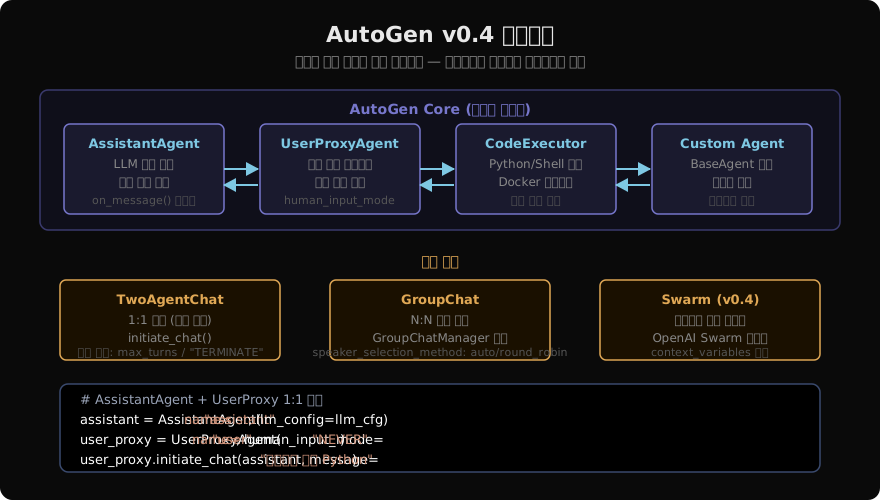
AutoGen은 대화 기반 에이전트 프레임워크다. 에이전트들이 메시지를 주고받으며 태스크를 해결하고, 코드를 작성하고, 실행 결과를 검증한다. v0.4에서 비동기 메시지 런타임 기반으로 완전히 재설계되었다.
기본 1:1 대화 (TwoAgentChat)
import autogen
from autogen import AssistantAgent, UserProxyAgent, config_list_from_json

# LLM 설정
llm_config = {
    "config_list": [
        {
            "model": "claude-sonnet-4-6",
            "api_key": "your-anthropic-key",
            "api_type": "anthropic",
        }
    ],
    "temperature": 0,
    "timeout": 120,
    "cache_seed": 42,  # 재현 가능한 결과
}

# AssistantAgent: LLM 기반 에이전트 (도구 호출 가능)
assistant = AssistantAgent(
    name="assistant",
    system_message="""당신은 Python 전문가입니다.
    코드를 작성할 때는 항상 ```python 블록 안에 넣으세요.
    완료 시 'TERMINATE'를 메시지에 포함하세요.""",
    llm_config=llm_config,
)

# UserProxyAgent: 사람을 대리하는 에이전트 (코드 실행 가능)
user_proxy = UserProxyAgent(
    name="user_proxy",
    human_input_mode="NEVER",   # NEVER/ALWAYS/TERMINATE
    max_consecutive_auto_reply=10,
    is_termination_msg=lambda x: "TERMINATE" in x.get("content", ""),
    code_execution_config={
        "executor": autogen.coding.LocalCommandLineCodeExecutor(
            work_dir="./autogen_workspace",
            timeout=60,
        ),
    },
)

# 대화 시작
chat_result = user_proxy.initiate_chat(
    assistant,
    message="피보나치 수열을 생성하는 Python 함수를 작성하고 n=10 결과를 출력해줘",
)
print("최종 응답:", chat_result.summary)
print("총 대화 턴:", len(chat_result.chat_history))

# 대화 이력 확인
for msg in chat_result.chat_history:
    print(f"[{msg['role']}]: {msg['content'][:100]}...")
GroupChat: 멀티 에이전트 대화
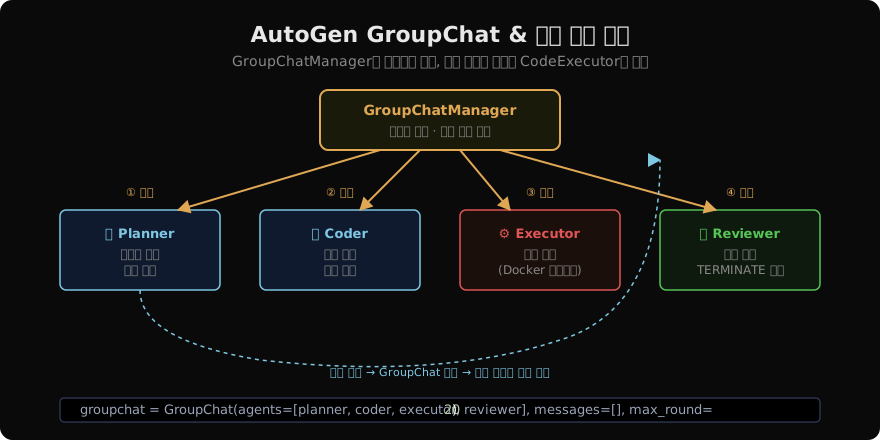
여러 에이전트가 그룹 채팅 형태로 협업한다.
from autogen import GroupChat, GroupChatManager

# 역할별 에이전트 정의
planner = AssistantAgent(
    name="Planner",
    system_message="""당신은 소프트웨어 아키텍트입니다.
    태스크를 분석하고 실행 계획을 제시합니다.
    Coder에게 구체적인 구현을 요청하세요.""",
    llm_config=llm_config,
)

coder = AssistantAgent(
    name="Coder",
    system_message="""당신은 시니어 Python 개발자입니다.
    Planner의 계획에 따라 코드를 작성합니다.
    코드는 반드시 ```python 블록에 넣으세요.""",
    llm_config=llm_config,
)

executor = UserProxyAgent(
    name="Executor",
    human_input_mode="NEVER",
    code_execution_config={
        "executor": autogen.coding.DockerCommandLineCodeExecutor(
            image="python:3.11-slim",
            work_dir="./workspace",
            timeout=60,
        ),
    },
    default_auto_reply="코드를 실행했습니다. 결과를 확인하세요.",
)

reviewer = AssistantAgent(
    name="Reviewer",
    system_message="""당신은 QA 엔지니어입니다.
    코드와 실행 결과를 검토합니다.
    문제가 없으면 'TERMINATE'를 포함해 종료하세요.""",
    llm_config=llm_config,
)

# GroupChat 구성
groupchat = GroupChat(
    agents=[planner, coder, executor, reviewer],
    messages=[],
    max_round=20,
    speaker_selection_method="auto",  # LLM이 다음 발언자 자동 선택
    # "round_robin": 순서대로 / "random": 무작위
)

manager = GroupChatManager(
    groupchat=groupchat,
    llm_config=llm_config,
)

# 실행
user_proxy.initiate_chat(
    manager,
    message="""
    CSV 파일을 읽어서 다음을 수행하는 Python 스크립트를 작성해주세요:
    1. 기술 통계 출력
    2. 결측값 처리
    3. matplotlib으로 분포 시각화
    """,
)
커스텀 에이전트 구현
from autogen import ConversableAgent
from typing import Optional, Union

class DatabaseAgent(ConversableAgent):
    """SQL 쿼리를 실행하는 커스텀 에이전트"""

    def __init__(self, connection_string: str, **kwargs):
        super().__init__(**kwargs)
        self.connection_string = connection_string
        # 메시지 핸들러 등록
        self.register_reply(
            [ConversableAgent, None],
            self._handle_sql_request,
            position=1,
        )

    def _handle_sql_request(
        self,
        messages: Optional[list] = None,
        sender: Optional[ConversableAgent] = None,
        config=None,
    ) -> tuple[bool, Optional[Union[str, dict]]]:
        """SQL 쿼리 요청 감지 및 실행"""
        last_message = messages[-1]["content"] if messages else ""
        if "```sql" in last_message:
            # SQL 블록 추출
            import re
            sql_match = re.search(r"```sql\n(.*?)```", last_message, re.DOTALL)
            if sql_match:
                query = sql_match.group(1).strip()
                try:
                    import sqlite3
                    conn = sqlite3.connect(self.connection_string)
                    cursor = conn.execute(query)
                    results = cursor.fetchall()
                    conn.close()
                    return True, f"쿼리 결과:\n{results}"
                except Exception as e:
                    return True, f"SQL 오류: {str(e)}"
        return False, None  # 기본 LLM 응답으로 폴백

db_agent = DatabaseAgent(
    connection_string="./company.db",
    name="DatabaseAgent",
    system_message="데이터베이스 전문가. SQL 쿼리를 작성하고 실행합니다.",
    llm_config=llm_config,
    human_input_mode="NEVER",
)
함수 등록과 도구 사용
from autogen import register_function

# 방법 1: 함수 직접 등록
def get_weather(city: str) -> str:
    """날씨 정보를 반환합니다."""
    weather_data = {"서울": "맑음 18°C", "부산": "흐림 15°C"}
    return weather_data.get(city, "데이터 없음")

# assistant가 호출 가능, executor가 실행
register_function(
    get_weather,
    caller=assistant,        # 함수 호출 결정
    executor=user_proxy,     # 함수 실제 실행
    name="get_weather",
    description="도시의 현재 날씨를 조회합니다.",
)

# 방법 2: tools 리스트로 일괄 등록
from autogen.tools import Tool

tools = [
    Tool(
        name="search",
        description="웹 검색",
        func=lambda q: f"'{q}' 검색 결과",
    ),
    Tool(
        name="calculate",
        description="수식 계산",
        func=lambda expr: str(eval(expr)),
    ),
]

assistant_with_tools = AssistantAgent(
    name="assistant",
    llm_config={**llm_config, "tools": [t.schema for t in tools]},
)
v0.4 비동기 API (AgentChat)
AutoGen v0.4는 완전한 비동기 인터페이스를 제공한다.
import asyncio
from autogen_agentchat.agents import AssistantAgent as AsyncAssistant
from autogen_agentchat.teams import RoundRobinGroupChat
from autogen_ext.models.anthropic import AnthropicChatCompletionClient

async def main():
    model_client = AnthropicChatCompletionClient(
        model="claude-sonnet-4-6",
    )

    agent1 = AsyncAssistant(
        name="writer",
        model_client=model_client,
        system_message="기술 글쓰기 전문가",
    )
    agent2 = AsyncAssistant(
        name="critic",
        model_client=model_client,
        system_message="내용을 비평하고 개선점을 제시합니다. 만족하면 'APPROVE'라고 하세요.",
    )

    team = RoundRobinGroupChat(
        participants=[agent1, agent2],
        termination_condition=lambda msgs: any("APPROVE" in m.content for m in msgs),
    )

    # 스트리밍 실행
    async for message in team.run_stream(
        task="AI 에이전트의 미래에 대한 500단어 에세이를 작성하세요."
    ):
        print(f"[{message.source}]: {message.content[:100]}")

asyncio.run(main())
AutoGen vs CrewAI vs LangGraph
| 기준 | AutoGen | CrewAI | LangGraph |
|---|---|---|---|
| 대화 패러다임 | 대화 기반 | 역할+태스크 기반 | 상태 기계 |
| 코드 실행 | 네이티브 지원 | 도구 통해 | 노드 통해 |
| 그룹 대화 | GroupChat | Crew | 멀티 노드 |
| 설정 복잡도 | 낮음 | 낮음 | 중간 |
| 비동기 지원 | v0.4 완전 지원 | 부분 지원 | 완전 지원 |
| 적합한 사례 | 코드 생성·검증 루프 | 역할 분리 파이프라인 | 복잡 상태 추적 |
정리
AutoGen은 에이전트 간 대화로 문제를 해결하는 독특한 패러다임을 제공한다:
- AssistantAgent: LLM 기반으로 코드 작성, 계획 수립, 분석 수행
- UserProxyAgent: 코드 실행과 사람 입력을 통합한 하이브리드 에이전트
- GroupChat: N:N 대화에서 GroupChatManager가 발언자를 LLM으로 자동 선택
- 코드 실행: 로컬 또는 Docker 샌드박스에서 안전하게 코드 실행·검증
- v0.4 비동기: 완전한 비동기 API로 고성능 멀티 에이전트 시스템 구현
데이터 분석, 코드 생성·리뷰, 수치 계산 등 코드 실행이 핵심인 워크플로우에서 AutoGen은 가장 강력한 선택이다.
지난 글: CrewAI 완전 가이드: 역할 기반 멀티 에이전트 협업
다음 글: OpenAI Swarm: 경량 멀티 에이전트 핸드오프 패턴
읽어주셔서 감사합니다. 😊