

지식
AI
에이전트 메모리: 단기·장기·시맨틱 메모리 아키텍처
AI 에이전트의 4가지 메모리 유형(In-Context, External, Episodic, Semantic)과 mem0, LangChain Memory, 벡터 DB 기반 구현까지 완전 해설합니다.
지난 글에서 Swarm의 핸드오프 패턴으로 에이전트를 연결하는 방법을 살펴봤다. 이번 글에서는 에이전트가 “기억”하는 방법, 즉 메모리 아키텍처를 다룬다. 사람처럼 과거를 기억하고 개인화된 응답을 제공하려면 단순한 대화 히스토리를 넘어선 정교한 메모리 설계가 필요하다.
에이전트 메모리의 4가지 유형
인지과학의 메모리 체계를 AI 에이전트에 적용하면 네 가지 유형이 나온다.
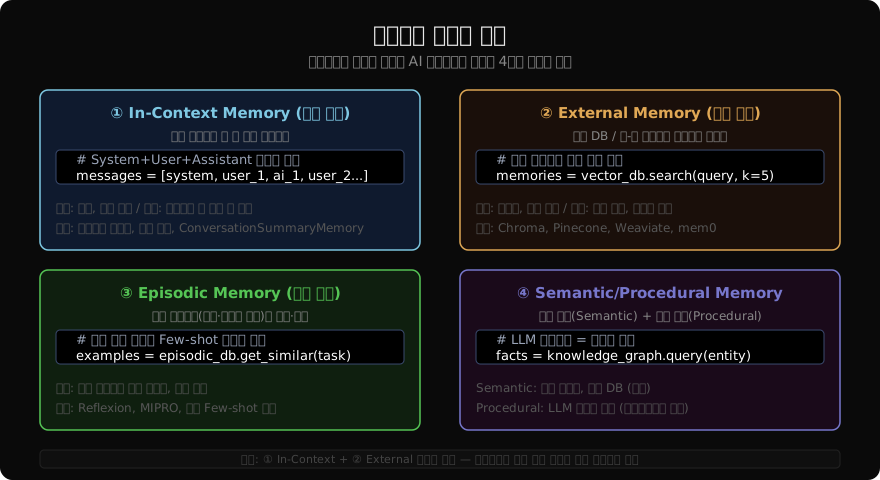
① In-Context Memory (작업 기억)
LLM의 컨텍스트 창에 담기는 대화 히스토리다. 가장 빠르고 즉각적이지만, 컨텍스트 창 크기에 제한된다.
from langchain_anthropic import ChatAnthropic
from langchain_core.chat_history import InMemoryChatMessageHistory
from langchain_core.messages import HumanMessage, AIMessage, SystemMessage
from langchain_core.runnables.history import RunnableWithMessageHistory

llm = ChatAnthropic(model="claude-sonnet-4-6")

# 세션별 히스토리 저장소
store: dict[str, InMemoryChatMessageHistory] = {}

def get_session_history(session_id: str) -> InMemoryChatMessageHistory:
    if session_id not in store:
        store[session_id] = InMemoryChatMessageHistory()
    return store[session_id]

from langchain_core.prompts import ChatPromptTemplate, MessagesPlaceholder

prompt = ChatPromptTemplate.from_messages([
    ("system", "당신은 친절한 AI 어시스턴트입니다."),
    MessagesPlaceholder(variable_name="history"),
    ("human", "{input}"),
])

chain = prompt | llm
chain_with_history = RunnableWithMessageHistory(
    chain,
    get_session_history,
    input_messages_key="input",
    history_messages_key="history",
)

# 같은 session_id → 이전 대화 기억
config = {"configurable": {"session_id": "user-001"}}
response1 = chain_with_history.invoke({"input": "내 이름은 김철수야"}, config=config)
response2 = chain_with_history.invoke({"input": "내 이름이 뭐야?"}, config=config)
print(response2.content)  # "김철수라고 하셨습니다."
컨텍스트 압축 전략
from langchain.memory import ConversationSummaryBufferMemory
from langchain_core.messages import get_buffer_string

# 요약 + 버퍼 하이브리드: 오래된 대화는 요약, 최근 N턴은 원문 유지
summary_buffer_memory = ConversationSummaryBufferMemory(
    llm=llm,
    max_token_limit=2000,       # 버퍼 토큰 한도 초과 시 자동 요약
    return_messages=True,
    memory_key="chat_history",
)

# 슬라이딩 윈도우: 최근 K턴만 유지
from langchain.memory import ConversationBufferWindowMemory
window_memory = ConversationBufferWindowMemory(
    k=10,                       # 최근 10턴만 컨텍스트에 포함
    return_messages=True,
)

# 토큰 기준 트리밍 (langchain_core)
from langchain_core.messages import trim_messages
trimmed = trim_messages(
    messages=store.get("user-001", InMemoryChatMessageHistory()).messages,
    strategy="last",
    token_counter=llm,
    max_tokens=4000,
    include_system=True,
)
② External Memory: 벡터 DB 기반 장기 기억
컨텍스트 창을 넘어서는 영속적 기억은 벡터 DB에 저장한다.
from langchain_chroma import Chroma
from langchain_openai import OpenAIEmbeddings
from langchain_core.documents import Document
from datetime import datetime

# 메모리 벡터 스토어 초기화
memory_store = Chroma(
    embedding_function=OpenAIEmbeddings(model="text-embedding-3-small"),
    collection_name="agent_memory",
    persist_directory="./memory_db",
)

def save_memory(user_id: str, content: str, memory_type: str = "conversation"):
    """기억을 벡터 DB에 저장"""
    doc = Document(
        page_content=content,
        metadata={
            "user_id": user_id,
            "type": memory_type,
            "timestamp": datetime.now().isoformat(),
        },
    )
    memory_store.add_documents([doc])

def retrieve_relevant_memories(user_id: str, query: str, k: int = 5) -> list[str]:
    """쿼리와 관련된 과거 기억 검색"""
    results = memory_store.similarity_search(
        query,
        k=k,
        filter={"user_id": user_id},
    )
    return [doc.page_content for doc in results]

# 사용 예시
save_memory("user-001", "사용자는 Python을 좋아하고 머신러닝에 관심이 많음")
save_memory("user-001", "사용자의 회사는 스타트업, 주로 NLP 프로젝트를 진행")

memories = retrieve_relevant_memories("user-001", "사용자의 관심사는?")
context = "\n".join(memories)
print(context)
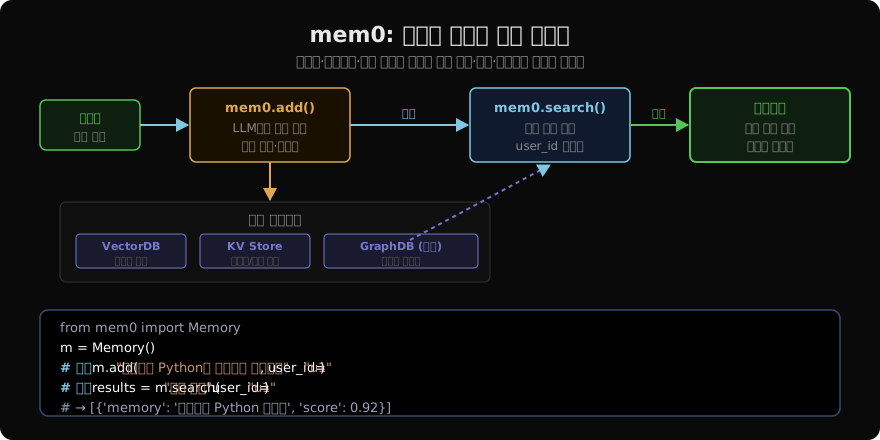
mem0: 계층적 메모리 관리
mem0는 대화에서 핵심 정보를 LLM으로 자동 추출해 저장하는 메모리 레이어다.
from mem0 import Memory
from anthropic import Anthropic

# mem0 초기화 (기본: in-memory / 프로덕션: vector DB 연동)
config = {
    "llm": {
        "provider": "anthropic",
        "config": {"model": "claude-sonnet-4-6", "temperature": 0},
    },
    "embedder": {
        "provider": "openai",
        "config": {"model": "text-embedding-3-small"},
    },
    "vector_store": {
        "provider": "chroma",
        "config": {"collection_name": "mem0_memories", "path": "./mem0_db"},
    },
}
m = Memory.from_config(config)

USER_ID = "user-001"

# 대화 내용에서 자동 추출·저장
def chat_with_memory(user_message: str, user_id: str) -> str:
    # 관련 기억 검색
    memories = m.search(user_message, user_id=user_id, limit=5)
    memory_context = "\n".join([f"- {mem['memory']}" for mem in memories])

    # 기억을 컨텍스트에 포함해 LLM 호출
    client = Anthropic()
    response = client.messages.create(
        model="claude-sonnet-4-6",
        max_tokens=1024,
        system=f"""당신은 사용자의 개인 AI 어시스턴트입니다.
사용자에 대해 알고 있는 정보:
{memory_context if memory_context else "아직 정보가 없습니다."}

이 정보를 바탕으로 개인화된 응답을 제공하세요.""",
        messages=[{"role": "user", "content": user_message}],
    )
    answer = response.content[0].text

    # 대화를 메모리에 저장 (LLM이 핵심 정보 자동 추출)
    m.add(
        [
            {"role": "user", "content": user_message},
            {"role": "assistant", "content": answer},
        ],
        user_id=user_id,
    )
    return answer

# 다턴 대화 (기억 축적)
print(chat_with_memory("나는 서울에 살고 Python 개발자야", USER_ID))
print(chat_with_memory("요즘 FastAPI 공부 중이야", USER_ID))
# 새 세션에서도 기억 유지
print(chat_with_memory("내가 어떤 기술을 공부하고 있었지?", USER_ID))
# → "FastAPI를 공부 중이라고 하셨습니다."

# 저장된 기억 전체 조회
all_memories = m.get_all(user_id=USER_ID)
for mem in all_memories:
    print(f"ID: {mem['id']}, 내용: {mem['memory']}")
LangGraph + 외부 메모리 통합
from langgraph.graph import StateGraph, END
from typing import TypedDict, Annotated
import operator

class MemoryAgentState(TypedDict):
    messages: Annotated[list, operator.add]
    user_id: str
    relevant_memories: list[str]

def retrieve_memory_node(state: MemoryAgentState) -> dict:
    """매 턴 시작 시 관련 기억 검색"""
    last_msg = state["messages"][-1].content if state["messages"] else ""
    memories = retrieve_relevant_memories(
        state["user_id"],
        last_msg,
        k=3,
    )
    return {"relevant_memories": memories}

def agent_node(state: MemoryAgentState) -> dict:
    """기억을 시스템 프롬프트에 주입해 LLM 호출"""
    memory_str = "\n".join(f"- {m}" for m in state["relevant_memories"])
    system = f"관련 기억:\n{memory_str}\n\n이 정보를 참고해 답변하세요."

    from langchain_core.messages import SystemMessage
    messages = [SystemMessage(content=system)] + state["messages"]
    response = llm.invoke(messages)
    return {"messages": [response]}

def save_memory_node(state: MemoryAgentState) -> dict:
    """대화 결과를 메모리에 저장"""
    if len(state["messages"]) >= 2:
        save_memory(
            state["user_id"],
            f"Q: {state['messages'][-2].content}\nA: {state['messages'][-1].content}",
        )
    return {}

graph = StateGraph(MemoryAgentState)
graph.add_node("retrieve", retrieve_memory_node)
graph.add_node("agent", agent_node)
graph.add_node("save", save_memory_node)

graph.set_entry_point("retrieve")
graph.add_edge("retrieve", "agent")
graph.add_edge("agent", "save")
graph.add_edge("save", END)

memory_agent = graph.compile()
메모리 전략 선택 가이드
| 사용 사례 | 권장 메모리 전략 |
|---|---|
| 단순 챗봇 (단일 세션) | In-Context만 (ConversationBufferWindowMemory) |
| 개인화 어시스턴트 | In-Context + External (mem0, Chroma) |
| 멀티 사용자 서비스 | user_id 필터링 + External Memory |
| 장기 프로젝트 에이전트 | Episodic Memory + Semantic KG |
| 고비용 컨텍스트 절약 | ConversationSummaryBufferMemory |
정리
에이전트 메모리는 어디에 무엇을 얼마나 기억할지를 설계하는 문제다:
- In-Context: 가장 빠르고 즉각적, 단 컨텍스트 창 한도 내에서만 유효
- 슬라이딩 윈도우·요약 압축: In-Context의 토큰 비용을 줄이는 핵심 전략
- External Memory: 벡터 DB로 영속화, 유사도 검색으로 관련 기억 검색
- mem0: LLM이 대화에서 핵심 정보를 자동 추출해 사용자별로 저장·검색
- Episodic/Semantic: 과거 에피소드와 도메인 지식을 Few-shot 예제로 재활용
대부분의 실전 에이전트는 In-Context + External 조합으로 충분하다.
지난 글: OpenAI Swarm: 경량 멀티 에이전트 핸드오프 패턴
다음 글: 에이전트 플래닝: ReAct, Plan-and-Execute, MCTS 전략
읽어주셔서 감사합니다. 😊