

AI 콘텐츠 생성 자동화 파이프라인
블로그 포스트, 마케팅 카피, 제품 설명을 자동으로 생성하는 AI 파이프라인을 설계하고, 품질 검토 루프와 톤앤매너 일관성 유지 방법을 다룹니다.
지난 글에서 고객 지원 자동화를 구현했다. 이번에는 콘텐츠 생성 자동화를 다룬다. 마케팅 블로그 포스트, 제품 설명, 이메일 뉴스레터 등 반복적으로 생산해야 하는 텍스트 콘텐츠를 AI 파이프라인으로 자동화하는 방법이다. 중요한 것은 “AI가 쓴 것 같은” 느낌 없이 브랜드 톤을 일관되게 유지하는 것이다.
파이프라인 설계 원칙
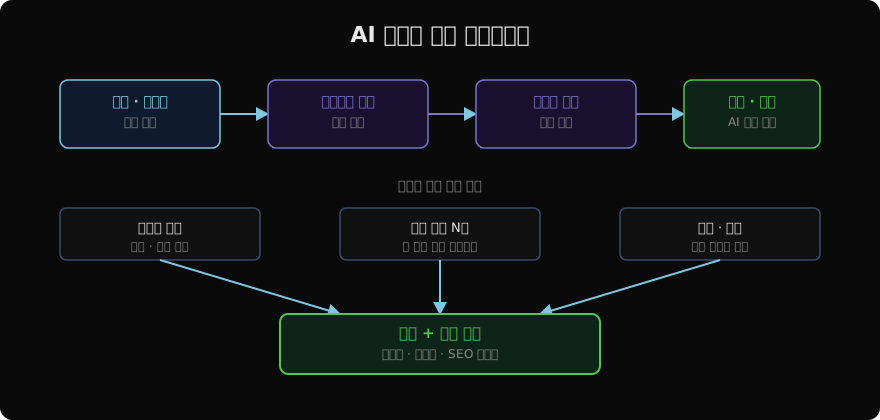
콘텐츠 생성 자동화에서 흔히 하는 실수는 LLM 하나로 전체 글을 한 번에 생성하려는 것이다. 긴 글을 한 번에 생성하면 중간에 맥락을 잃거나, 반복되거나, 뒷부분이 앞부분과 일관성을 잃는다. 대신 단계별 파이프라인을 사용한다.
- 아웃라인 생성 (구조 설계)
- 섹션별 병렬 작성 (내용 생성)
- 통합 및 편집 (일관성 확보)
- AI 품질 검토 (사실 확인, 톤 점검)
아웃라인 생성
아웃라인은 전체 콘텐츠의 뼈대다. 섹션 제목과 각 섹션에서 다룰 핵심 포인트를 구조화된 형태로 생성한다.
import anthropic
import json

client = anthropic.Anthropic()

def generate_outline(
    topic: str,
    keywords: list[str],
    tone: str = "professional",
    target_length: str = "1500 words",
) -> dict:
    keywords_str = ", ".join(keywords)
    response = client.messages.create(
        model="claude-opus-4-7",
        max_tokens=1024,
        system=(
            "당신은 SEO에 최적화된 블로그 아웃라인을 작성하는 전문가입니다. "
            f"톤: {tone}. "
            "JSON으로만 응답하세요."
        ),
        messages=[
            {
                "role": "user",
                "content": (
                    f"주제: {topic}\n"
                    f"키워드: {keywords_str}\n"
                    f"목표 길이: {target_length}\n\n"
                    "다음 형식으로 아웃라인을 작성하세요:\n"
                    '{"title": "...", "sections": [{"heading": "...", "key_points": ["..."]}]}'
                ),
            }
        ],
    )
    return json.loads(response.content[0].text)
섹션별 병렬 작성
아웃라인이 나오면 각 섹션을 독립적으로 작성한다. 섹션 간 의존성이 없으므로 병렬 처리로 전체 생성 시간을 크게 줄일 수 있다.
import asyncio
import anthropic

async_client = anthropic.AsyncAnthropic()

async def write_section(
    section: dict,
    context: str,
    style_guide: str,
) -> str:
    heading = section["heading"]
    key_points = "\n".join(f"- {p}" for p in section["key_points"])

    response = await async_client.messages.create(
        model="claude-opus-4-7",
        max_tokens=800,
        system=f"당신은 전문 콘텐츠 작가입니다.\n{style_guide}",
        messages=[
            {
                "role": "user",
                "content": (
                    f"전체 글 맥락:\n{context}\n\n"
                    f"이번 섹션 제목: {heading}\n"
                    f"다룰 핵심 포인트:\n{key_points}\n\n"
                    "위 포인트를 자연스럽게 풀어 200~300단어 분량의 섹션을 작성하세요."
                ),
            }
        ],
    )
    return f"## {heading}\n\n{response.content[0].text}"

async def write_all_sections(outline: dict, style_guide: str) -> list[str]:
    context = f"글 제목: {outline['title']}"
    tasks = [
        write_section(section, context, style_guide)
        for section in outline["sections"]
    ]
return await asyncio.gather(*tasks)asyncio.gather로 모든 섹션을 동시에 생성한다. 섹션이 5개라면 순차 처리 대비 약 5배 빠르다.
품질 검토 루프
생성된 초안을 AI가 다시 검토하고 개선한다. 이 루프는 최대 3회까지 반복한다.
def review_content(content: str, requirements: dict) -> dict:
    criteria = "\n".join(f"- {k}: {v}" for k, v in requirements.items())
    response = client.messages.create(
        model="claude-opus-4-7",
        max_tokens=512,
        system="콘텐츠 품질 검토자로서 다음 기준으로 평가하고 JSON으로 응답하세요.",
        messages=[
            {
                "role": "user",
                "content": (
                    f"평가 기준:\n{criteria}\n\n"
                    f"콘텐츠:\n{content[:2000]}\n\n"
                    '{"passed": true/false, "score": 0-10, "issues": ["..."], "improvements": ["..."]}'
                ),
            }
        ],
    )
    return json.loads(response.content[0].text)

def generate_content_with_review(topic: str, keywords: list[str]) -> str:
    outline = generate_outline(topic, keywords)
    sections = asyncio.run(write_all_sections(outline, STYLE_GUIDE))
    draft = f"# {outline['title']}\n\n" + "\n\n".join(sections)

    for attempt in range(3):
        review = review_content(draft, QUALITY_REQUIREMENTS)
        if review["passed"] and review["score"] >= 8:
            break
        if review["improvements"]:
            draft = apply_improvements(draft, review["improvements"])

    return draft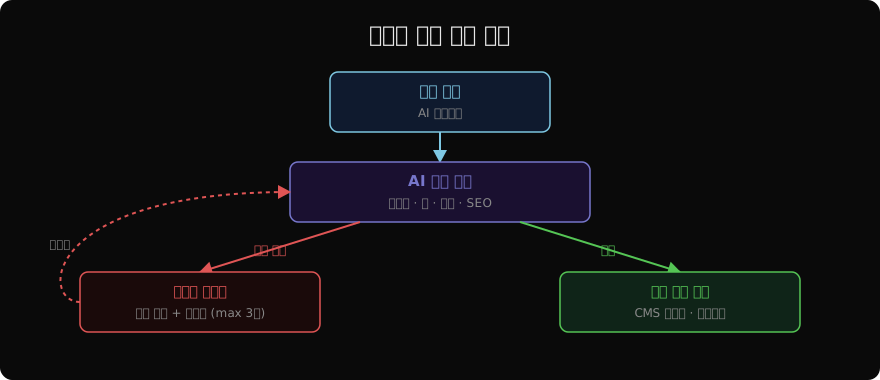
톤앤매너 일관성 유지
AI가 생성한 콘텐츠가 브랜드 목소리와 다르면 독자가 바로 알아챈다. 스타일 가이드를 시스템 프롬프트에 구체적으로 명시하는 것이 핵심이다.
STYLE_GUIDE = """
브랜드 보이스 가이드:
- 어조: 친근하지만 전문적. 친구처럼 편하게 설명하되 허술하지 않게.
- 문장 길이: 짧고 명확하게. 한 문장에 한 가지 아이디어.
- 전문 용어: 불가피한 경우 첫 사용 시 괄호로 설명 추가.
- 금지 표현: "혁신적인", "획기적인", "패러다임", "시너지" 등 클리셰.
- 수동태 지양: "~되어집니다" → "~합니다"
- 예시 활용: 추상적 설명보다 구체적 사례를 먼저.
- 독자 호칭: "여러분", "독자분들" 대신 "당신"
"""

QUALITY_REQUIREMENTS = {
    "사실 정확성": "잘못된 수치나 사실이 없어야 함",
    "톤 일관성": "전체 글에서 브랜드 보이스 일관 유지",
    "SEO": "주요 키워드가 자연스럽게 포함됨",
    "가독성": "단락 길이 적절, 소제목으로 구조화됨",
    "중복 제거": "반복되는 내용이나 표현 없음",
}
다양한 콘텐츠 형식
같은 파이프라인 코어에 형식별 프롬프트를 교체해서 다양한 콘텐츠를 생성한다.
CONTENT_FORMATS = {
    "blog": {
        "structure": "도입 → 본론 → 결론, H2/H3 소제목 사용",
        "length": "1000~2000 words",
        "cta": "글 마지막에 구독 또는 공유 유도",
    },
    "product_description": {
        "structure": "핵심 가치 → 주요 기능 → 사용 사례 → 기술 사양",
        "length": "200~500 words",
        "cta": "구매 또는 무료 체험 유도",
    },
    "email_newsletter": {
        "structure": "훅 → 주요 내용 → 액션 아이템",
        "length": "300~500 words",
        "cta": "클릭 유도 링크 포함",
    },
    "social_media": {
        "structure": "주목 → 가치 → 행동 촉구",
        "length": "LinkedIn: 300 words / Twitter: 280 chars",
        "cta": "댓글, 공유, 팔로우",
    },
}
콘텐츠 캘린더 자동화
주제 브리프만 입력하면 한 달치 콘텐츠 계획을 자동으로 잡는다.
def create_content_calendar(
    brand_topics: list[str],
    month: str,
    posts_per_week: int = 3,
) -> list[dict]:
    response = client.messages.create(
        model="claude-opus-4-7",
        max_tokens=2048,
        system="콘텐츠 마케팅 전문가로서 콘텐츠 캘린더를 JSON으로 작성하세요.",
        messages=[
            {
                "role": "user",
                "content": (
                    f"월: {month}\n"
                    f"주제 풀: {brand_topics}\n"
                    f"주당 포스팅: {posts_per_week}회\n\n"
                    '각 항목: {"date": "...", "topic": "...", "keywords": [...], "format": "..."}'
                ),
            }
        ],
    )
    return json.loads(response.content[0].text)
지난 글: AI 고객 지원 자동화: 티켓 분류부터 답변 생성까지
다음 글: AI 데이터 분석 보조 시스템
읽어주셔서 감사합니다. 😊