

AI 폼·서류 자동화: OCR부터 자동 입력까지
스캔 문서, 이미지, PDF에서 구조화 데이터를 추출해 ERP·CRM 시스템에 자동으로 입력하는 AI 폼 자동화 파이프라인을 구현합니다.
지난 글에서 AI 번역 시스템을 구축했다. 이번에는 폼과 서류 처리 자동화를 다룬다. 발주서, 납품확인서, 세금계산서, 입사 서류, 보험 청구서 — 기업에서 매일 처리하는 수많은 문서들이다. 이를 사람이 수동으로 읽고 시스템에 입력하는 과정을 AI로 자동화하면 처리 속도와 정확도를 동시에 높일 수 있다.
폼 자동화의 가치
수동 데이터 입력의 문제는 속도, 비용, 오류 세 가지다. 숙련된 직원도 청구서 하나를 처리하는 데 35분이 걸린다. 1,000건이면 5080 시간이다. 오탈자, 필드 혼동 같은 인적 오류도 피할 수 없다. AI 자동화로 처리 시간을 90% 줄이고 오류율을 크게 낮출 수 있다.
단, AI가 모든 서류를 완벽하게 처리할 수는 없다. 신뢰도 기반 자동화가 핵심이다. 신뢰도가 높은 건은 자동 처리, 낮은 건은 사람 검토로 라우팅한다.
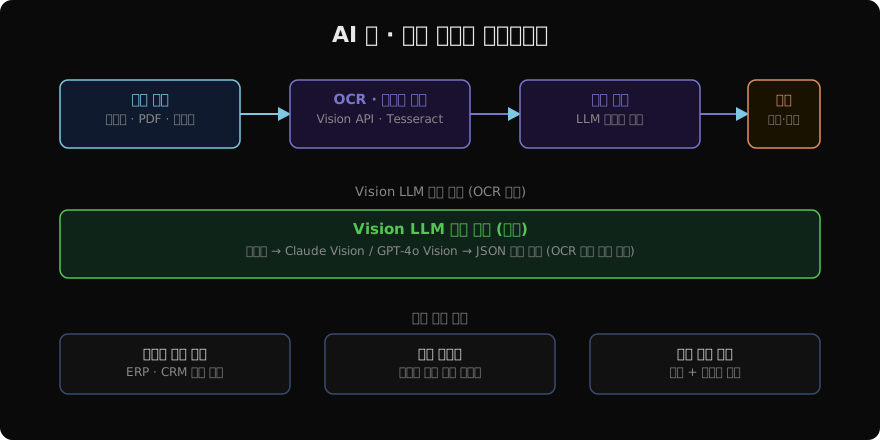
Vision LLM으로 이미지 문서 처리
스캔 이미지나 사진 촬영 문서는 전통적 OCR보다 Vision LLM이 더 정확한 경우가 많다. 기울어진 글자, 표 구조, 도장, 수기 글씨를 함께 처리할 수 있다.
import anthropic
import base64
import json
from pydantic import BaseModel, Field
from typing import Optional

client = anthropic.Anthropic()

class PurchaseOrder(BaseModel):
    po_number: str = Field(description="발주번호")
    vendor: str = Field(description="공급업체명")
    order_date: str = Field(description="발주일 YYYY-MM-DD")
    delivery_date: Optional[str] = Field(description="납기일", default=None)
    items: list[dict] = Field(description="발주 품목 목록 [{name, qty, unit_price}]")
    total_amount: float = Field(description="발주 총액")
    department: Optional[str] = Field(description="발주 부서", default=None)
    approved_by: Optional[str] = Field(description="승인자", default=None)

def extract_purchase_order(image_path: str) -> tuple[PurchaseOrder, float]:
    with open(image_path, "rb") as f:
        b64_data = base64.standard_b64encode(f.read()).decode()

    ext = image_path.rsplit(".", 1)[-1].lower()
    media_type = {"jpg": "image/jpeg", "jpeg": "image/jpeg",
                  "png": "image/png", "pdf": "application/pdf"}.get(ext, "image/jpeg")

    response = client.messages.create(
        model="claude-opus-4-7",
        max_tokens=2048,
        messages=[
            {
                "role": "user",
                "content": [
                    {
                        "type": "image",
                        "source": {"type": "base64", "media_type": media_type, "data": b64_data},
                    },
                    {
                        "type": "text",
                        "text": (
                            "이 발주서 문서에서 데이터를 추출하세요.\n"
                            f"JSON 스키마: {json.dumps(PurchaseOrder.model_json_schema())}\n\n"
                            '응답 형식: {"data": {...}, "confidence": 0.0~1.0}'
                        ),
                    },
                ],
            }
        ],
    )

    result = json.loads(response.content[0].text)
    po = PurchaseOrder.model_validate(result["data"])
    confidence = result.get("confidence", 0.8)
    return po, confidence
응답에 confidence 점수를 함께 요청하면 LLM이 자신의 추출 결과에 얼마나 확신하는지 알 수 있다.
신뢰도 기반 라우팅
def route_by_confidence(document: dict, confidence: float) -> str:
    if confidence >= 0.95:
        return "auto_process"       # 자동 처리
    elif confidence >= 0.80:
        return "review_suggested"   # 검토 권장 (필드 하이라이트 표시)
    else:
        return "manual_required"    # 수동 처리 필수

def process_document(image_path: str, db_conn) -> dict:
    po, confidence = extract_purchase_order(image_path)
    route = route_by_confidence(po.model_dump(), confidence)

    result = {
        "file": image_path,
        "extracted": po.model_dump(),
        "confidence": confidence,
        "route": route,
    }

    if route == "auto_process":
        insert_to_erp(po, db_conn)
        result["status"] = "COMPLETED"
    elif route == "review_suggested":
        add_to_review_queue(po, confidence, db_conn)
        result["status"] = "PENDING_REVIEW"
    else:
        add_to_manual_queue(image_path, db_conn)
        result["status"] = "MANUAL_REQUIRED"

    return result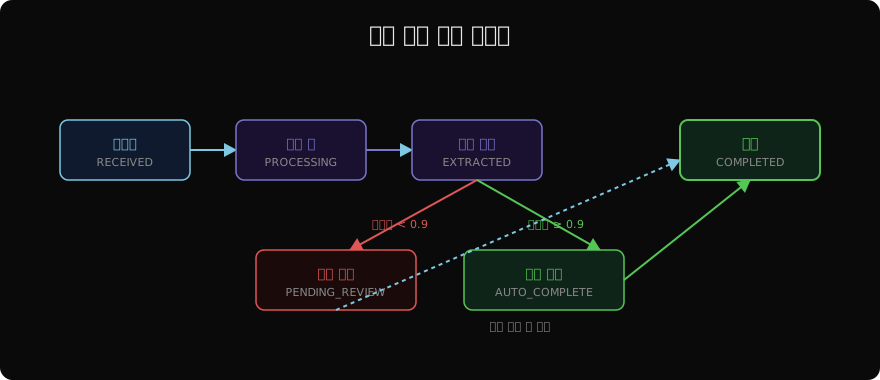
필드 수준 신뢰도
문서 전체가 아닌 필드별로 신뢰도를 관리하면 더 정교한 검토가 가능하다.
def extract_with_field_confidence(image_path: str) -> dict:
    with open(image_path, "rb") as f:
        b64_data = base64.standard_b64encode(f.read()).decode()

    response = client.messages.create(
        model="claude-opus-4-7",
        max_tokens=2048,
        messages=[
            {
                "role": "user",
                "content": [
                    {
                        "type": "image",
                        "source": {"type": "base64", "media_type": "image/jpeg", "data": b64_data},
                    },
                    {
                        "type": "text",
                        "text": (
                            "각 필드의 값과 신뢰도(0~1)를 JSON으로 반환하세요.\n"
                            '예: {"vendor": {"value": "ABC Corp", "confidence": 0.98}, ...}'
                        ),
                    },
                ],
            }
        ],
    )

    fields = json.loads(response.content[0].text)
    # 낮은 신뢰도 필드만 검토 표시
    flagged_fields = [k for k, v in fields.items() if v.get("confidence", 1) < 0.85]
    return {"fields": fields, "review_required_fields": flagged_fields}
사람 검토 인터페이스 연동
검토 필요 항목은 사람이 쉽게 확인하고 수정할 수 있는 UI와 연동한다.
def prepare_review_payload(image_path: str, extracted: dict, low_confidence_fields: list) -> dict:
    return {
        "document_id": generate_id(image_path),
        "image_url": upload_to_storage(image_path),
        "extracted_data": extracted,
        "review_hints": [
            {
                "field": field,
                "current_value": extracted.get(field),
                "reason": "AI 신뢰도 낮음 — 확인 필요",
            }
            for field in low_confidence_fields
        ],
        "created_at": datetime.now().isoformat(),
    }
검토 UI에서 원본 이미지와 추출 결과를 나란히 보여주고, 낮은 신뢰도 필드를 하이라이트하면 검토 시간을 크게 줄일 수 있다.
ERP/CRM 자동 입력
추출된 데이터를 기존 시스템에 자동으로 입력한다.
import requests

def insert_to_erp(po: PurchaseOrder, api_base: str, api_key: str) -> dict:
    payload = {
        "po_number": po.po_number,
        "vendor_code": lookup_vendor_code(po.vendor),  # 벤더명 → 내부 코드 매핑
        "order_date": po.order_date,
        "delivery_date": po.delivery_date,
        "lines": [
            {
                "item_code": lookup_item_code(item["name"]),
                "quantity": item["qty"],
                "unit_price": item["unit_price"],
            }
            for item in po.items
        ],
        "total_amount": po.total_amount,
    }

    response = requests.post(
        f"{api_base}/purchase-orders",
        json=payload,
        headers={"Authorization": f"Bearer {api_key}"},
        timeout=30,
    )
    response.raise_for_status()
    return response.json()
ERP 시스템의 내부 코드(벤더 코드, 품목 코드)와 자유 텍스트 매핑이 까다로운 부분이다. 마스터 데이터 테이블을 관리하고 퍼지 매칭을 적용한다.
배치 처리와 모니터링
import asyncio
from pathlib import Path

async def batch_process_documents(input_dir: str, output_dir: str):
    paths = list(Path(input_dir).glob("*.{jpg,png,pdf}"))
    total = len(paths)
    success, failed, manual = 0, 0, 0

    for path in paths:
        result = process_document(str(path), db_conn=get_db())
        if result["status"] == "COMPLETED":
            success += 1
        elif result["status"] == "MANUAL_REQUIRED":
            manual += 1
        else:
            failed += 1

    print(f"처리 완료: {total}건")
    print(f"  자동 처리: {success}건 ({success/total*100:.1f}%)")
    print(f"  수동 필요: {manual}건 ({manual/total*100:.1f}%)")
    print(f"  오류: {failed}건")
자동화율(auto-processing rate) 목표를 70~85%로 설정하고, 미달 시 스키마나 프롬프트를 개선한다.
지난 글: AI 번역 시스템 구축: 도메인 특화 고품질 번역
다음 글: AI 회의 요약 시스템: 음성 인식부터 인사이트 추출까지
읽어주셔서 감사합니다. 😊