

소스맵 완전 정복 — 디버깅의 숨은 열쇠
소스맵의 VLQ 인코딩 구조, webpack·Vite·Rollup·esbuild 설정 옵션, 프로덕션에서 소스맵 보안 처리, Sentry와 연동한 에러 추적, Node.js 소스맵 활성화까지 정리합니다.
지난 글에서 Parcel과 Turbopack을 살펴봤습니다. 번들러가 코드를 압축·난독화하면 에러 스택 트레이스가 bundle.js:1:34821처럼 쓸모없어집니다. 소스맵은 번들된 코드와 원본 소스를 연결하는 메타데이터 파일로, 브라우저와 에러 추적 도구가 원본 파일의 정확한 위치를 찾을 수 있게 해줍니다.
소스맵이 하는 일
번들러는 변환·최소화 후 생성된 파일의 각 위치가 원본 소스의 어디에서 왔는지 기록한 .map 파일을 생성합니다. 브라우저 DevTools는 sourceMappingURL 주석을 보고 이 파일을 로드해 역방향으로 매핑합니다.
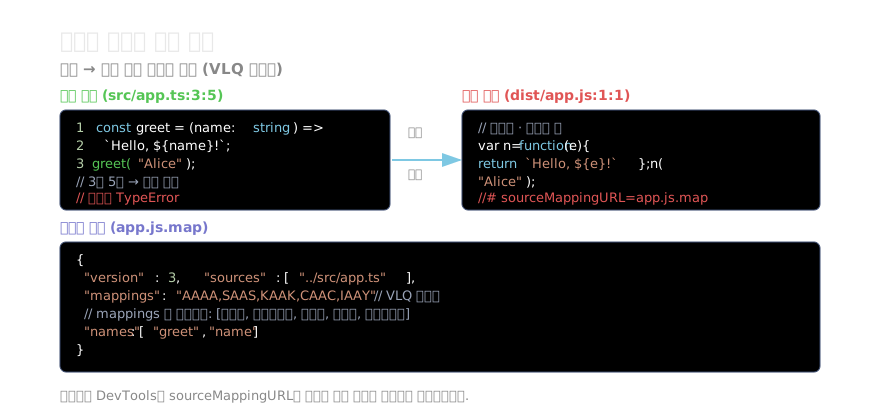
// 번들 파일 맨 끝에 추가되는 주석
//# sourceMappingURL=app.js.map

// 또는 Base64 인라인
//# sourceMappingURL=data:application/json;charset=utf-8;base64,eyJ2ZXJzaW...
소스맵 파일 구조
{
  "version": 3,
  "file": "app.js",
  "sources": ["../src/app.ts", "../src/utils.ts"],
  "sourcesContent": ["const greet = ..."],
  "names": ["greet", "name"],
  "mappings": "AAAA,SAAS,KAAK,CAAC,IAAY"
}
각 필드의 역할:
version: 항상 3 (Source Map v3 스펙)sources: 원본 파일 경로 배열sourcesContent: 원본 소스 내용 인라인 (선택)names: 식별자 이름 배열mappings: VLQ(Variable-Length Quantity) 인코딩된 위치 매핑
mappings는 쉼표로 구분된 세그먼트의 세미콜론 구분 행 묶음입니다. 각 세그먼트는 [생성열, 소스인덱스, 원본행, 원본열, 이름인덱스] 5개의 VLQ 값으로 구성됩니다.
빌드 도구별 설정
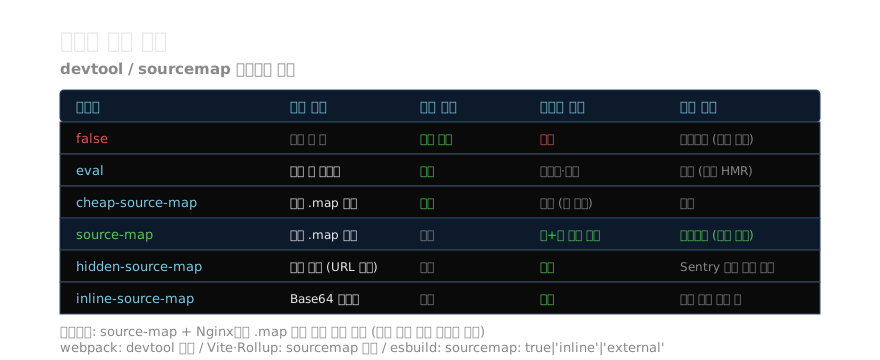
webpack
// webpack.config.js
export default {
  // 개발 환경
  devtool: 'eval-cheap-module-source-map',

  // 프로덕션 환경
  devtool: process.env.NODE_ENV === 'production'
    ? 'hidden-source-map'   // DevTools 자동 로드 막음
    : 'eval-cheap-module-source-map',
};
Vite
// vite.config.ts
export default defineConfig({
  build: {
    sourcemap: true,           // 별도 .map 파일
    // sourcemap: 'inline',    // Base64 인라인
    // sourcemap: 'hidden',    // URL 주석 없는 별도 파일
  },
});
Rollup
// rollup.config.js
export default {
  output: {
    sourcemap: true,         // 별도 .map 파일
    // sourcemap: 'inline',  // Base64 인라인
  },
};
esbuild
await esbuild.build({
  sourcemap: true,        // 별도 .map 파일
  // sourcemap: 'inline', // Base64 인라인
  // sourcemap: 'external', // URL 주석 없는 별도 파일
  // sourcemap: 'both',   // 인라인 + 별도 파일
});
프로덕션 소스맵 보안
소스맵을 퍼블릭하게 노출하면 원본 소스 코드가 그대로 드러납니다. 이는 비즈니스 로직, API 키 실수, 알고리즘 노출 위험이 있습니다.
권장 전략: hidden-source-map + 접근 제어
# Nginx에서 .map 파일을 내부 네트워크만 접근 가능하도록 제한
location ~* \.map$ {
  allow 10.0.0.0/8;      # 내부 네트워크
  allow 127.0.0.1;
  deny all;
}
// webpack: hidden-source-map
// Vite: sourcemap: 'hidden'
// → 번들에 sourceMappingURL 주석 없음 → 브라우저 자동 로드 안 됨
// → Sentry 같은 에러 추적 도구는 서버에서 직접 .map을 업로드해서 사용Sentry 에러 추적 연동
npm install --save-dev @sentry/webpack-plugin// webpack.config.js
import { SentryWebpackPlugin } from '@sentry/webpack-plugin';
plugins: [
new SentryWebpackPlugin({
org: 'my-org',
project: 'my-project',
include: './dist',
authToken: process.env.SENTRY_AUTH_TOKEN,
// 업로드 후 .map 파일 자동 삭제
cleanArtifacts: true,
}),
],// vite.config.ts
import { sentryVitePlugin } from '@sentry/vite-plugin';
plugins: [
sentryVitePlugin({
org: 'my-org',
project: 'my-project',
authToken: process.env.SENTRY_AUTH_TOKEN,
}),
],
build: { sourcemap: true },Sentry는 소스맵을 서버에 업로드해 에러 발생 시 서버 측에서 역매핑합니다. 프로덕션 서버에 소스맵 파일을 두지 않아도 됩니다.
Node.js에서 소스맵 활성화
TypeScript로 작성한 Node.js 앱도 소스맵이 필요합니다.
# Node.js 12.12+ — --enable-source-maps 플래그
node --enable-source-maps dist/server.js

# Node.js 18+ — 기본 활성화 옵션
NODE_OPTIONS='--enable-source-maps' node dist/server.js
// package.json
{
"scripts": {
"start": "node --enable-source-maps dist/server.js"
}
}활성화하면 에러 스택 트레이스에 원본 TypeScript 파일의 경로와 줄 번호가 표시됩니다.
sourcesContent — 원본 소스 인라인
소스맵에 sourcesContent를 포함하면 원본 파일 없이도 DevTools에서 소스를 볼 수 있습니다. CDN 배포처럼 원본 파일이 다른 경로에 있을 때 유용합니다.
// webpack: 기본적으로 sourcesContent 포함
// Vite: 기본적으로 포함
// Rollup: sourcemapExcludeSources: true 로 제외 가능
// esbuild: 기본 포함 (excludeSourcesContent 옵션으로 제외)
커스텀 소스맵 생성
라이브러리를 만들거나 코드 변환 도구를 작성할 때 소스맵을 직접 생성해야 할 수 있습니다.
npm install magic-stringimport MagicString from 'magic-string';
const s = new MagicString('function hello() { return "world"; }');
s.overwrite(9, 14, 'greet'); // 'hello' → 'greet'
const code = s.toString();
const map = s.generateMap({
source: 'input.js',
file: 'output.js',
includeContent: true,
});
// map.toString() → JSON 소스맵 문자열
// map.toUrl() → data:application/json;base64,...지난 글: Parcel · Turbopack — 무설정·Rust 번들러
다음 글: Tree Shaking 심층 분석 — 죽은 코드 완전 제거
읽어주셔서 감사합니다. 😊
PALDYN / ARTICLE AI
글의 개념, 수식, 코드에 대해 물어보세요.
질문과 관련된 문단을 골라 답변의 문맥으로 사용합니다.생각 중 · 0초