

Docker Compose healthcheck: 서비스 상태 검사 완전 정복
Compose healthcheck의 test·interval·timeout·retries·start_period 옵션, starting/healthy/unhealthy 상태 흐름, 실전 DB·HTTP 예시를 정리합니다.
지난 글에서 depends_on의 service_healthy condition을 살펴봤다. 이번에는 그 조건을 만족시키는 healthcheck 블록 자체를 자세히 파고든다.
healthcheck가 하는 일
Docker는 일정 간격으로 컨테이너 안에서 지정된 명령을 실행한다. 명령이 exit 0을 반환하면 healthy, 그렇지 않으면 unhealthy로 표시한다. depends_on: condition: service_healthy는 이 상태를 보고 다음 서비스의 시작 여부를 결정한다.
docker ps   # STATUS 열에 (healthy) 또는 (unhealthy) 표시
docker inspect --format='{{.State.Health.Status}}' <container>
상태 전환 흐름
컨테이너가 시작되면 starting 상태다. start_period 동안은 test가 실패해도 retries 카운트에 포함되지 않는다. 이후 retries 횟수 연속 실패하면 unhealthy가 되고, 다시 성공하면 healthy로 복귀한다.
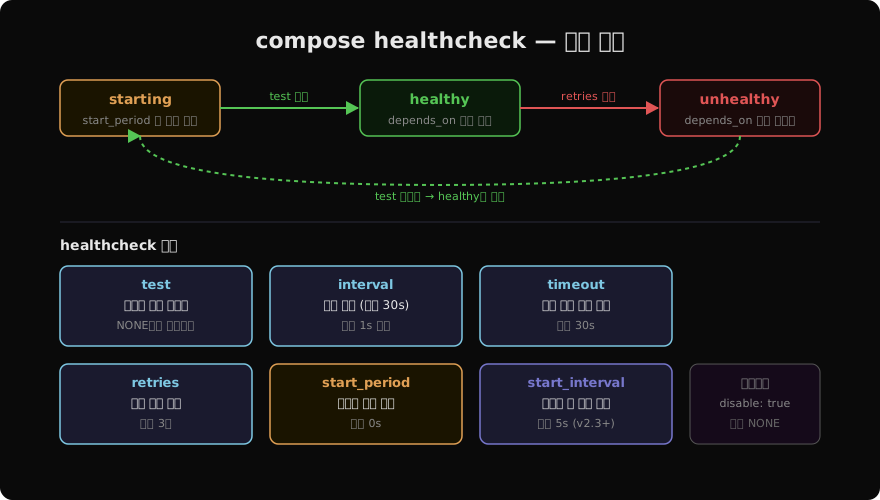
옵션 상세
healthcheck:
  test: ["CMD-SHELL", "pg_isready -U postgres"]
  interval: 5s       # 검사 간격 (기본 30s)
  timeout: 5s        # 단일 검사 제한 시간 (기본 30s)
  retries: 5         # unhealthy 판정 전 연속 실패 허용 횟수 (기본 3)
start_period: 10s # 초기화 유예 시간 (기본 0s)start_period는 DB나 앱 서버처럼 기동에 시간이 걸리는 서비스에서 필수다. 이 시간 동안 실패해도 retries에 누적되지 않는다. 단, start_period 내에 test가 성공하면 즉시 healthy로 전환된다.
start_interval(Compose v2.3+)을 설정하면 start_period 동안 더 짧은 간격으로 검사해서 빠르게 healthy를 감지할 수 있다.
healthcheck:
  test: ["CMD", "curl", "-f", "http://localhost/health"]
  interval: 10s
  start_period: 20s
  start_interval: 2s  # 초기화 중에는 2초마다 검사
test 명령 형식
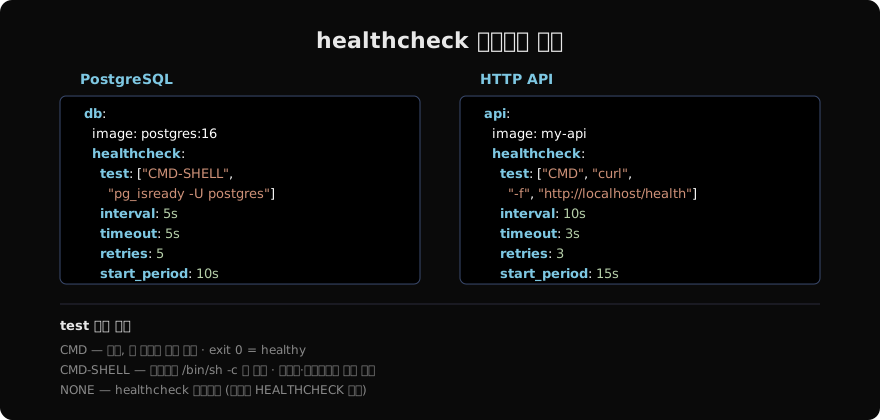
test는 세 가지 형식 중 하나를 사용한다.
# CMD: 배열, exit 0이면 healthy
test: ["CMD", "pg_isready", "-U", "postgres"]

# CMD-SHELL: /bin/sh -c 로 실행, 파이프·리다이렉트 사용 가능
test: ["CMD-SHELL", "curl -f http://localhost/health || exit 1"]

# 문자열 축약 (CMD-SHELL과 동일)
test: "curl -f http://localhost/health || exit 1"

# NONE: healthcheck 비활성화 (이미지 HEALTHCHECK 덮어쓰기)
test: ["NONE"]CMD는 shell을 거치지 않아 오버헤드가 적다. 파이프(|)나 조건 연산자(||)가 필요할 때만 CMD-SHELL을 쓴다.
서비스별 실전 예시
Redis
redis:
  image: redis:7
  healthcheck:
    test: ["CMD", "redis-cli", "ping"]
    interval: 5s
    timeout: 3s
    retries: 5
MySQL
mysql:
  image: mysql:8
  environment:
    MYSQL_ROOT_PASSWORD: secret
  healthcheck:
    test: ["CMD", "mysqladmin", "ping", "-h", "localhost"]
    interval: 10s
    timeout: 5s
    retries: 5
    start_period: 30s
직접 만든 API 서버
api:
  image: my-api
  healthcheck:
    test: ["CMD-SHELL", "wget -qO- http://localhost:8080/health | grep ok || exit 1"]
    interval: 10s
    timeout: 5s
    retries: 3
    start_period: 15s
depends_on과 연결
services:
  db:
    image: postgres:16
    healthcheck:
      test: ["CMD-SHELL", "pg_isready -U postgres"]
      interval: 5s
      retries: 5
      start_period: 10s

  api:
    image: my-api
    depends_on:
      db:
condition: service_healthydb가 healthy 상태가 되어야 api가 시작된다. compose up --wait를 사용하면 모든 서비스가 healthy(또는 started)가 될 때까지 명령이 블록된다.
Dockerfile HEALTHCHECK와 우선순위
이미지 자체에 HEALTHCHECK 지시자가 있어도 Compose의 healthcheck 블록이 우선한다. 이미지 healthcheck를 그대로 쓰려면 Compose에 선언하지 않으면 된다. 이미지 healthcheck를 끄려면 disable: true나 test: ["NONE"]을 쓴다.
healthcheck:
  disable: true   # 이미지에 정의된 HEALTHCHECK 무시
상태 확인 명령
# 헬스 상태 확인
docker inspect --format='{{.State.Health.Status}}' mydb
# 최근 헬스 로그 확인
docker inspect --format='{{range .State.Health.Log}}{{.Output}}{{end}}' mydb
# compose 전체 서비스 상태
docker compose ps
지난 글: Docker Compose depends_on: 서비스 의존성과 시작 순서 제어
다음 글: Docker Compose profiles: 환경별 서비스 선택 실행
읽어주셔서 감사합니다. 😊
PALDYN / ARTICLE AI
글의 개념, 수식, 코드에 대해 물어보세요.
질문과 관련된 문단을 골라 답변의 문맥으로 사용합니다.생각 중 · 0초