

Docker Compose services 완전 정복
compose.yaml의 services 키 아래 자주 쓰는 모든 옵션 — image/build, ports, volumes, environment, depends_on, healthcheck, restart, deploy를 실전 예제로 정리합니다.
지난 글에서 compose.yaml의 YAML 문법을 살펴봤다. 이번에는 services 키 아래 사용할 수 있는 주요 옵션을 모두 정리한다.
서비스 정의 전체 구조
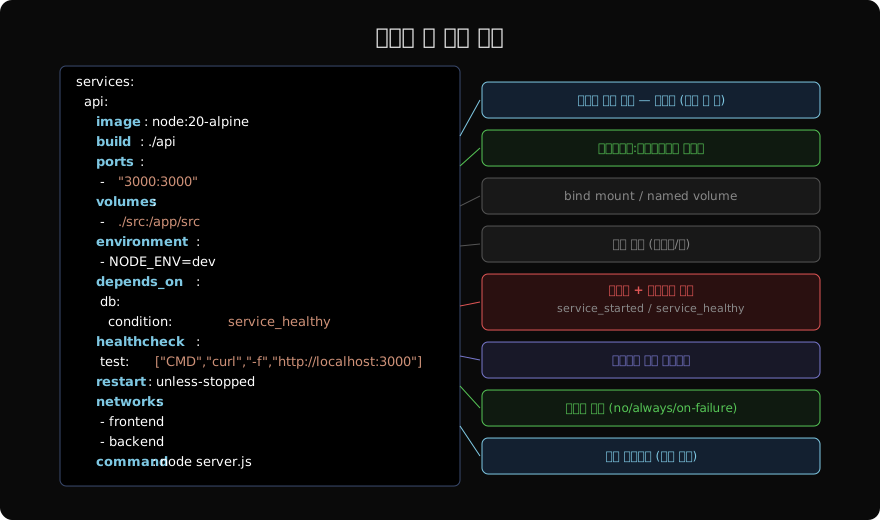
한 서비스는 image 또는 build(또는 둘 다), 그리고 ports, volumes, environment, depends_on, healthcheck, restart, networks를 조합해 정의한다.
image와 build
services:
  # 이미지 직접 지정
  db:
    image: postgres:16

  # Dockerfile 빌드
  api:
    build: ./api   # Dockerfile 경로

  # 빌드 + 이미지 태그 (캐시 재사용)
  web:
    build:
      context: ./web
      dockerfile: Dockerfile.prod
      args:
        NODE_ENV: production
image: myapp/web:${TAG:-latest}build와 image를 함께 쓰면 빌드 결과에 이미지 이름을 부여한다. 레지스트리 푸시 시 편리하다.
ports와 expose
services:
  web:
    image: nginx
    ports:
      - "80:80"           # 호스트포트:컨테이너포트
      - "127.0.0.1:443:443"  # 로컬호스트 바인딩
    expose:
- "8080" # 컨테이너 간 통신만ports는 호스트에 바인딩하고, expose는 같은 네트워크 내 컨테이너에만 포트를 선언한다.
volumes
services:
  api:
    volumes:
      # bind mount: 호스트 경로:컨테이너 경로
      - ./src:/app/src
      # named volume
      - node_modules:/app/node_modules
      # read-only
      - ./config:/app/config:ro

volumes:
  node_modules:
개발 환경에서는 소스 코드를 bind mount해 코드 변경이 즉시 반영되도록 한다.
depends_on과 healthcheck
depends_on만 쓰면 컨테이너가 시작됐을 때 다음 서비스를 실행한다. DB가 실제로 준비되기 전에 앱이 시작하면 연결 오류가 날 수 있다. condition: service_healthy와 함께 써야 DB가 준비된 후 앱이 시작된다.
services:
  api:
    depends_on:
      db:
        condition: service_healthy  # DB 헬스체크 통과 후 시작

  db:
    image: postgres:16
    healthcheck:
      test: ["CMD-SHELL", "pg_isready -U postgres"]
      interval: 10s
      timeout: 5s
      retries: 5
      start_period: 30s
condition 옵션:
service_started(기본): 컨테이너가 시작된 직후service_healthy: 헬스체크가 healthy 상태가 된 후service_completed_successfully: 마이그레이션 같은 일회성 작업 완료 후
restart 정책
services:
  web:
    restart: unless-stopped  # 수동 중지 외 항상 재시작

  worker:
restart: on-failure:3 # 실패 시 최대 3회 재시작| 값 | 동작 |
|---|---|
no | 재시작 안 함 (기본) |
always | 항상 재시작 |
on-failure | 오류 종료 시만 |
unless-stopped | 수동 중지 외 항상 |
deploy (리소스 제한)
services:
  api:
    deploy:
      resources:
        limits:
          cpus: "0.5"
          memory: 512M
        reservations:
          memory: 256M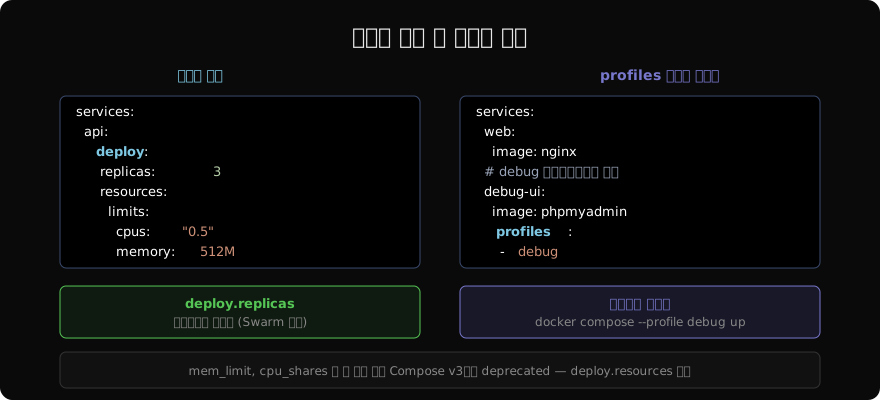
deploy.replicas는 Docker Swarm에서만 의미 있다. 로컬 Compose에서는 무시된다. 로컬에서 스케일을 조정하려면 docker compose up --scale api=3을 쓴다.
command와 entrypoint 오버라이드
services:
  worker:
    image: myapp:latest
    command: ["node", "worker.js"]      # CMD 오버라이드

  migrate:
    image: myapp:latest
    entrypoint: ["sh", "-c"]
    command: ["npm run migrate && echo done"]
전체 예시
services:
  web:
    build: .
    ports:
      - "3000:3000"
    volumes:
      - ./src:/app/src
    environment:
      - NODE_ENV=development
    depends_on:
      db:
        condition: service_healthy
    restart: unless-stopped

  db:
    image: postgres:16
    environment:
      POSTGRES_PASSWORD: ${DB_PASSWORD}
    volumes:
      - pgdata:/var/lib/postgresql/data
    healthcheck:
      test: ["CMD-SHELL", "pg_isready -U postgres"]
      interval: 10s
      retries: 5

volumes:
  pgdata:
정리
image/build중 하나 또는 둘 다 지정한다.ports는 호스트 바인딩,expose는 메타데이터다.depends_on+condition: service_healthy로 의존 서비스 준비를 보장한다.healthcheck는 Compose와 오케스트레이터 모두에서 서비스 준비 상태 판단에 쓰인다.- 리소스 제한은
deploy.resources에 명시한다.
지난 글: Docker Compose YAML 기초 문법
다음 글: Docker Compose build vs image
읽어주셔서 감사합니다. 😊
PALDYN / ARTICLE AI
글의 개념, 수식, 코드에 대해 물어보세요.
질문과 관련된 문단을 골라 답변의 문맥으로 사용합니다.생각 중 · 0초