

Dependabot 자동 머지를 너무 믿었다 — Spring Boot 4 / React 19 사고기
6개 레포에 Dependabot 깔고 첫 주에 62개 PR 일괄 머지 → 다음 태그 push 에 빌드 다 깨짐. 메이저 bump 일괄 되돌리고 ignore 룰 강화한 회고.
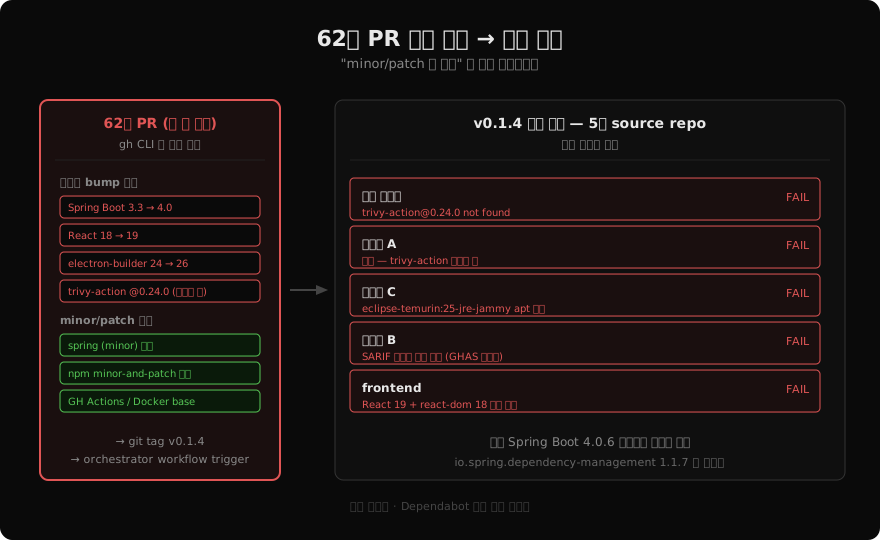
Dependabot 을 처음 도입한 그 주에 62개 PR 이 한꺼번에 쏟아졌다. gh CLI 로 일괄 머지하고 한숨 돌리려는 순간, 다음 릴리스 태그를 push 했더니 5개 source repo 빌드가 모두 빨갛게 떴다. “minor / patch 만 머지” 는 그저 바람이었다.
상황 / 배경
- self-hosted 백엔드 시스템. 백엔드 4개 (인증 / 도메인 A / B / C 서비스) + 프론트 1개 + 릴리스 오케스트레이터까지 6개 레포로 구성
- Dependabot 을 6개 레포에 한 번에 깔고 매주 npm/gradle/Docker base/GH Actions 자동 PR 받기로 결정
- 첫 주 — 62개 PR 가 쌓였다 (그동안 stale 이었던 누적치)
- 메이저 bump 들도 같이 올라옴 (Spring Boot 3.3 → 4.0, React 18 → 19, electron-builder 24 → 26 등)
dependabot.yml 의 groups 에 update-types: ["minor", "patch"] 제한이
있는 줄 알았는데, 실제로는 그룹화된 minor/patch 외 메이저 bump 는 별도
PR 로 와서 같이 머지 가능한 상태였다.
무엇이 문제였나
gh pr merge --squash --delete-branch 로 일괄 머지 후, 릴리스 오케스트레이터에
새 릴리스 태그를 push 했다. 워크플로우 결과:
=== 인증 서비스 ===
Error: Unable to resolve action `aquasecurity/trivy-action@0.24.0`,
unable to find version `0.24.0`

=== 도메인 A ===
Error: 동일

=== 도메인 C ===
ERROR: failed to build: failed to solve: process "/bin/sh -c
apt-get update && apt-get install -y --no-install-recommends curl"
did not complete successfully: exit code: 100

=== frontend / 도메인 B ===
##[error]Resource not accessible by integration
(SARIF 업로드 권한 부족)
로컬 Java 빌드도 줄줄이 깨졌다.
> Could not resolve all files for configuration ':compileClasspath'.
   > Could not find org.springframework.boot:spring-boot-starter-aop:.
     Required by:
         root project '...'
spring-boot-starter-aop 의 버전이 빈 값. Spring Boot 4.0 +
io.spring.dependency-management 1.1.7 조합이 의존성 해석을 못 함.
frontend 쪽도 마찬가지였다.
$ npm ls react react-dom
+-- @testing-library/react@13.4.0 invalid: "^16.3.2" from the root project
| +-- react-dom@18.3.1 deduped invalid: "^19.2.5" from the root project
react: ^18.3.1 와 react-dom: ^19.2.5 가 동시에 박혀 있는 모순.
lockfile 은 18.3.1 로 고정되어 있어 vite build 는 통과하지만, 정직한
npm install 한 번 돌리면 깨지는 상태.
원인 정리:
- Spring Boot 4.0 은 ecosystem (특히
io.spring.dependency-management1.1.x) 와 호환 미흡 - React 19 는
@testing-library/react16,eslint-plugin-react-hooks7 등 함께 묶어야 일관성 — 하나만 올리면 깨짐 - eclipse-temurin:25-jre-jammy 는 Docker Hub 에 태그가 있긴 하지만
apt 베이스가 변경돼 일부 환경에서
apt-get install curl실패 - trivy-action@0.24.0 — 처음 publish.yml 작성 시 잘못 핀한 버전. Dependabot 이 일부 레포엔 PR 안 만들어서 두 백엔드 API 에는 잘못된 버전이 그대로 남아있음
- SARIF 업로드 — private repo + GitHub Advanced Security 미활성 환경 에서 권한 부족
어떻게 해결했나
전략: 메이저 bump 만 되돌리고 minor/patch 는 유지. Dependabot 의 가치는 살리되 ecosystem 미흡한 메이저는 차단.
1. Spring Boot 3.3.5 로 되돌림 (4개 Java repo)
plugins {
    id 'java'
    id 'org.springframework.boot' version '3.3.5'   // 4.0.6 → 3.3.5
    id 'io.spring.dependency-management' version '1.1.7'
}
mybatis 4 → 3.0.3, springdoc 3 → 2.5.0, p6spy 2 → 1.9.1 도 함께 되돌림. 이들은 Spring Boot 3.x 호환만 보장.
2. React 18 정렬 (frontend)
{
  "react": "^18.3.1",
  "react-dom": "^18.3.1",          // ^19.2.5 → ^18.3.1
  "react-window": "^1.8.11",       // ^2.2.7 → ^1.8.11 (API 깨짐)
  "@testing-library/react": "^13.4.0",
  "@fortawesome/free-solid-svg-icons": "^6.7.2",
  "electron-builder": "^24.13.3"
}
3. Dockerfile 베이스 되돌림
-FROM eclipse-temurin:25-jre-jammy
+FROM eclipse-temurin:21-jre-jammy   # 인증 서비스
+FROM eclipse-temurin:17-jre-jammy   # 도메인 A / B / C
4. publish.yml 수정
- name: Run Trivy vulnerability scanner
  uses: aquasecurity/trivy-action@v0.36.0   # @0.24.0 → 실존 태그로

- name: Upload Trivy results to GitHub Security
  if: always()
  continue-on-error: true                    # 권한 부족 시 워크플로우 통과
  uses: github/codeql-action/upload-sarif@v3
5. dependabot.yml — 메이저 ignore 룰 추가
핵심. 같은 사고 재발 방지.
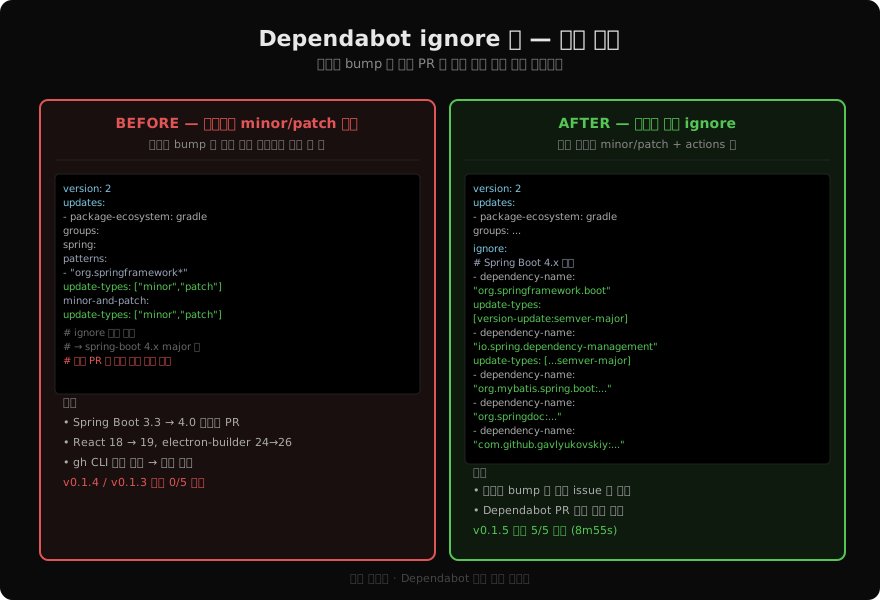
version: 2
updates:
  - package-ecosystem: gradle
    directory: /
    schedule:
      interval: weekly
    groups:
      spring:
        patterns: ["org.springframework*", "io.spring*"]
        update-types: ["minor", "patch"]   # ← 메이저 자동 그룹화 차단
      minor-and-patch:
        update-types: ["minor", "patch"]
        exclude-patterns: ["org.springframework*", "io.spring*"]
    ignore:
      # ecosystem 호환성 검토 필요 — 메이저 자동 머지 차단
      - dependency-name: "org.springframework.boot"
        update-types: ["version-update:semver-major"]
      - dependency-name: "io.spring.dependency-management"
        update-types: ["version-update:semver-major"]
      - dependency-name: "org.mybatis.spring.boot:mybatis-spring-boot-starter"
        update-types: ["version-update:semver-major"]
      - dependency-name: "org.springdoc:springdoc-openapi-starter-webmvc-ui"
        update-types: ["version-update:semver-major"]
      - dependency-name: "com.github.gavlyukovskiy:p6spy-spring-boot-starter"
        update-types: ["version-update:semver-major"]

  - package-ecosystem: docker
    directory: /
    schedule:
      interval: weekly
    ignore:
      - dependency-name: "eclipse-temurin"
        update-types: ["version-update:semver-major"]
frontend 쪽도 동일하게 react / electron / vite / fortawesome 메이저 ignore.
결과
| 지표 | 사고 시점 | fix 후 |
|---|---|---|
| 이미지 빌드 성공 | 0 / 5 | 5 / 5 |
| 릴리스 워크플로우 | failure (15분) | success (8분 55초) |
| 운영 영향 | 새 이미지 미생성 → 기존 운영 그대로 | 정상 배포 흐름 회복 |
| Dependabot 메이저 자동 차단 | 없음 | 8개 라이브러리 |
fix 릴리스 태그 push 후 모니터링:
=== 릴리스 워크플로우 ===
completed	success	8m55s

=== source repos ===
  frontend          : completed / success
  인증 서비스          : completed / success
  도메인 A          : completed / success
  도메인 B           : completed / success
  도메인 C   : completed / success
앞으로 어떻게 할 것인가
- 메이저 bump 는 항상 사람이 —
dependabot.yml에 메이저 ignore 룰을 기본 옵션으로 두기. 메이저는 별도 issue 로 검토 → 의식적 결정. - Action 버전 핀할 때 실존 태그 확인 —
gh api repos/<owner>/<repo>/releases/latest로 확인 후 핀. 추측 금지. - 62개 PR 머지 같은 batch 작업은 단계별로 — 다음번엔 세 묶음으로 나눔: (1) actions / docker base, (2) minor/patch 그룹, (3) 메이저 (개별 검토). 한 번에 머지 후 태그 push 는 위험.
- 운영에 영향 없는 이유 명시 — 빌드 실패는 새 이미지 미생성으로 끝나서 기존 운영 환경 그대로 작동했다. 다행. 그래도 다음 릴리스 시점까지 fix 는 필수.
CI 의 SARIF 업로드 부분은 별개 이슈 — private repo 에서 GitHub Advanced
Security 미활성이면 권한이 없어 실패. continue-on-error: true 로
fail-soft 처리해 워크플로우는 통과시키되 결과는 로그로 남김. GHAS 활성
시 자동으로 Security 탭에도 누적.
회고 한 줄
Dependabot 의 “auto” 는 minor/patch 까지만 안전하다. 메이저는 항상 사람이 검토한다는 룰을 코드 (dependabot.yml) 에 박아두자.
읽어주셔서 감사합니다. 😊
PALDYN / ARTICLE AI
글의 개념, 수식, 코드에 대해 물어보세요.
질문과 관련된 문단을 골라 답변의 문맥으로 사용합니다.생각 중 · 0초