

Docker BuildKit 심화 — 내부 구조와 고급 기능
BuildKit의 LLB 솔버, 병렬 빌드, 캐시 마운트, 시크릿 마운트, SSH 포워딩, 멀티 플랫폼 빌드까지 실무에서 쓰이는 고급 기능을 심층 설명합니다.
지난 글에서 시간대 불일치 문제를 해결했다. 이번에는 Docker 빌드 시스템의 핵심인 BuildKit을 깊이 들여다본다. 일반 docker build와 달리 BuildKit은 병렬 실행, 고급 캐시, 시크릿 안전 처리 등 실무에서 차별화되는 기능을 제공한다.
BuildKit이란
BuildKit은 Docker 18.09에 도입된 차세대 빌드 엔진이다. Docker 23부터는 기본 활성화되어 있다.
# BuildKit 활성화 여부 확인
docker info | grep -i buildkit

# 수동 활성화 (구버전)
DOCKER_BUILDKIT=1 docker build .

# daemon.json으로 영구 활성화
# /etc/docker/daemon.json
# { "features": { "buildkit": true } }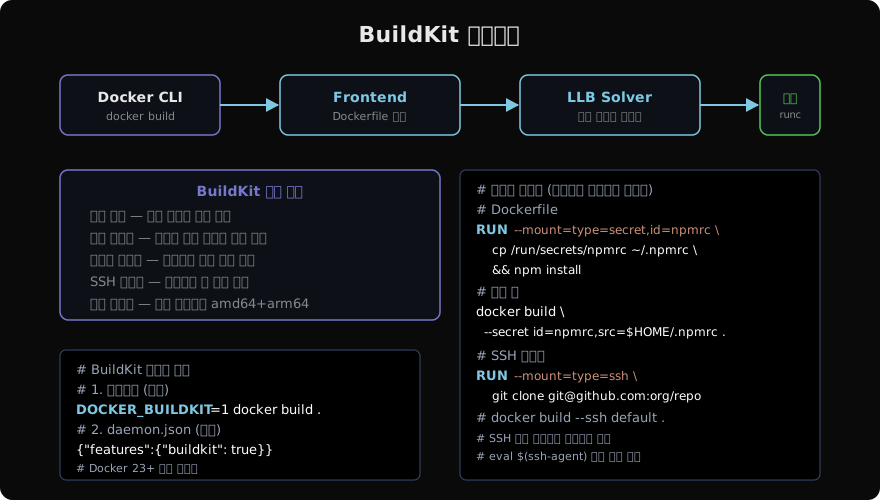
내부 구조: LLB
BuildKit의 핵심은 LLB(Low-Level Build)라는 중간 표현이다. Dockerfile 파서(Frontend)가 LLB 그래프를 생성하고, Solver가 의존성을 분석해 병렬로 실행한다.
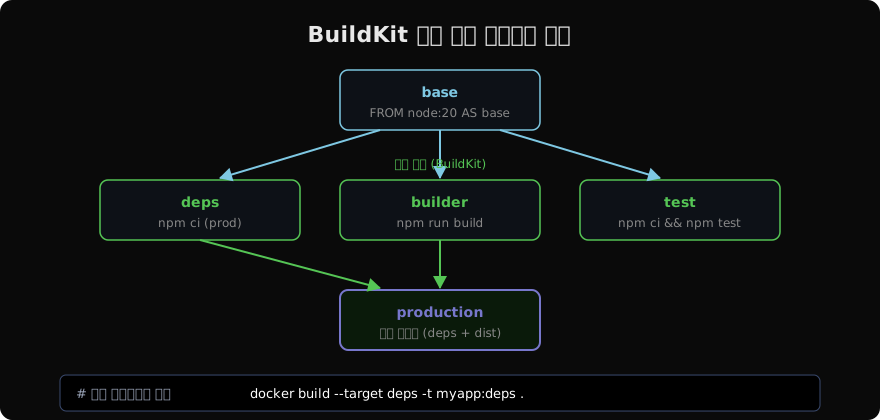
기존 Docker 빌드는 각 레이어를 순차적으로 실행했다. BuildKit은 의존성이 없는 단계를 동시에 실행한다.
병렬 멀티 스테이지 빌드
# syntax=docker/dockerfile:1

FROM node:20-alpine AS base
WORKDIR /app

FROM base AS deps
COPY package*.json ./
RUN --mount=type=cache,target=/root/.npm \
    npm ci --only=production

FROM base AS test
COPY package*.json ./
RUN npm ci
COPY . .
RUN npm test

FROM base AS builder
COPY --from=deps /app/node_modules ./node_modules
COPY . .
RUN npm run build

FROM node:20-alpine AS production
WORKDIR /app
COPY --from=deps /app/node_modules ./node_modules
COPY --from=builder /app/dist ./dist
USER node
CMD ["node", "dist/server.js"]deps, test, builder 세 스테이지가 모두 base에 의존하지만 서로 독립적이므로 BuildKit이 병렬로 실행한다.
# 특정 스테이지만 빌드
docker build --target deps -t myapp:deps .
docker build --target test -t myapp:test .
docker build --target production -t myapp:prod .
캐시 마운트
# npm: 패키지 캐시를 빌드 간 유지
RUN --mount=type=cache,target=/root/.npm \
    npm ci

# pip: Python 패키지 캐시
RUN --mount=type=cache,target=/root/.cache/pip \
    pip install -r requirements.txt

# apt: 데비안 패키지 캐시
RUN --mount=type=cache,target=/var/cache/apt,sharing=locked \
    --mount=type=cache,target=/var/lib/apt,sharing=locked \
    apt-get update && apt-get install -y build-essential

# Go 모듈 캐시
RUN --mount=type=cache,target=/go/pkg/mod \
    go build ./...
캐시 마운트는 이미지 레이어에 포함되지 않으므로 이미지 크기에 영향을 주지 않는다.
시크릿 마운트 — 이미지에 흔적 없이
빌드 중 비밀번호나 API 키가 필요할 때 기존 방식(ARG, ENV)은 이미지 레이어에 값이 그대로 남는다.
# 잘못된 방법 — 이미지 레이어에 토큰이 남음
ARG NPM_TOKEN
RUN echo "//registry.npmjs.org/:_authToken=${NPM_TOKEN}" > .npmrc \
    && npm install \
    && rm -f .npmrc
BuildKit 시크릿 마운트는 빌드 중에만 파일로 마운트되고, 빌드 후에는 어떤 레이어에도 남지 않는다.
# 올바른 방법 — 이미지에 토큰 흔적 없음
# syntax=docker/dockerfile:1
RUN --mount=type=secret,id=npmrc,target=/root/.npmrc \
    npm install
# 빌드 시 시크릿 파일 전달
docker build \
--secret id=npmrc,src=$HOME/.npmrc \
-t myapp .
# 환경변수에서 직접
echo "//registry.npmjs.org/:_authToken=${NPM_TOKEN}" \
| docker build --secret id=npmrc,src=/dev/stdin .SSH 포워딩 — 비공개 Git 저장소 클론
# syntax=docker/dockerfile:1
FROM alpine

RUN apk add --no-cache openssh-client git

RUN --mount=type=ssh \
    git clone git@github.com:myorg/private-repo.git /app
# SSH 에이전트 시작
eval $(ssh-agent)
ssh-add ~/.ssh/id_ed25519
# SSH 에이전트 소켓을 빌드에 전달
docker build --ssh default -t myapp .SSH 키가 이미지 어디에도 포함되지 않는다. 빌드 컨테이너에서 에이전트 포워딩으로만 사용된다.
빌드 결과 내보내기 (buildx)
# 로컬에 이미지로 저장 (기본)
docker build -t myapp .

# 타르볼로 내보내기
docker build -o type=tar,dest=myapp.tar .

# 디렉터리로 내보내기 (파일시스템만)
docker build --target builder -o type=local,dest=./output .

# OCI 이미지 타르볼
docker buildx build -o type=oci,dest=myapp-oci.tar .
멀티 플랫폼 빌드
# QEMU 에뮬레이터 설정
docker run --privileged --rm \
  tonistiigi/binfmt --install all

# buildx 빌더 생성
docker buildx create --name mybuilder --use

# amd64, arm64 동시 빌드
docker buildx build \
  --platform linux/amd64,linux/arm64 \
  -t myregistry/myapp:latest \
  --push .
빌드 시간이 오래 걸리는 arm64는 크로스 컴파일을 활용하면 빠르다.
# syntax=docker/dockerfile:1
FROM --platform=$BUILDPLATFORM golang:1.22 AS builder

ARG TARGETPLATFORM TARGETOS TARGETARCH

RUN GOOS=$TARGETOS GOARCH=$TARGETARCH \
    go build -o /app/server .

FROM --platform=$TARGETPLATFORM alpine
COPY --from=builder /app/server /app/server
CMD ["/app/server"]$BUILDPLATFORM(빌드 호스트)에서 Go를 크로스 컴파일하고, 최종 이미지는 $TARGETPLATFORM으로 만든다. QEMU 에뮬레이션 없이 네이티브 속도로 컴파일된다.
빌드 인자와 캐시 효율
# syntax=docker/dockerfile:1.4

# 자주 바뀌는 ARG는 레이어 맨 뒤에 선언
FROM node:20-alpine

COPY package*.json ./
RUN --mount=type=cache,target=/root/.npm npm ci

COPY . .

# 빌드 시 주입, 소스 코드에 삽입
ARG BUILD_VERSION=dev
RUN echo "BUILD_VERSION=$BUILD_VERSION" > .build-info
docker build --build-arg BUILD_VERSION=$(git rev-parse --short HEAD) -t myapp .디버그: buildx bake
# bake 파일로 복잡한 빌드 정의
cat > docker-bake.hcl <<'EOF'
group "default" {
  targets = ["app", "test"]
}

target "app" {
  dockerfile = "Dockerfile"
  target = "production"
  tags = ["myapp:latest"]
}

target "test" {
  dockerfile = "Dockerfile"
  target = "test"
  tags = ["myapp:test"]
}
EOF

# 동시에 두 타겟 빌드
docker buildx bake
BuildKit은 Docker 빌드의 성능과 보안을 모두 개선한다. 캐시 마운트와 병렬 빌드로 속도를, 시크릿 마운트와 SSH 포워딩으로 보안을 챙길 수 있다.
지난 글: Docker 컨테이너 시간대(Timezone) 불일치 해결
다음 글: Docker 네임스페이스와 cgroups — 컨테이너 격리의 원리
읽어주셔서 감사합니다. 😊
PALDYN / ARTICLE AI
글의 개념, 수식, 코드에 대해 물어보세요.
질문과 관련된 문단을 골라 답변의 문맥으로 사용합니다.생각 중 · 0초