

buildx 멀티 아키텍처 빌드 완전 정복
docker buildx로 amd64, arm64, arm/v7 등 여러 플랫폼을 동시에 빌드하는 방법, manifest list, QEMU 에뮬레이션, GitHub Actions CI 연동, TARGETARCH 활용을 정리합니다.
지난 글에서 빌드 ARG의 고급 활용을 살펴봤다. 이번에는 하나의 이미지로 x86 서버, Apple Silicon, ARM 기기를 모두 지원하는 멀티 아키텍처 빌드를 정리한다.
왜 멀티 아키텍처인가
Apple M1/M2/M3 맥북의 보급, AWS Graviton(arm64) 인스턴스의 비용 효율성, Raspberry Pi 등 IoT 기기의 증가로 amd64 단독 이미지로는 부족해졌다. docker pull myapp:latest가 자동으로 해당 플랫폼에 맞는 레이어를 선택하려면 manifest list(이미지 인덱스)가 필요하다.
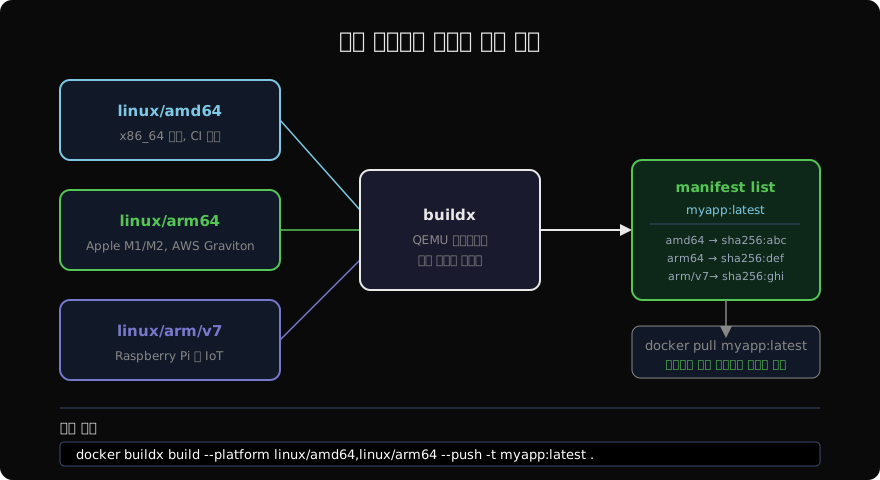
docker buildx란
docker buildx는 BuildKit 기반의 확장 빌드 CLI다. 기존 docker build와 달리 멀티 플랫폼 빌드, 빌더 인스턴스 관리, 다양한 캐시/출력 형식을 지원한다.
# 현재 빌더 목록 확인
docker buildx ls

# 기본 빌더는 단일 플랫폼만 지원
# NAME/NODE  DRIVER/ENDPOINT  STATUS  PLATFORMS
# default *  docker           running linux/amd64
멀티 플랫폼 빌더 설정
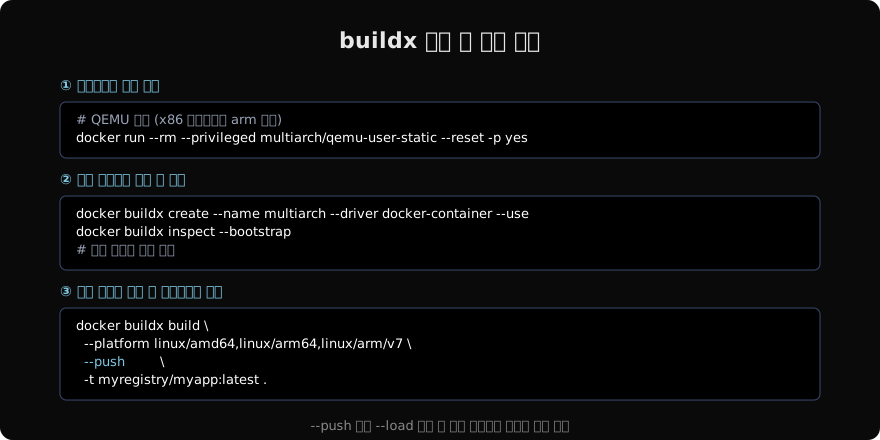
# 1. QEMU 에뮬레이터 등록 (x86 호스트에서 arm 빌드 가능)
docker run --rm --privileged \
  multiarch/qemu-user-static --reset -p yes

# 2. docker-container 드라이버로 빌더 생성
docker buildx create \
  --name multiarch \
  --driver docker-container \
  --use

# 3. 빌더 초기화 및 지원 플랫폼 확인
docker buildx inspect --bootstrap
멀티 플랫폼 빌드 및 푸시
docker buildx build \
  --platform linux/amd64,linux/arm64,linux/arm/v7 \
  --push \
  -t myregistry/myapp:latest \
.--push를 반드시 지정해야 한다. 멀티 플랫폼 이미지는 로컬 Docker 데몬에 로드할 수 없고(단일 플랫폼만 가능), 레지스트리에만 manifest list로 저장된다.
# 단일 플랫폼을 로컬에 로드 (테스트용)
docker buildx build \
  --platform linux/amd64 \
  --load \
  -t myapp:test .

# manifest 내용 확인
docker buildx imagetools inspect myregistry/myapp:latest
Dockerfile에서 플랫폼 분기
BuildKit은 빌드 시 BUILDPLATFORM, TARGETPLATFORM, TARGETOS, TARGETARCH 등의 내장 ARG를 제공한다.
# syntax=docker/dockerfile:1
FROM --platform=$BUILDPLATFORM golang:1.22 AS builder
ARG TARGETOS
ARG TARGETARCH
RUN CGO_ENABLED=0 GOOS=$TARGETOS GOARCH=$TARGETARCH \
    go build -o /app .

FROM alpine:3.19
COPY --from=builder /app /app
CMD ["/app"]--platform=$BUILDPLATFORM은 빌더 호스트 플랫폼(amd64)에서 Go 컴파일러를 실행하고, GOOS/GOARCH로 타겟 플랫폼 바이너리를 크로스 컴파일한다. QEMU 에뮬레이션보다 훨씬 빠르다.
GitHub Actions에서 멀티 아키텍처 빌드
name: Build and Push

on:
  push:
    branches: [main]

jobs:
  build:
    runs-on: ubuntu-latest
    steps:
      - uses: actions/checkout@v4

      - name: Set up QEMU
        uses: docker/setup-qemu-action@v3

      - name: Set up Docker Buildx
        uses: docker/setup-buildx-action@v3

      - name: Login to Docker Hub
        uses: docker/login-action@v3
        with:
          username: ${{ secrets.DOCKERHUB_USERNAME }}
          password: ${{ secrets.DOCKERHUB_TOKEN }}

      - name: Build and push
        uses: docker/build-push-action@v5
        with:
          platforms: linux/amd64,linux/arm64
          push: true
          tags: myuser/myapp:latest
          cache-from: type=gha
          cache-to: type=gha,mode=max
플랫폼 지정 풀
# 특정 플랫폼 이미지 강제 풀
docker pull --platform linux/arm64 myapp:latest

# 현재 시스템 플랫폼 확인
docker info | grep Architecture

# 실행 중인 컨테이너 플랫폼 확인
docker inspect mycontainer | grep -i arch
베이스 이미지 플랫폼 호환성 확인
# 이미지가 지원하는 플랫폼 목록
docker buildx imagetools inspect node:20-alpine
# Image Index: ...
#   linux/amd64, linux/arm64/v8, linux/arm/v7, ...
공식 이미지 대부분은 멀티 아키텍처를 지원한다. 서드파티 이미지는 확인이 필요하다.
핵심 정리
docker buildx build --platform으로 여러 아키텍처를 한 번에 빌드- 결과물은 manifest list로 레지스트리에 저장,
docker pull이 자동으로 맞는 레이어 선택 - QEMU 에뮬레이션 vs 크로스 컴파일: Go/Rust 등 정적 컴파일 언어는 크로스 컴파일이 훨씬 빠름
BUILDPLATFORM,TARGETARCH내장 ARG로 플랫폼별 빌드 분기 가능- GitHub Actions:
setup-qemu-action+setup-buildx-action+build-push-action
지난 글: 빌드 ARG 고급 활용
다음 글: Dockerfile 모범 사례 총정리
읽어주셔서 감사합니다. 😊
PALDYN / ARTICLE AI
글의 개념, 수식, 코드에 대해 물어보세요.
질문과 관련된 문단을 골라 답변의 문맥으로 사용합니다.생각 중 · 0초