

ResizeObserver · IntersectionObserver — 요소 크기와 가시성 감지
ResizeObserver로 요소 크기 변화를 감지하고, IntersectionObserver로 뷰포트와의 교차를 추적하는 방법을 비교하고 지연 로딩·무한 스크롤 구현 패턴을 정리합니다.
지난 글에서 MutationObserver로 DOM 변화를 감지하는 방법을 알아봤습니다. 이번에는 요소의 크기와 가시성을 추적하는 두 Observer — ResizeObserver와 IntersectionObserver — 를 다룹니다.
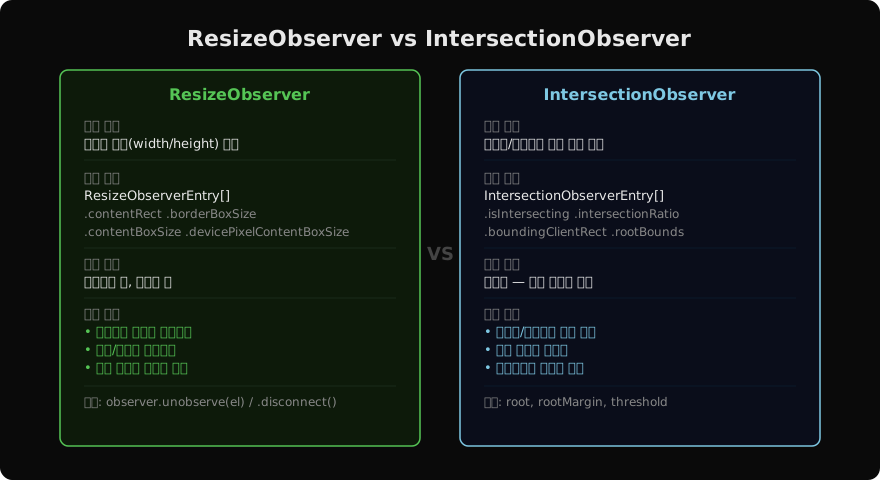
두 Observer 한눈에 비교
ResizeObserver
ResizeObserver는 요소의 크기(content box 또는 border box)가 바뀔 때마다 콜백을 실행합니다. window.resize 이벤트와 달리 창 크기와 무관하게 특정 요소의 크기 변화를 추적합니다. 부모 컨테이너가 줄거나, 내부 콘텐츠로 높이가 늘어나거나, 폰트 크기가 바뀌어도 감지합니다.
const ro = new ResizeObserver(entries => {
  for (const entry of entries) {
    const { width, height } = entry.contentRect;
    console.log(`${entry.target.id}: ${width}×${height}`);

    // borderBoxSize는 배열 (다중 fragment 지원)
    const [{ inlineSize, blockSize }] = entry.borderBoxSize;
    console.log(`borderBox: ${inlineSize}×${blockSize}`);
  }
});

ro.observe(document.querySelector('.resizable'));

// 특정 요소 감시 해제
ro.unobserve(el);
// 전체 해제
ro.disconnect();
ResizeObserverEntry 주요 필드
| 필드 | 설명 |
|---|---|
contentRect | padding 제외 content 영역 |
borderBoxSize | border 포함 전체 크기 |
contentBoxSize | content box (contentRect와 유사) |
devicePixelContentBoxSize | 물리 픽셀 기준 크기 |
주의: 루프 감지 방지
콜백 안에서 크기를 변경하면 무한 루프가 발생할 수 있습니다. 브라우저는 이를 감지해 ResizeObserver loop limit exceeded 경고를 내거나 콜백을 다음 프레임으로 미룹니다. 크기 변경이 불가피하다면 requestAnimationFrame으로 감쌉니다.
IntersectionObserver
IntersectionObserver는 대상 요소가 루트(기본: 뷰포트)와 교차하는 비율이 임계값(threshold)을 넘거나 밑돌 때 콜백을 실행합니다. 스크롤 이벤트와 달리 메인 스레드를 차단하지 않고 비동기로 실행됩니다.
const io = new IntersectionObserver(
  (entries, observer) => {
    for (const entry of entries) {
      if (entry.isIntersecting) {
        entry.target.classList.add('visible');
        observer.unobserve(entry.target); // 한 번 진입하면 중단
      }
    }
  },
  {
    root: null,          // null = 뷰포트
    rootMargin: '0px',   // 루트 경계 확장 (px 또는 %)
    threshold: 0.1,      // 10% 이상 교차 시 발화
  }
);

document.querySelectorAll('.fade-in').forEach(el => io.observe(el));
IntersectionObserverEntry 주요 필드
| 필드 | 설명 |
|---|---|
isIntersecting | 교차 여부 |
intersectionRatio | 교차 비율 (0~1) |
boundingClientRect | 대상 요소의 뷰포트 기준 rect |
rootBounds | 루트 rect |
time | 교차 시각 (DOMHighResTimeStamp) |
threshold 배열
// [0, 0.25, 0.5, 0.75, 1] — 25%마다 콜백 실행
const io = new IntersectionObserver(cb, { threshold: [0, .25, .5, .75, 1] });
rootMargin — 루트 경계 확장
// 뷰포트보다 200px 아래까지 미리 감지 (지연 로딩 적합)
const io = new IntersectionObserver(cb, { rootMargin: '0px 0px 200px 0px' });
실전 패턴
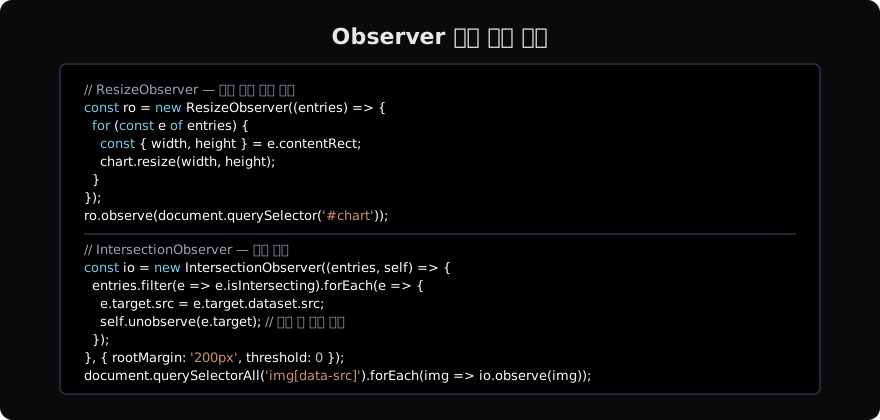
이미지 지연 로딩
<img data-src="/images/photo.jpg" src="/images/placeholder.jpg" loading="lazy">const lazyIO = new IntersectionObserver((entries, self) => {
entries
.filter(e => e.isIntersecting)
.forEach(e => {
const img = e.target;
img.src = img.dataset.src;
img.removeAttribute('data-src');
self.unobserve(img);
});
}, { rootMargin: '300px' });
document.querySelectorAll('img[data-src]').forEach(img => lazyIO.observe(img));loading="lazy" 네이티브 속성이 대부분 충분하지만, Observer는 더 세밀한 제어(로드 완료 후 효과, 분석 이벤트 등)가 필요할 때 유용합니다.
무한 스크롤 센티널 패턴
const sentinel = document.querySelector('#load-more-sentinel');

const infiniteIO = new IntersectionObserver(async ([entry]) => {
  if (!entry.isIntersecting) return;
  infiniteIO.unobserve(sentinel);
  await loadNextPage();
  infiniteIO.observe(sentinel); // 다음 트리거 등록
});

infiniteIO.observe(sentinel);
공통 주의 사항
observe/unobserve 비대칭: 여러 요소를 observe했다면 cleanup 시 모두 unobserve하거나 disconnect를 호출해야 메모리 누수가 없습니다. 컴포넌트 라이프사이클(React useEffect cleanup 등)에서 처리합니다.
초기 호출: IntersectionObserver는 observe 직후 현재 상태로 콜백을 한 번 실행합니다. 초기에 isIntersecting이 true인 요소는 바로 처리됩니다.
SSR: 서버 환경에서는 IntersectionObserver와 ResizeObserver가 존재하지 않습니다. typeof window !== 'undefined' 가드를 사용합니다.
지난 글: MutationObserver — DOM 변화 감지
다음 글: Shadow DOM · Custom Elements — 웹 컴포넌트 기초
읽어주셔서 감사합니다. 😊
PALDYN / ARTICLE AI
글의 개념, 수식, 코드에 대해 물어보세요.
질문과 관련된 문단을 골라 답변의 문맥으로 사용합니다.생각 중 · 0초