

style · CSSOM — 자바스크립트로 스타일 다루기
element.style, getComputedStyle, document.styleSheets로 CSS를 읽고 쓰는 방법과 CSS 커스텀 프로퍼티(변수)를 자바스크립트에서 조작하는 패턴을 정리합니다.
지난 글에서 innerHTML·textContent·innerText의 차이를 비교했습니다. 이번에는 CSS를 자바스크립트로 읽고 쓰는 CSSOM 인터페이스 — element.style, getComputedStyle, document.styleSheets — 를 살펴봅니다.
CSSOM 레이어 구조
브라우저는 스타일 정보를 여러 레이어에 나눠 관리합니다.
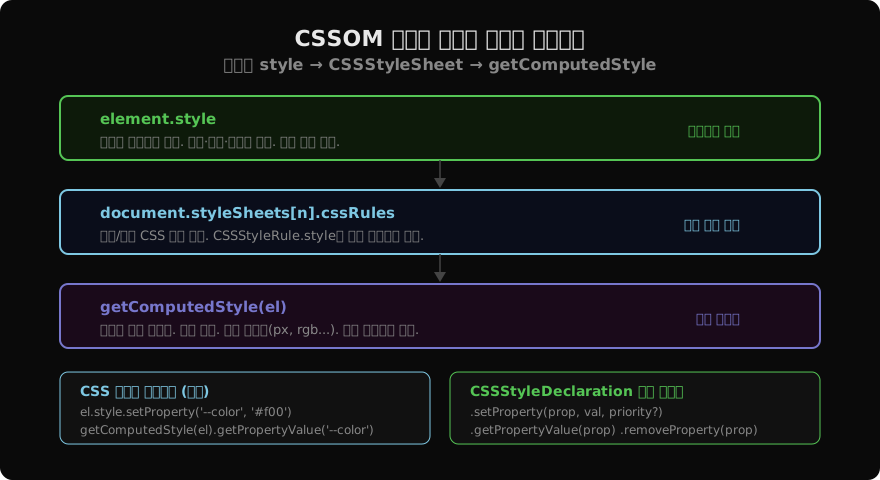
element.style: 해당 요소의 style 속성(인라인)에 선언된 값만 반영합니다. 시트 규칙, 상속, 초기값은 포함하지 않습니다. 읽으면 CSSStyleDeclaration 객체가 반환되고, 프로퍼티에 직접 쓰면 인라인 스타일로 즉시 적용됩니다.
document.styleSheets: <link>, <style> 태그로 로드된 시트 목록입니다. 각 시트는 CSSStyleSheet 객체이며, .cssRules로 규칙을 순회할 수 있습니다.
getComputedStyle: 캐스케이드·상속·초기값을 모두 적용한 최종 계산값입니다. 읽기 전용이며, 항상 절대 단위(px, rgb(...))로 반환됩니다.
element.style 사용법
const el = document.querySelector('.card');

// 프로퍼티명은 camelCase (background-color → backgroundColor)
el.style.backgroundColor = '#f0f0f0';
el.style.fontSize        = '16px';

// 여러 프로퍼티를 cssText로 한 번에 (기존 인라인 스타일 전체 대체)
el.style.cssText = 'color: red; margin: 0;';

// 특정 프로퍼티 제거 (인라인에서 삭제, 시트 규칙이 다시 적용됨)
el.style.removeProperty('background-color');

// 우선순위 지정 (important)
el.style.setProperty('color', 'blue', 'important');element.style은 인라인 스타일만 다룹니다. 클래스로 적용된 스타일을 읽으려면 getComputedStyle을 써야 합니다.
getComputedStyle
const cs = getComputedStyle(document.querySelector('.box'));

cs.width;           // "320px"
cs.color;           // "rgb(0, 0, 0)"
cs.display;         // "block"
cs.fontSize;        // "16px"

// ::before 같은 가상 요소도 접근 가능
const before = getComputedStyle(el, '::before');
before.content; // '"★"'getComputedStyle을 루프 안에서 반복 호출하면 매번 레이아웃 재계산이 트리거될 수 있습니다. 필요한 값을 한 번 읽어 변수에 캐시하는 것이 좋습니다.
CSS 커스텀 프로퍼티(변수) 조작
CSS 커스텀 프로퍼티(--name)는 element.style.setProperty와 getComputedStyle().getPropertyValue로 접근합니다.
// 쓰기
document.documentElement.style.setProperty('--primary', '#7ec8e3');

// 읽기 (계산값 포함)
getComputedStyle(document.documentElement)
  .getPropertyValue('--primary'); // " #7ec8e3"  (앞 공백 주의)

// 다크모드 전환 예시
document.documentElement.style.setProperty(
  '--bg-color',
  isDark ? '#0a0a0a' : '#ffffff'
);
CSS 변수는 상속되므로 :root에 설정하면 전체 문서에 영향을 줍니다.
document.styleSheets로 규칙 수정
동적으로 새 CSS 규칙을 삽입하거나 기존 규칙을 수정할 때 사용합니다.
// 새 시트 생성 & 규칙 삽입
const sheet = new CSSStyleSheet();
sheet.replaceSync('.highlight { background: yellow; }');
document.adoptedStyleSheets = [...document.adoptedStyleSheets, sheet];

// 기존 시트 첫 번째 규칙 수정
const rule = document.styleSheets[0].cssRules[0];
if (rule instanceof CSSStyleRule) {
  rule.style.setProperty('color', 'red');
}adoptedStyleSheets는 Constructable Stylesheets API로, Shadow DOM에도 공유할 수 있어 컴포넌트 스타일링에 유용합니다.
실무 패턴 요약
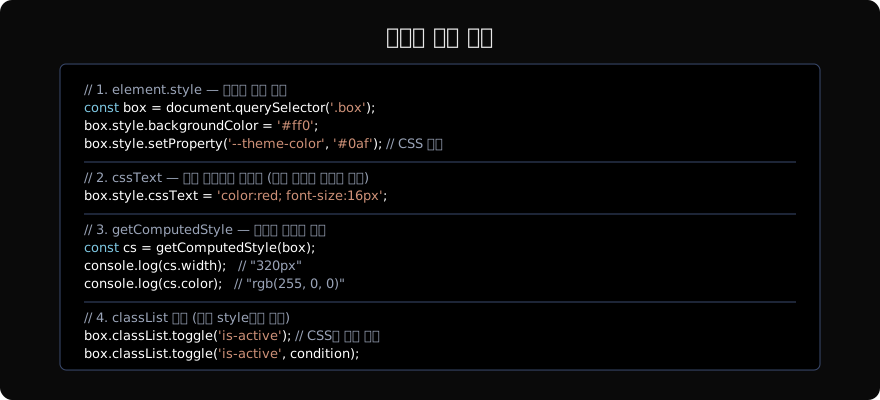
권장: 상태 전환은 classList.toggle()로 CSS와 로직을 분리하고, 동적으로 계산된 값(애니메이션 위치, 사용자 설정 색상 등)만 style.setProperty나 CSS 변수로 반영합니다. getComputedStyle은 루프 밖에서 한 번만 읽습니다.
| 상황 | 권장 API |
|---|---|
| 단순 상태 토글 | classList.toggle |
| 계산된 값 적용 | element.style.setProperty |
| 테마 전역 변경 | CSS 변수 (--var) |
| 현재 값 읽기 | getComputedStyle |
| 동적 CSS 규칙 | CSSStyleSheet + adoptedStyleSheets |
지난 글: innerHTML · textContent · innerText 완벽 비교
다음 글: MutationObserver — DOM 변화 감지
읽어주셔서 감사합니다. 😊
PALDYN / ARTICLE AI
글의 개념, 수식, 코드에 대해 물어보세요.
질문과 관련된 문단을 골라 답변의 문맥으로 사용합니다.생각 중 · 0초