

template · slot — 웹 컴포넌트 마크업 청사진
HTML template 요소로 재사용 가능한 마크업을 정의하고, slot으로 Light DOM 콘텐츠를 Shadow DOM 내에 투영하는 웹 컴포넌트 합성 패턴을 정리합니다.
지난 글에서 Custom Elements와 Shadow DOM으로 캡슐화된 컴포넌트를 만드는 방법을 살펴봤습니다. 이번에는 웹 컴포넌트 합성의 핵심인 <template>과 <slot>을 다룹니다.
<template> 요소
<template>은 HTML 파서가 내용을 파싱하지만 화면에 렌더링하지 않는 요소입니다. 스크립트를 실행하지 않고, 이미지를 로드하지 않으며, CSS를 적용하지 않습니다. .content 프로퍼티가 DocumentFragment로, cloneNode(true)로 복사해 사용합니다.
<template id="row-tpl">
  <tr>
    <td class="name"></td>
    <td class="score"></td>
  </tr>
</template>
const tpl = document.querySelector('#row-tpl');
data.forEach(item => {
const row = tpl.content.cloneNode(true);
row.querySelector('.name').textContent = item.name;
row.querySelector('.score').textContent = item.score;
tbody.appendChild(row);
});<template>은 Shadow DOM 없이도 사용할 수 있습니다. 단순한 테이블 행 반복 렌더링에도 유용합니다.
<slot> — 콘텐츠 투영
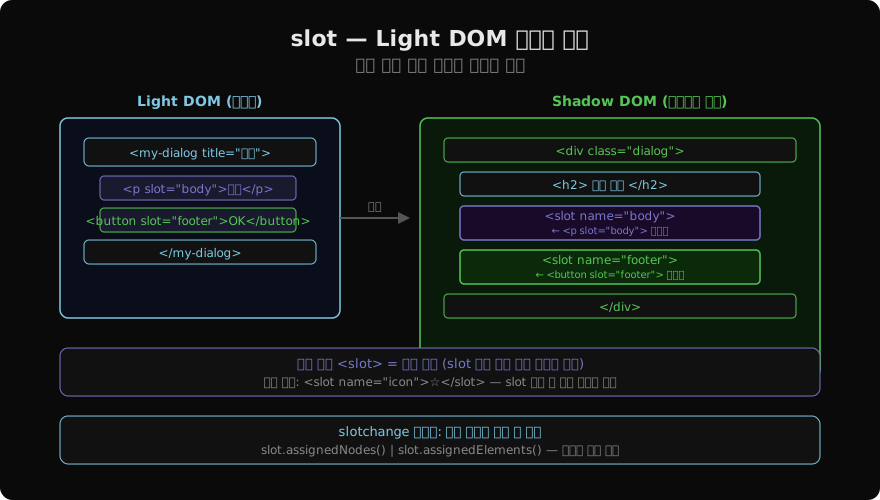
<slot>은 Shadow DOM 내에서 Light DOM 콘텐츠가 나타날 위치를 지정하는 구멍입니다. 콘텐츠가 Shadow 트리로 실제 이동하지 않고, 렌더링 시 해당 위치에 투영됩니다.
기본 슬롯
이름 없는 <slot>은 slot 속성이 없는 모든 자식 노드를 받습니다.
<!-- Shadow DOM 내부 -->
<div class="card">
  <slot></slot>  <!-- Light DOM 자식이 여기에 투영 -->
</div>

<!-- 사용처 -->
<my-card>
  <p>이 단락이 기본 슬롯에 투영됩니다.</p>
</my-card>
이름 있는 슬롯
name 속성으로 여러 슬롯을 구분합니다.
<!-- Shadow DOM 내부 -->
<header><slot name="title">기본 제목</slot></header>
<main><slot></slot></main>
<footer><slot name="actions"></slot></footer>

<!-- 사용처 -->
<my-layout>
  <h1 slot="title">페이지 제목</h1>
  <article>본문 콘텐츠</article>
  <button slot="actions">저장</button>
</my-layout>
slot="name" 속성이 있는 요소는 해당 이름의 슬롯에, 없는 요소는 기본 슬롯에 배분됩니다.
슬롯 폴백 콘텐츠
슬롯에 배분되는 노드가 없으면 슬롯 내부의 콘텐츠(폴백)가 표시됩니다.
<slot name="icon">★</slot> <!-- slot="icon"이 없으면 ★ 표시 -->::slotted() 가상 클래스
Shadow DOM 내 CSS에서 투영된 Light DOM 요소를 선택합니다.
/* Shadow 내부 style */
::slotted(p) {
  color: #333;
  margin-bottom: 1rem;
}

::slotted(*) {
  box-sizing: border-box;
}
직계 자식만 선택됩니다. ::slotted(p span) 같은 자손 선택자는 동작하지 않습니다.
template + slot 통합 패턴
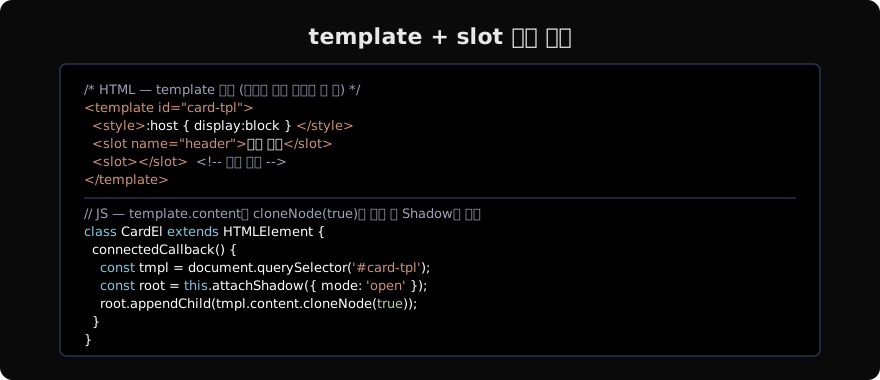
class DialogEl extends HTMLElement {
  connectedCallback() {
    const tmpl = document.querySelector('#dialog-tpl');
    const root = this.attachShadow({ mode: 'open' });
    root.appendChild(tmpl.content.cloneNode(true));

    // slotchange 이벤트로 배분 변화 감지
    root.querySelector('slot').addEventListener('slotchange', e => {
      const nodes = e.target.assignedNodes();
      console.log('배분된 노드:', nodes);
    });
  }
}
customElements.define('dialog-el', DialogEl);
슬롯 API
const slot = shadowRoot.querySelector('slot[name="content"]');

// 배분된 노드 목록 (텍스트 포함)
slot.assignedNodes();

// 배분된 요소만
slot.assignedElements();

// flatten: true → 폴백 포함
slot.assignedNodes({ flatten: true });
Declarative Shadow DOM
서버 사이드 렌더링(SSR)을 위한 선언형 Shadow DOM은 HTML에서 직접 Shadow DOM을 정의합니다.
<my-card>
  <template shadowrootmode="open">
    <style>:host { display: block; }</style>
    <slot></slot>
  </template>
  <p>콘텐츠</p>
</my-card>
JS 없이 서버에서 Shadow DOM을 포함한 HTML을 전송할 수 있어 초기 렌더링에 유리합니다. Chrome 90+, Firefox 123+, Safari 16.4+에서 지원됩니다.
<template>은 “마크업 청사진”, <slot>은 “콘텐츠 구멍”입니다. 두 기술을 함께 사용하면 Shadow DOM 컴포넌트가 외부 콘텐츠를 유연하게 받아들이면서도 내부 구조를 보호할 수 있습니다.
지난 글: Shadow DOM · Custom Elements — 웹 컴포넌트 기초
다음 글: 이벤트 위임 — 효율적인 이벤트 리스너 관리
읽어주셔서 감사합니다. 😊
PALDYN / ARTICLE AI
글의 개념, 수식, 코드에 대해 물어보세요.
질문과 관련된 문단을 골라 답변의 문맥으로 사용합니다.생각 중 · 0초