

git cat-file: 오브젝트 내용을 직접 읽는 plumbing 명령
git cat-file의 -t(타입)·-s(크기)·-p(내용)·--batch 옵션으로 blob·tree·commit·tag 오브젝트를 직접 조회하는 방법과 실전 활용 패턴을 설명한다.
지난 글에서 .git/index 파일의 구조와 역할을 살펴봤다. 이번에는 Git 오브젝트를 SHA만으로 직접 읽어볼 수 있는 plumbing 명령 git cat-file을 다룬다.
git cat-file이란
Git 오브젝트는 .git/objects/ 아래 zlib으로 압축된 바이너리로 저장되어 일반 텍스트 편집기로 읽을 수 없다. git cat-file은 이 오브젝트를 사람이 읽을 수 있는 형태로 출력하는 plumbing 명령이다.
# 기본 문법
git cat-file <옵션> <SHA 또는 참조>

# HEAD 커밋의 타입 확인
git cat-file -t HEAD
# commit

# HEAD 커밋의 바이트 크기
git cat-file -s HEAD
# 250

# HEAD 커밋 내용 출력
git cat-file -p HEAD
blob: 파일 내용 읽기
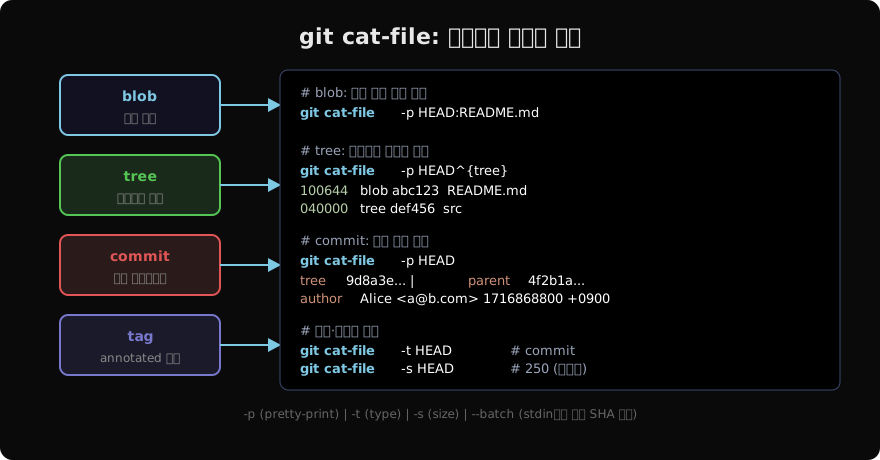
blob 오브젝트는 파일 내용을 그대로 담고 있다. SHA로 직접 조회하거나 HEAD:파일경로 형식으로 참조할 수 있다.
# SHA로 직접 읽기
git cat-file -p abc123def456

# 참조 형식으로 읽기
git cat-file -p HEAD:README.md
git cat-file -p main:src/main.go

# 특정 커밋의 파일 내용 (과거 버전)
git cat-file -p v1.0.0:config/settings.json
tree: 디렉터리 구조 읽기
tree 오브젝트는 디렉터리의 파일·서브디렉터리 목록을 담는다.
# HEAD의 루트 tree
git cat-file -p HEAD^{tree}
# 100644 blob abc123  .gitignore
# 100644 blob bcd234  README.md
# 040000 tree cde345  src
# 100755 blob def456  scripts/deploy.sh

# 서브디렉터리 tree 읽기
git cat-file -p cde345  # src/ 내용
출력 형식은 <mode> <type> <sha>\t<name>이다. 040000은 디렉터리, 100644는 일반 파일, 100755는 실행 파일, 120000은 심볼릭 링크다.
commit: 커밋 내부 읽기
git cat-file -p HEAD
# tree   9d8a3e2f...
# parent 4f2b1ae7...
# author Alice <alice@example.com> 1716868800 +0900
# committer Alice <alice@example.com> 1716868800 +0900
#
# feat: add user authentication

# 두 단계 전 커밋
git cat-file -p HEAD~2
commit 오브젝트는 tree SHA, parent SHA, author/committer(이름·이메일·타임스탬프), 메시지로 구성된다. merge 커밋은 parent가 두 줄이다.
tag: annotated 태그 읽기
# annotated 태그 내용
git cat-file -p v2.0.0
# object abc123def...
# type   commit
# tag    v2.0.0
# tagger Alice <alice@example.com> 1716868800 +0900
#
# Release version 2.0.0 with security fixes

# 태그가 가리키는 커밋 내용
git cat-file -p v2.0.0^{commit}
—batch로 대량 처리
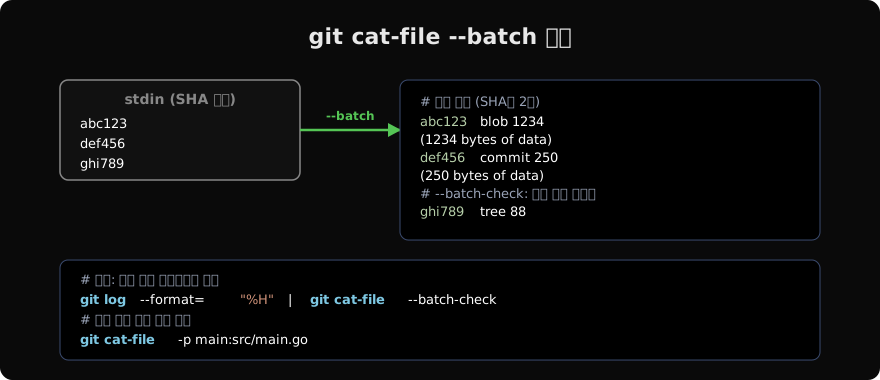
SHA 목록을 stdin에서 받아 한 번에 처리하는 --batch는 스크립트에서 유용하다.
# stdin에서 SHA를 줄별로 받아 처리
echo "HEAD" | git cat-file --batch

# 내용 없이 메타데이터만 (더 빠름)
echo "HEAD" | git cat-file --batch-check

# 모든 커밋의 tree SHA 추출
git log --format="%H" | git cat-file --batch-check \
| grep commit | awk '{print $1}'--batch는 SHA당 헤더 줄(<sha> <type> <size>)과 내용을 출력하고 줄 사이에 빈 줄을 넣는다. --batch-check는 내용 없이 헤더만 출력해 속도가 빠르다.
실전 활용 패턴
# 파일이 어느 커밋에서 처음 추가됐는지 확인
git log --diff-filter=A --format="%H %ai" -- path/to/file

# 특정 커밋의 파일을 현재 작업 디렉터리에 복원
git cat-file -p HEAD~5:src/config.go > src/config.go.bak

# pack에서도 동일하게 동작 (pack/loose 구분 없음)
git cat-file -p abc123

# 오브젝트 존재 여부 확인 (exit code 활용)
git cat-file -e abc123 && echo "exists" || echo "not found"
-e 옵션은 오브젝트가 존재하면 0, 없으면 1을 반환한다. 스크립트에서 오브젝트 존재 여부를 확인할 때 사용한다.
cat-file vs show
git show는 포르셀린(porcelain) 명령으로 사람이 읽기 좋은 형태로 출력한다. git cat-file -p는 오브젝트 원시 내용을 그대로 보여준다.
# git show: diff 포함, 컬러, 페이지 처리
git show HEAD

# git cat-file: 원시 내용, 스크립트 친화적
git cat-file -p HEAD
커밋 오브젝트에서 git show는 diff를 포함하지만, git cat-file -p는 커밋 메타데이터와 메시지만 출력한다. 자동화 스크립트에서는 cat-file이 더 예측 가능하다.
지난 글: Git Index 파일: 스테이징 영역의 실체
다음 글: git hash-object: 파일을 직접 오브젝트로 만들기
읽어주셔서 감사합니다. 😊
PALDYN / ARTICLE AI
글의 개념, 수식, 코드에 대해 물어보세요.
질문과 관련된 문단을 골라 답변의 문맥으로 사용합니다.생각 중 · 0초