

Git Commit 오브젝트: 커밋 내부 구조
Git commit 오브젝트가 담는 tree·parent·author·committer·message 필드의 의미와, cat-file·commit-tree로 커밋을 직접 읽고 만드는 방법을 설명한다.
지난 글에서 tree 오브젝트가 디렉터리 스냅샷을 어떻게 저장하는지 살펴봤다. 이번에는 그 tree를 가리키고 역사를 이어붙이는 commit 오브젝트를 분해한다.
commit 오브젝트가 담는 것
git cat-file -p HEAD를 실행하면 commit 오브젝트의 원문을 볼 수 있다.
tree   abc123def456…
parent fff000aaa111…
author Alice <alice@example.com> 1716681600 +0900
committer Bob <bob@example.com> 1716681700 +0000

feat: add login feature

Implements OAuth2 login flow.
Closes #42
각 필드의 역할은 다음과 같다.
| 필드 | 설명 |
|---|---|
tree | 이 커밋이 가리키는 루트 tree SHA |
parent | 이전 커밋 SHA (머지 커밋이면 2개 이상) |
author | 코드를 작성한 사람과 작성 시각 |
committer | 커밋을 저장소에 기록한 사람과 시각 |
| 빈 줄 이후 | 커밋 메시지(subject + body) |
author와 committer가 다를 수 있다. rebase나 cherry-pick으로 커밋이 옮겨지면 committer가 갱신되지만 author는 원저자로 보존된다.
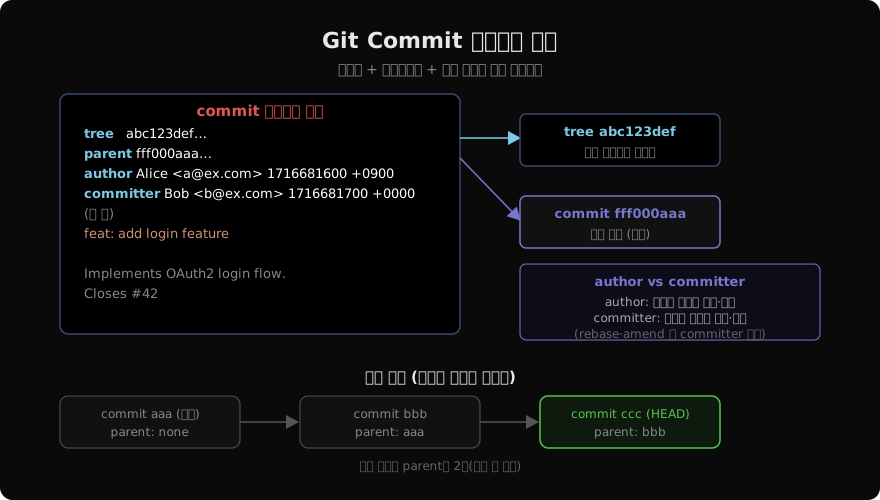
커밋 체인이 역사를 만든다
각 커밋은 parent 필드로 이전 커밋을 가리킨다. 이 단방향 연결이 쌓여 역사 그래프가 된다.
# parent 체인 따라가기
git log --oneline --graph -5

# 특정 커밋의 parent 확인
git cat-file -p HEAD | grep "^parent"
# parent fff000aaa111...

# 조상 커밋 표기
git show HEAD~2        # 2단계 위 조상
git show HEAD^2        # 머지 커밋의 두 번째 부모
머지 커밋은 parent 줄이 두 개다. HEAD^1은 주 브랜치 부모, HEAD^2는 머지된 브랜치 부모다.
cat-file로 commit 원문 읽기
# HEAD 커밋 내용 출력
git cat-file -p HEAD

# 특정 SHA 커밋
git cat-file -p abc123def

# 커밋이 가리키는 tree SHA만 꺼내기
git rev-parse HEAD^{tree}
# abc123def456…

# tree 내용 확인
git cat-file -p $(git rev-parse HEAD^{tree})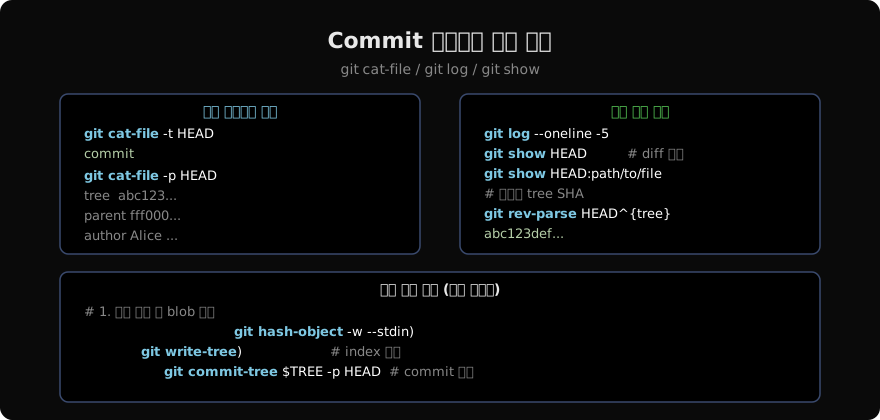
commit-tree: 커밋을 손으로 만들기
Git 내부 이해를 위해 git commit-tree로 커밋 오브젝트를 직접 생성할 수 있다. git commit이 내부적으로 이 순서를 따른다.
# 1. blob 생성
echo "hello" | git hash-object -w --stdin
# 8c7e5a667f1b771847fe88c01c3de34413a1b220

# 2. index에 등록하고 tree 작성
git update-index --add --cacheinfo 100644 8c7e5a66 hello.txt
TREE=$(git write-tree)

# 3. 최초 커밋 (parent 없음)
echo "initial commit" | git commit-tree $TREE
# d9f3a1b2...

# 4. 이후 커밋 (-p로 parent 지정)
echo "second commit" | git commit-tree $TREE -p d9f3a1b2
author vs committer 실전 차이
# rebase 전 로그
git log --format="%H author=%ae committer=%ce" -3

# rebase 후
git rebase main
git log --format="%H author=%ae committer=%ce" -3
# author는 원저자, committer는 rebase 수행자(자신)로 바뀜

# 특정 포맷으로 author·committer 분리 출력
git log --format="A: %an <%ae> %ai%nC: %cn <%ce> %ci" -1
commit 오브젝트의 불변성
blob·tree처럼 commit도 불변이다. git commit --amend는 기존 커밋을 수정하는 것이 아니라 새 commit 오브젝트를 생성하고 브랜치 포인터를 옮기는 것이다. 이미 push된 커밋을 amend하면 SHA가 바뀌어 협업자와 히스토리가 갈라진다.
다음 글에서는 annotated tag의 실체인 tag 오브젝트를 살펴본다.
지난 글: Git Tree 오브젝트: 디렉터리 구조의 저장 방식
다음 글: Git Tag 오브젝트: annotated tag의 내부 구조
읽어주셔서 감사합니다. 😊
PALDYN / ARTICLE AI
글의 개념, 수식, 코드에 대해 물어보세요.
질문과 관련된 문단을 골라 답변의 문맥으로 사용합니다.생각 중 · 0초