

commitlint: 커밋 메시지 형식 자동 검증
commitlint 설치와 설정, @commitlint/config-conventional 확장, 룰 레벨(0/1/2)과 applicable(always/never) 구조, Husky commit-msg 훅 연동, 커스텀 룰 추가 방법을 설명한다.
지난 글에서 Conventional Commits 스펙의 메시지 형식을 다뤘다. 형식을 정했다면 팀원 모두가 지키도록 자동 검증이 필요하다. commitlint는 커밋 메시지가 지정된 규칙에 맞는지 검사하는 도구다.
설치
# commitlint 코어와 conventional commits 룰셋 설치
npm install --save-dev @commitlint/cli @commitlint/config-conventional
설정 파일
commitlint.config.js를 프로젝트 루트에 생성한다.
// commitlint.config.js
module.exports = {
  extends: ['@commitlint/config-conventional'],
};@commitlint/config-conventional는 Conventional Commits 스펙에 맞는 룰셋을 미리 정의한다. extends로 상속받아 사용한다.
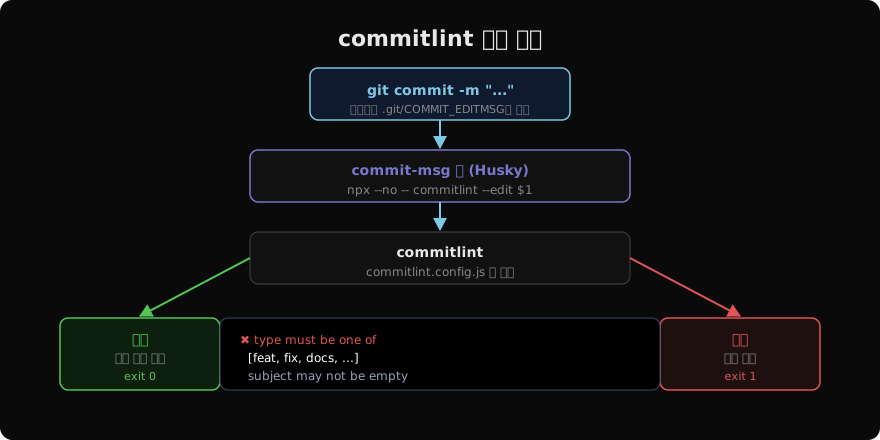
Husky commit-msg 훅 연동
# .husky/commit-msg
#!/bin/sh

npx --no -- commitlint --edit "$1"$1은 Git이 전달하는 커밋 메시지 파일 경로(.git/COMMIT_EDITMSG)다. --edit은 이 파일을 읽어서 검증한다.
룰 구조
각 룰은 [level, applicable, value] 배열 형태다.
module.exports = {
  extends: ['@commitlint/config-conventional'],
  rules: {
    'header-max-length': [2, 'always', 72],
    'type-case': [2, 'always', 'lower-case'],
    'subject-empty': [2, 'never'],
    'scope-enum': [2, 'always', ['api', 'auth', 'ui', 'db']],
  },
};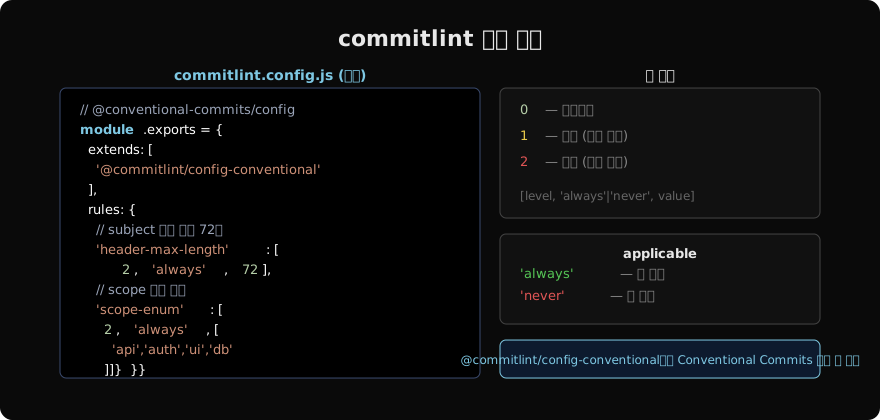
| level | 의미 |
|---|---|
0 | 비활성화 |
1 | 경고 (커밋 허용) |
2 | 에러 (커밋 차단) |
| applicable | 의미 |
|---|---|
'always' | 룰 적용 |
'never' | 룰 반전 (예: 'subject-empty': [2, 'never'] = subject는 비어 있으면 안 됨) |
자주 쓰는 커스텀 룰
scope 목록 강제
'scope-enum': [2, 'always', [
  'api', 'auth', 'cart', 'user', 'payment', 'infra'
]],
팀 모듈 구조에 맞게 scope 목록을 정의한다.
제목 길이 제한
'header-max-length': [2, 'always', 100],
'subject-min-length': [2, 'always', 5],
대소문자 강제
'type-case': [2, 'always', 'lower-case'],      // type은 소문자
'subject-case': [2, 'never', 'start-case'],    // Title Case 금지
검증 오류 메시지
commitlint가 실패하면 구체적인 오류를 출력한다.
⧗   input: Update user profile
✖   subject may not be empty [subject-empty]
✖   type must be one of [feat, fix, docs, style, refactor,
    test, chore, perf, ci, build, revert] [type-enum]

✖   found 2 problems, 0 warnings
ⓘ   Get help: https://github.com/conventional-changelog/commitlint
feat: update user profile 형식으로 수정하면 통과한다.
commitizen과 함께 사용
commitlint가 검증 도구라면, commitizen은 커밋 메시지를 대화형으로 작성하는 도구다.
npm install --save-dev commitizen cz-conventional-changelog

# package.json에 추가
{
  "config": {
    "commitizen": {
      "path": "cz-conventional-changelog"
    }
  }
}
# git commit 대신 실행
npx czcommitizen이 타입, scope, description을 단계별로 질문하면 commitlint 형식에 맞는 메시지가 자동으로 생성된다.
CI에서 전체 브랜치 이력 검사
# .github/workflows/lint-commit.yml
- name: Validate commit messages
  uses: wagoid/commitlint-github-action@v6
  with:
    configFile: commitlint.config.js
PR에 포함된 모든 커밋 메시지를 자동 검사해 표준을 지키지 않은 커밋이 있으면 CI를 실패시킨다.
지난 글: Conventional Commits: 커밋 메시지 표준 형식
다음 글: Gitflow: 브랜치 전략 개요
읽어주셔서 감사합니다. 😊
PALDYN / ARTICLE AI
글의 개념, 수식, 코드에 대해 물어보세요.
질문과 관련된 문단을 골라 답변의 문맥으로 사용합니다.생각 중 · 0초