

Git Credential Helper: 인증 정보 안전하게 저장하기
git credential helper의 종류(cache/store/osxkeychain/libsecret)와 보안 수준을 비교하고, OS별 설정 방법, 저장된 credential 삭제 및 갱신 방법, 멀티 계정 credential 분리 방법까지 설명한다.
지난 글에서 SSH와 HTTPS 프로토콜을 비교했다. HTTPS를 사용한다면 매번 username·PAT를 입력하지 않도록 credential helper를 설정해야 한다. 이번 글에서는 각 helper의 특성과 보안 수준, OS별 설정 방법을 다룬다.
Credential Helper란
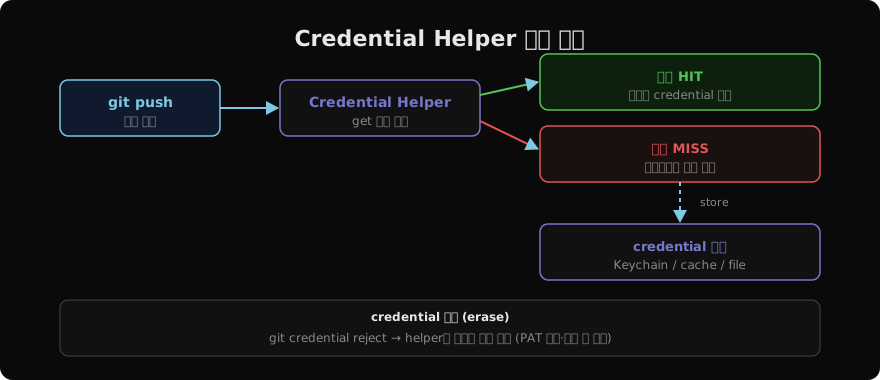
Git이 HTTPS 인증 정보를 외부 프로그램에 위임해 저장하고 조회하는 메커니즘이다. git push처럼 인증이 필요한 명령 실행 시 Git은 helper의 get 서브커맨드를 호출해 저장된 credential을 가져온다. 없으면 사용자에게 입력을 요청하고, 이후 store로 저장한다.
Helper 종류와 보안 비교
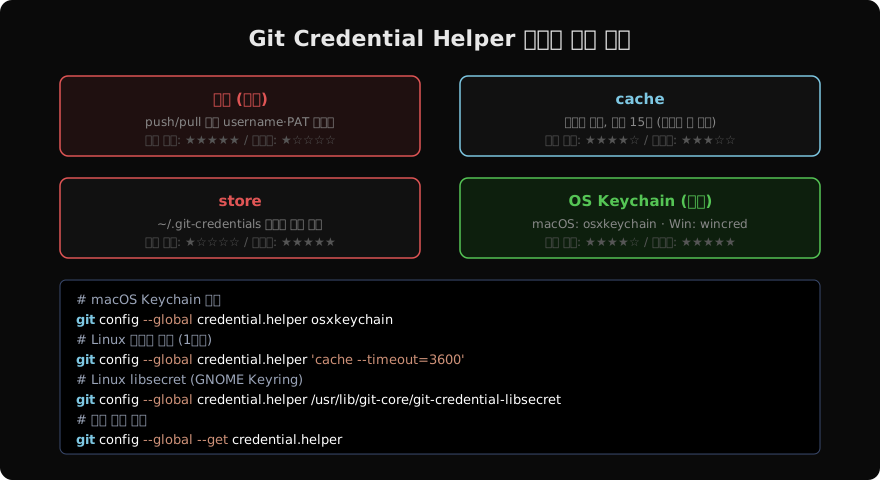
cache: 메모리에만 저장하고 기본 15분 후 만료된다. 재부팅하면 사라진다. 가장 안전하지만 장기 사용에 불편하다.
store: ~/.git-credentials 파일에 평문으로 저장한다. 설정이 간단하지만 파일 시스템에 접근할 수 있는 누구나 읽을 수 있어 위험하다. 서버 환경에서는 사용을 피한다.
osxkeychain (macOS): macOS Keychain에 암호화 저장한다. 로그인 비밀번호로 보호되며, 재부팅해도 유지된다. macOS에서 가장 권장되는 방식이다.
wincred (Windows): Windows Credential Manager에 저장한다. Git for Windows에 포함되어 있다.
libsecret (Linux): GNOME Keyring에 저장한다. 별도 설치가 필요하지만 장기 보관에 적합하다.
OS별 설정
# macOS — Keychain 사용 (가장 권장)
git config --global credential.helper osxkeychain

# Windows — Credential Manager
git config --global credential.helper wincred

# Linux — 메모리 캐시 (1시간)
git config --global credential.helper 'cache --timeout=3600'

# Linux — GNOME Keyring (libsecret)
sudo apt-get install libsecret-1-0 libsecret-1-dev
sudo make -C /usr/share/doc/git/contrib/credential/libsecret
git config --global credential.helper /usr/share/doc/git/contrib/credential/libsecret/git-credential-libsecret
설정 확인:
git config --global --get credential.helper
git config --list | grep credential
cache timeout 조정
# 8시간 캐시
git config --global credential.helper 'cache --timeout=28800'

# 캐시 즉시 삭제
git credential-cache exit
credential 갱신·삭제
PAT가 만료되거나 바뀌면 저장된 credential을 먼저 지워야 한다.
# macOS: Keychain Access 앱에서 github.com 항목 삭제
# 또는 커맨드라인으로 erase
git credential reject <<EOF
protocol=https
host=github.com
EOF

# store 방식: ~/.git-credentials 파일 직접 편집
cat ~/.git-credentials
# https://alice:ghp_xxxxx@github.com
nano ~/.git-credentials    # 해당 줄 삭제
삭제 후 다시 git push하면 새 PAT를 입력하라는 프롬프트가 나온다.
멀티 계정 credential 분리
같은 GitHub에 개인/회사 계정이 있다면 URL별로 helper를 다르게 설정할 수 있다.
# 회사 GitHub에 별도 설정
git config --global credential.https://company.github.com.helper /path/to/special-helper

# 레포별 override
git config credential.helper store # 이 레포만 store 사용credential.useHttpPath=true를 설정하면 레포별 URL까지 포함해 credential을 구분한다.
git config --global credential.useHttpPath true보안 체크리스트
storehelper(평문 파일)는 개인 PC에서만, 서버에서는 절대 사용하지 않는다- PAT 스코프는 최소 권한(예:
repo스코프만)으로 설정한다 - PAT 만료일을 설정하고 정기적으로 교체한다
.git-credentials파일이 실수로 커밋되지 않도록.gitignore에 추가한다
지난 글: SSH vs HTTPS: Git 원격 인증 프로토콜 선택 가이드
다음 글: Token vs Password: GitHub 인증 방식 변천사
읽어주셔서 감사합니다. 😊
PALDYN / ARTICLE AI
글의 개념, 수식, 코드에 대해 물어보세요.
질문과 관련된 문단을 골라 답변의 문맥으로 사용합니다.생각 중 · 0초