

git lost-found로 고립 객체 찾기
git fsck --lost-found 명령으로 dangling commit/blob을 .git/lost-found/ 디렉터리에 저장하고 내용을 확인해 잃어버린 파일과 커밋을 복구하는 방법을 설명한다.
지난 글에서 저장소 손상을 복구했다. 이번에는 git fsck --lost-found 옵션으로 SHA를 모르는 고립 객체를 체계적으로 찾고 복구하는 방법을 알아본다. reflog와 fsck의 기본 출력만으로는 찾기 어려울 때 마지막으로 꺼내는 도구다.
lost-found란
git fsck --lost-found는 git fsck의 확장 옵션이다. dangling 객체(어떤 ref에서도 도달 불가)를 찾아 .git/lost-found/ 디렉터리에 저장한다.
.git/lost-found/commit/: 각 파일명이 dangling commit의 SHA, 내용이 커밋 정보.git/lost-found/other/: 각 파일명이 dangling blob/tree의 SHA, 내용이 파일 내용
기존 파일을 덮어쓰지 않고 추가만 하므로 안전하다.
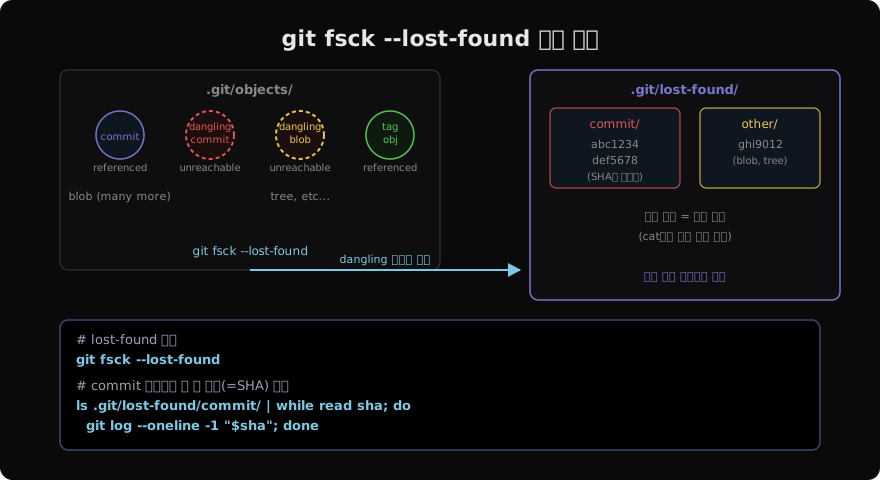
기본 사용법
# lost-found 실행
git fsck --lost-found

# 출력 예시
# Checking object directories: 100% (256/256), done.
# dangling commit abc1234...
# dangling blob def5678...

# .git/lost-found/ 구조 확인
ls .git/lost-found/
# commit/  other/

ls .git/lost-found/commit/
# abc1234abc1234abc1234abc1234abc1234abc1234
# 111222111222...

ls .git/lost-found/other/
# def5678def5678...
잃어버린 커밋 찾기
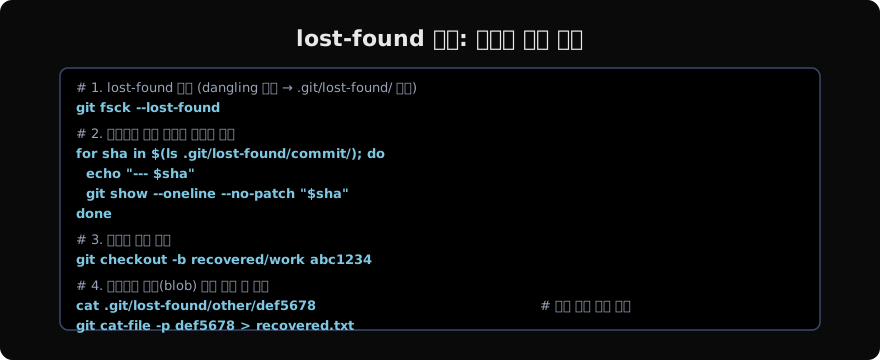
# 모든 lost commit 메시지 조회
for sha in $(ls .git/lost-found/commit/); do
  echo "=== $sha ==="
  git show --oneline --no-patch "$sha" 2>/dev/null
done

# 날짜 포함 조회 (가장 최근 것 먼저)
for sha in $(ls -t .git/lost-found/commit/); do
  git log --format="%H %ai %s" -1 "$sha" 2>/dev/null
done | sort -k2 -r | head -20
찾는 커밋 메시지나 날짜가 보이면 해당 SHA를 사용해 복구한다.
# 복구
git checkout -b recover/feature abc1234

# 현재 브랜치에 cherry-pick
git cherry-pick abc1234

# git log로 커밋 이력 확인
git log --oneline recover/feature
잃어버린 파일(blob) 찾기
git add한 후 커밋하지 않은 파일, 또는 스테이징 후 git reset --hard로 사라진 파일의 내용을 찾을 수 있다.
# other/ 디렉터리의 blob 내용 조회
for sha in $(ls .git/lost-found/other/); do
  echo "=== $sha ==="
  git cat-file -t "$sha" 2>/dev/null   # 타입 확인
  git cat-file -p "$sha" 2>/dev/null | head -5  # 내용 미리보기
  echo "---"
done

# 특정 blob 내용 전체 출력
git cat-file -p def5678

# 파일로 저장
git cat-file -p def5678 > recovered-file.txt
키워드로 blob 검색
잃어버린 파일에 특정 키워드가 있다면 all blobs에서 grep한다.
# lost-found/other/ 에서 키워드 검색
for sha in $(ls .git/lost-found/other/); do
  if git cat-file -p "$sha" 2>/dev/null | grep -q "결제 모듈"; then
    echo "Found in: $sha"
    git cat-file -p "$sha"
    echo "==="
  fi
done
파일 크기를 먼저 확인해서 너무 큰 객체는 건너뛰는 것이 효율적이다.
# blob 크기 확인 후 작은 것 먼저 조회
for sha in $(ls .git/lost-found/other/); do
  size=$(git cat-file -s "$sha" 2>/dev/null)
  echo "$size $sha"
done | sort -n | head -20
reflog와 lost-found 비교
| 항목 | reflog | lost-found |
|---|---|---|
| 대상 | HEAD 이동 기록 | 모든 dangling 객체 |
| 보존 기간 | 90일 (reachable) / 30일 (unreachable) | gc 전까지 |
| 파일 내용 직접 접근 | 불가 (SHA 조회 후 별도 명령) | 가능 (cat으로 직접) |
| 커밋 메시지 | 표시 | show 명령 필요 |
| 사용 시점 | 최근 작업 복구 | SHA 불명, 파일 내용 검색 |
임시 stash 또는 WIP 커밋 찾기
git stash로 저장한 후 git stash drop이나 git stash clear로 삭제한 stash도 dangling commit으로 남아 있다.
# stash 메시지는 "WIP on branchname:" 형태
for sha in $(ls .git/lost-found/commit/); do
  msg=$(git show --format="%s" -s "$sha" 2>/dev/null)
  if echo "$msg" | grep -q "WIP on"; then
    echo "$sha: $msg"
  fi
done

# 발견된 stash 복구
git stash apply abc1234
# 또는
git checkout -b recovered-stash abc1234
정리 후 lost-found 삭제
복구가 완료되면 .git/lost-found/ 디렉터리를 삭제해도 된다. git이 자동으로 관리하지 않으므로 그냥 두어도 무방하지만 공간을 차지한다.
# 복구 완료 후 정리
rm -rf .git/lost-found/

# gc로 dangling 객체도 정리 (복구가 완전히 끝난 후에만!)
git gc --prune=now--lost-found는 git fsck의 출력을 파일 시스템으로 구체화한 것이다. SHA를 모르더라도 파일 내용으로 검색할 수 있어, reflog가 만료된 후에도 복구할 수 있는 마지막 수단이 된다.
지난 글: Git 저장소 손상 복구하기
읽어주셔서 감사합니다. 😊
PALDYN / ARTICLE AI
글의 개념, 수식, 코드에 대해 물어보세요.
질문과 관련된 문단을 골라 답변의 문맥으로 사용합니다.생각 중 · 0초