

git 커밋 작성자 일괄 수정
git commit --amend, rebase -i, filter-repo를 이용해 커밋 author와 committer 정보를 수정하는 방법, 범위에 따른 선택 기준을 다룬다.
지난 글에서 머지 커밋을 되돌리는 방법을 살펴봤다. 이번에는 커밋의 작성자(author) 정보를 수정하는 방법을 다룬다. 회사 이메일 대신 개인 이메일로 커밋됐거나, 팀원 이름이 바뀐 경우, 계정을 잘못 설정한 채 여러 커밋을 남긴 경우에 필요한 작업이다.
author vs committer
Git 커밋에는 두 가지 작성자 정보가 있다.
- author: 코드를 처음 작성한 사람 (git commit 시 기록)
- committer: 커밋을 저장소에 적용한 사람 (rebase, cherry-pick, amend 시 재기록)
git log에서 기본적으로 author가 표시되고, git log --format="%an <%ae>" 같은 명령으로 확인할 수 있다.
범위에 따른 방법 선택
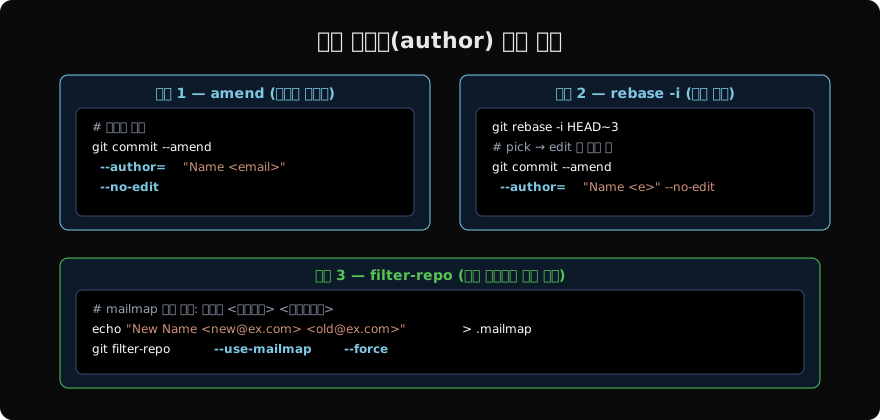
방법 1: 마지막 커밋만 수정
# 마지막 커밋의 author 변경
git commit --amend \
  --author="정확한 이름 <correct@example.com>" \
  --no-edit

# 전역 설정을 현재 커밋에 반영 (이름/이메일을 이미 수정한 경우)
git commit --amend --reset-author --no-edit--no-edit은 커밋 메시지를 그대로 유지한다. --reset-author는 git config user.name과 user.email로 author를 새로 설정한다.
방법 2: 몇 개의 커밋을 수정 (rebase -i)
# 마지막 3개 커밋 중 일부 수정
git rebase -i HEAD~3
에디터에서 수정할 커밋 앞을 pick에서 edit으로 변경한다.
edit abc111 feat: 로그인
pick def222 feat: 회원가입
edit ghi333 fix: 버그 수정
저장 후 각 edit 지점에서 rebase가 멈추면:
# 현재 멈춘 커밋의 author 수정
git commit --amend \
  --author="정확한 이름 <correct@example.com>" \
  --no-edit

# 다음 커밋으로 진행
git rebase --continue
모든 edit 커밋을 처리할 때까지 반복한다.
방법 3: 전체 히스토리 일괄 수정 (filter-repo)
특정 이메일로 커밋된 모든 커밋을 한 번에 교체한다.
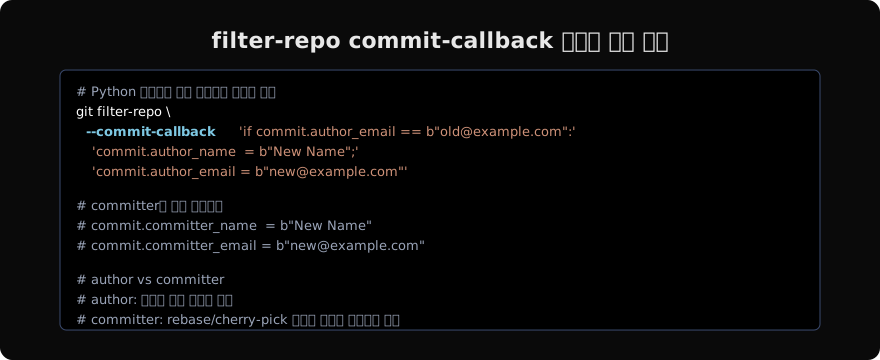
# 파일로 콜백 작성
cat > /tmp/fix_author.py <<'EOF'
if commit.author_email == b"old@company.com":
    commit.author_name = b"New Name"
    commit.author_email = b"new@company.com"
    commit.committer_name = b"New Name"
    commit.committer_email = b"new@company.com"
EOF

git filter-repo --commit-callback "$(cat /tmp/fix_author.py)"
또는 .mailmap 파일을 이용할 수도 있다.
# .mailmap 형식: 새이름 <새이메일> <이전이메일>
echo "New Name <new@company.com> <old@company.com>" > .mailmap
git filter-repo --use-mailmap --force
git config 먼저 확인
author 오류의 가장 흔한 원인은 git config 설정이다.
# 현재 설정 확인
git config user.name
git config user.email

# 저장소별 설정
git config --local user.name "정확한 이름"
git config --local user.email "correct@company.com"

# 전역 설정
git config --global user.name "정확한 이름"
git config --global user.email "correct@company.com"
작업 전 git config --list로 어떤 설정이 적용 중인지 먼저 확인하면 실수를 줄일 수 있다.
push 후 처리
author 수정은 SHA를 바꾸므로 이미 push한 브랜치라면 force push가 필요하다. 팀원이 있다면 공지 후 진행하고, 팀원은 re-clone하거나 git reset --hard origin/main으로 동기화해야 한다.
git push --force-with-lease origin feature/my-branch지난 글: git revert — 머지 커밋 되돌리기
다음 글: 히스토리 재작성 전 반드시 알아야 할 것들
읽어주셔서 감사합니다. 😊
PALDYN / ARTICLE AI
글의 개념, 수식, 코드에 대해 물어보세요.
질문과 관련된 문단을 골라 답변의 문맥으로 사용합니다.생각 중 · 0초