

서버 사이드 훅: pre-receive, update, post-receive
Git 서버에서 실행되는 세 가지 훅(pre-receive, update, post-receive)의 실행 순서, stdin/인수 형식, exit 코드 의미, 보호 브랜치 강제와 CI 트리거 패턴을 설명한다.
지난 글에서 머지 후 자동화를 다루는 post-merge 훅을 살펴봤다. 로컬 훅은 --no-verify로 우회할 수 있다. 이를 완전히 차단하려면 서버 사이드 훅이 필요하다.
서버 사이드 훅의 위치
서버 사이드 훅은 bare 레포지토리의 hooks/ 디렉터리에 위치한다. 일반 클론에 있는 .git/hooks/가 아니라, 원격 서버의 myrepo.git/hooks/다.
/srv/git/myrepo.git/
├── config
├── HEAD
├── hooks/
│   ├── pre-receive      ← 서버 훅
│   ├── update           ← 서버 훅
│   └── post-receive     ← 서버 훅
└── objects/
GitHub·GitLab 같은 호스팅 서비스에서는 이 훅 대신 Webhook이나 CI/CD 파이프라인으로 동일한 기능을 제공한다.
세 훅의 실행 순서
git push가 서버에 도달하면 다음 순서로 훅이 실행된다.
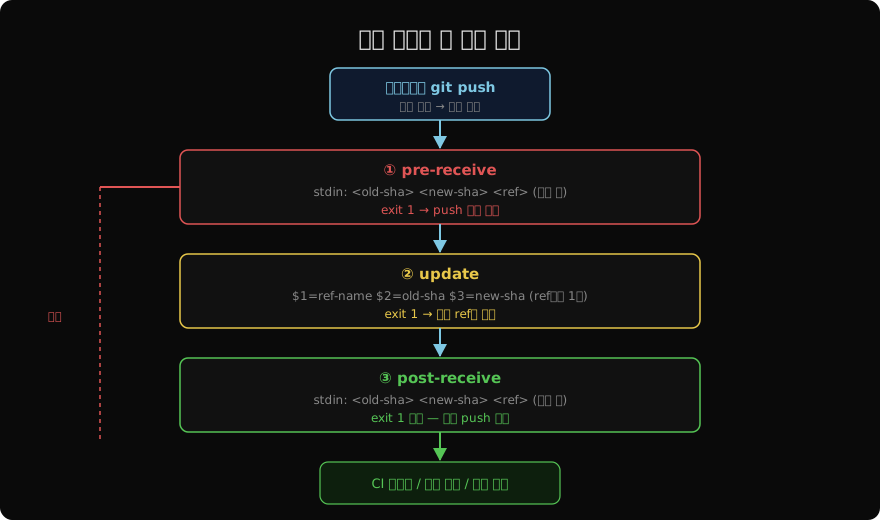
① pre-receive
push된 모든 ref를 한 번에 처리한다. stdin으로 입력을 받는다.
<old-sha> <new-sha> <ref-name>
<old-sha> <new-sha> <ref-name>
...
exit 1이면 push 전체가 거부된다. 가장 강력한 차단 지점이다.
② update
각 ref마다 한 번씩 호출된다. 인수로 전달된다.
$1 = ref 이름   (예: refs/heads/main)
$2 = 이전 SHA   (새 브랜치이면 000...000)
$3 = 새 SHA
exit 1이면 해당 ref만 거부된다. 다른 ref는 계속 처리된다.
③ post-receive
push가 성공적으로 완료된 후 실행된다. stdin 형식은 pre-receive와 동일하다. exit 1을 반환해도 이미 완료된 push는 되돌려지지 않는다. CI 트리거, 배포 알림, 이슈 자동 닫기 등에 사용한다.
pre-receive 예제: 보호 브랜치 강제
#!/bin/sh
# hooks/pre-receive

while read old_sha new_sha ref; do
  # main / master 직접 push 차단
  if echo "$ref" | grep -qE "refs/heads/(main|master)"; then
    echo "ERROR: main에 직접 push 금지. PR을 이용하세요."
    exit 1
  fi
done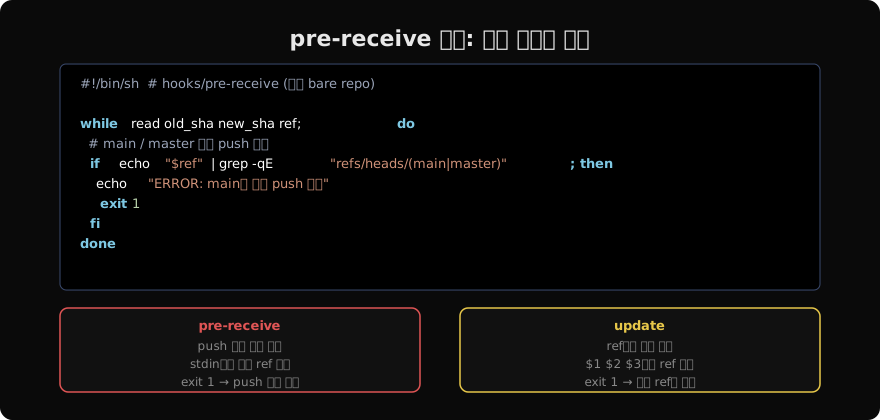
update 예제: 브랜치별 권한 제어
pre-receive는 push 전체를 보고, update는 ref별로 세밀하게 제어할 수 있다.
#!/bin/sh
# hooks/update

REF=$1
OLD=$2
NEW=$3
USER=$(git config user.email)

# release 브랜치는 릴리즈 팀만 push 가능
if echo "$REF" | grep -q "refs/heads/release/"; then
  if ! echo "$USER" | grep -q "@release-team.com"; then
    echo "ERROR: release 브랜치는 릴리즈 팀만 push할 수 있습니다."
    exit 1
  fi
fi

# force push (history rewrite) 차단
if [ "$OLD" != "0000000000000000000000000000000000000000" ]; then
  # 새 커밋이 기존 커밋의 후손인지 확인
  if ! git merge-base --is-ancestor "$OLD" "$NEW" 2>/dev/null; then
    echo "ERROR: force push (history rewrite)는 허용되지 않습니다."
    exit 1
  fi
fi
post-receive 예제: CI 트리거
#!/bin/sh
# hooks/post-receive

while read old_sha new_sha ref; do
  BRANCH=$(echo "$ref" | sed 's|refs/heads/||')

  # main 브랜치에 push됐을 때만 배포 트리거
  if [ "$BRANCH" = "main" ]; then
    echo "Triggering CI/CD for $BRANCH..."
    curl -s -X POST "$CI_WEBHOOK_URL" \
      -H "Content-Type: application/json" \
      -d "{\"branch\":\"$BRANCH\",\"sha\":\"$new_sha\"}" &
  fi
done&로 백그라운드에서 실행해 push 응답 시간에 영향을 주지 않는다.
GitHub·GitLab에서의 대응
직접 bare 레포를 관리하지 않는 경우:
| 서버 훅 | GitHub 대응 | GitLab 대응 |
|---|---|---|
| pre-receive | Branch protection rules | Push rules (EE) |
| update | Protected branch rules | Protected branches |
| post-receive | Webhooks / Actions | Webhooks / CI |
GitHub Actions의 push 트리거는 post-receive와 동일한 시점에 동작하며, Branch protection rules는 pre-receive보다 더 강력한 서버 정책을 제공한다.
로컬 훅과의 관계
| 훅 | 위치 | 우회 가능 | 용도 |
|---|---|---|---|
| pre-commit | 클라이언트 | --no-verify | 빠른 lint |
| pre-push | 클라이언트 | --no-verify | 테스트 게이트 |
| pre-receive | 서버 | 불가 | 정책 강제 |
| update | 서버 | 불가 | ref별 권한 |
| post-receive | 서버 | 불가 | CI·알림 |
서버 훅은 --no-verify로 우회할 수 없다. 팀 정책을 강제하려면 반드시 서버 사이드 훅이나 플랫폼 규칙을 사용해야 한다.
지난 글: post-merge 훅: 머지 후 자동화 작업 구성
다음 글: Husky: Node.js 프로젝트의 Git 훅 관리
읽어주셔서 감사합니다. 😊
PALDYN / ARTICLE AI
글의 개념, 수식, 코드에 대해 물어보세요.
질문과 관련된 문단을 골라 답변의 문맥으로 사용합니다.생각 중 · 0초