

GPU 메모리 최적화: OOM 없이 더 크게 훈련하는 법
GPU OOM 에러 원인 분석부터 gradient checkpointing, mixed precision, gradient accumulation, 메모리 프로파일링까지 — 제한된 VRAM으로 더 큰 모델을 훈련하는 실전 기법 완전 정복.
지난 글에서 CUDA 프로그래밍 모델과 GPU 병렬 연산의 기초를 살펴봤다. 이번에는 그 위에서 실제 딥러닝 모델을 훈련할 때 가장 자주 마주치는 장벽인 GPU 메모리(VRAM) 부족 문제를 다룬다. “CUDA out of memory”라는 메시지를 한 번도 본 적 없는 딥러닝 실무자는 거의 없을 것이다. 이 글에서는 OOM의 원인을 정확히 진단하고, gradient checkpointing·mixed precision·gradient accumulation·CPU offload 등 실전에서 검증된 최적화 기법을 코드와 함께 정복한다.
GPU OOM의 원인: 무엇이 VRAM을 잡아먹는가
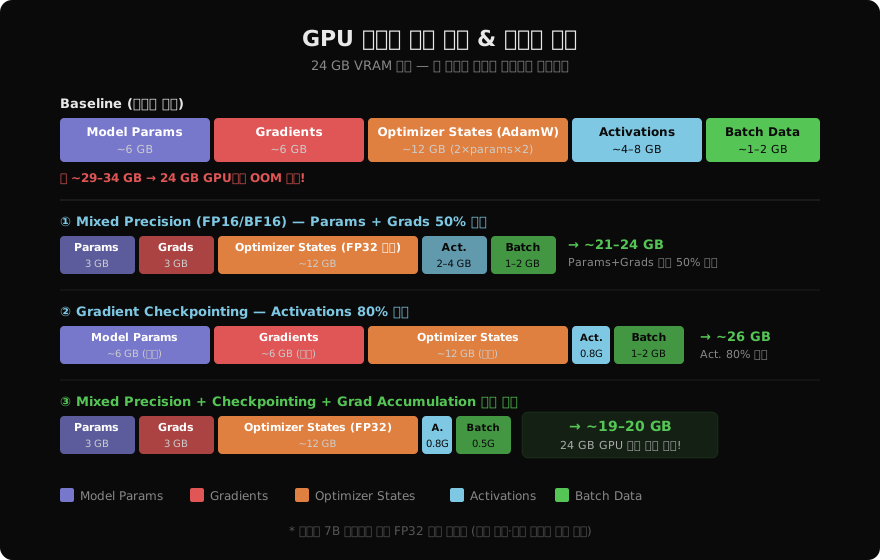
훈련 중 GPU 메모리는 크게 다섯 가지 구성 요소로 채워진다.
- Model Parameters: 모델 가중치 그 자체. 7B 파라미터 모델을 FP32로 올리면 7 × 4 bytes = 28 GB.
- Gradients: 역전파 과정에서 파라미터마다 하나씩 생성. 파라미터와 동일한 크기.
- Optimizer States: AdamW는 파라미터마다 m(1차 모멘트)과 v(2차 모멘트)를 FP32로 유지 → 파라미터의 2배 크기 추가.
- Activations: 순전파 시 역전파를 위해 저장해 두는 중간 결과값. 배치 크기와 시퀀스 길이에 비례해 폭발적으로 증가.
- Batch Data: 입력 텐서 자체. 배치 크기 × 시퀀스 길이 × hidden dim.
FP32 기준으로 7B 파라미터 모델 하나를 훈련하려면 파라미터(28 GB) + 그래디언트(28 GB) + AdamW 상태(56 GB) = 최소 112 GB. 단일 A100(80 GB)으로도 부족하다.
메모리 프로파일링: 먼저 병목을 측정하라
최적화 전에 반드시 현재 상태를 측정해야 한다. PyTorch는 torch.cuda.memory_summary()를 비롯해 강력한 프로파일링 도구를 제공한다.
import torch

# 기본 메모리 현황
def print_gpu_memory(tag=""):
    allocated = torch.cuda.memory_allocated() / 1024**3
    reserved  = torch.cuda.memory_reserved()  / 1024**3
    print(f"[{tag}] allocated={allocated:.2f}GB  reserved={reserved:.2f}GB")

# 훈련 루프 안에서 호출
print_gpu_memory("before forward")
outputs = model(inputs)
print_gpu_memory("after forward")
loss = criterion(outputs, labels)
loss.backward()
print_gpu_memory("after backward")
더 상세한 분석이 필요하면 memory_summary()를 사용한다.
# 상세 요약 출력
print(torch.cuda.memory_summary(device="cuda:0", abbreviated=False))

# 피크 메모리 추적
torch.cuda.reset_peak_memory_stats()
# ... 훈련 코드 ...
peak = torch.cuda.max_memory_allocated() / 1024**3
print(f"Peak VRAM: {peak:.2f} GB")
PyTorch Profiler를 이용하면 연산 단위까지 메모리 타임라인을 확인할 수 있다.
from torch.profiler import profile, ProfilerActivity, record_function

with profile(
    activities=[ProfilerActivity.CPU, ProfilerActivity.CUDA],
    profile_memory=True,
    record_shapes=True,
) as prof:
    with record_function("training_step"):
        outputs = model(inputs)
        loss = criterion(outputs, labels)
        loss.backward()

print(prof.key_averages().table(
    sort_by="cuda_memory_usage", row_limit=10
))
Gradient Checkpointing: 컴퓨트로 메모리를 산다
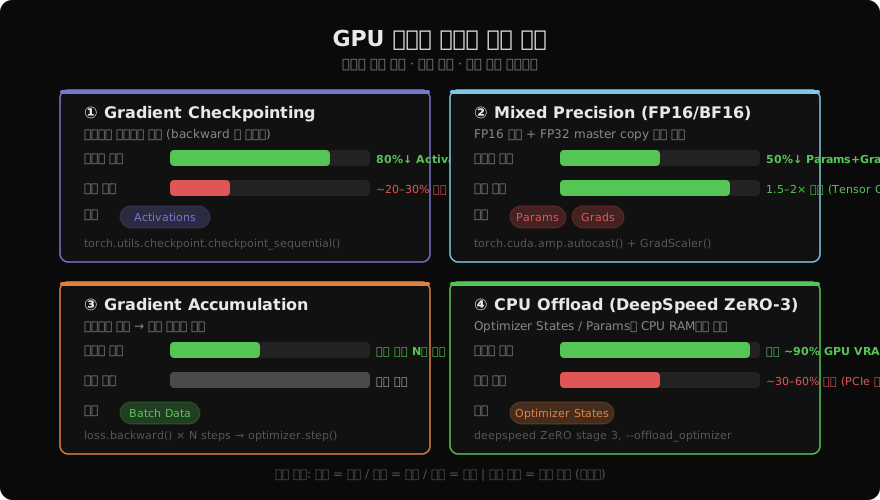
가장 효과적인 메모리 절감 기법 중 하나다. 순전파 시 모든 중간 활성화값을 저장하지 않고 역전파 때 필요한 구간만 재계산한다. 메모리는 O(√N)으로 줄고, 연산은 약 20–30% 증가한다.
import torch
from torch.utils.checkpoint import checkpoint, checkpoint_sequential

# 방법 1: Sequential 모델 전체에 적용
model = torch.nn.Sequential(*layers)
# segments=4 → 4 구간으로 나눠 재계산
output = checkpoint_sequential(model, segments=4, input=x)

# 방법 2: 개별 서브모듈에 적용
class MyTransformerLayer(torch.nn.Module):
    def forward(self, x):
        # checkpoint로 감싸면 활성화값 저장 안 함
        return checkpoint(self._forward, x, use_reentrant=False)

    def _forward(self, x):
        x = self.attention(x)
        x = self.ffn(x)
        return x
HuggingFace Transformers를 사용하면 한 줄로 끝난다.
from transformers import AutoModelForCausalLM

model = AutoModelForCausalLM.from_pretrained("meta-llama/Llama-2-7b-hf")
model.gradient_checkpointing_enable()  # 끝!
Mixed Precision Training: FP16/BF16으로 절반을 줄인다
FP32(32-bit float) 대신 FP16(16-bit float)으로 순전파·역전파를 수행하면 파라미터와 그래디언트가 절반으로 줄어든다. 동시에 NVIDIA Tensor Core를 활성화해 연산 속도도 1.5–2배 향상된다.
다만 FP16은 수치 범위가 좁아 underflow/overflow 위험이 있다. PyTorch AMP(Automatic Mixed Precision)는 이를 GradScaler로 자동 처리한다.
from torch.cuda.amp import autocast, GradScaler

scaler = GradScaler()

for batch in dataloader:
    optimizer.zero_grad()

    # autocast 안에서 FP16으로 연산
    with autocast(dtype=torch.float16):
        outputs = model(batch["input_ids"])
        loss = criterion(outputs.logits, batch["labels"])

    # scaler: 손실을 스케일업 → 역전파 → 스케일다운
    scaler.scale(loss).backward()
    scaler.unscale_(optimizer)
    # gradient clipping (선택)
    torch.nn.utils.clip_grad_norm_(model.parameters(), max_norm=1.0)
    scaler.step(optimizer)
    scaler.update()
BF16(Brain Float 16)은 FP32와 동일한 지수 범위를 가져 수치 안정성이 FP16보다 높다. Ampere 이상(A100, 3090 등) GPU에서는 BF16을 권장한다.
# BF16은 GradScaler 불필요
with autocast(dtype=torch.bfloat16):
    outputs = model(inputs)
    loss = criterion(outputs, labels)
loss.backward()
optimizer.step()
Gradient Accumulation: 가상 배치로 메모리를 절약한다
배치 크기를 늘리면 학습이 안정화되지만 메모리가 폭증한다. Gradient Accumulation은 소배치(micro-batch)를 여러 번 순전파해 그래디언트를 누적한 후 한 번만 파라미터를 업데이트한다. 실제 배치 크기(effective batch size) = micro_batch × accumulation_steps.
accumulation_steps = 8
optimizer.zero_grad()

for step, batch in enumerate(dataloader):
    with autocast(dtype=torch.bfloat16):
        outputs = model(batch["input_ids"])
        # accumulation_steps로 나눠 스케일 조정
        loss = criterion(outputs.logits, batch["labels"])
        loss = loss / accumulation_steps

    loss.backward()  # 그래디언트 누적

    if (step + 1) % accumulation_steps == 0:
        optimizer.step()
        optimizer.zero_grad()
        scheduler.step()
배치 크기 256이 필요하지만 VRAM이 32만 허용한다면, micro_batch=32, accumulation_steps=8로 동일 효과를 낼 수 있다.
CPU Offloading: DeepSpeed ZeRO-3 개념
DeepSpeed의 ZeRO(Zero Redundancy Optimizer) 최적화는 모델 상태를 GPU 간에, 그리고 CPU RAM으로 분산한다.
- ZeRO-1: Optimizer States를 GPU 간 분산
- ZeRO-2: + Gradients 분산
- ZeRO-3: + Parameters 분산
- ZeRO-Infinity: + CPU/NVMe Offload
ZeRO-3 + CPU Offload를 사용하면 단일 GPU VRAM을 최대 90%까지 절감할 수 있다. 단, CPU↔GPU 간 데이터 이동(PCIe 대역폭)으로 인해 훈련 속도는 30–60% 감소한다.
# ds_config.json
{
  "zero_optimization": {
    "stage": 3,
    "offload_optimizer": {
      "device": "cpu",
      "pin_memory": true
    },
    "offload_param": {
      "device": "cpu",
      "pin_memory": true
    }
  },
  "bf16": {"enabled": true}
}
HuggingFace Trainer와의 통합은 간단하다.
from transformers import TrainingArguments, Trainer

args = TrainingArguments(
    output_dir="./output",
    deepspeed="ds_config.json",
    per_device_train_batch_size=1,
    gradient_accumulation_steps=16,
    bf16=True,
)
trainer = Trainer(model=model, args=args, ...)
trainer.train()
Model Parallelism vs Data Parallelism
모델 자체가 단일 GPU에 올라가지 않을 때는 모델 병렬화(Model Parallelism)를 사용한다.
| 방식 | 분산 단위 | 사용 상황 |
|---|---|---|
| Data Parallel (DDP) | 배치 | 모델은 GPU에 다 올라가지만 속도를 높이고 싶을 때 |
| Tensor Parallel | 레이어 내 행렬 연산 | 단일 레이어가 너무 클 때 (Megatron-LM) |
| Pipeline Parallel | 레이어 단위 | 깊은 모델을 GPU 여러 장에 순차 배치 |
| ZeRO (FSDP) | 파라미터 샤딩 | 단일 노드 멀티 GPU (PyTorch FSDP) |
PyTorch FSDP(Fully Sharded Data Parallel)는 ZeRO-3에 해당하는 기능을 PyTorch 기본 라이브러리로 제공한다.
from torch.distributed.fsdp import FullyShardedDataParallel as FSDP
from torch.distributed.fsdp import MixedPrecision
import torch.distributed as dist

dist.init_process_group("nccl")
mp_policy = MixedPrecision(
    param_dtype=torch.bfloat16,
    reduce_dtype=torch.bfloat16,
    buffer_dtype=torch.bfloat16,
)
model = FSDP(model, mixed_precision=mp_policy)
실전 메모리 예산 계획
실무에서는 다음 순서로 최적화를 적용한다.
- Mixed Precision(BF16) 먼저 — 코드 변경이 가장 적고 속도도 빨라진다.
- Gradient Checkpointing 추가 — Activations 폭발을 억제.
- Batch size + Gradient Accumulation 조합 — 안정적인 학습 + 메모리 절감.
- FSDP / DeepSpeed ZeRO-3 — 단일 GPU로 감당 안 될 때.
- CPU Offload — 최후의 수단. 속도 희생을 감수.
빠른 예산 계산 공식 (FP16 Mixed Precision 기준):
GPU VRAM 필요량 ≈
  params × 2 bytes (FP16)          # 파라미터
+ params × 2 bytes (FP16 grads)    # 그래디언트
+ params × 12 bytes (AdamW FP32)   # 옵티마이저 상태
+ activations (배치·시퀀스 의존)
예: 7B 파라미터 모델, Mixed Precision = 7B × 16 bytes ≈ 112 GB. Gradient Checkpointing + ZeRO-3를 적용하면 단일 A100(80 GB)에서도 훈련 가능하다.
정리: OOM 대응 체크리스트
OOM이 발생했을 때 순서대로 시도하자.
torch.cuda.memory_summary()로 어떤 컴포넌트가 메모리를 잡고 있는지 확인model.gradient_checkpointing_enable()+ BF16autocast적용- Batch size 줄이고
gradient_accumulation_steps늘리기 - 불필요한 텐서 즉시 del +
torch.cuda.empty_cache() - FSDP 또는 DeepSpeed ZeRO-3으로 전환
- CPU/NVMe Offload 고려
메모리 최적화는 한 번에 하나씩 적용하고 프로파일링으로 효과를 측정하는 습관이 중요하다. 다음 글에서는 이러한 기법들을 바탕으로 RAG 시스템을 처음부터 직접 구축하는 프로젝트를 진행한다.
지난 글: GPU와 CUDA: 딥러닝 가속의 핵심 이해하기
다음 글: RAG 시스템 처음부터 구축하기: 실전 프로젝트
읽어주셔서 감사합니다. 😊