

HuggingFace Hub: 모델 공유와 배포
huggingface_hub 라이브러리로 모델 다운로드·업로드하기, 모델 카드 작성, Gradio/Streamlit Spaces 배포, from_pretrained()이 내부적으로 하는 일까지 — HuggingFace Hub 활용법을 실전 코드로 정리합니다.
지난 글에서 HuggingFace Datasets로 데이터를 로딩하고 전처리하는 방법을 다뤘다. 파인튜닝까지 마쳤다면 이제 결과물을 팀과 공유하거나 서비스로 배포할 차례다. 이번 글에서는 HuggingFace Hub를 활용해 모델을 올리고, 모델 카드를 작성하고, 웹 데모 앱을 배포하는 방법을 살펴본다.
HuggingFace Hub란?
HuggingFace Hub는 모델·데이터셋·앱(Spaces)을 호스팅하는 플랫폼이다. 내부적으로 Git + Git LFS 기반이라 git clone / git push로도 조작할 수 있지만, 실제로는 Python 라이브러리 huggingface_hub와 Transformers의 push_to_hub() 메서드를 쓰는 것이 훨씬 편하다.
pip install huggingface_hub인증: 토큰 설정
Hub에 파일을 올리려면 액세스 토큰이 필요하다. huggingface.co/settings/tokens에서 발급할 수 있다.
from huggingface_hub import login

# 방법 1: 인터랙티브 (Colab / 노트북)
login()

# 방법 2: 토큰 직접 전달
login(token="hf_xxxxxxxxxxxxxxxxxxxx")

# 방법 3: 환경변수
# export HUGGING_FACE_HUB_TOKEN="hf_xxxx"
CLI를 쓰는 경우에는 huggingface-cli login을 실행하면 된다. 토큰은 ~/.cache/huggingface/token에 저장되어 이후 모든 API 호출에 자동으로 사용된다.
모델 업로드: push_to_hub()
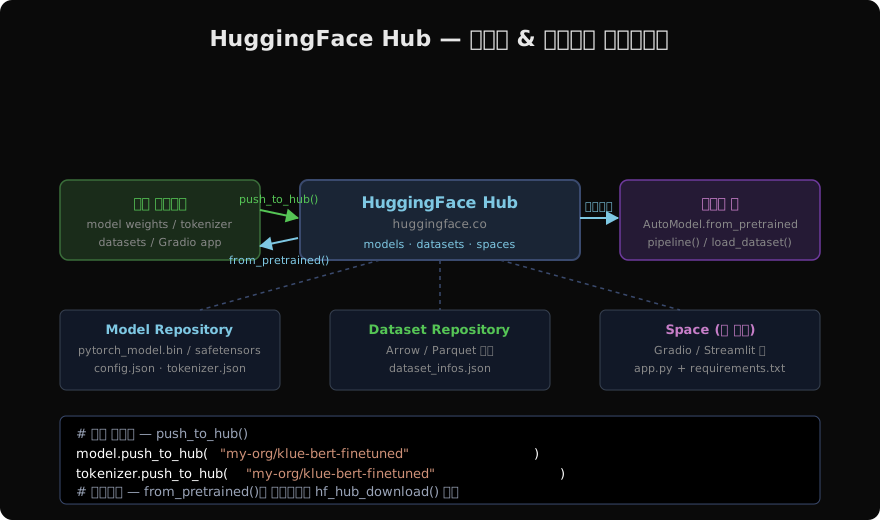
파인튜닝된 모델을 Hub에 올리는 가장 간단한 방법은 push_to_hub()다.
from transformers import AutoModelForSequenceClassification, AutoTokenizer

model     = AutoModelForSequenceClassification.from_pretrained("./my-model")
tokenizer = AutoTokenizer.from_pretrained("./my-model")

# 업로드 — 리포가 없으면 자동 생성
model.push_to_hub("my-username/klue-bert-sentiment")
tokenizer.push_to_hub("my-username/klue-bert-sentiment")
Trainer를 쓰는 경우 TrainingArguments에 push_to_hub=True를 주면 학습 완료 후 자동 업로드된다.
from transformers import TrainingArguments, Trainer

args = TrainingArguments(
    output_dir="./results",
    push_to_hub=True,
    hub_model_id="my-username/klue-bert-sentiment",
)
trainer = Trainer(model=model, args=args, ...)
trainer.train()
trainer.push_to_hub()   # 최종 체크포인트 업로드
파일 다운로드: hf_hub_download / snapshot_download
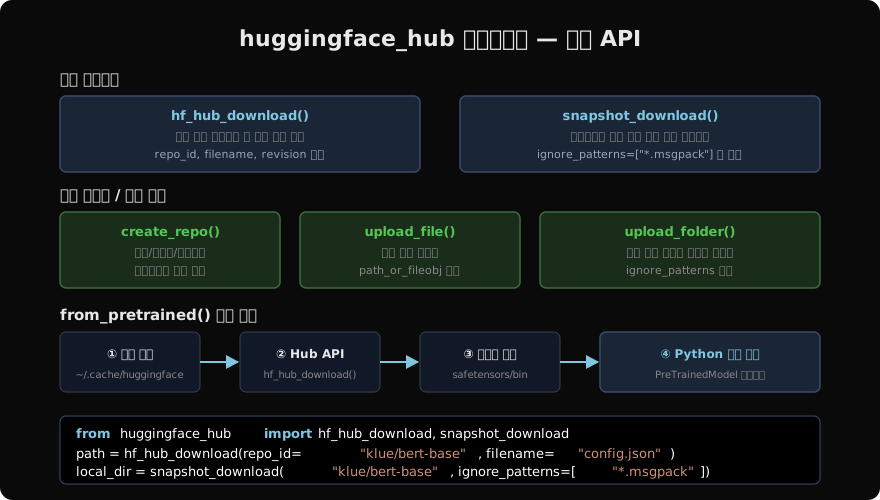
huggingface_hub 라이브러리는 단일 파일 또는 리포 전체를 다운로드하는 저수준 API를 제공한다.
from huggingface_hub import hf_hub_download, snapshot_download

# 단일 파일 — 로컬 캐시 경로 반환
config_path = hf_hub_download(
    repo_id="klue/bert-base",
    filename="config.json"
)
print(config_path)
# ~/.cache/huggingface/hub/models--klue--bert-base/snapshots/.../config.json

# 특정 revision (브랜치 / 커밋 해시)
weights_path = hf_hub_download(
    repo_id="klue/bert-base",
    filename="pytorch_model.bin",
    revision="main"
)

# 리포 전체 다운로드
local_dir = snapshot_download(
    repo_id="klue/bert-base",
    ignore_patterns=["*.msgpack", "flax_model*"]
)
from_pretrained()이 내부적으로 하는 일
AutoModel.from_pretrained("klue/bert-base")를 호출할 때 내부에서는 다음 흐름이 실행된다.
~/.cache/huggingface/hub/에 해당 리포+revision의 파일이 있는지 확인- 없으면
hf_hub_download()로config.json→tokenizer_config.json→ 가중치 파일 순서로 내려받음 config.json을 파싱해 모델 클래스 결정- 가중치를 로드해
PreTrainedModel인스턴스 반환
캐시가 있으면 네트워크 접근 없이 즉시 반환된다. 오프라인 환경에서는 HF_DATASETS_OFFLINE=1 환경변수를 설정하면 캐시만 사용한다.
리포지터리 직접 관리
HfApi 클래스로 리포 생성·파일 업로드·삭제 등을 프로그래밍 방식으로 제어할 수 있다.
from huggingface_hub import HfApi

api = HfApi()

# 리포 생성
api.create_repo(
    repo_id="my-username/my-model",
    repo_type="model",       # "dataset" | "space"
    private=True
)

# 단일 파일 업로드
api.upload_file(
    path_or_fileobj="./results/pytorch_model.bin",
    path_in_repo="pytorch_model.bin",
    repo_id="my-username/my-model"
)

# 폴더 통째로 업로드
api.upload_folder(
    folder_path="./results",
    repo_id="my-username/my-model",
    ignore_patterns=["*.log", "*.tmp"]
)

# 파일 목록 조회
files = api.list_repo_files("klue/bert-base")
print(list(files))
모델 카드 (README.md)
Hub 리포에 README.md를 올리면 자동으로 모델 카드로 표시된다. 프론트매터에 메타데이터를 작성하면 태스크·언어·라이선스 등이 검색 필터에 반영된다.
---
language:
  - ko
license: apache-2.0
tags:
  - text-classification
  - klue
datasets:
  - klue
metrics:
  - accuracy
---
# KLUE BERT Sentiment
KLUE 데이터셋으로 파인튜닝한 한국어 감성 분류 모델입니다.
## 사용법
```python
from transformers import pipeline
clf = pipeline("text-classification",
model="my-username/klue-bert-sentiment")
print(clf("이 영화 정말 재밌었어요"))성능
| 데이터셋 | Accuracy |
|---|---|
| KLUE-TC | 87.3% |
`huggingface_hub`의 `ModelCard` 클래스를 쓰면 프로그래밍 방식으로 카드를 생성할 수도 있다.

```python
from huggingface_hub import ModelCard

card = ModelCard.load("my-username/klue-bert-sentiment")
print(card.data.language)   # ['ko']

# 카드 수정 후 저장
card.text += "\n\n## 업데이트\n- 2026-05-28 최초 공개"
card.push_to_hub("my-username/klue-bert-sentiment")
Spaces: 웹 데모 배포
Spaces는 Gradio 또는 Streamlit 앱을 허브에서 바로 실행할 수 있는 무료 호스팅 환경이다.
Gradio 앱 예제
# app.py
import gradio as gr
from transformers import pipeline

clf = pipeline("text-classification",
               model="my-username/klue-bert-sentiment")

def predict(text):
    result = clf(text)[0]
    return f"{result['label']} ({result['score']:.2%})"

demo = gr.Interface(
    fn=predict,
    inputs=gr.Textbox(placeholder="한국어 텍스트를 입력하세요"),
    outputs="text",
    title="한국어 감성 분석"
)
demo.launch()
Spaces 리포의 구조는 다음과 같다.
my-username/klue-sentiment-demo/
├── app.py
├── requirements.txt
└── README.md   ← YAML 헤더에 sdk: gradio 명시
README.md 프론트매터에 sdk: gradio(또는 streamlit)를 지정하면 Hub가 자동으로 환경을 구성하고 앱을 실행한다.
---
title: 한국어 감성 분석 데모
emoji: 🎭
colorFrom: blue
colorTo: green
sdk: gradio
sdk_version: "4.0"
app_file: app.py
---
Spaces 업로드
api = HfApi()

# Space 생성
api.create_repo(
    repo_id="my-username/klue-sentiment-demo",
    repo_type="space",
    space_sdk="gradio"
)

# 앱 파일 업로드
api.upload_folder(
    folder_path="./demo",
    repo_id="my-username/klue-sentiment-demo",
    repo_type="space"
)
유용한 유틸리티
from huggingface_hub import list_models, model_info

# 허브에서 모델 검색
korean_models = list_models(language="ko", task="text-classification")
for m in korean_models:
    print(m.modelId, m.downloads)

# 특정 모델 정보 조회
info = model_info("klue/bert-base")
print(info.sha)          # 최신 커밋 해시
print(info.card_data)    # 모델 카드 메타데이터
print(info.siblings)     # 파일 목록
정리
| 작업 | API |
|---|---|
| 단일 파일 다운로드 | hf_hub_download(repo_id, filename) |
| 리포 전체 다운로드 | snapshot_download(repo_id) |
| 모델/토크나이저 업로드 | model.push_to_hub("user/repo") |
| 리포 생성 | HfApi().create_repo(repo_id, repo_type) |
| 폴더 업로드 | HfApi().upload_folder(folder_path, repo_id) |
| Spaces 배포 | create_repo(..., repo_type="space") |
다음 글에서는 Anthropic이 직접 개발한 Anthropic SDK로 Claude API를 호출하는 방법을 다룬다. 스트리밍, 도구 사용, 비전, 프롬프트 캐싱 등 Claude만의 고급 기능을 실전 코드로 살펴볼 예정이다.
지난 글: HuggingFace Datasets로 데이터 관리하기
다음 글: Anthropic SDK로 Claude API 활용하기
읽어주셔서 감사합니다. 😊