

지식
AI
llama.cpp 완전 가이드: CPU에서 LLM 추론하기
llama.cpp 빌드, GGUF 모델 다운로드, CLI 추론, llama-cpp-python Python 바인딩, OpenAI 호환 서버, 멀티모달 지원, 성능 최적화 옵션 완전 가이드.
지난 글에서 주요 추론 엔진을 비교했다. CPU나 VRAM이 적은 환경에서 LLM을 실행하는 선택지로 llama.cpp가 있다. Georgi Gerganov가 2023년 초 공개한 이 C++ 라이브러리는 GPU 없이도 LLM을 실행할 수 있게 해줬다. Apple Silicon의 Metal, NVIDIA CUDA, AMD ROCm, Vulkan 등 다양한 백엔드를 지원하며, 순수 CPU 추론에서도 SIMD 최적화로 합리적인 속도를 낸다.
빌드
git clone https://github.com/ggerganov/llama.cpp
cd llama.cpp

# 옵션 1: CPU 전용 (가장 단순)
cmake -B build
cmake --build build -j$(nproc)

# 옵션 2: NVIDIA CUDA
cmake -B build -DGGML_CUDA=ON
cmake --build build -j$(nproc)

# 옵션 3: Apple Metal (M1/M2/M3)
cmake -B build -DGGML_METAL=ON
cmake --build build -j$(nproc)

# 빌드 결과: build/bin/ 디렉토리에 실행 파일들
ls build/bin/
# llama-cli  llama-server  llama-bench  llama-quantize  ...
GGUF 모델 준비
Hugging Face에서 바로 다운로드한다.
pip install huggingface-hub

# Llama-3.1-8B Q4_K_M 다운로드 (4.6 GB)
huggingface-cli download \
  bartowski/Meta-Llama-3.1-8B-Instruct-GGUF \
  Meta-Llama-3.1-8B-Instruct-Q4_K_M.gguf \
  --local-dir ./models

# 더 작은 모델 (Phi-3.5 Mini: 2.2 GB)
huggingface-cli download \
  bartowski/Phi-3.5-mini-instruct-GGUF \
  Phi-3.5-mini-instruct-Q4_K_M.gguf \
  --local-dir ./models
CLI 추론
# 기본 추론 (CPU)
./build/bin/llama-cli \
  -m models/Meta-Llama-3.1-8B-Instruct-Q4_K_M.gguf \
  -p "한국의 전통 음식 5가지를 설명해줘" \
  -n 512

# GPU 오프로드 (전체 레이어를 GPU로)
./build/bin/llama-cli \
  -m models/Meta-Llama-3.1-8B-Instruct-Q4_K_M.gguf \
  -p "서울의 주요 관광지를 알려줘" \
  -n 512 \
  -ngl -1 \
  --temp 0.7 \
  --top-p 0.9

# 채팅 모드 (대화 형식)
./build/bin/llama-cli \
  -m models/Meta-Llama-3.1-8B-Instruct-Q4_K_M.gguf \
  --chat-template llama3 \
  -ngl -1 \
  -c 8192 \
  -i    # interactive 모드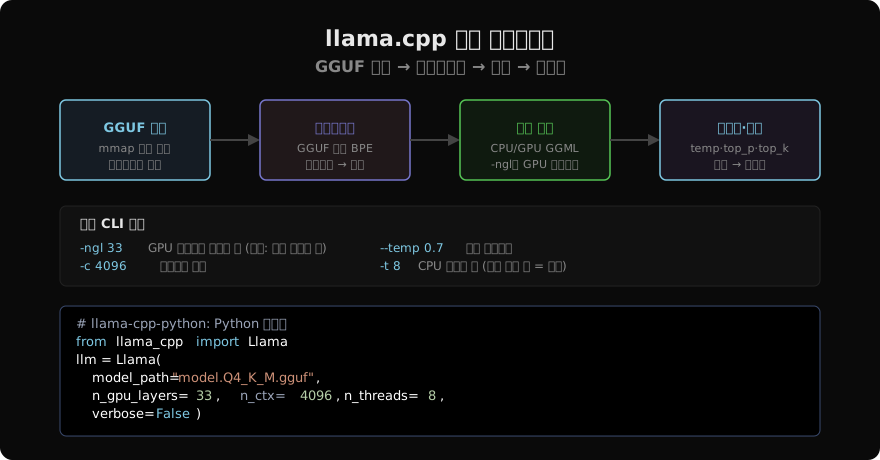
OpenAI 호환 서버 실행
llama-server는 OpenAI API 형식의 HTTP 서버를 제공한다.
./build/bin/llama-server \
  -m models/Meta-Llama-3.1-8B-Instruct-Q4_K_M.gguf \
  -ngl -1 \
  -c 8192 \
  --host 0.0.0.0 \
  --port 8080 \
  --parallel 4    # 최대 동시 요청 수
OpenAI 클라이언트로 연결한다.
from openai import OpenAI

client = OpenAI(
    base_url="http://localhost:8080/v1",
    api_key="not-needed",
)

response = client.chat.completions.create(
    model="not-needed",  # llama-server는 모델명 무시
    messages=[
        {"role": "system", "content": "당신은 친절한 AI 어시스턴트입니다."},
        {"role": "user", "content": "Python 람다 함수를 설명해줘"},
    ],
    max_tokens=400,
    temperature=0.7,
    stream=True,
)
for chunk in response:
    if chunk.choices[0].delta.content:
        print(chunk.choices[0].delta.content, end="", flush=True)
Python 바인딩: llama-cpp-python
llama-cpp-python은 llama.cpp를 Python에서 직접 사용할 수 있게 해주는 바인딩이다.
# CPU 전용 설치
pip install llama-cpp-python

# CUDA 지원
CMAKE_ARGS="-DGGML_CUDA=on" pip install llama-cpp-python --force-reinstall

# Metal 지원 (macOS)
CMAKE_ARGS="-DGGML_METAL=on" pip install llama-cpp-python --force-reinstall
from llama_cpp import Llama
llm = Llama(
model_path="models/Meta-Llama-3.1-8B-Instruct-Q4_K_M.gguf",
n_gpu_layers=-1, # -1 = 전체 GPU 오프로드
n_ctx=8192, # 컨텍스트 길이
n_batch=512, # 배치 크기 (프리필 속도에 영향)
n_threads=8, # CPU 스레드 수
flash_attn=True, # Flash Attention (CUDA/Metal만)
verbose=False,
)
# Chat Completion API (OpenAI 형식)
response = llm.create_chat_completion(
messages=[
{"role": "system", "content": "You are a helpful assistant."},
{"role": "user", "content": "비트코인을 쉽게 설명해줘"},
],
max_tokens=300,
temperature=0.8,
top_p=0.9,
stream=False,
)
print(response["choices"][0]["message"]["content"])스트리밍 응답:
for chunk in llm.create_chat_completion(
    messages=[{"role": "user", "content": "한국 경제를 요약해줘"}],
    max_tokens=500,
    stream=True,
):
    content = chunk["choices"][0]["delta"].get("content", "")
    if content:
        print(content, end="", flush=True)
print()
성능 최적화
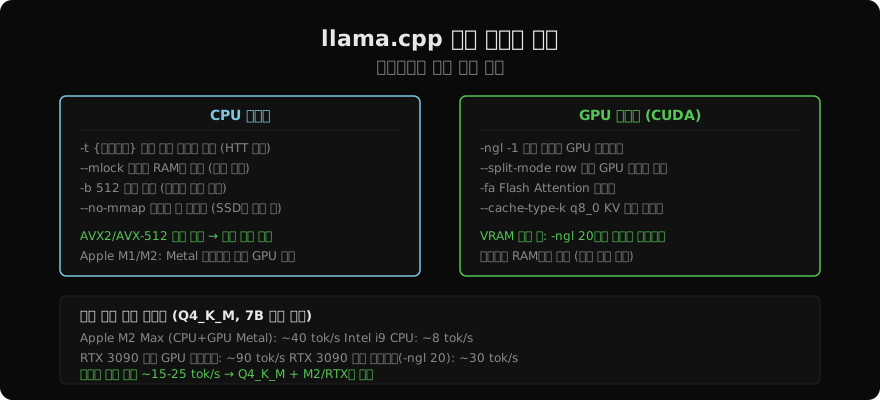
Hugging Face 모델에서 직접 변환
파인튜닝한 모델을 직접 GGUF로 변환할 수 있다.
# 변환 스크립트 의존성
pip install -r requirements.txt

# F16으로 변환
python convert_hf_to_gguf.py \
  ./my-finetuned-model/ \
  --outtype f16 \
  --outfile my-model-f16.gguf

# Q4_K_M으로 양자화
./build/bin/llama-quantize my-model-f16.gguf my-model-Q4_K_M.gguf Q4_K_M

# 품질 체크: 퍼플렉시티 측정
./build/bin/llama-perplexity \
  -m my-model-Q4_K_M.gguf \
  -f wikitext-2-raw/wiki.test.raw \
  --chunks 50
멀티모달: LLaVA와 moondream
llama.cpp는 멀티모달 모델도 지원한다.
# LLaVA 1.6으로 이미지 분석
./build/bin/llama-llava-cli \
  -m models/llava-1.6-mistral-7b-Q4_K_M.gguf \
  --mmproj models/llava-1.6-mistral-7b-mmproj.gguf \
  --image photo.jpg \
  -p "이 이미지에 무엇이 있나요?" \
  -ngl -1
from llama_cpp import Llama
from llama_cpp.llama_chat_format import Llava16ChatHandler
chat_handler = Llava16ChatHandler(
clip_model_path="models/llava-mmproj.gguf"
)
llm = Llama(
model_path="models/llava-7b-Q4_K_M.gguf",
chat_handler=chat_handler,
n_ctx=4096,
n_gpu_layers=-1,
)
response = llm.create_chat_completion(
messages=[{
"role": "user",
"content": [
{"type": "image_url", "image_url": {"url": "photo.jpg"}},
{"type": "text", "text": "이 사진을 설명해줘"},
],
}]
)
print(response["choices"][0]["message"]["content"])벤치마크 실행
# 추론 속도 측정
./build/bin/llama-bench \
  -m models/Meta-Llama-3.1-8B-Instruct-Q4_K_M.gguf \
  -ngl -1 \
  -p 512 \   # 프리필 토큰 수
  -n 128     # 생성 토큰 수
# 출력 예시:
# pp=512: 3847.12 ms (7.5 tok/s)
# tg=128: 2986.45 ms (42.8 tok/s)
정리
llama.cpp는 GPU 없이 LLM을 실행하는 가장 성숙한 방법이다.
- CPU 추론: AVX2/AVX-512 최적화로 합리적인 속도
- Apple Silicon: Metal 백엔드로 GPU 수준 성능
- 부분 GPU 오프로드: VRAM이 부족해도
-ngl로 일부만 GPU에 올리기 - GGUF + K-Quant: Q4_K_M이 크기·품질 균형의 최선
- 서버 모드: OpenAI 호환 API로 기존 애플리케이션 그대로 연결
다음 글에서는 llama.cpp 위에 친화적인 UI와 API를 씌운 Ollama를 다룬다.
지난 글: LLM 추론 엔진 완전 비교: vLLM·TGI·llama.cpp·Ollama
다음 글: Ollama 완전 가이드: 로컬 LLM을 가장 쉽게 실행하기
읽어주셔서 감사합니다. 😊