

TGI 완전 가이드: Hugging Face의 프로덕션급 LLM 서빙
Text Generation Inference(TGI)의 아키텍처, Continuous Batching·Flash Attention·Tensor Parallelism, Docker 배포, Python 클라이언트, 구조화 출력·투기적 디코딩 고급 옵션.
지난 글에서 개발 환경에 특화된 Ollama를 살펴봤다. 이번에는 Hugging Face가 만든 프로덕션 서빙 솔루션 TGI(Text Generation Inference)를 다룬다. HF Hub의 수천 개 모델을 Docker 한 줄로 서빙할 수 있고, Flash Attention·Continuous Batching·Tensor Parallelism이 기본 내장되어 있다. HF Inference Endpoints 서비스의 엔진이기도 하다.
TGI 아키텍처
TGI는 고성능 Rust 라우터와 Python GPU 워커의 조합이다.
Rust 라우터: HTTP 요청 수신, 입력 검증, Server-Sent Events(SSE) 스트리밍 전송을 담당한다. 비동기 처리로 수천 개의 동시 연결을 처리할 수 있다.
Scheduler: Continuous Batching 로직을 담당한다. 각 Forward Pass(iteration)마다 완료된 요청을 제거하고 대기 중인 요청을 추가한다.
GPU Worker: PyTorch 기반으로 실제 추론을 수행한다. Flash Attention, 양자화 커널, Tensor Parallelism 샤딩이 여기서 실행된다.
# Hugging Face 토큰 설정 (게이트 모델에 필요)
export HUGGING_FACE_HUB_TOKEN="hf_..."

# 기본 실행 (Docker)
docker run --gpus all \
  -e HUGGING_FACE_HUB_TOKEN=$HUGGING_FACE_HUB_TOKEN \
  -p 8080:80 \
  -v ~/.cache/huggingface:/root/.cache/huggingface \
  ghcr.io/huggingface/text-generation-inference:latest \
  --model-id meta-llama/Llama-3.1-8B-Instruct \
  --max-input-length 4096 \
  --max-total-tokens 8192 \
  --max-batch-prefill-tokens 8192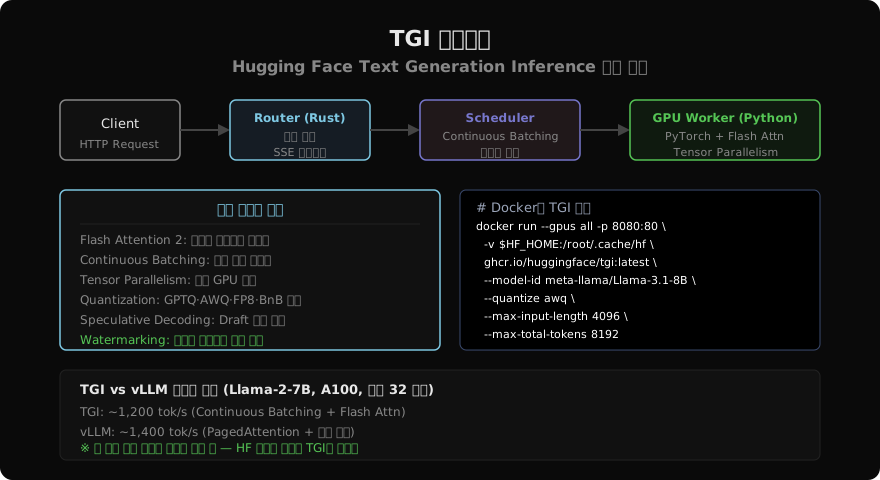
주요 실행 옵션
docker run --gpus all -p 8080:80 \
  -v $HF_HOME:/root/.cache/huggingface \
  ghcr.io/huggingface/text-generation-inference:latest \
  --model-id meta-llama/Llama-3.1-70B-Instruct \
  --num-shard 4 \                  # 4 GPU Tensor Parallelism
  --quantize awq \                 # AWQ 4비트 양자화
  --max-input-length 8192 \
  --max-total-tokens 16384 \
  --max-batch-total-tokens 65536 \ # 배치 전체 최대 토큰
  --speculate 3 \                  # 투기적 디코딩 (K=3)
  --hostname 0.0.0.0 \
  --port 80
지원 양자화 옵션: awq, gptq, eetq(INT8), fp8, bitsandbytes(NF4)
Python 클라이언트
from huggingface_hub import InferenceClient

client = InferenceClient(model="http://localhost:8080")

# 단순 텍스트 생성
text = client.text_generation(
    "Python의 asyncio 이벤트 루프를 설명해줘",
    max_new_tokens=300,
    temperature=0.7,
    top_p=0.9,
    repetition_penalty=1.05,
)
print(text)

# 스트리밍
for token in client.text_generation(
    "한국 경제의 특징을 설명해줘",
    max_new_tokens=400,
    stream=True,
):
    print(token, end="", flush=True)
print()

# Chat Completion API (OpenAI 호환)
response = client.chat_completion(
    messages=[
        {"role": "system", "content": "You are a helpful assistant."},
        {"role": "user", "content": "머신러닝과 딥러닝의 차이는?"},
    ],
    max_tokens=300,
    stream=False,
)
print(response.choices[0].message.content)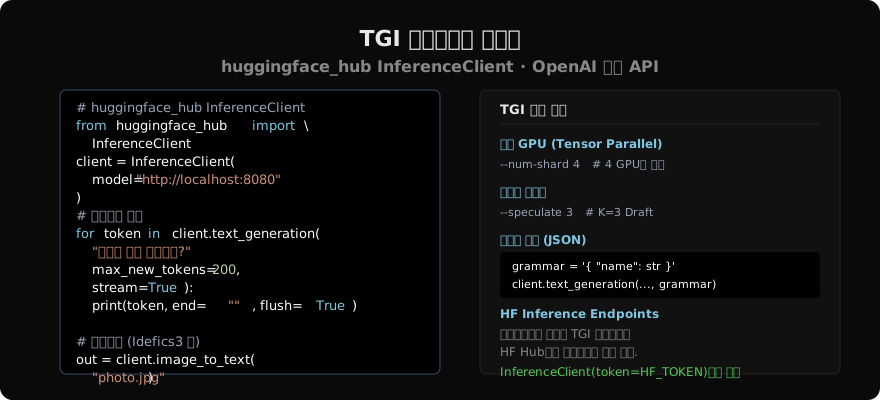
HF Inference Endpoints: 클라우드 서빙
직접 서버를 관리하기 싫다면 HF Inference Endpoints가 답이다. HF Hub에서 클릭 몇 번으로 TGI 인스턴스를 클라우드에 배포한다.
from huggingface_hub import InferenceClient

# HF Inference Endpoint URL로 연결
client = InferenceClient(
    model="https://xxx.us-east-1.aws.endpoints.huggingface.cloud",
    token="hf_...",
)

response = client.text_generation(
    "Explain transformer architecture",
    max_new_tokens=200,
)
print(response)
구조화 출력 (Grammar Constraints)
TGI는 JSON Schema나 Regex로 출력 형식을 강제할 수 있다.
import json

# JSON Schema로 출력 형식 강제
schema = {
    "type": "object",
    "properties": {
        "name": {"type": "string"},
        "age": {"type": "integer"},
        "city": {"type": "string"},
    },
    "required": ["name", "age", "city"],
}

result = client.text_generation(
    "다음 텍스트에서 정보를 추출: 김민수(32세)는 부산에 삽니다.",
    grammar={"type": "json", "value": schema},
    max_new_tokens=100,
)
parsed = json.loads(result)
print(parsed)  # {"name": "김민수", "age": 32, "city": "부산"}
멀티모달: IDEFICS와 LLaVA
TGI는 멀티모달 모델도 지원한다.
from huggingface_hub import InferenceClient

client = InferenceClient(model="http://localhost:8080")

# 이미지 + 텍스트 입력
import base64
with open("diagram.png", "rb") as f:
    img_b64 = base64.b64encode(f.read()).decode()

result = client.chat_completion(
    messages=[{
        "role": "user",
        "content": [
            {"type": "image_url", "image_url": {"url": f"data:image/png;base64,{img_b64}"}},
            {"type": "text", "text": "이 다이어그램을 설명해줘"},
        ],
    }],
    max_tokens=300,
)
print(result.choices[0].message.content)
Tensor Parallelism으로 대형 모델 실행
70B 모델을 멀티 GPU에 샤딩하는 방법이다.
# 4 GPU A100으로 Llama-3.1-70B 실행
docker run --gpus '"device=0,1,2,3"' \
  -p 8080:80 \
  -v $HF_HOME:/root/.cache/huggingface \
  ghcr.io/huggingface/text-generation-inference:latest \
  --model-id meta-llama/Llama-3.1-70B-Instruct \
  --num-shard 4 \
  --max-input-length 8192 \
  --max-total-tokens 16384
# Python에서 대형 모델 성능 벤치마크
import time
prompts = ["Python은 어떤 언어인가요?"] * 32
start = time.time()
results = []
for p in prompts:
r = client.text_generation(p, max_new_tokens=100)
results.append(r)
elapsed = time.time() - start
total_tokens = sum(len(r.split()) for r in results)
print(f"총 시간: {elapsed:.1f}s, 처리량: {total_tokens/elapsed:.0f} tok/s")TGI vs vLLM 선택 기준
TGI를 선택해야 할 때:
- HF Hub 모델을 바로 배포하고 싶을 때
- HF Inference Endpoints의 관리형 서비스를 쓸 때
huggingface_hub생태계와 깊이 통합된 코드가 있을 때- 구조화 출력(Grammar Constraints)이 중요할 때
vLLM을 선택해야 할 때:
- OpenAI API 호환성이 최우선일 때
- 처리량 극대화가 필요할 때
- AWQ·GPTQ 로드가 더 단순한 환경에서
두 엔진 모두 활발히 개발 중이며 성능 차이가 계속 줄어들고 있다. 팀의 기존 스택에 맞는 쪽을 선택하는 것이 합리적이다.
지난 글: Ollama 완전 가이드: 로컬 LLM을 가장 쉽게 실행하기
다음 글: LLM 추론 배치 전략: Continuous Batching과 PagedAttention 완전 해설
읽어주셔서 감사합니다. 😊