

AsynchronousFileChannel — 비동기 파일 I/O
Java AsynchronousFileChannel 완전 가이드 — CompletionHandler 콜백, Future 기반 읽기/쓰기, 병렬 오프셋 접근, AsynchronousChannelGroup, CompletableFuture 연계
지난 글에서 파일 시스템 변경을 감시하는 WatchService를 다뤘다. 이번에는 파일 I/O 자체를 비동기로 수행하는 AsynchronousFileChannel을 정리한다. 읽기·쓰기 완료를 기다리지 않고 다른 작업을 계속하다가 완료 시 콜백 또는 Future로 결과를 받는 패턴이다.
왜 비동기 파일 I/O인가
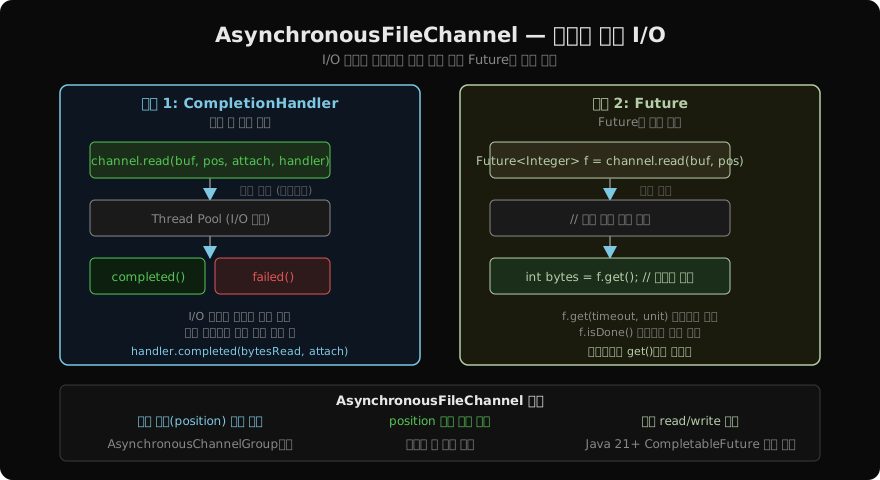
FileChannel의 read()는 블로킹이다 — 스레드는 OS가 디스크에서 데이터를 읽어올 때까지 잠든다. 대량 파일을 처리하는 서버에서 스레드 블로킹은 응답 지연의 주원인이 된다. AsynchronousFileChannel은 I/O 요청만 던지고 즉시 반환한다. 실제 읽기는 OS I/O 스레드 풀이 처리하고, 완료되면 두 가지 방법으로 결과를 전달받는다.
채널 열기
import java.nio.channels.AsynchronousFileChannel;
import static java.nio.file.StandardOpenOption.*;

Path path = Path.of("large-file.dat");

// 기본 (기본 스레드 풀 사용)
AsynchronousFileChannel afc = AsynchronousFileChannel.open(path, READ);

// 커스텀 ExecutorService로 스레드 풀 지정
ExecutorService pool = Executors.newFixedThreadPool(4);
AsynchronousFileChannel afc2 = AsynchronousFileChannel.open(
path, Set.of(READ), pool);AsynchronousFileChannel도 AutoCloseable이므로 try-with-resources를 사용한다.
패턴 1: CompletionHandler 콜백
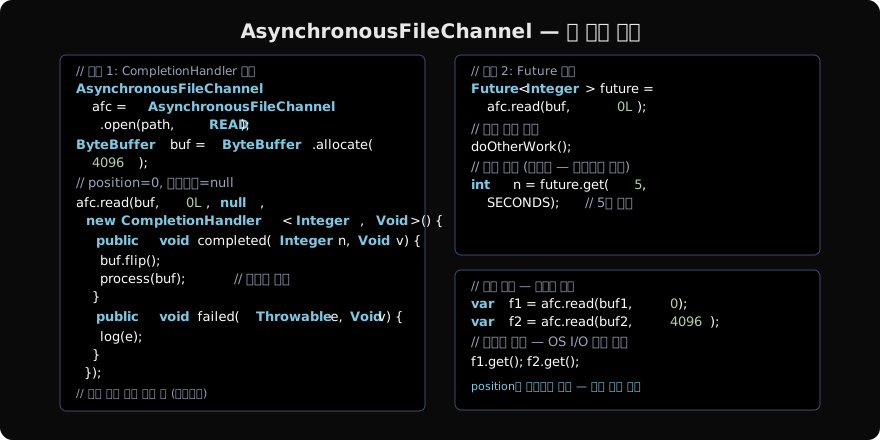
I/O가 완료되면 OS I/O 스레드가 handler.completed() 또는 handler.failed()를 호출한다.
ByteBuffer buf = ByteBuffer.allocate(4096);

afc.read(buf, 0L, null, new CompletionHandler<Integer, Void>() {
    @Override
    public void completed(Integer bytesRead, Void attach) {
        if (bytesRead == -1) return; // EOF
        buf.flip();
        byte[] data = new byte[buf.remaining()];
        buf.get(data);
        System.out.println("읽은 바이트: " + bytesRead);
    }

    @Override
    public void failed(Throwable exc, Void attach) {
        System.err.println("읽기 실패: " + exc.getMessage());
    }
});

// read() 반환 직후 이 코드가 실행됨 (비동기)
System.out.println("read() 호출 완료 — I/O는 백그라운드 진행 중");
세 번째 인자 attach는 첨부 객체다. 콜백에서 채널 상태나 컨텍스트를 전달할 때 사용한다.
패턴 2: Future
read(buf, position) (2인자 오버로드)는 Future<Integer>를 반환한다. future.get()에서 결과가 준비될 때까지 블로킹한다.
ByteBuffer buf = ByteBuffer.allocate(4096);
Future<Integer> future = afc.read(buf, 0L);

// 결과를 기다리는 동안 다른 작업 수행 가능
doSomethingElse();

// 결과 대기 (타임아웃 권장)
try {
    int bytesRead = future.get(10, TimeUnit.SECONDS);
    if (bytesRead != -1) {
        buf.flip();
        process(buf);
    }
} catch (TimeoutException e) {
    future.cancel(true);
}future.isDone()으로 완료 여부를 비블로킹으로 확인할 수 있다.
병렬 읽기 — 오프셋 기반
FileChannel과 달리 AsynchronousFileChannel은 내부 position이 없다. 모든 읽기/쓰기에 오프셋을 명시하므로 여러 호출을 동시에 발행할 수 있다.
long fileSize = afc.size();
int chunkSize = 4096;
int numChunks = (int) Math.ceil((double) fileSize / chunkSize);

List<Future<Integer>> futures = new ArrayList<>();
List<ByteBuffer> buffers = new ArrayList<>();

for (int i = 0; i < numChunks; i++) {
    ByteBuffer buf = ByteBuffer.allocate(chunkSize);
    buffers.add(buf);
    futures.add(afc.read(buf, (long) i * chunkSize));
}

// 모든 청크 완료 대기
for (int i = 0; i < futures.size(); i++) {
    int n = futures.get(i).get();
    if (n > 0) {
        buffers.get(i).flip();
        processChunk(i, buffers.get(i));
    }
}
OS가 내부적으로 I/O를 병렬화할 수 있어 순차 읽기보다 빠를 수 있다 (SSD NVMe에서 특히).
비동기 쓰기
byte[] content = "Hello, NIO!".getBytes(StandardCharsets.UTF_8);
ByteBuffer buf = ByteBuffer.wrap(content);

try (AsynchronousFileChannel wfc = AsynchronousFileChannel.open(
        out, WRITE, CREATE, TRUNCATE_EXISTING)) {

    Future<Integer> fw = wfc.write(buf, 0L);
    int written = fw.get();
    System.out.println("쓴 바이트: " + written);
}
CompletableFuture와 연계
Java 8+ 코드에서는 CompletionHandler를 CompletableFuture로 변환해 체이닝할 수 있다.
public static CompletableFuture<ByteBuffer> readAsync(
        AsynchronousFileChannel ch, long pos, int size) {
    CompletableFuture<ByteBuffer> cf = new CompletableFuture<>();
    ByteBuffer buf = ByteBuffer.allocate(size);
    ch.read(buf, pos, buf, new CompletionHandler<>() {
        @Override
        public void completed(Integer n, ByteBuffer b) {
            b.flip();
            cf.complete(b);
        }
        @Override
        public void failed(Throwable e, ByteBuffer b) {
            cf.completeExceptionally(e);
        }
    });
    return cf;
}

// 사용
readAsync(afc, 0, 4096)
    .thenApply(buf -> new String(buf.array(), StandardCharsets.UTF_8))
    .thenAccept(System.out::println)
    .exceptionally(e -> { e.printStackTrace(); return null; });
AsynchronousChannelGroup — 스레드 풀 공유
여러 AsynchronousFileChannel이 같은 I/O 스레드 풀을 공유하게 하려면 AsynchronousChannelGroup을 사용한다.
AsynchronousChannelGroup group = AsynchronousChannelGroup.withThreadPool(
    Executors.newFixedThreadPool(8));

AsynchronousFileChannel ch1 = AsynchronousFileChannel.open(
    path1, Set.of(READ), group.executor());
AsynchronousFileChannel ch2 = AsynchronousFileChannel.open(
    path2, Set.of(READ), group.executor());

// 종료 시
group.shutdown();
group.awaitTermination(10, TimeUnit.SECONDS);
주의사항
- CompletionHandler는 I/O 스레드에서 실행된다 — 장시간 작업하면 I/O 스레드 풀을 고갈시킨다. 무거운 처리는 별도 풀로 위임한다.
- ByteBuffer는 완료 전 재사용 금지 — 읽기 완료 전에 같은 버퍼를 다른 읽기에 쓰면 데이터가 섞인다.
- cancel()은 베스트 에포트 — OS I/O가 이미 진행 중이면 취소가 반영되지 않을 수 있다.
FileChannel vs AsynchronousFileChannel
| 기준 | FileChannel | AsynchronousFileChannel |
|---|---|---|
| I/O 방식 | 동기 블로킹 | 비동기 논블로킹 |
| position 관리 | 채널 내부 | 호출마다 명시 |
| transferTo/From | 지원 | 미지원 |
| 병렬 읽기 | 제한적 | 자연스럽게 지원 |
| 적합 상황 | 단순 순차 처리 | 고처리량 서버, 병렬 I/O |
핵심 정리
afc.read(buf, pos)= Future 패턴,afc.read(buf, pos, attach, handler)= 콜백 패턴- 오프셋(position)은 호출마다 명시 — 내부 position 없음
- 병렬 read 요청 동시 발행 → OS가 I/O 병렬화
- CompletionHandler는 I/O 풀 스레드에서 실행 — 블로킹 금지
CompletableFuture래퍼로 체이닝 가능
지난 글: WatchService — 디렉터리 변경 감시
다음 글: Java 직렬화 — 객체를 바이트로
읽어주셔서 감사합니다. 😊
PALDYN / ARTICLE AI
글의 개념, 수식, 코드에 대해 물어보세요.
질문과 관련된 문단을 골라 답변의 문맥으로 사용합니다.생각 중 · 0초