

Files 클래스 — 파일 시스템 조작 완전 가이드
Java Files 클래스 완전 가이드 — readString/writeString, readAllBytes, copy/move/delete, createDirectories, walk/list 디렉터리 탐색, Path vs File 비교, StandardOpenOption 활용
지난 글에서 BufferedReader/BufferedWriter의 버퍼링 동작 원리와 활용법을 살펴봤다. 이번에는 Java 7에서 도입된 java.nio.file.Files 유틸리티 클래스를 총정리한다. 파일 읽기/쓰기부터 디렉터리 탐색까지 현대 Java의 파일 조작 API를 완전히 이해한다.
Files가 필요한 이유
Java 7 이전의 java.io.File 클래스는 설계 결함이 많았다. delete()가 실패해도 false만 반환하고 이유를 알 수 없었고, 경로 구성이 비직관적이었다. Files와 Path는 이런 문제를 해결하기 위해 설계된 현대적 파일 API다.
파일 읽기
// 전체 파일을 문자열로 (Java 11+, 소형 파일)
String content = Files.readString(Path.of("config.txt"), StandardCharsets.UTF_8);

// 전체 파일을 바이트 배열로
byte[] data = Files.readAllBytes(Path.of("image.png"));

// 줄 단위 리스트 (주의: 전체 내용을 메모리에 올림)
List<String> lines = Files.readAllLines(Path.of("data.txt"), StandardCharsets.UTF_8);

// 대용량 파일 스트림 처리 (lazy — 권장)
try (Stream<String> stream = Files.lines(Path.of("large.log"), StandardCharsets.UTF_8)) {
    long errorCount = stream
        .filter(line -> line.contains("ERROR"))
        .count();
}주의: readAllBytes()와 readAllLines()는 파일 전체를 메모리에 올린다. 수 MB 이상 파일은 Files.lines()의 lazy 스트림을 사용한다.
파일 쓰기
// 문자열 쓰기 (Java 11+)
Files.writeString(Path.of("output.txt"), "내용", StandardCharsets.UTF_8);

// 바이트 배열 쓰기
Files.write(Path.of("data.bin"), byteArray);

// 여러 줄 쓰기
List<String> lines = List.of("첫째 줄", "둘째 줄", "셋째 줄");
Files.write(Path.of("list.txt"), lines, StandardCharsets.UTF_8);

// 추가 모드
Files.writeString(
    Path.of("log.txt"),
    "새 로그 항목\n",
    StandardCharsets.UTF_8,
    StandardOpenOption.APPEND,
    StandardOpenOption.CREATE // 없으면 생성
);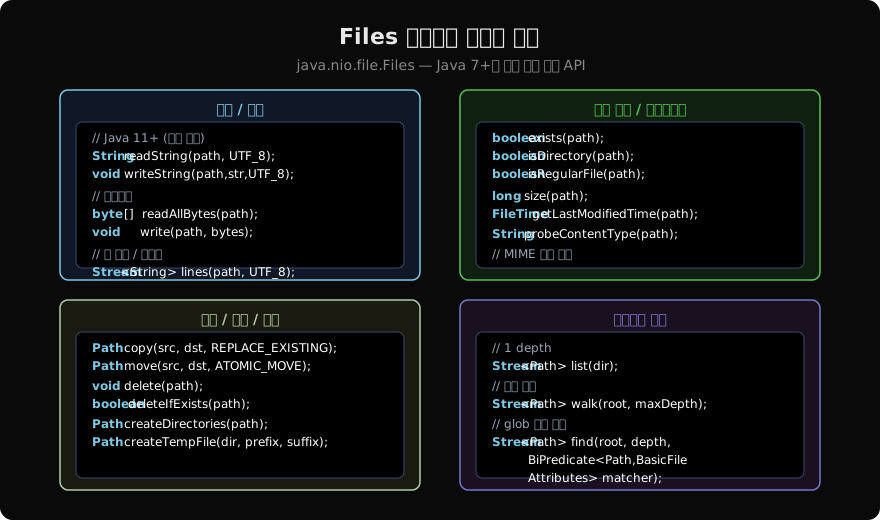
파일/디렉터리 조작
Path src = Path.of("original.txt");
Path dst = Path.of("backup/original.txt");

// 복사 (기본은 기존 파일 있으면 예외)
Files.copy(src, dst);
Files.copy(src, dst, StandardCopyOption.REPLACE_EXISTING);

// 스트림에서 파일로 복사
try (InputStream is = url.openStream()) {
    Files.copy(is, Path.of("download.zip"), StandardCopyOption.REPLACE_EXISTING);
}

// 이동/이름 변경
Files.move(src, dst, StandardCopyOption.ATOMIC_MOVE); // 원자적 이동 (같은 파티션)

// 삭제
Files.delete(Path.of("temp.txt"));           // 없으면 NoSuchFileException
Files.deleteIfExists(Path.of("temp.txt"));   // 없으면 false 반환

// 디렉터리 생성
Files.createDirectories(Path.of("a/b/c/d")); // 중간 경로도 생성
Files.createTempFile(Path.of("/tmp"), "app-", ".tmp"); // 임시 파일
메타데이터 조회
Path path = Path.of("data.json");

boolean exists  = Files.exists(path);
boolean isDir   = Files.isDirectory(path);
boolean isFile  = Files.isRegularFile(path);
boolean canRead = Files.isReadable(path);
long size       = Files.size(path); // 바이트 단위

FileTime lastModified = Files.getLastModifiedTime(path);
Instant instant = lastModified.toInstant();

// 파일 속성 전체 조회
BasicFileAttributes attrs = Files.readAttributes(path, BasicFileAttributes.class);
System.out.println(attrs.creationTime());
System.out.println(attrs.isSymbolicLink());
디렉터리 탐색 — list, walk, find
// 1 depth — 디렉터리 직속 항목만
try (Stream<Path> entries = Files.list(Path.of("/home/user/docs"))) {
    entries.filter(Files::isRegularFile)
           .forEach(System.out::println);
}

// 재귀 탐색 — walk
try (Stream<Path> tree = Files.walk(Path.of("/home/user"), 5)) { // 최대 5 depth
    List<Path> javaFiles = tree
        .filter(p -> p.toString().endsWith(".java"))
        .collect(Collectors.toList());
}

// 조건 기반 탐색 — find (가장 유연)
try (Stream<Path> found = Files.find(
        Path.of("/home/user"),
        Integer.MAX_VALUE,
        (path, attrs) -> attrs.isRegularFile() && attrs.size() > 1_000_000)) {
    found.forEach(p -> System.out.println(p + ": " + p.toFile().length() / 1024 + " KB"));
}중요: list(), walk(), find() 모두 Stream을 반환하므로 반드시 try-with-resources로 닫아야 한다. 디렉터리 파일 핸들이 유지되기 때문이다.
Path vs File
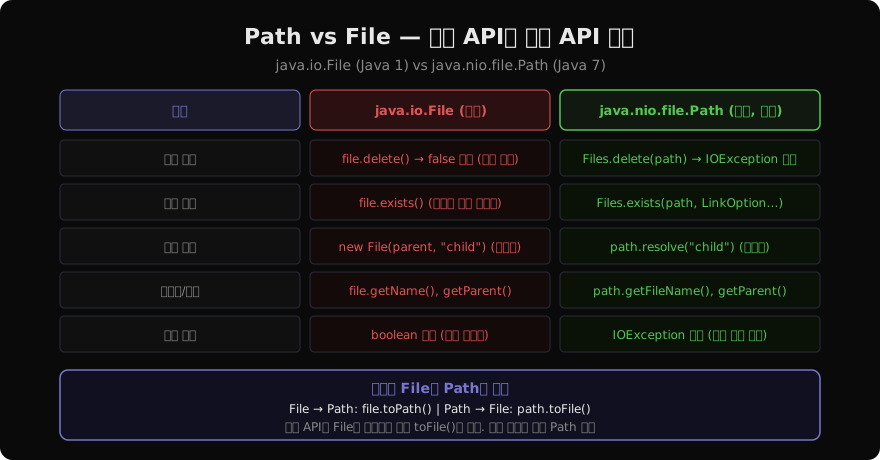
// ❌ 구식 File — 실패 이유를 모름
File file = new File("data.txt");
if (!file.delete()) {
    System.out.println("삭제 실패"); // 왜 실패했는지 모름
}

// ✅ 현대 Path + Files — 명확한 예외
try {
    Files.delete(Path.of("data.txt"));
} catch (NoSuchFileException e) {
    // 파일이 없음
} catch (DirectoryNotEmptyException e) {
    // 빈 디렉터리가 아님
} catch (IOException e) {
    // 권한 오류 등
}

// 상호 변환
File oldFile = new File("data.txt");
Path path = oldFile.toPath();  // File → Path
File backToFile = path.toFile(); // Path → File
Path 경로 조작
Path p = Path.of("/home/user/docs/report.txt");

p.getFileName();      // report.txt
p.getParent();        // /home/user/docs
p.getRoot();          // /
p.getNameCount();     // 4 (home, user, docs, report.txt)
p.getName(2);         // docs (0-indexed)

// 경로 결합
Path base = Path.of("/home/user");
Path full = base.resolve("docs/report.txt"); // /home/user/docs/report.txt

// 상대 경로 계산
Path from = Path.of("/home/user/docs");
Path to   = Path.of("/home/user/photos");
Path rel  = from.relativize(to); // ../photos

// 정규화 (.. 제거)
Path messy = Path.of("/home/user/../user/./docs");
Path clean  = messy.normalize(); // /home/user/docs

// 절대 경로로 변환
Path abs = Path.of("docs/report.txt").toAbsolutePath();
StandardOpenOption — 파일 열기 옵션
| 옵션 | 설명 |
|---|---|
READ | 읽기 모드 |
WRITE | 쓰기 모드 |
CREATE | 없으면 생성 |
CREATE_NEW | 이미 있으면 실패 |
APPEND | 기존 파일에 이어쓰기 |
TRUNCATE_EXISTING | 기존 내용 삭제 후 쓰기 (기본) |
SYNC | 쓰기마다 디스크 동기화 |
// 파일 없으면 생성, 있으면 이어쓰기
try (BufferedWriter bw = Files.newBufferedWriter(
        Path.of("log.txt"),
        StandardCharsets.UTF_8,
        StandardOpenOption.CREATE,
        StandardOpenOption.APPEND)) {
    bw.write(LocalDateTime.now() + " - 이벤트 발생\n");
}
요약 — Files 클래스 사용 지침
- 텍스트 파일 전체 읽기/쓰기 →
Files.readString()/Files.writeString()(Java 11+) - 줄 단위 대용량 처리 →
Files.lines()(lazy Stream) - 복사/이동/삭제 →
Files.copy(),Files.move(),Files.delete() - 디렉터리 재귀 탐색 →
Files.walk()(try-with-resources 필수) - 조건 탐색 →
Files.find() - 레거시
File대신 →Path.of()+Files유틸리티
지난 글: BufferedReader/Writer — 버퍼링 IO와 줄 단위 처리
다음 글: Path API — 경로 표현의 표준
읽어주셔서 감사합니다. 😊
PALDYN / ARTICLE AI
글의 개념, 수식, 코드에 대해 물어보세요.
질문과 관련된 문단을 골라 답변의 문맥으로 사용합니다.생각 중 · 0초