

배열과 문자열의 .at() 메서드
ES2022에서 도입된 .at() 메서드로 배열·문자열·TypedArray에서 양수와 음수 인덱스를 모두 사용해 요소에 접근하는 방법을 설명합니다.
지난 글에서 WeakRef와 FinalizationRegistry를 살펴봤습니다. 이번에는 ES2022에서 추가된 .at() 메서드를 다룹니다. 단순하지만, 오랫동안 JavaScript 개발자들이 불편해하던 음수 인덱스로 마지막 요소 접근하기를 깔끔하게 해결합니다.
음수 인덱스의 필요성
배열의 마지막 요소를 가져오려면 전통적으로 arr[arr.length - 1]이라는 장황한 표현을 써야 했습니다. 메서드 체이닝 중에는 더욱 불편합니다.
const scores = [42, 87, 91, 63, 78];

// 기존 방식
const last = scores[scores.length - 1]; // 78

// .at() 사용
const last2 = scores.at(-1); // 78.at()은 Python의 음수 인덱싱과 비슷한 개념으로, 배열 끝에서부터 역방향으로 계산합니다.
동작 방식
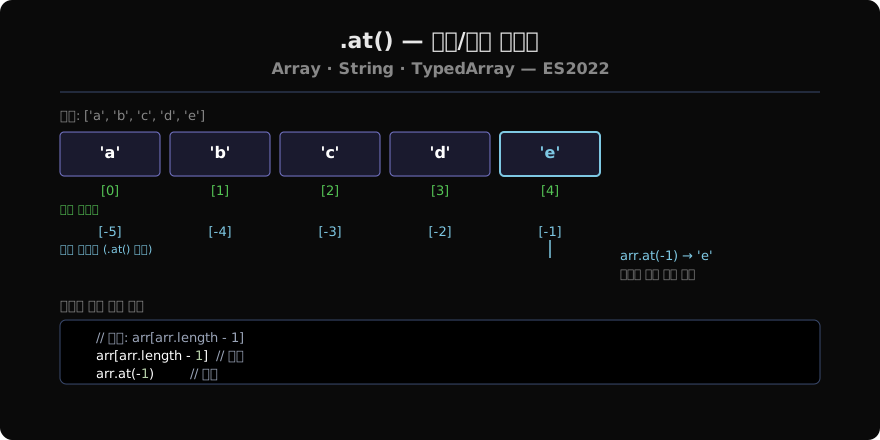
양수 인덱스는 arr[i]와 동일하게 작동합니다. 음수 인덱스 n은 내부적으로 arr[arr.length + n]으로 변환됩니다.
at(0)→ 첫 번째 요소at(-1)→ 마지막 요소at(-2)→ 뒤에서 두 번째- 범위를 벗어나면
undefined반환(에러 없음)
배열·문자열·TypedArray 모두 지원
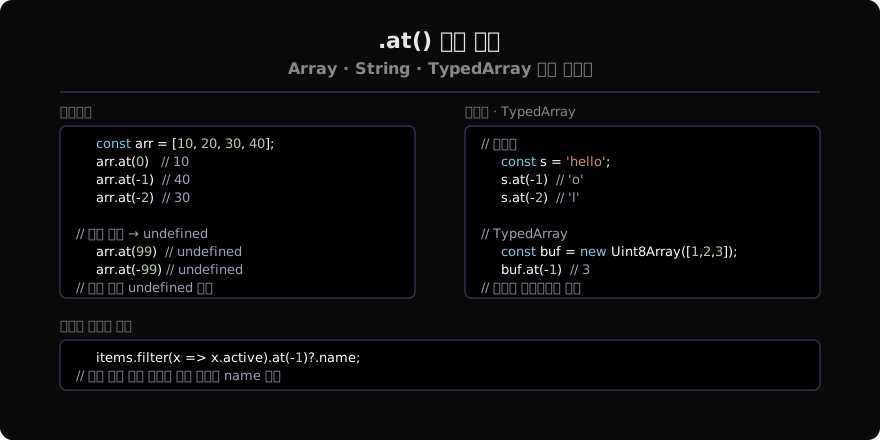
.at()은 Array.prototype, String.prototype, TypedArray.prototype 모두에 추가되어 동일한 인터페이스를 제공합니다.
// Array
[1, 2, 3].at(-1);    // 3

// String
'hello'.at(-1);      // 'o'
'hello'.at(-3);      // 'l'

// Uint8Array
new Uint8Array([10, 20, 30]).at(-1); // 30
메서드 체이닝에서의 장점
.at()의 진가는 체이닝 중간에서 드러납니다.
const users = [
  { name: 'Alice', active: true },
  { name: 'Bob', active: false },
  { name: 'Carol', active: true },
];

// 기존 방식 — 임시 변수 필요
const active = users.filter(u => u.active);
const lastActive = active[active.length - 1]; // Carol

// .at() 방식 — 한 줄로
const lastActive2 = users.filter(u => u.active).at(-1); // Carol
arr[arr.length - 1] vs .at(-1)
두 방식은 대부분 동일하게 동작하지만 미묘한 차이가 있습니다.
const arr = [1, 2, 3];

// 인덱스 표기는 NaN을 0으로 처리
arr[undefined - 1]; // arr[NaN] → undefined
arr.at(undefined);  // at(0) → 1  ← 주의

// 범위 초과 처리
arr[100];    // undefined
arr.at(100); // undefined ← 동일at(undefined)는 at(0)으로 처리되는 점을 주의해야 합니다. 인자를 변수로 넘길 때는 undefined가 들어가지 않도록 검증하는 것이 좋습니다.
지원 환경
Chrome 92+, Firefox 90+, Safari 15.4+, Node.js 16.6+에서 지원됩니다. 레거시 환경을 위한 폴리필은 간단하게 작성할 수 있습니다.
if (!Array.prototype.at) {
  Array.prototype.at = function(n) {
    n = Math.trunc(n) || 0;
    if (n < 0) n += this.length;
    if (n < 0 || n >= this.length) return undefined;
    return this[n];
  };
}
지난 글: WeakRef와 FinalizationRegistry
다음 글: Object.hasOwn()
읽어주셔서 감사합니다. 😊
PALDYN / ARTICLE AI
글의 개념, 수식, 코드에 대해 물어보세요.
질문과 관련된 문단을 골라 답변의 문맥으로 사용합니다.생각 중 · 0초