

비동기 이터러블과 for await...of
Symbol.asyncIterator와 async generator를 사용해 비동기 데이터 스트림을 우아하게 순회하는 방법과 실용적인 패턴을 소개합니다.
지난 글에서 동기 이터러블을 커스터마이징하는 방법을 살펴봤습니다. 이번 글에서는 비동기 이터러블을 다룹니다. 네트워크 응답, 파일 스트림, 이벤트 큐처럼 값이 비동기로 도착하는 데이터 소스를 순회할 때 필수적입니다.
비동기 이터러블 프로토콜
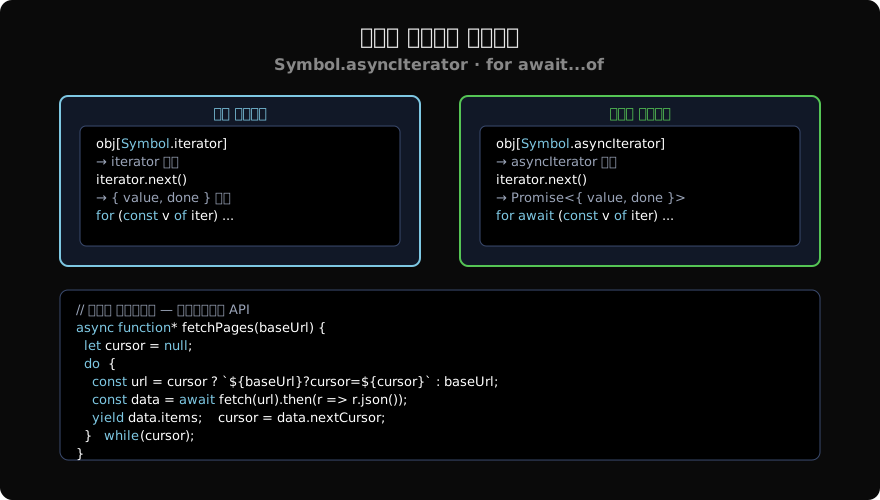
비동기 이터러블은 [Symbol.asyncIterator]() 메서드를 가지며, 이 메서드는 비동기 이터레이터를 반환합니다. 비동기 이터레이터의 next()는 IteratorResult가 아닌 Promise<IteratorResult>를 반환합니다.
const asyncIterable = {
  [Symbol.asyncIterator]() {
    let i = 0;
    return {
      async next() {
        await new Promise(r => setTimeout(r, 100)); // 비동기 작업 시뮬레이션
        if (i < 3) return { value: i++, done: false };
        return { value: undefined, done: true };
      },
    };
  },
};

for await (const v of asyncIterable) {
  console.log(v); // 0, 1, 2 (각각 100ms 간격)
}
async function* — 비동기 제너레이터
비동기 이터러블을 가장 간편하게 만드는 방법은 async function*(비동기 제너레이터)입니다.
async function* countdown(from) {
  for (let i = from; i >= 0; i--) {
    await new Promise(r => setTimeout(r, 500));
    yield i;
  }
}

for await (const n of countdown(3)) {
  console.log(n); // 3, 2, 1, 0 (0.5초 간격)
}
비동기 제너레이터는 자동으로 Symbol.asyncIterator를 구현하므로 for await...of와 바로 사용할 수 있습니다.
실용 패턴 1: 페이지네이션 API 순회
커서 기반 API를 비동기 제너레이터로 추상화합니다.
async function* fetchPages(baseUrl) {
  let cursor = null;
  do {
    const url = cursor ? `${baseUrl}?cursor=${cursor}` : baseUrl;
    const data = await fetch(url).then(r => r.json());
    yield data.items;
    cursor = data.nextCursor;
  } while (cursor);
}

// 소비 측 — 페이지 경계를 신경 쓸 필요 없음
for await (const page of fetchPages('/api/products')) {
  for (const item of page) {
    console.log(item.name);
  }
}
실용 패턴 2: Node.js 파일 라인 읽기
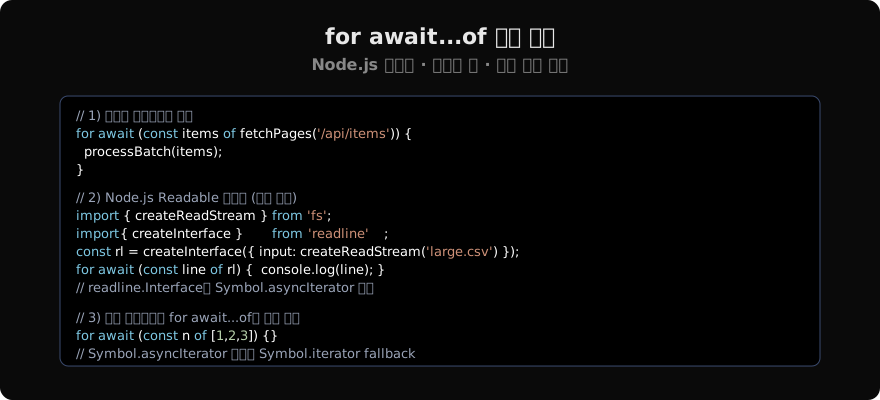
readline.Interface는 Symbol.asyncIterator를 구현합니다.
import { createReadStream } from 'fs';
import { createInterface } from 'readline';

async function processCSV(filePath) {
  const rl = createInterface({
    input: createReadStream(filePath),
    crlfDelay: Infinity,
  });

  let lineNum = 0;
  for await (const line of rl) {
    lineNum++;
    if (lineNum === 1) continue; // 헤더 건너뜀
    const [name, age] = line.split(',');
    console.log({ name, age });
  }
}
실용 패턴 3: 동시성 제한 배치 처리
비동기 이터러블을 활용해 배치 크기를 제한하며 처리합니다.
async function* chunks(iterable, size) {
  let batch = [];
  for await (const item of iterable) {
    batch.push(item);
    if (batch.length >= size) {
      yield batch;
      batch = [];
    }
  }
  if (batch.length > 0) yield batch;
}

// URL 목록을 3개씩 묶어 병렬 처리
for await (const group of chunks(urlIterator, 3)) {
  await Promise.all(group.map(url => fetch(url)));
}
for await…of의 fallback
for await...of는 먼저 [Symbol.asyncIterator]를 찾고, 없으면 [Symbol.iterator]로 폴백합니다. 동기 이터러블도 for await...of로 사용할 수 있습니다.
// 동기 배열도 for await...of 가능
for await (const n of [1, 2, 3]) {
  console.log(n); // 1, 2, 3
}

// Promise 배열도 순서대로 await
async function* fromPromises(promises) {
  for (const p of promises) yield await p;
}
에러 처리
비동기 제너레이터에서 발생한 예외는 for await...of의 try...catch로 잡을 수 있습니다.
async function* riskyStream() {
  yield 1;
  throw new Error('스트림 오류');
  yield 2; // 도달하지 않음
}

try {
  for await (const v of riskyStream()) {
    console.log(v); // 1
  }
} catch (e) {
  console.error(e.message); // 스트림 오류
}
주의사항
비동기 이터러블의 for await...of는 순차 처리입니다. 병렬로 처리하려면 Promise.all을 별도로 사용해야 합니다. 또한 for await...of는 반드시 async 함수 또는 최상위 await 컨텍스트(Top-Level Await) 안에서 사용해야 합니다.
다음 글에서는 Map과 Set 컬렉션의 내부 동작과 실용적인 활용 패턴을 살펴봅니다.
지난 글: Symbol.iterator 심화
다음 글: Map과 Set
읽어주셔서 감사합니다. 😊
PALDYN / ARTICLE AI
글의 개념, 수식, 코드에 대해 물어보세요.
질문과 관련된 문단을 골라 답변의 문맥으로 사용합니다.생각 중 · 0초