

call, apply, bind 완전 이해
Function.prototype의 세 메서드 call, apply, bind의 차이와 동작 원리를 정확히 이해하고, 실무에서 각각 언제 사용하는지 구체적인 예제와 함께 설명합니다.
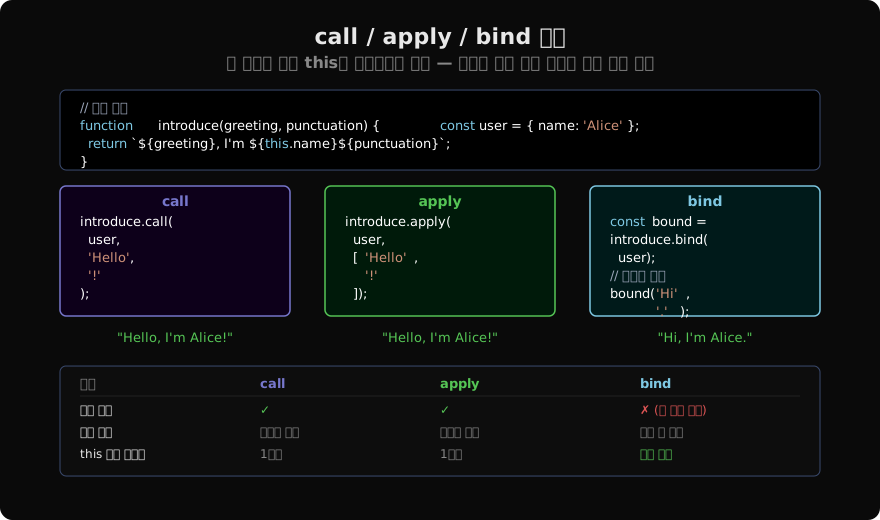
지난 글에서 화살표 함수가 this를 선언 시점에 캡처한다는 것을 배웠습니다. 이번에는 일반 함수에서 this를 직접 지정할 수 있는 세 가지 메서드 — call, apply, bind — 를 다룹니다. 셋 다 Function.prototype에 정의되어 있고, 모두 this를 명시적으로 설정한다는 공통점이 있습니다. 차이는 인수 전달 방식과 실행 시점입니다.
call — 즉시 실행, 인수를 쉼표로
fn.call(thisArg, arg1, arg2, ...) 형태로 호출합니다. 첫 번째 인수가 this가 되고, 이후 인수들은 쉼표로 나열됩니다.
function greet(greeting, punctuation) {
  return `${greeting}, I'm ${this.name}${punctuation}`;
}

const user = { name: 'Alice' };

greet.call(user, 'Hello', '!');
// "Hello, I'm Alice!"this로 null이나 undefined를 넘기면 비엄격 모드에서는 전역 객체, 엄격 모드에서는 그대로 null/undefined가 됩니다.
apply — 즉시 실행, 인수를 배열로
fn.apply(thisArg, [arg1, arg2, ...]) 형태입니다. call과 동일하지만 인수를 배열(또는 유사배열)로 받습니다.
greet.apply(user, ['Hello', '!']);
// "Hello, I'm Alice!"

// 실용 예시: 배열을 가변 인수 함수에 전달
const nums = [3, 1, 4, 1, 5, 9];
Math.max.apply(null, nums); // 9 — ES6 이전 방식
Math.max(...nums);          // 9 — ES6+ 권장
오늘날에는 스프레드 연산자(...)로 배열을 펼칠 수 있어 apply의 사용이 줄었지만, 레거시 코드를 읽거나 동적으로 구성된 인수 배열을 처리할 때 여전히 만납니다.
bind — 새 함수 반환, this 영구 고정
fn.bind(thisArg, arg1, arg2, ...) 는 this와 초기 인수가 고정된 새 함수를 반환합니다. 즉시 실행되지 않습니다.
function greet(greeting, punctuation) {
  return `${greeting}, I'm ${this.name}${punctuation}`;
}

const user = { name: 'Bob' };
const boundGreet = greet.bind(user);

boundGreet('Hi', '.');  // "Hi, I'm Bob."
boundGreet('Hey', '!'); // "Hey, I'm Bob!"

// call로 this를 바꾸려 해도 bind가 우선
boundGreet.call({ name: 'Charlie' }, 'Hello', '?');
// 여전히 "Hello, I'm Bob?" — bind는 영구 고정bind로 인수도 미리 고정할 수 있습니다. 이를 부분 적용(Partial Application)이라 합니다.
function multiply(a, b) { return a * b; }

// a = 2 고정
const double = multiply.bind(null, 2);
double(5);  // 10
double(10); // 20
세 메서드 비교 요약
| 메서드 | 실행 | 인수 전달 | this 고정 영구성 |
|---|---|---|---|
call | 즉시 | 쉼표로 나열 | 1회성 |
apply | 즉시 | 배열 | 1회성 |
bind | 지연 (새 함수) | 호출 시 또는 미리 | 영구 |
실전 패턴 1 — 이벤트 핸들러 바인딩
클래스 메서드를 이벤트 핸들러로 전달할 때 bind가 필요합니다.
class Counter {
  constructor(el) {
    this.count = 0;
    this.el = el;

    // constructor에서 bind
    this.handleClick = this.handleClick.bind(this);
    this.el.addEventListener('click', this.handleClick);
  }

  handleClick() {
    this.count++;
    this.el.textContent = this.count;
  }

  destroy() {
    this.el.removeEventListener('click', this.handleClick);
  }
}
bind(this) 없이 this.handleClick을 직접 넘기면 클릭 시 this가 el이 됩니다.
실전 패턴 2 — 유사배열을 배열 메서드로 처리
DOM의 NodeList나 arguments 객체는 배열이 아닙니다. Array.prototype.slice.call()로 실제 배열로 변환하는 고전 패턴입니다.
function sumArgs() {
  // arguments는 배열이 아님
  const arr = Array.prototype.slice.call(arguments);
  return arr.reduce((acc, n) => acc + n, 0);
}

sumArgs(1, 2, 3); // 6

// ES6+ 대안
function sumArgs2(...args) {
  return args.reduce((acc, n) => acc + n, 0);
}
또는 Array.from(arguments)를 사용하는 것이 더 명확합니다.
실전 패턴 3 — call로 상속 체인
ES5 스타일 생성자 함수 상속에서 부모 생성자를 call로 호출합니다. class extends를 사용하면 super()가 동일한 역할을 하므로 현대 코드에서는 이 패턴을 직접 쓸 일이 적지만, 레거시 코드에서 자주 만납니다.
function Animal(name) {
  this.name = name;
}

function Dog(name, breed) {
  Animal.call(this, name); // Animal 생성자를 현재 this에 적용
  this.breed = breed;
}

const dog = new Dog('Rex', 'Labrador');
dog.name;  // 'Rex'
dog.breed; // 'Labrador'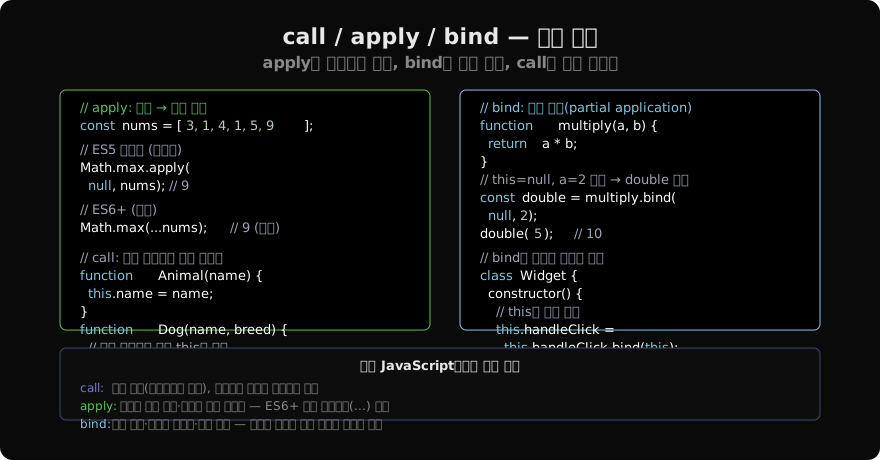
자체 bind 구현으로 이해하기
bind의 내부 동작을 이해하기 위해 폴리필을 직접 구현해보면 명확해집니다.
Function.prototype.myBind = function(thisArg, ...presetArgs) {
  const fn = this; // 원본 함수

  return function(...laterArgs) {
    return fn.apply(thisArg, [...presetArgs, ...laterArgs]);
  };
};

function greet(greeting) { return `${greeting}, ${this.name}`; }
const bound = greet.myBind({ name: 'Alice' });
bound('Hi'); // "Hi, Alice"
실제 bind는 new를 통해 호출될 때 thisArg를 무시하고 새 인스턴스를 this로 사용하는 추가 처리가 있습니다만, 핵심 개념은 위와 같습니다.
현대 JavaScript에서의 선택 기준
call: 레거시 상속 체인, 유사배열 처리, 함수를 다른 컨텍스트에서 1회 실행할 때apply: 동적으로 구성된 인수 배열 전달 (스프레드 사용 불가 환경)bind: 콜백으로 메서드 전달, 이벤트 핸들러 등록, 부분 적용- 화살표 함수: 많은
bind사용 사례를 더 간결하게 대체
세 메서드가 정확히 어떻게 동작하는지 알면, 어떤 레거시 코드를 만나도 this의 흐름을 추적할 수 있습니다.
지난 글: 화살표 함수와 this — 선언 시점의 this를 캡처한다
다음 글: 클래스 메서드와 this — 잃어버리기 쉬운 컨텍스트
읽어주셔서 감사합니다. 😊
PALDYN / ARTICLE AI
글의 개념, 수식, 코드에 대해 물어보세요.
질문과 관련된 문단을 골라 답변의 문맥으로 사용합니다.생각 중 · 0초