

Error cause (ES2022) — 에러 원인 연결
ES2022에서 도입된 Error cause 옵션으로 에러 체인을 구성하는 방법을 알아봅니다. 레이어 간 에러 래핑 시 근본 원인을 보존하고 추적하는 패턴을 정리합니다.
지난 글에서 커스텀 Error 클래스 설계 방법을 살펴봤습니다. 이번에는 ES2022에서 추가된 Error cause 기능으로 에러를 레이어마다 래핑하면서도 근본 원인을 보존하는 방법을 다룹니다.
cause가 없을 때의 문제
에러를 잡아서 다른 에러로 래핑할 때, 기존에는 원인 정보를 전달할 표준 방법이 없었습니다.
// 이전 방법 — 원인 정보를 message에 끼워 넣음 (비권장)
try {
  await fetchUser(id);
} catch (originalError) {
  throw new Error(`사용자 로드 실패: ${originalError.message}`);
  // originalError 객체 자체는 사라짐
  // stack trace, name, 타입 정보 유실
}
메시지에 원인을 문자열로 붙이면 근본 원인의 타입과 스택을 잃게 됩니다.
Error cause (ES2022)
ES2022부터 new Error(message, { cause })로 원인 에러를 직접 연결할 수 있습니다.
try {
  await fetchUser(id);
} catch (cause) {
  throw new Error(`사용자 ${id} 로드 실패`, { cause });
}e.cause로 원인 에러에 접근할 수 있습니다.
const e = new Error('대시보드 로드 실패', {
  cause: new Error('사용자 로드 실패', {
    cause: new FetchError('HTTP 500'),
  }),
});

console.log(e.message);              // '대시보드 로드 실패'
console.log(e.cause.message);        // '사용자 로드 실패'
console.log(e.cause.cause.message);  // 'HTTP 500'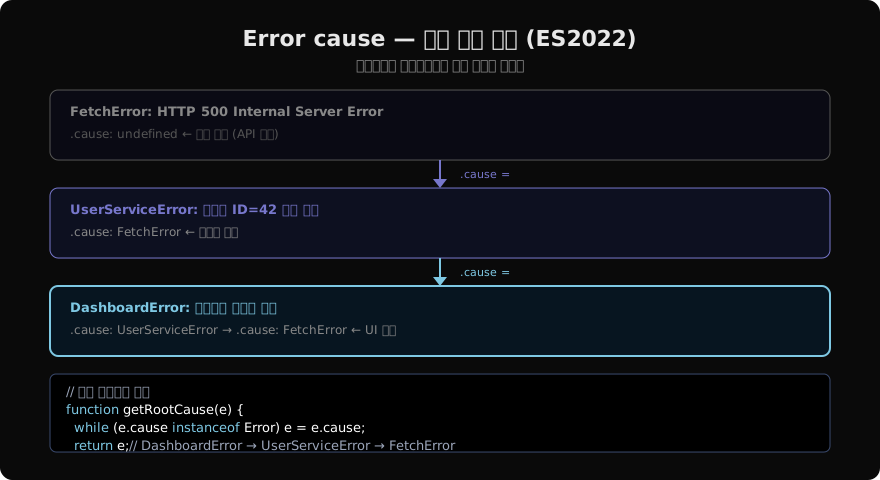
실전 패턴 — 레이어별 래핑
각 레이어는 자신의 컨텍스트를 추가하면서 원인을 보존합니다.
// API 계층
async function fetchUser(id) {
  const res = await fetch(`/api/users/${id}`);
  if (!res.ok) {
    throw new FetchError(`HTTP ${res.status}`, { statusCode: res.status });
  }
  return res.json();
}

// 서비스 계층
async function getUser(id) {
  try {
    return await fetchUser(id);
  } catch (cause) {
    throw new UserServiceError(`사용자 ID=${id} 로드 실패`, { cause });
  }
}

// UI 계층
async function initDashboard(userId) {
  try {
    const user = await getUser(userId);
    renderDashboard(user);
  } catch (cause) {
    throw new DashboardError('대시보드 초기화 실패', { cause });
  }
}
최상위에서 에러를 잡으면 체인 전체를 순회할 수 있습니다.
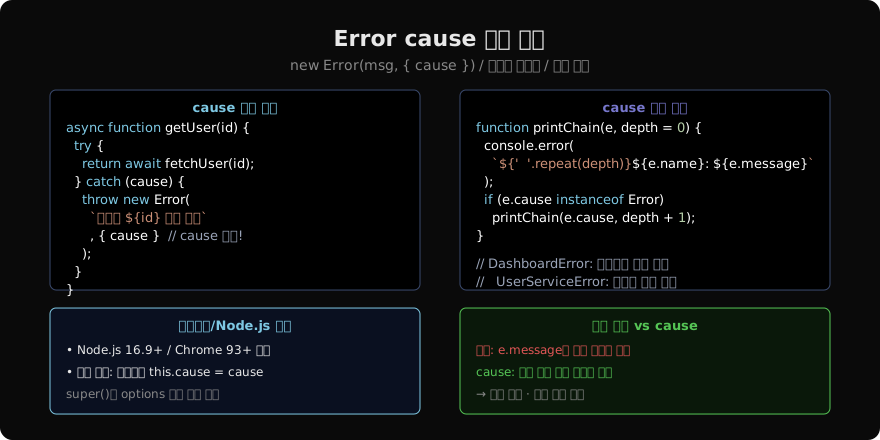
cause 체인 순회
function printCauseChain(e, depth = 0) {
  const indent = '  '.repeat(depth);
  console.error(`${indent}${e.name}: ${e.message}`);
  if (e.cause instanceof Error) {
    printCauseChain(e.cause, depth + 1);
  }
}

try {
  await initDashboard(userId);
} catch (e) {
  printCauseChain(e);
  // DashboardError: 대시보드 초기화 실패
  //   UserServiceError: 사용자 ID=42 로드 실패
  //     FetchError: HTTP 500
}
커스텀 클래스에서 cause 전달
super(message, options)에 { cause }를 담아 전달합니다. ES2022 이전 환경을 지원해야 한다면 this.cause = options?.cause로 직접 할당합니다.
class AppError extends Error {
  constructor(message, options = {}) {
    super(message, options); // cause 전달
    this.name = this.constructor.name;
    if (Error.captureStackTrace) {
      Error.captureStackTrace(this, this.constructor);
    }
  }
}

class UserServiceError extends AppError {}

// 사용
throw new UserServiceError('로드 실패', { cause: fetchError });
로거에서 cause 출력
에러를 로그로 남길 때 cause 체인을 포함해야 디버깅에 유용합니다.
function serializeError(e, depth = 0) {
  if (!(e instanceof Error) || depth > 5) return String(e);
  return {
    name: e.name,
    message: e.message,
    stack: e.stack?.split('\n').slice(0, 5),
    cause: e.cause ? serializeError(e.cause, depth + 1) : undefined,
  };
}

logger.error('에러 발생', serializeError(err));
브라우저/런타임 지원
| 환경 | 지원 버전 |
|---|---|
| Node.js | 16.9.0+ |
| Chrome | 93+ |
| Firefox | 91+ |
| Safari | 15+ |
구형 환경을 지원해야 한다면 폴리필 없이 this.cause = cause로 직접 프로퍼티를 할당하면 됩니다. super(message, { cause })로 전달하는 방식은 구형 엔진에서는 단순히 무시됩니다.
정리
new Error(msg, { cause })— ES2022 표준 에러 원인 연결e.cause로 원인 에러에 접근 가능- 레이어별 래핑 시
catch (cause) { throw new MyError(msg, { cause }); } - 체인 순회:
while (e.cause instanceof Error) e = e.cause - 커스텀 클래스는
super(message, options)로 cause 전달 - 로거에서 cause 체인 직렬화하여 근본 원인까지 기록
지난 글: 커스텀 Error 클래스 — 도메인 에러 설계
다음 글: AggregateError — 여러 에러를 하나로
읽어주셔서 감사합니다. 😊
PALDYN / ARTICLE AI
글의 개념, 수식, 코드에 대해 물어보세요.
질문과 관련된 문단을 골라 답변의 문맥으로 사용합니다.생각 중 · 0초