

instanceof와 Symbol.hasInstance — 타입 검사의 비밀
JavaScript instanceof 연산자의 프로토타입 체인 탐색 메커니즘, 한계점, Symbol.hasInstance로 동작을 커스터마이즈하는 방법, typeof와의 차이까지 정리합니다.
지난 글에서 extends와 super로 상속 계층을 구성하는 방법을 살펴봤습니다. 상속 계층을 만들었다면 어떤 타입인지 확인해야 할 때가 옵니다. instanceof는 이를 위한 연산자이지만, 알려지지 않은 한계가 있고 Symbol.hasInstance로 동작을 완전히 제어할 수도 있습니다.
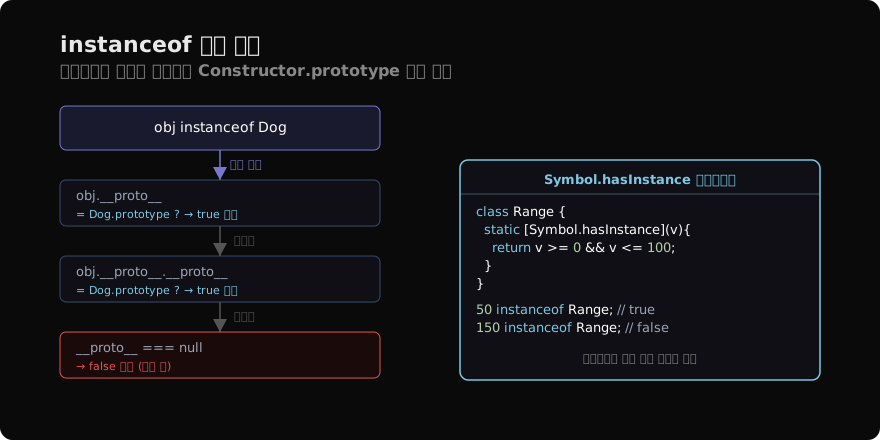
instanceof의 기본 동작
obj instanceof Constructor는 obj의 프로토타입 체인을 따라가며 Constructor.prototype을 찾습니다.
class Animal {}
class Dog extends Animal {}

const d = new Dog();
console.log(d instanceof Dog);    // true
console.log(d instanceof Animal); // true (체인에 있음)
console.log(d instanceof Object); // true (최상위)
console.log(d instanceof Array);  // false
프로토타입 체인: d.__proto__ → Dog.prototype → Animal.prototype → Object.prototype → null
instanceof Animal이 true인 이유는 Animal.prototype이 체인 어딘가에 있기 때문입니다.
instanceof의 한계
원시값은 항상 false
console.log('hello' instanceof String); // false
console.log(42 instanceof Number);      // false
원시값은 객체가 아니므로 프로토타입 체인이 없습니다. 따라서 instanceof는 항상 false를 반환합니다.
프로토타입 변경 시 혼란
function Foo() {}
const f = new Foo();
Foo.prototype = {}; // 프로토타입 교체!

console.log(f instanceof Foo); // false!Foo.prototype을 교체하면 기존에 만들어진 인스턴스 f는 새 프로토타입과 연결되어 있지 않으므로 false가 됩니다.
다른 realm 문제
// iframe이나 vm 모듈로 만든 다른 실행 환경
// const arr = iframeWindow.eval('[]');
// arr instanceof Array; // false!
// 이 경우 Array.isArray(arr) 사용
다른 window나 iframe에서 생성된 객체는 다른 Array.prototype을 갖기 때문에 instanceof가 false가 됩니다.
Symbol.hasInstance — 커스텀 타입 검사
Symbol.hasInstance well-known symbol을 구현하면 instanceof 동작을 완전히 제어할 수 있습니다.
class Range {
  static [Symbol.hasInstance](v) {
    return (
      typeof v === 'number' &&
      v >= 0 && v <= 100
    );
  }
}

console.log(50 instanceof Range);  // true
console.log(150 instanceof Range); // false
console.log('A' instanceof Range); // false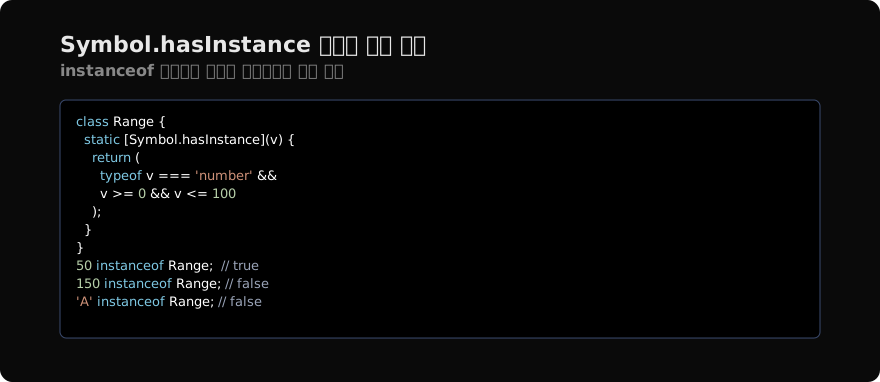
Range는 일반 클래스처럼 보이지만, instanceof를 사용하면 숫자가 0~100 범위인지 검사하는 로직이 실행됩니다. 인스턴스를 만들 필요도 없습니다.
Symbol.hasInstance의 호출 시점
obj instanceof Constructor를 실행하면 JavaScript 엔진은 다음 순서로 확인합니다.
Constructor[Symbol.hasInstance]가 존재하면 호출하고 그 결과를 반환- 없으면 기본 프로토타입 체인 탐색으로 진행
이는 Symbol.hasInstance가 정적 메서드처럼 클래스에 붙기 때문입니다.
typeof와의 비교
typeof는 원시값 타입 확인에, instanceof는 객체의 클래스 확인에 적합합니다.
// typeof: 원시값 타입 확인
typeof 42;          // 'number'
typeof 'str';       // 'string'
typeof true;        // 'boolean'
typeof undefined;   // 'undefined'
typeof null;        // 'object' (역사적 버그!)
typeof {};          // 'object'
typeof [];          // 'object'
typeof function(){}; // 'function'

// instanceof: 클래스/생성자 확인
[] instanceof Array;   // true
{} instanceof Object;  // true
/re/ instanceof RegExp; // true
typeof null === 'object'는 JavaScript의 역사적 버그이므로 null 검사는 항상 === null을 사용해야 합니다.
실용적인 타입 체크 전략
실무에서는 상황에 맞는 방법을 선택합니다.
// 1. 원시값 체크: typeof
function isString(v) {
  return typeof v === 'string';
}

// 2. 배열 체크: Array.isArray (cross-realm 안전)
function isArray(v) {
  return Array.isArray(v);
}

// 3. 클래스 인스턴스: instanceof
function isError(v) {
  return v instanceof Error;
}

// 4. 정확한 타입: Object.prototype.toString
function getType(v) {
  return Object.prototype.toString.call(v);
  // '[object Array]', '[object Date]' 등
}

getType([]);         // '[object Array]'
getType(new Date()); // '[object Date]'
getType(null); // '[object Null]'Object.prototype.toString은 내장 타입을 가장 정확하게 판별합니다.
constructor 프로퍼티로 확인
instanceof 대신 constructor 프로퍼티를 확인하는 방법도 있지만, 덜 신뢰할 수 있습니다.
const d = new Dog();
d.constructor === Dog;    // true (일반적으로)
d.constructor.name; // 'Dog'constructor는 수동으로 변경할 수 있어서 instanceof보다 덜 안전합니다. 그러나 동적으로 클래스 이름을 가져올 때 instance.constructor.name은 유용합니다.
덕 타이핑 — 타입보다 인터페이스
JavaScript에서는 instanceof로 엄격한 타입 검사를 하기보다 특정 메서드/프로퍼티의 존재 여부를 확인하는 덕 타이핑(duck typing)이 더 유연한 경우가 많습니다.
function processIterable(iterable) {
  // 'instanceof' 대신 이터러블 프로토콜 확인
  if (typeof iterable[Symbol.iterator] !== 'function') {
    throw new TypeError('이터러블이 아닙니다');
  }
  return [...iterable].map(x => x * 2);
}

processIterable([1, 2, 3]); // [2, 4, 6]
processIterable('abc');      // [97*2, 98*2, 99*2] - charCode
processIterable(new Set([1, 2])); // [2, 4]
이 방식은 Array, Set, String, 커스텀 이터러블 등 어떤 타입이든 작동합니다.
지난 글: extends와 super — JavaScript 상속의 실제 동작
다음 글: 믹스인 패턴 — 다중 상속 없이 기능 합성하기
읽어주셔서 감사합니다. 😊
PALDYN / ARTICLE AI
글의 개념, 수식, 코드에 대해 물어보세요.
질문과 관련된 문단을 골라 답변의 문맥으로 사용합니다.생각 중 · 0초