

지식
JavaScript
Intl.NumberFormat · DateTimeFormat — 국제화 포맷팅
Intl.NumberFormat으로 통화·퍼센트·단위를 포맷하고, Intl.DateTimeFormat으로 타임존·로케일별 날짜를 표시하는 방법, RelativeTimeFormat·ListFormat까지 정리합니다.
지난 글에서 JSON 직렬화 옵션을 살펴봤습니다. 이번에는 JavaScript 내장 국제화 API인 Intl 객체를 정리합니다. Intl.NumberFormat과 Intl.DateTimeFormat은 다국어 서비스에서 숫자와 날짜를 올바르게 표시하는 표준 도구입니다.
Intl이란
Intl은 브라우저와 Node.js에 내장된 국제화 API입니다. ICU(International Components for Unicode) 데이터를 기반으로 로케일별 포맷팅을 지원합니다.
// 포맷터 인스턴스 생성 (비용이 있으므로 재사용 권장)
const fmt = new Intl.NumberFormat('ko-KR', { style: 'currency', currency: 'KRW' });
fmt.format(15000); // '₩15,000'

// 또는 toLocaleString 단축 (내부적으로 Intl 사용)
(15000).toLocaleString('ko-KR', { style: 'currency', currency: 'KRW' });
// '₩15,000'
포맷터 인스턴스는 생성 시 로케일 데이터를 로드하므로, 모듈 레벨이나 컴포넌트 마운트 시 한 번 생성하고 재사용합니다.
Intl.NumberFormat
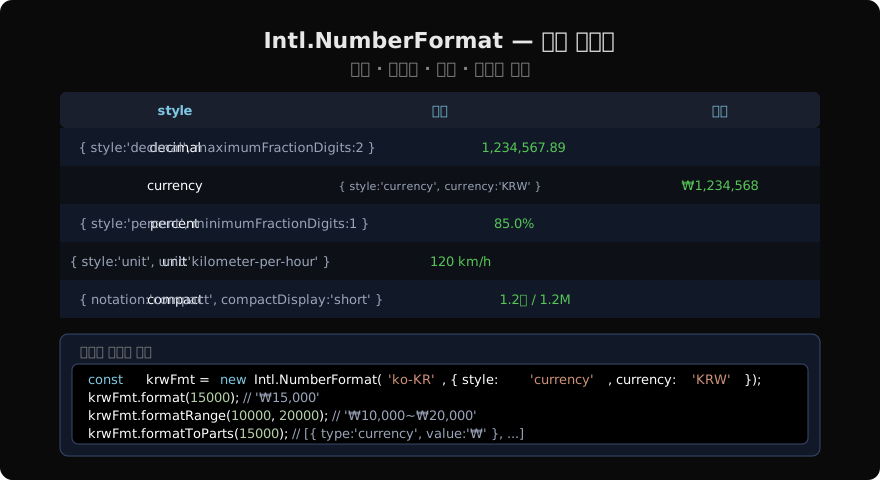
const n = 1234567.89;

// 일반 숫자 (locale 기본값)
new Intl.NumberFormat('ko-KR').format(n);
// '1,234,567.89'

new Intl.NumberFormat('de-DE').format(n);
// '1.234.567,89' — 독일식 (. 천단위, , 소수점)

// 통화
new Intl.NumberFormat('ko-KR', {
  style: 'currency',
  currency: 'KRW',
}).format(15000);
// '₩15,000'

new Intl.NumberFormat('en-US', {
  style: 'currency',
  currency: 'USD',
}).format(1234.5);
// '$1,234.50'

// 퍼센트
new Intl.NumberFormat('ko-KR', {
  style: 'percent',
  minimumFractionDigits: 1,
}).format(0.856);
// '85.6%'
NumberFormat 상세 옵션
// 소수점 자리 제어
new Intl.NumberFormat('ko-KR', {
  minimumFractionDigits: 2,
  maximumFractionDigits: 2,
}).format(3.1); // '3.10'

// 단위 (style: 'unit')
new Intl.NumberFormat('ko-KR', {
  style: 'unit',
  unit: 'kilometer-per-hour',
  unitDisplay: 'short',
}).format(120); // '120km/h'

new Intl.NumberFormat('en-US', {
  style: 'unit',
  unit: 'liter',
  unitDisplay: 'long',
}).format(2); // '2 liters'

// 컴팩트 표기
new Intl.NumberFormat('ko-KR', {
  notation: 'compact',
  compactDisplay: 'short',
}).format(12000); // '1.2만'

new Intl.NumberFormat('en-US', {
  notation: 'compact',
  compactDisplay: 'short',
}).format(1200000); // '1.2M'

// 부호 표시
new Intl.NumberFormat('ko-KR', {
  signDisplay: 'always',
}).format(42); // '+42'
formatRange와 formatToParts
const krwFmt = new Intl.NumberFormat('ko-KR', {
  style: 'currency',
  currency: 'KRW',
});

// 범위 포맷 (ES2021)
krwFmt.formatRange(10000, 20000); // '₩10,000~₩20,000'

// 구성 요소별 분리
krwFmt.formatToParts(15000);
// [
//   { type: 'currency', value: '₩' },
//   { type: 'integer', value: '15' },
//   { type: 'group', value: ',' },
//   { type: 'integer', value: '000' },
// ]formatToParts는 각 부분을 개별적으로 스타일링하거나 접근할 때 유용합니다.
Intl.DateTimeFormat
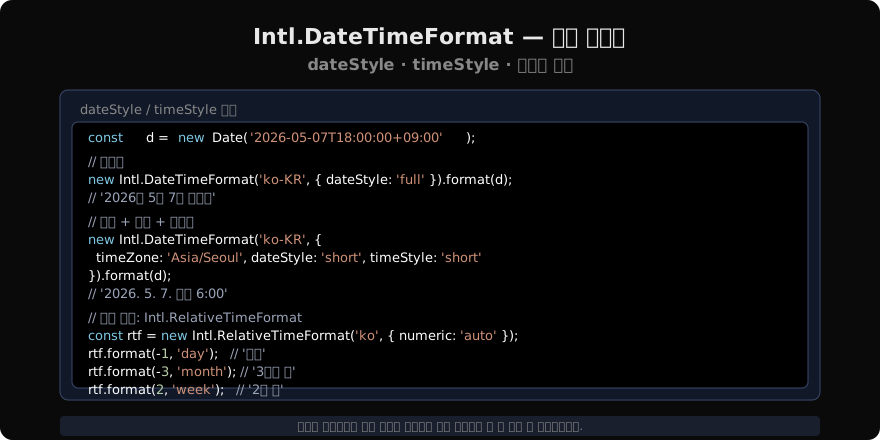
const d = new Date('2026-05-07T09:00:00Z');

// dateStyle 단축 옵션
new Intl.DateTimeFormat('ko-KR', { dateStyle: 'full' }).format(d);
// '2026년 5월 7일 목요일'

new Intl.DateTimeFormat('en-US', { dateStyle: 'long' }).format(d);
// 'May 7, 2026'

// dateStyle + timeStyle 조합
new Intl.DateTimeFormat('ko-KR', {
  dateStyle: 'short',
  timeStyle: 'medium',
  timeZone: 'Asia/Seoul',
}).format(d);
// '2026. 5. 7. 오후 6:00:00'

// 세밀한 제어
new Intl.DateTimeFormat('ko-KR', {
  year: 'numeric',
  month: '2-digit',
  day: '2-digit',
  weekday: 'short',
  hour: '2-digit',
  minute: '2-digit',
  hour12: false,
  timeZone: 'Asia/Seoul',
}).format(d);
// '2026. 05. 07. (목) 18:00'
Intl.RelativeTimeFormat
“3일 전”, “2주 후”처럼 상대적 시간 표현을 현지화합니다.
const rtf = new Intl.RelativeTimeFormat('ko', { numeric: 'auto' });

rtf.format(-1, 'day');    // '어제'
rtf.format(-3, 'month');  // '3개월 전'
rtf.format(2, 'week');    // '2주 후'
rtf.format(1, 'year');    // '내년'
rtf.format(0, 'day');     // '오늘'

// numeric: 'always' 이면 숫자로만 (어제/내일도 '1일 전/후')
const rtf2 = new Intl.RelativeTimeFormat('ko', { numeric: 'always' });
rtf2.format(-1, 'day'); // '1일 전'

// ms → 적절한 단위 선택 유틸리티
function timeAgo(ms) {
  const abs = Math.abs(ms);
  const sign = ms < 0 ? -1 : 1;
  if (abs < 60_000)  return rtf.format(Math.round(ms / 1_000), 'second');
  if (abs < 3_600_000) return rtf.format(Math.round(ms / 60_000), 'minute');
  if (abs < 86_400_000) return rtf.format(Math.round(ms / 3_600_000), 'hour');
  return rtf.format(Math.round(ms / 86_400_000), 'day');
}
timeAgo(-5 * 60 * 1000); // '5분 전'
기타 Intl API
// Intl.ListFormat — 목록 결합
const lf = new Intl.ListFormat('ko', { type: 'conjunction' });
lf.format(['사과', '바나나', '체리']); // '사과, 바나나, 체리'

const lfEn = new Intl.ListFormat('en', { type: 'disjunction' });
lfEn.format(['cat', 'dog', 'bird']); // 'cat, dog, or bird'

// Intl.PluralRules — 복수형 판별
const pr = new Intl.PluralRules('en');
pr.select(1); // 'one'
pr.select(2); // 'other'

// Intl.Collator — 로케일 인식 문자열 비교
const col = new Intl.Collator('ko', { sensitivity: 'base' });
['나', '가', '다', '마'].sort(col.compare); // ['가', '나', '다', '마']

// Intl.Segmenter — 단어/문장 분리 (ES2022)
const seg = new Intl.Segmenter('ko', { granularity: 'word' });
[...seg.segment('안녕 세계')].map(s => s.segment); // ['안녕', ' ', '세계']
실무 패턴: 공유 포맷터
// formatters.js — 앱 전역에서 재사용
export const krwFormatter = new Intl.NumberFormat('ko-KR', {
  style: 'currency',
  currency: 'KRW',
  maximumFractionDigits: 0,
});

export const percentFormatter = new Intl.NumberFormat('ko-KR', {
  style: 'percent',
  maximumFractionDigits: 1,
});

export const dateFormatter = new Intl.DateTimeFormat('ko-KR', {
  timeZone: 'Asia/Seoul',
  dateStyle: 'short',
});

export const relativeFormatter = new Intl.RelativeTimeFormat('ko', {
  numeric: 'auto',
});

// 사용처
import { krwFormatter } from './formatters';
krwFormatter.format(product.price);
지난 글: JSON — 직렬화 옵션과 활용
읽어주셔서 감사합니다. 😊
PALDYN / ARTICLE AI
글의 개념, 수식, 코드에 대해 물어보세요.
질문과 관련된 문단을 골라 답변의 문맥으로 사용합니다.생각 중 · 0초