

지식
JavaScript
정규식 심화 — 그룹·후방탐색·플래그
JavaScript 정규식의 기명 캡처 그룹, 전방탐색·후방탐색, dotAll·sticky·hasIndices 플래그, matchAll과 replace 함수 활용 패턴을 정리합니다.
지난 글에서 Date 객체와 타임존 처리를 살펴봤습니다. 이번에는 JavaScript 정규식의 심화 기능인 기명 캡처 그룹, 전방탐색·후방탐색, ES2018 이후 추가된 플래그들을 정리합니다.
정규식 기본 복습
// 리터럴 vs 생성자
const re1 = /hello/gi;
const re2 = new RegExp('hello', 'gi'); // 동적 패턴에 사용

// 주요 메서드
/foo/.test('foobar');      // true — boolean 반환
'hello'.match(/l+/);       // ['ll', index:2, ...]
'hello'.replace(/l/g, 'r'); // 'herro'
'a.b.c'.split(/\./);       // ['a', 'b', 'c']
/\d+/.exec('abc123');       // ['123', index:3, ...]
플래그
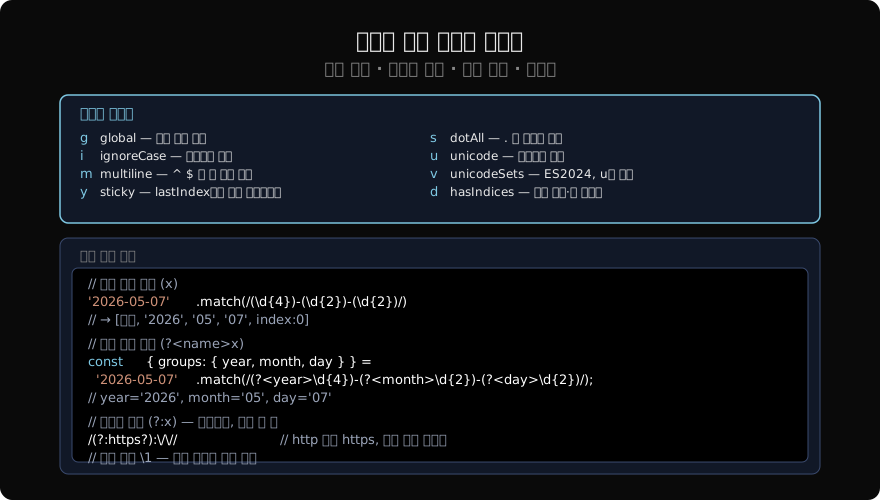
// g — global: 모든 매치
'aaa'.match(/a/g);   // ['a', 'a', 'a']
'aaa'.match(/a/);    // ['a'] — 첫 번째만

// i — ignoreCase
/hello/i.test('HELLO'); // true

// m — multiline: ^ $ 가 각 줄에 작동
const text = 'foo\nbar\nbaz';
text.match(/^\w+/gm); // ['foo', 'bar', 'baz']

// s — dotAll: . 이 \n도 매치 (ES2018)
/.+/s.test('a\nb');  // true
/.+/.test('a\nb');   // false

// u — unicode (ES2015)
/\u{1F600}/u.test('😀'); // true
/./u.test('😀');         // true (서로게이트 쌍을 하나로)

// d — hasIndices (ES2022): 캡처 시작·끝 인덱스
const m = /(\d+)/.exec('abc123def');
m[1];         // '123'
// m 에 indices 속성: [[3,6], [3,6]]
캡처 그룹
// 번호 캡처 그룹
const m = '2026-05-07'.match(/(\d{4})-(\d{2})-(\d{2})/);
m[0]; // '2026-05-07' (전체 매치)
m[1]; // '2026'
m[2]; // '05'
m[3]; // '07'

// replace에서 $1, $2로 참조
'2026-05-07'.replace(/(\d{4})-(\d{2})-(\d{2})/, '$3/$2/$1');
// '07/05/2026'

// 비캡처 그룹 (?:) — 그룹화만, 번호 할당 없음
/(https?):\/\//.exec('http://foo.com')[1]; // 'http'
/(?:https?):\/\//.exec('http://foo.com')[1]; // undefined (캡처 없음)

// 후방 참조 \N — 같은 패턴 반복 탐지
/(\b\w+\b) \1/.test('hello hello'); // true
/(\b\w+\b) \1/.test('hello world'); // false
기명 캡처 그룹
ES2018에서 도입된 기명 캡처 그룹은 (?<name>패턴) 형식입니다. match 결과의 groups 속성에서 이름으로 접근할 수 있습니다.
const dateRe = /(?<year>\d{4})-(?<month>\d{2})-(?<day>\d{2})/;

const { groups } = '2026-05-07'.match(dateRe);
groups.year;  // '2026'
groups.month; // '05'
groups.day;   // '07'

// 구조 분해
const { groups: { year, month, day } } = '2026-05-07'.match(dateRe);

// replace에서 $<name>으로 참조
'2026-05-07'.replace(dateRe, '$<day>/$<month>/$<year>');
// '07/05/2026'

// replace 함수에서 groups 접근
'2026-05-07'.replace(dateRe, (_, y, mo, d, offset, str, groups) =>
  `${groups.day} ${groups.month} ${groups.year}`
);

// matchAll + 기명 그룹
const log = '2026-01-01 error\n2026-02-15 info';
const logRe = /(?<date>\d{4}-\d{2}-\d{2}) (?<level>\w+)/g;
for (const { groups: { date, level } } of log.matchAll(logRe)) {
  console.log(date, level);
}
전방탐색과 후방탐색
전방탐색(lookahead)과 후방탐색(lookbehind)은 위치에 조건을 거는 zero-width 어서션입니다. 매치에 포함되지 않습니다.
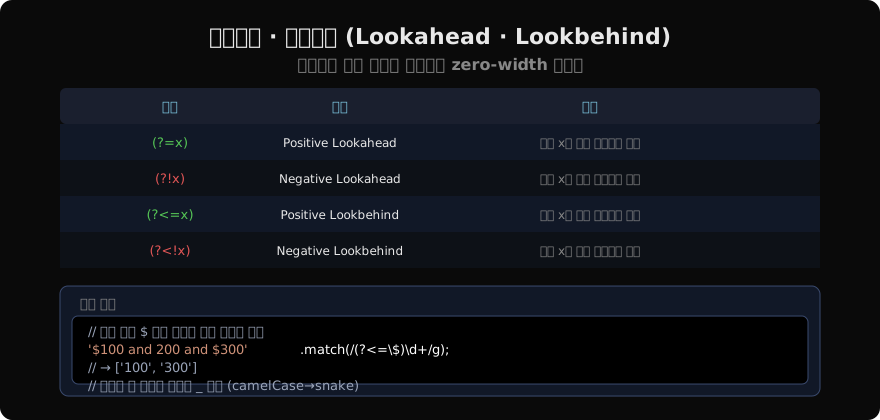
// Positive lookahead (?=x): 뒤에 x가 오는 위치
'100px 200em 300px'.match(/\d+(?=px)/g); // ['100', '300']

// Negative lookahead (?!x): 뒤에 x가 없는 위치
'100px 200em 300px'.match(/\d+(?!px)\b/g); // ['200']

// Positive lookbehind (?<=x): 앞에 x가 있는 위치 (ES2018)
'$100 and €200 and $300'.match(/(?<=\$)\d+/g); // ['100', '300']

// Negative lookbehind (?<!x): 앞에 x가 없는 위치
'$100 and 200 and $300'.match(/(?<!\$)\d+/g); // ['200']

// 실용 예: 숫자 3자리마다 콤마 (천 단위)
const addCommas = n =>
  String(n).replace(/\B(?=(\d{3})+(?!\d))/g, ',');
addCommas(1234567); // '1,234,567'
matchAll과 exec 비교
const re = /(\d+)/g; // g 플래그 필수
const str = 'abc123def456ghi789';

// matchAll — 이터레이터, g 필수
for (const m of str.matchAll(re)) {
  console.log(m[0], m.index); // '123' 3, '456' 9, '789' 15
}

// [...str.matchAll(re)] — 배열로 펼치기
[...str.matchAll(re)].map(m => m[0]); // ['123', '456', '789']

// exec + while — 구식 방법 (g 플래그 필수)
let m;
re.lastIndex = 0; // 재사용 시 초기화 필요
while ((m = re.exec(str)) !== null) {
  console.log(m[0], m.index);
}matchAll이 가독성이 좋고 lastIndex 관리가 불필요합니다.
성능과 주의사항
// 역추적(backtracking) 지수 폭발 주의
// /(a+)+$/.test('aaaaaaaaaaab') — ReDoS 취약
// 대안: 소유 수량자(possessive, JS 미지원) 또는 원자 그룹

// 정규식 재사용 시 g 플래그 + lastIndex 주의
const re = /\d+/g;
re.test('abc123'); // true, lastIndex = 6
re.test('abc123'); // true, lastIndex = 0 다시 찾기
re.test('abc123'); // false! (이미 끝까지 탐색 후 reset)

// 해결: 매번 새 객체 생성하거나 lastIndex 초기화
re.lastIndex = 0;
유용한 패턴 모음
// 이메일 (간단 버전)
const emailRe = /^[a-zA-Z0-9._%+-]+@[a-zA-Z0-9.-]+\.[a-zA-Z]{2,}$/;

// URL (간단 버전)
const urlRe = /https?:\/\/[^\s]+/g;

// 한글 포함 여부
/[가-힣]/.test('안녕'); // true
/\p{Script=Hangul}/u.test('안녕'); // true (u 플래그 필요)

// 비밀번호 강도 (최소 8자, 대소문자, 숫자, 특수문자 포함)
const strongPw = /^(?=.*[a-z])(?=.*[A-Z])(?=.*\d)(?=.*[\W_]).{8,}$/;
strongPw.test('Pass1234!'); // true

// camelCase → snake_case
'helloWorldFoo'.replace(/(?<=[a-z])(?=[A-Z])/g, '_').toLowerCase();
// 'hello_world_foo'
지난 글: Date와 타임존 — 날짜 다루기의 모든 것
다음 글: JSON — 직렬화 옵션과 활용
읽어주셔서 감사합니다. 😊
PALDYN / ARTICLE AI
글의 개념, 수식, 코드에 대해 물어보세요.
질문과 관련된 문단을 골라 답변의 문맥으로 사용합니다.생각 중 · 0초