

Symbol.toPrimitive — 객체의 원시값 변환 제어
객체가 숫자·문자열·기본값으로 변환될 때 호출되는 ToPrimitive 알고리즘과 Symbol.toPrimitive, valueOf, toString을 활용한 커스텀 변환을 다룹니다.
지난 글에서 암묵적 형변환 규칙을 살펴봤습니다. 객체가 원시값(숫자, 문자열 등)으로 변환될 때 엔진은 ToPrimitive라는 내부 알고리즘을 실행합니다. 이번에는 그 알고리즘과 Symbol.toPrimitive로 변환을 직접 제어하는 법을 정리합니다.
ToPrimitive 알고리즘
객체에 산술 연산, 문자열 연결, 비교 등이 적용될 때 엔진은 내부적으로 ToPrimitive(obj, hint)를 호출합니다. hint는 “number”, “string”, “default” 세 가지입니다.
// hint: "number" — 산술 연산, 단항 +, 관계 연산
+obj       // hint: "number"
obj - 1    // hint: "number"
obj > 0    // hint: "number"

// hint: "string" — String(), 템플릿 리터럴
String(obj)  // hint: "string"
`${obj}`     // hint: "string"
alert(obj)   // hint: "string"

// hint: "default" — +, ==
obj + 1      // hint: "default"
obj == 42    // hint: "default"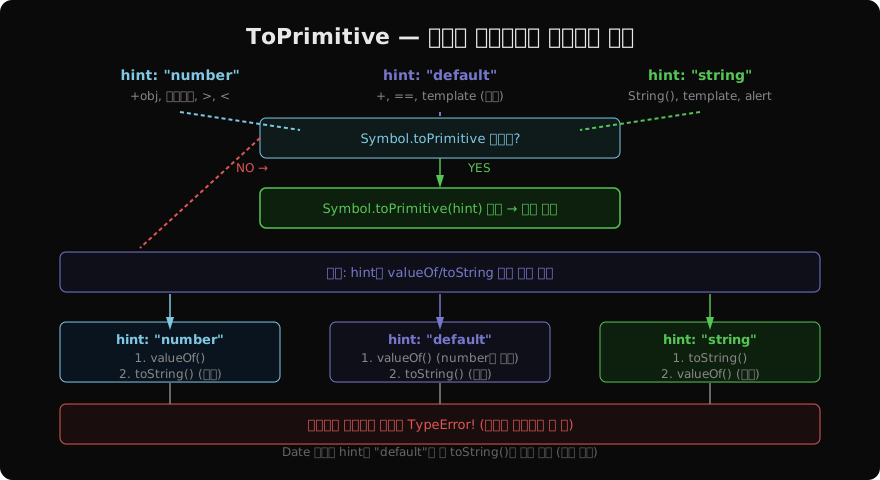
Symbol.toPrimitive
Symbol.toPrimitive를 정의하면 ToPrimitive 알고리즘을 완전히 제어할 수 있습니다. hint 인자를 받아 알맞은 원시값을 반환합니다.
class Temperature {
  constructor(celsius) {
    this.celsius = celsius;
  }

  [Symbol.toPrimitive](hint) {
    if (hint === 'number') {
      return this.celsius;          // 숫자 컨텍스트: 섭씨 온도
    }
    if (hint === 'string') {
      return `${this.celsius}°C`;   // 문자열 컨텍스트: "25°C"
    }
    // default
    return this.celsius;
  }
}

const temp = new Temperature(25);

+temp           // 25       (hint: "number")
temp - 0        // 25       (hint: "number")
`온도: ${temp}` // "온도: 25°C"  (hint: "string")
temp + 0        // 25       (hint: "default")
폴백: valueOf와 toString
Symbol.toPrimitive가 없으면 엔진은 valueOf와 toString을 hint에 따라 순서를 바꿔 호출합니다.
- hint
"number"/"default":valueOf()→toString()순서 - hint
"string":toString()→valueOf()순서
반환값이 원시값이 아니면 다음 메서드를 시도하고, 모두 실패하면 TypeError를 던집니다.
const obj = {
  valueOf() { return 42; },
  toString() { return 'forty-two'; },
};

+obj          // 42         (number hint → valueOf 먼저)
obj + 1       // 43         (default hint → valueOf 먼저)
`${obj}`      // "forty-two" (string hint → toString 먼저)
String(obj)   // "forty-two"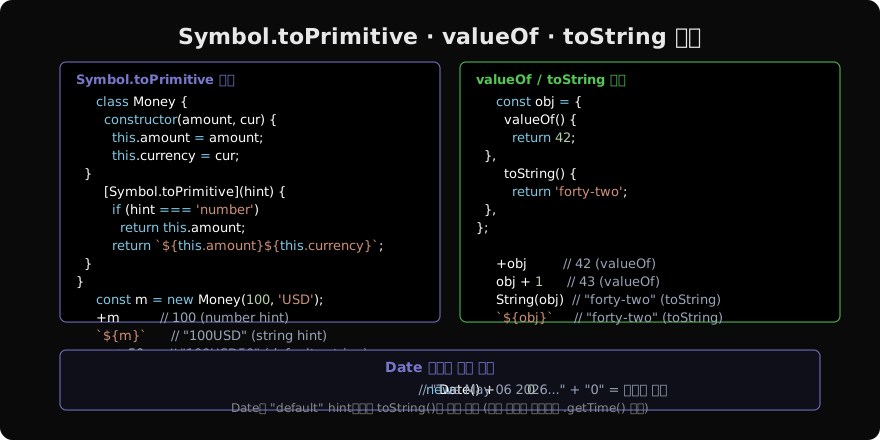
Date 객체의 특별 동작
Date는 "default" hint에서도 toString()을 먼저 호출합니다(다른 일반 객체와 다름). 이는 날짜 + 문자열 연결이 숫자 덧셈보다 더 자연스럽기 때문입니다.
const now = new Date('2026-05-06');

now + ''      // "Wed May 06 2026 ..."  (문자열)
now + 0       // "Wed May 06 2026 ...0" (문자열 연결!)
+now          // 1746489600000         (hint: number → 타임스탬프)
now - 0       // 1746489600000         (산술 → 숫자)

// 날짜 비교: - 연산자로 ms 차이 계산
const diff = new Date('2026-12-31') - now;
console.log(diff / (1000 * 60 * 60 * 24), '일 남음');
실용 패턴 — 화폐 객체
class Money {
  constructor(amount, currency = 'KRW') {
    this.amount = amount;
    this.currency = currency;
  }

  [Symbol.toPrimitive](hint) {
    if (hint === 'number') return this.amount;
    // string, default 모두 포맷된 문자열
    return new Intl.NumberFormat('ko-KR', {
      style: 'currency',
      currency: this.currency,
    }).format(this.amount);
  }

  add(other) {
    const otherAmount = +other; // hint: "number" 호출
    return new Money(this.amount + otherAmount, this.currency);
  }
}

const price = new Money(10_000);
const tax = new Money(1_000);

console.log(`가격: ${price}`);     // "가격: ₩10,000"
console.log(`합계: ${price.add(tax)}`); // "합계: ₩11,000"
console.log(+price + +tax);        // 11000 (숫자)
일반 객체의 기본 동작
Symbol.toPrimitive도, valueOf도, toString도 재정의하지 않은 일반 객체의 기본 동작입니다.
const plain = {};
+plain           // NaN  (valueOf → Object, toString → "[object Object]" → NaN)
`${plain}`       // "[object Object]"
plain + 1        // "[object Object]1"

const arr = [1, 2, 3];
+arr             // NaN  ([1,2,3] → "1,2,3" → NaN)
+[42]            // 42   ([42] → "42" → 42)
`${arr}`         // "1,2,3"
Symbol.toStringTag
Object.prototype.toString.call()이 반환하는 태그를 커스터마이즈합니다.
class MyBuffer {
  get [Symbol.toStringTag]() { return 'MyBuffer'; }
}

const buf = new MyBuffer();
Object.prototype.toString.call(buf); // "[object MyBuffer]"
// typeof 결과에는 영향 없음
정리
ToPrimitive(obj, hint): 객체→원시값 변환 내부 알고리즘- hint 종류:
"number"(산술),"string"(String()),"default"(+, ==) Symbol.toPrimitive있으면 hint를 인자로 받아 직접 제어- 없으면 폴백: number/default →
valueOf→toString, string →toString→valueOf - 반환값은 반드시 원시값 (아니면 TypeError)
Date는 “default” hint에서 toString 우선 (특별 규칙)Symbol.toStringTag는Object.prototype.toString출력만 변경
지난 글: 암묵적 형변환 — 자동 타입 변환의 규칙
다음 글: Truthy · Falsy — 조건식에서의 값 판별
읽어주셔서 감사합니다. 😊
PALDYN / ARTICLE AI
글의 개념, 수식, 코드에 대해 물어보세요.
질문과 관련된 문단을 골라 답변의 문맥으로 사용합니다.생각 중 · 0초