

Helm Chart 템플릿 심화 — 함수·파이프라인·제어 흐름
Helm의 Go 템플릿 엔진을 활용한 함수(tpl, include, required, default), 파이프라인, if/else/range/with 제어 흐름, named templates(_helpers.tpl), 그리고 값 검증 패턴을 상세히 설명합니다.
지난 글에서 Kyverno로 정책을 선언적으로 관리하는 방법을 살펴봤다. 이번 글에서는 Helm의 Go 템플릿 엔진을 깊이 파고든다. helm install 한 줄로 애플리케이션을 배포할 수 있는 것도 결국 템플릿이 values를 정확히 렌더링하기 때문이다. 함수(function), 파이프라인(pipeline), 조건·반복 제어 흐름, named template, 값 검증 패턴까지 실무에서 자주 쓰이는 패턴을 예제 중심으로 정리한다.
렌더링 파이프라인 이해
Helm이 Chart를 처리하는 과정을 한눈에 이해하는 것이 출발점이다.
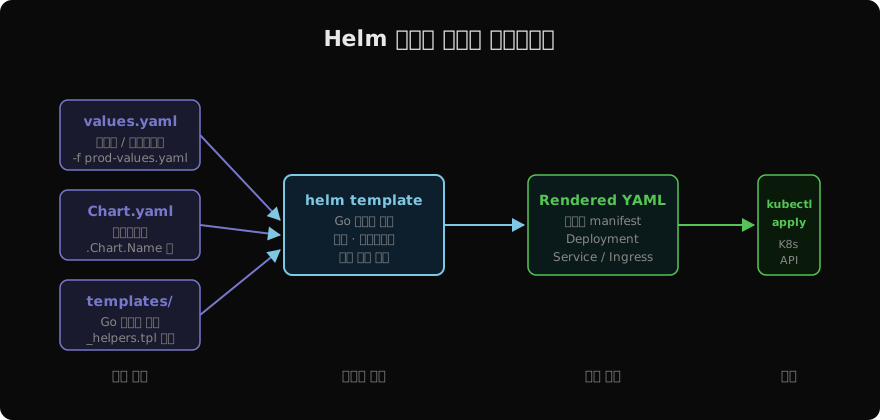
values.yaml의 기본값, -f 옵션으로 넘긴 오버라이드 파일, --set 인라인 값이 병합된 뒤 Go 템플릿 엔진에 전달된다. 엔진은 templates/ 아래의 모든 .yaml 파일과 _helpers.tpl을 읽어 완성된 Kubernetes manifest를 생성한다. 이 과정을 로컬에서 확인하고 싶다면 helm template 명령을 사용한다.
# 렌더링 결과만 출력 (클러스터에 적용하지 않음)
helm template my-release ./mychart \
  -f values-production.yaml \
  --set image.tag=2.1.0

# 특정 템플릿 파일만 확인
helm template my-release ./mychart \
  --show-only templates/deployment.yaml
렌더링 결과를 파이프로 kubectl apply에 넘기거나, CI/CD 파이프라인에서 diff 확인용으로 활용할 수 있다.
Go 템플릿 기본 문법
Helm 템플릿은 Go의 text/template 패키지 위에 Sprig 라이브러리와 Helm 전용 함수를 얹은 구조다. 기본 표현식은 이중 중괄호 {{ }}로 감싼다. 공백 트리밍은 대시 -로 제어한다.
# 기본 값 참조
replicas: {{ .Values.replicaCount }}

# 앞뒤 공백(줄바꿈) 트리밍
{{- if .Values.ingress.enabled }}
# ...
{{- end }}

# 오른쪽만 트리밍
{{ .Values.image.tag -}}
{{ - 는 앞의 공백/줄바꿈을 제거하고, - }} 는 뒤의 공백/줄바꿈을 제거한다. YAML 파서가 예상치 못한 빈 줄로 오류를 낼 때 이 트리밍이 매우 중요하다.
파이프라인과 핵심 함수
Go 템플릿의 파이프라인은 Unix 쉘의 |와 같다. 이전 단계의 출력이 다음 함수의 마지막 인수로 전달된다.
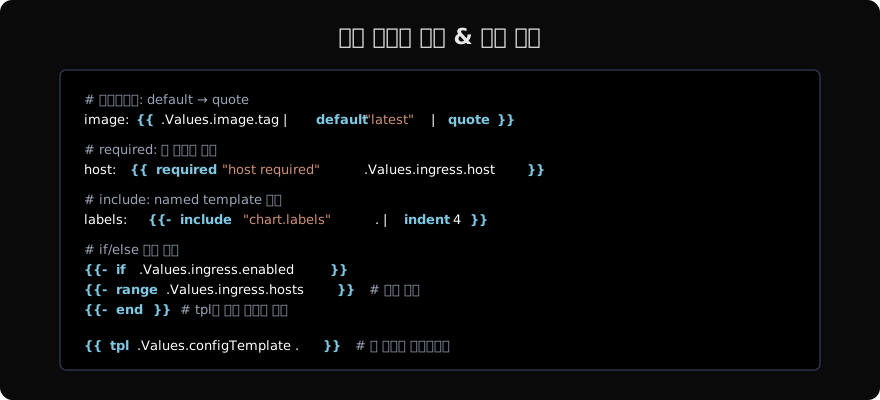
default — 기본값 지정
값이 비어 있거나 설정되지 않았을 때 대체값을 제공한다.
# .Values.image.tag 가 비어 있으면 "latest" 사용
image: {{ .Values.image.repository }}:{{ .Values.image.tag | default "latest" }}

# 파이프라인으로 추가 변환 적용
tag: {{ .Values.image.tag | default "latest" | quote }}quote는 문자열 값 주변에 큰따옴표를 추가한다. YAML에서 숫자처럼 보이는 태그(1.0)도 문자열로 강제할 때 유용하다.
required — 필수 값 검증
값이 없으면 렌더링 단계에서 즉시 에러를 발생시킨다. 프로덕션 배포 전에 누락된 설정을 조기에 발견할 수 있다.
# .Values.global.domain 이 없으면 에러 메시지와 함께 중단
host: {{ required "global.domain is required" .Values.global.domain }}

# 여러 필드 검증
apiKey: {{ required "Please set .Values.app.apiKey" .Values.app.apiKey | b64enc | quote }}
include vs template
named template을 호출할 때 template 액션과 include 함수 두 가지를 사용할 수 있다. 실무에서는 항상 include를 사용한다. template은 반환값을 파이프라인에 연결할 수 없지만, include는 문자열로 반환하므로 indent나 nindent 같은 후처리가 가능하다.
# _helpers.tpl 정의
{{- define "mychart.labels" -}}
app.kubernetes.io/name: {{ .Chart.Name }}
app.kubernetes.io/version: {{ .Chart.AppVersion | quote }}
helm.sh/chart: {{ .Chart.Name }}-{{ .Chart.Version }}
{{- end }}

# templates/deployment.yaml 에서 호출
metadata:
  labels:
    {{- include "mychart.labels" . | nindent 4 }}
nindent 4는 4칸 들여쓰기를 추가하면서 앞에 줄바꿈도 함께 삽입한다. indent 4는 줄바꿈 없이 들여쓰기만 적용한다.
tpl — 값 자체를 템플릿으로
values.yaml에 저장된 문자열 값 안에 템플릿 표현식을 쓰고 싶을 때 tpl을 사용한다.
# values.yaml
configAnnotation: "{{ .Release.Name }}-config-v{{ .Values.appVersion }}"

# templates/deployment.yaml
annotations:
config-ref: {{ tpl .Values.configAnnotation . | quote }}tpl은 강력하지만 남용하면 디버깅이 어렵다. 동적 구성이 꼭 필요한 경우에만 제한적으로 사용한다.
제어 흐름: if / else / with
if / else if / else
# 환경별 리소스 설정
resources:
  {{- if eq .Values.environment "production" }}
  requests:
    cpu: 500m
    memory: 512Mi
  limits:
    cpu: 1000m
    memory: 1Gi
  {{- else if eq .Values.environment "staging" }}
  requests:
    cpu: 250m
    memory: 256Mi
  {{- else }}
  requests:
    cpu: 100m
    memory: 128Mi
  {{- end }}
비교 연산자: eq, ne, lt, le, gt, ge. 논리 연산자: and, or, not.
{{- if and .Values.ingress.enabled .Values.ingress.tls.enabled }}
# TLS + Ingress 모두 활성화된 경우
{{- end }}
with — 컨텍스트 스코프 변경
with는 참조 경로가 깊을 때 유용하다. 블록 안에서 .이 해당 값으로 바뀐다.
{{- with .Values.ingress }}
apiVersion: networking.k8s.io/v1
kind: Ingress
metadata:
  name: {{ $.Release.Name }}-ingress
  annotations:
    {{- toYaml .annotations | nindent 4 }}
spec:
  ingressClassName: {{ .className | default "nginx" }}
{{- end }}
with 블록 안에서 상위 컨텍스트에 접근하려면 $ 변수를 사용한다. $는 항상 템플릿의 루트 컨텍스트를 가리킨다.
반복문: range
range는 슬라이스(list)와 맵(dict) 모두 순회할 수 있다.
# 슬라이스 순회
{{- range .Values.ingress.hosts }}
- host: {{ .host | quote }}
  http:
    paths:
    {{- range .paths }}
    - path: {{ .path }}
      pathType: {{ .pathType | default "Prefix" }}
    {{- end }}
{{- end }}

# 맵 순회 (key, value 쌍)
{{- range $key, $val := .Values.extraEnv }}
- name: {{ $key | upper | quote }}
  value: {{ $val | quote }}
{{- end }}
range 안에서도 $를 통해 루트 컨텍스트에 접근할 수 있다.
_helpers.tpl 패턴
Chart의 templates/_helpers.tpl은 언더스코어(_)로 시작하기 때문에 직접 manifest로 렌더링되지 않는다. 재사용 가능한 named template을 모아두는 파일이다. 실무에서 자주 쓰는 패턴을 소개한다.
# templates/_helpers.tpl

{{/*
공통 레이블 — 모든 리소스에 삽입
*/}}
{{- define "mychart.labels" -}}
app.kubernetes.io/name: {{ include "mychart.name" . }}
app.kubernetes.io/instance: {{ .Release.Name }}
app.kubernetes.io/version: {{ .Chart.AppVersion | quote }}
app.kubernetes.io/managed-by: {{ .Release.Service }}
helm.sh/chart: {{ .Chart.Name }}-{{ .Chart.Version | replace "+" "_" }}
{{- end }}

{{/*
selector 레이블 — Deployment의 selector.matchLabels 에서 사용
변경하면 롤링 업데이트 불가 → 신중하게 정의
*/}}
{{- define "mychart.selectorLabels" -}}
app.kubernetes.io/name: {{ include "mychart.name" . }}
app.kubernetes.io/instance: {{ .Release.Name }}
{{- end }}

{{/*
fullname: Release명이 Chart명을 이미 포함하면 중복 방지
*/}}
{{- define "mychart.fullname" -}}
{{- if .Values.fullnameOverride }}
{{- .Values.fullnameOverride | trunc 63 | trimSuffix "-" }}
{{- else }}
{{- $name := default .Chart.Name .Values.nameOverride }}
{{- if contains $name .Release.Name }}
{{- .Release.Name | trunc 63 | trimSuffix "-" }}
{{- else }}
{{- printf "%s-%s" .Release.Name $name | trunc 63 | trimSuffix "-" }}
{{- end }}
{{- end }}
{{- end }}
trunc 63은 Kubernetes 리소스 이름의 최대 길이 제한(63자)을 맞추기 위한 표준 패턴이다.
toYaml / toJson
복잡한 구조체를 그대로 YAML로 직렬화할 때 toYaml이 필수다.
# values.yaml
affinity:
  nodeAffinity:
    requiredDuringSchedulingIgnoredDuringExecution:
      nodeSelectorTerms:
      - matchExpressions:
        - key: kubernetes.io/arch
          operator: In
          values: [amd64]

# templates/deployment.yaml
spec:
  template:
    spec:
      {{- with .Values.affinity }}
      affinity:
        {{- toYaml . | nindent 8 }}
      {{- end }}
      {{- with .Values.tolerations }}
      tolerations:
        {{- toYaml . | nindent 8 }}
      {{- end }}
toYaml . | nindent 8 패턴은 Helm Chart를 읽다 보면 가장 자주 마주치는 관용구다.
값 검증 전략
values.schema.json으로 타입 검증
Chart.yaml과 같은 디렉터리에 values.schema.json을 추가하면 helm install/upgrade 시 JSON Schema 검증이 자동으로 실행된다.
{
  "$schema": "http://json-schema.org/draft-07/schema",
  "type": "object",
  "required": ["image"],
  "properties": {
    "replicaCount": {
      "type": "integer",
      "minimum": 1,
      "maximum": 20
    },
    "image": {
      "type": "object",
      "required": ["repository", "tag"],
      "properties": {
        "repository": { "type": "string" },
        "tag": { "type": "string" },
        "pullPolicy": {
          "type": "string",
          "enum": ["Always", "IfNotPresent", "Never"]
        }
      }
    }
  }
}
required + fail 조합 패턴
required로 단순 존재 여부를, fail로 복잡한 조건 위반을 처리한다.
# 특정 환경에서만 TLS 필수
{{- if and (eq .Values.environment "production") (not .Values.ingress.tls.enabled) }}
{{- fail "TLS must be enabled in production environment" }}
{{- end }}

# 값 범위 검사
{{- if gt (int .Values.replicaCount) 10 }}
{{- fail "replicaCount must not exceed 10" }}
{{- end }}
실전 디버깅 팁
# 렌더링 오류 상세 확인
helm template . --debug 2>&1 | head -50

# 값 덤프 (템플릿 안에서)
# templates/_debug.yaml (개발 중에만 사용)
{{ .Values | toYaml }}

# lint — 문법·구조 검사
helm lint ./mychart

# helm get values — 현재 Release의 실제 값 확인
helm get values my-release -n production --all
--debug 플래그는 템플릿 렌더링 전 병합된 values와 실패 지점을 함께 출력하므로 오류 원인을 빠르게 파악할 수 있다.
지난 글: Kyverno — Kubernetes 네이티브 정책 엔진
다음 글: Helm Hook — 배포 라이프사이클 확장
읽어주셔서 감사합니다. 😊
PALDYN / ARTICLE AI
글의 개념, 수식, 코드에 대해 물어보세요.
질문과 관련된 문단을 골라 답변의 문맥으로 사용합니다.생각 중 · 0초