

쿠버네티스 Labels와 Selectors 완전 이해
Kubernetes에서 리소스를 식별하고 그룹화하는 Labels와, 그것을 기반으로 대상을 선택하는 Selectors의 동작 원리와 실전 활용법을 정리합니다.
지난 글에서 임시 디버그 컨테이너로 실행 중인 Pod를 진단하는 방법을 살펴봤습니다. 이번에는 Kubernetes에서 거의 모든 리소스가 의존하는 핵심 메커니즘인 Labels와 Selectors를 다룹니다. Service가 어떤 Pod로 트래픽을 보낼지, Deployment가 어떤 Pod를 관리할지, 모두 이 두 개념의 조합으로 결정됩니다.
Labels란
Labels는 Kubernetes 오브젝트에 붙이는 key-value 메타데이터입니다. 사람 또는 시스템이 의미 있는 속성을 기술하기 위해 사용하며, API 서버가 오브젝트를 저장하거나 조회할 때 인덱싱에 활용됩니다.
metadata:
  labels:
    app: web
    env: production
    tier: frontend
    version: v1.2.0
라벨 키는 선택적으로 prefix를 가질 수 있습니다. app.kubernetes.io/name, app.kubernetes.io/version 같은 형태가 공식 권장 패턴입니다. prefix 없는 키는 사용자 영역으로 간주됩니다.
metadata:
  labels:
    app.kubernetes.io/name: web
    app.kubernetes.io/version: "1.2.0"
    app.kubernetes.io/component: frontend
    app.kubernetes.io/managed-by: helm
Selectors와 매칭 원리
Selectors는 Labels 조건을 기술해 대상 오브젝트를 선택합니다. 모든 조건이 AND 관계입니다.
Equality-based Selector
=, ==, != 세 가지 연산자를 지원합니다. =와 ==는 동일합니다.
# CLI에서 사용
kubectl get pods -l app=web,env=production
kubectl get pods -l 'app!=db'

# YAML: Service 또는 ReplicaSet의 matchLabels
selector:
  matchLabels:
    app: web
    env: production
Set-based Selector
in, notin, exists, ! 연산자로 더 표현력 있는 조건을 작성합니다.
# env가 production 또는 staging인 Pod
kubectl get pods -l 'env in (production,staging)'

# tier 라벨이 없는 Pod
kubectl get pods -l '!tier'

# YAML: Deployment의 matchExpressions
selector:
  matchExpressions:
  - key: env
    operator: In
    values:
    - production
    - staging
  - key: tier
    operator: NotIn
    values:
    - db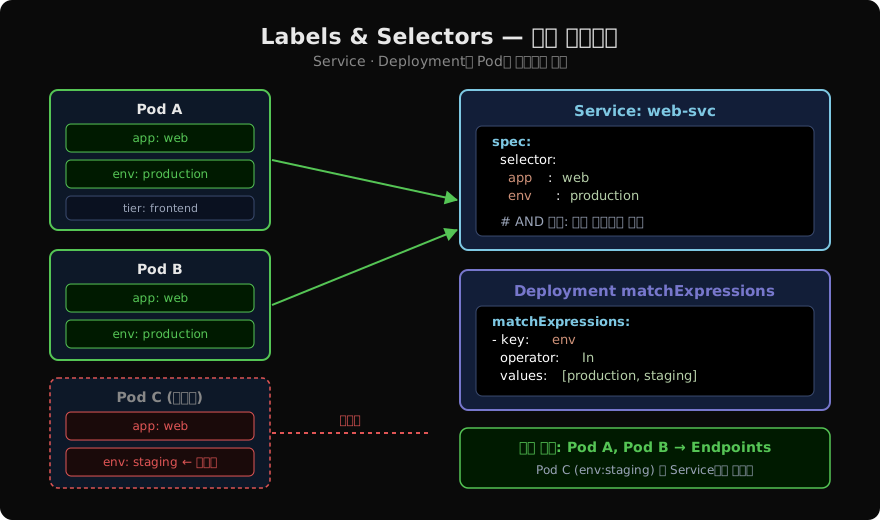
Service와 Selector
Service는 spec.selector로 라우팅 대상 Pod를 선택합니다. Kubernetes 컨트롤러는 이 selector와 일치하는 Pod의 IP를 Endpoints 오브젝트에 자동으로 등록합니다.
apiVersion: v1
kind: Service
metadata:
  name: web-svc
spec:
  selector:
    app: web
    env: production
  ports:
  - port: 80
    targetPort: 8080
app: web이면서 env: production인 Pod만 트래픽을 수신합니다. Pod가 새로 생성되거나 Labels가 변경되면 Endpoints도 즉시 갱신됩니다.
Deployment와 matchLabels
Deployment는 spec.selector로 자신이 관리할 Pod 집합을 정의합니다. spec.template.metadata.labels는 반드시 selector와 일치해야 하며, 불일치하면 Deployment 생성이 거부됩니다.
apiVersion: apps/v1
kind: Deployment
metadata:
  name: web
spec:
  replicas: 3
  selector:
    matchLabels:
      app: web
      env: production
  template:
    metadata:
      labels:
        app: web
        env: production
        # 추가 라벨은 가능
        version: v1.2.0
    spec:
      containers:
      - name: web
        image: nginx:1.25
kubectl로 Labels 관리
# 라벨 추가
kubectl label pod my-pod tier=frontend

# 라벨 수정 (--overwrite 필수)
kubectl label pod my-pod env=staging --overwrite

# 라벨 삭제 (키 뒤에 -)
kubectl label pod my-pod tier-

# 조건으로 삭제 (env=prod인 모든 Pod에서 tier 라벨 제거)
kubectl label pods -l env=production tier-

# 라벨 컬럼 표시
kubectl get pods --show-labels
kubectl get pods -L app,env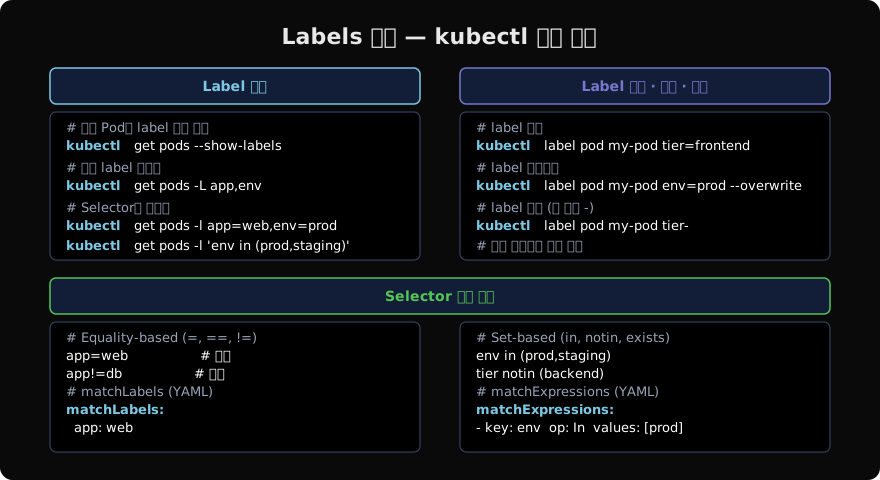
라벨 선택 시 주의사항
Deployment의 spec.selector는 생성 후 변경 불가합니다. 변경이 필요하면 Deployment를 삭제하고 재생성해야 합니다(롤링 업데이트 중에는 두 ReplicaSet이 같은 Pod를 동시에 선택하는 충돌이 발생할 수 있기 때문입니다).
# selector 변경 시도 → 에러 발생
kubectl patch deployment web --type=merge \
  -p '{"spec":{"selector":{"matchLabels":{"version":"v2"}}}}'
# Error: field is immutable
또한 동일한 Labels를 가진 Pod가 여러 Service의 selector와 매칭될 수 있습니다. 이는 의도된 기능이지만(예: 내부 전용 Service + 외부 노출 Service) 라벨 설계 시 주의가 필요합니다.
지난 글: Ephemeral Debug Container로 실행 중인 Pod 디버깅하기
다음 글: 쿠버네티스 Annotations 실전 활용
읽어주셔서 감사합니다. 😊
PALDYN / ARTICLE AI
글의 개념, 수식, 코드에 대해 물어보세요.
질문과 관련된 문단을 골라 답변의 문맥으로 사용합니다.생각 중 · 0초