

지식
Kubernetes
쿠버네티스 RBAC — 역할 기반 접근 제어
Role, ClusterRole, RoleBinding, ClusterRoleBinding의 관계와 사용법, verbs/resources/apiGroups 설정, 권한 디버깅, 최소 권한 원칙을 설명합니다.
지난 글에서 ServiceAccount로 워크로드 ID를 관리하는 방법을 알아봤다. 이번에는 그 SA에 실제 권한을 부여하는 RBAC(Role-Based Access Control)을 다룬다. K8s 1.8부터 기본 인가 방식이 됐으며, 누가(Subject) 어디에서(Scope) 무엇을(Verb + Resource) 할 수 있는지를 세밀하게 제어한다.
RBAC 네 가지 오브젝트
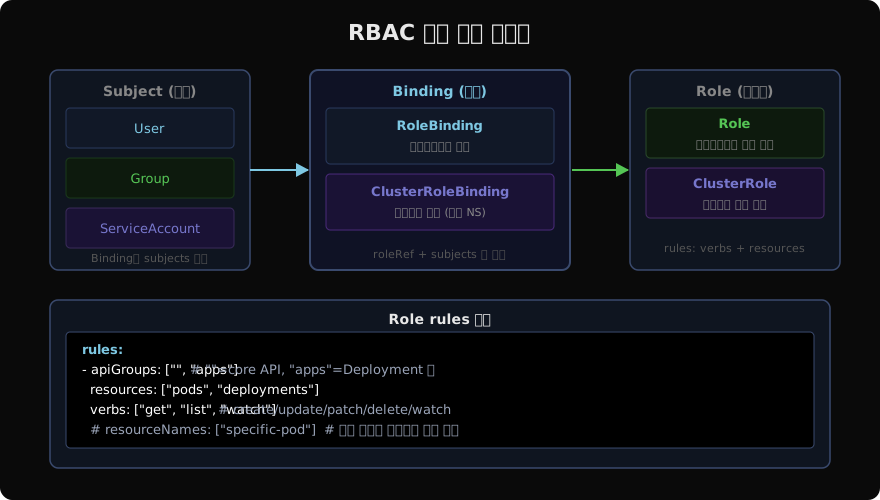
RBAC는 네 종류의 API 오브젝트로 구성된다.
| 오브젝트 | 범위 | 역할 |
|---|---|---|
| Role | 네임스페이스 | 특정 NS 내 리소스 권한 정의 |
| ClusterRole | 클러스터 전체 | 모든 NS 또는 클러스터 레벨 리소스 권한 |
| RoleBinding | 네임스페이스 | Subject와 Role/ClusterRole 연결 (NS 내) |
| ClusterRoleBinding | 클러스터 전체 | Subject와 ClusterRole 연결 (전체 NS) |
Role 생성
# Role: production NS 내 파드 읽기 권한
apiVersion: rbac.authorization.k8s.io/v1
kind: Role
metadata:
  name: pod-reader
  namespace: production
rules:
  - apiGroups: [""]           # "" = core API 그룹 (Pod, Service, ConfigMap 등)
    resources: ["pods", "pods/log", "pods/status"]
    verbs: ["get", "list", "watch"]
  - apiGroups: ["apps"]       # apps/v1 (Deployment, ReplicaSet 등)
    resources: ["deployments"]
    verbs: ["get", "list"]
# Role 확인
kubectl get role -n production
kubectl describe role pod-reader -n productionClusterRole 생성
# ClusterRole: 클러스터 전체 노드 조회 + 네임스페이스 생성 권한
apiVersion: rbac.authorization.k8s.io/v1
kind: ClusterRole
metadata:
  name: node-reader
rules:
  - apiGroups: [""]
    resources: ["nodes", "namespaces"]
    verbs: ["get", "list", "watch"]
  - apiGroups: ["storage.k8s.io"]
    resources: ["storageclasses"]
    verbs: ["get", "list", "watch"]
RoleBinding — Subject와 Role 연결
# SA에 pod-reader Role 부여
apiVersion: rbac.authorization.k8s.io/v1
kind: RoleBinding
metadata:
  name: read-pods
  namespace: production
subjects:
  - kind: ServiceAccount
    name: my-app
    namespace: production
  - kind: User              # 사람 계정에도 적용 가능
    name: alice
    apiGroup: rbac.authorization.k8s.io
  - kind: Group
    name: developers
    apiGroup: rbac.authorization.k8s.io
roleRef:
  kind: Role
  name: pod-reader
  apiGroup: rbac.authorization.k8s.io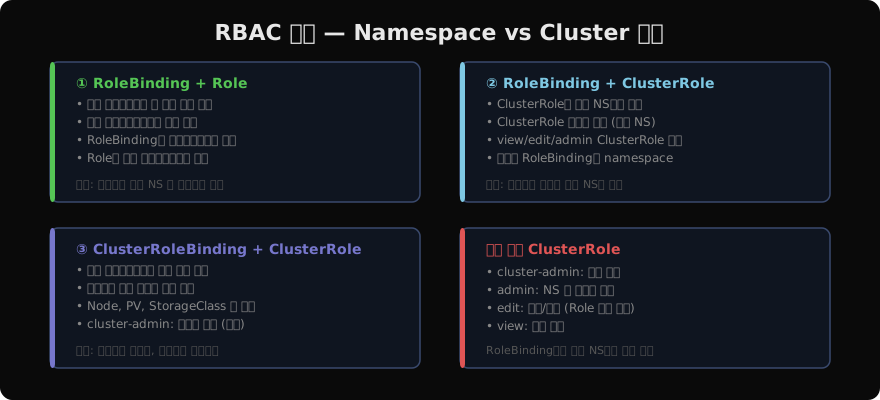
기본 제공 ClusterRole 활용
K8s는 자주 쓰이는 ClusterRole을 기본으로 제공한다. RoleBinding으로 특정 네임스페이스에만 적용할 수 있다.
# 기본 ClusterRole 목록 확인
kubectl get clusterrole | grep -v "^system:"

# dev 팀에 production NS의 edit 권한 부여
kubectl create rolebinding dev-edit \
  --clusterrole=edit \
  --group=dev-team \
  --namespace=production
apiGroups와 verbs 이해
# 어떤 apiGroup에 어떤 리소스가 있는지 확인
kubectl api-resources --sort-by=group | head -40

# 예시 출력:
# NAME                  SHORTNAMES  APIVERSION  KIND
# pods                  po          v1          Pod          (apiGroup: "")
# deployments           deploy      apps/v1     Deployment   (apiGroup: "apps")
# ingresses             ing         networking.k8s.io/v1     (apiGroup: "networking.k8s.io")
# jobs                                batch/v1  Job          (apiGroup: "batch")
verbs 목록: get, list, watch, create, update, patch, delete, deletecollection. *는 모든 verbs를 의미한다.
권한 디버깅
# 특정 SA가 무엇을 할 수 있는지 확인
kubectl auth can-i --list \
  --as=system:serviceaccount:production:my-app \
  -n production

# 특정 동작 가능 여부 확인
kubectl auth can-i create pods \
  --as=system:serviceaccount:production:my-app \
  -n production
# → yes 또는 no

# 현재 사용자 권한 확인
kubectl auth can-i --list

# 특정 리소스 접근 거부 이유 분석
kubectl auth can-i delete secrets \
  --as=system:serviceaccount:production:my-app \
  -n production --v=6  # 상세 로그
최소 권한 원칙 적용
# 나쁜 예: 너무 많은 권한
rules:
  - apiGroups: ["*"]
    resources: ["*"]
    verbs: ["*"]     # cluster-admin 수준 — 절대 지양

# 좋은 예: 필요한 것만
rules:
  - apiGroups: ["apps"]
    resources: ["deployments"]
    verbs: ["get", "list", "watch", "update", "patch"]  # delete 없음
    resourceNames: ["my-app-deployment"]  # 특정 이름으로 제한
# 사용되지 않는 ClusterRoleBinding 찾기 (감사 목적)
kubectl get clusterrolebinding -o json | \
python3 -c "
import sys, json
data = json.load(sys.stdin)
for item in data['items']:
name = item['metadata']['name']
subj = item.get('subjects', [])
if not subj:
print(f'No subjects: {name}')
"지난 글: 쿠버네티스 ServiceAccount — 워크로드 ID와 권한
다음 글: 쿠버네티스 Security Context — 파드 보안 설정
읽어주셔서 감사합니다. 😊
PALDYN / ARTICLE AI
글의 개념, 수식, 코드에 대해 물어보세요.
질문과 관련된 문단을 골라 답변의 문맥으로 사용합니다.생각 중 · 0초