

ReplicationController vs Deployment — 진화의 역사
Kubernetes 초기 워크로드 오브젝트인 ReplicationController와 현재 표준인 Deployment를 비교하고, RC에서 Deployment로 마이그레이션하는 방법을 설명합니다.
지난 글에서 ReplicaSet의 컨트롤 루프와 자가 치유 동작을 살펴봤습니다. 이번에는 Kubernetes 역사를 거슬러 올라가 최초의 Pod 복제 오브젝트인 ReplicationController(RC)와, 현재의 표준인 Deployment를 비교합니다. 레거시 클러스터를 유지보수하거나 RC로 작성된 YAML을 마이그레이션해야 할 때 이 차이를 아는 것이 중요합니다.
ReplicationController의 등장
ReplicationController는 Kubernetes 1.0부터 존재한 오리지널 복제 오브젝트입니다. 지정한 수의 Pod를 유지하는 역할을 하지만 현재 기준으로 여러 한계가 있습니다.
apiVersion: v1
kind: ReplicationController
metadata:
  name: web-rc
spec:
  replicas: 3
  selector:
    app: web          # equality-based만 지원, matchLabels 없음
  template:
    metadata:
      labels:
        app: web
    spec:
      containers:
      - name: web
        image: nginx:1.25
RC의 selector는 key: value 형태의 equality-based 방식만 지원합니다. matchExpressions를 사용할 수 없습니다.
핵심 차이점
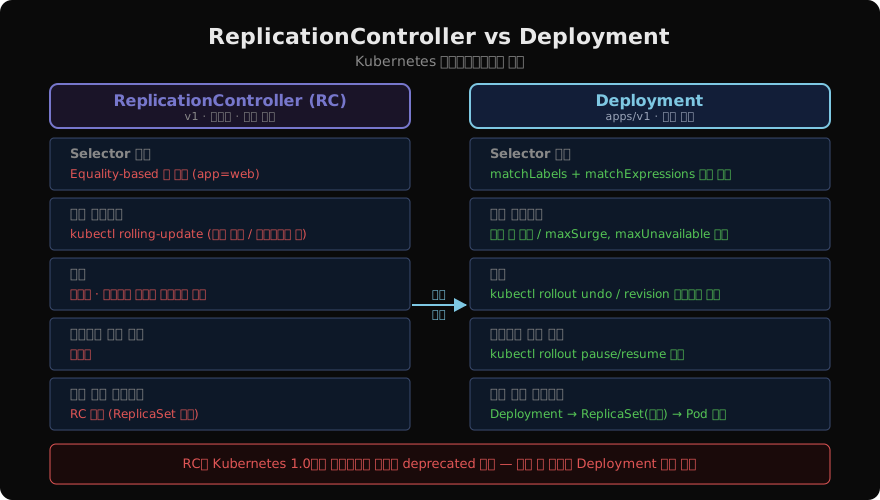
| 기능 | RC | Deployment |
|---|---|---|
| Selector | equality-based만 | matchLabels + matchExpressions |
| 롤링 업데이트 | 클라이언트 측 (kubectl rolling-update) | 서버 측 자동 |
| 롤백 | 미지원 | kubectl rollout undo |
| 업데이트 일시 정지 | 미지원 | pause/resume |
| 히스토리 관리 | 없음 | revision 히스토리 |
| 내부 구조 | RC → Pod 직접 | Deployment → ReplicaSet → Pod |
RC 롤링 업데이트의 문제
RC로 롤링 업데이트를 하려면 kubectl rolling-update 명령을 사용해야 했습니다. 이 명령은 클라이언트 측에서 실행되므로 명령이 중단되면(네트워크 단절, 클라이언트 종료) 업데이트가 불완전한 상태로 멈춥니다. 서버 상태와 클라이언트 기대 상태가 불일치하는 위험이 있습니다.
# RC rolling-update (더 이상 권장하지 않음)
kubectl rolling-update web-rc --image=nginx:1.26
# 클라이언트 연결이 끊기면 반쯤 업데이트된 상태로 멈춤
Deployment는 이 문제를 서버 측에서 처리합니다. 롤아웃 상태를 Deployment 오브젝트에 기록하므로 클라이언트가 끊겨도 컨트롤러가 계속 업데이트를 진행합니다.
RC → Deployment 마이그레이션
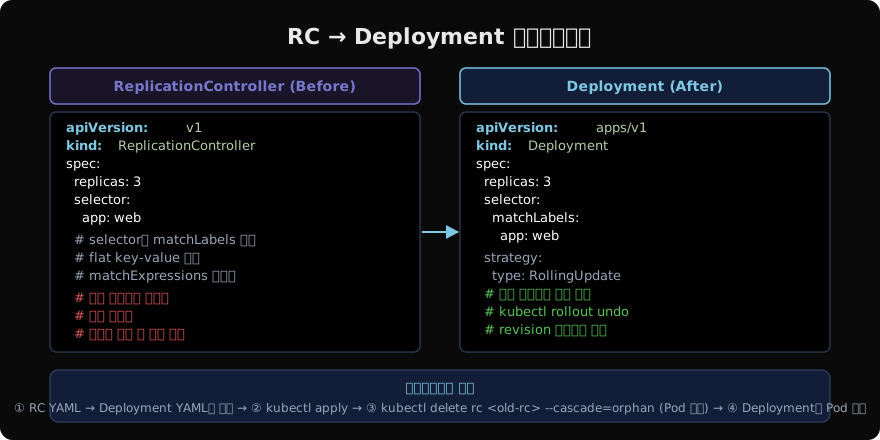
무중단으로 RC를 Deployment로 전환하는 방법입니다.
# 1. 기존 RC 확인
kubectl get rc web-rc

# 2. Deployment YAML 작성 (selector 형식 변경 주의)
# spec.selector.app=web → spec.selector.matchLabels.app=web

# 3. Deployment 적용
kubectl apply -f web-deployment.yaml

# 4. RC는 Pod 유지하면서 삭제 (--cascade=orphan)
kubectl delete rc web-rc --cascade=orphan
# Pod가 남아 있고, Deployment의 selector가 일치하므로 Pod를 인수(adopt)

# 5. Deployment 상태 확인
kubectl rollout status deployment/web
kubectl get pods -l app=web--cascade=orphan으로 RC만 삭제하면 기존 Pod가 살아있고, Deployment의 selector가 동일한 labels를 가진 Pod를 인수합니다. Pod 재시작 없이 마이그레이션할 수 있습니다.
Deployment의 내부 구조
Deployment는 RC와 달리 Pod를 직접 관리하지 않습니다. Deployment → ReplicaSet → Pod 체계입니다.
# Deployment가 생성한 ReplicaSet 확인
kubectl get replicaset -l app=web

# 롤링 업데이트 시 두 ReplicaSet이 공존
kubectl get rs
# NAME              DESIRED  CURRENT  READY
# web-7d9f8c        3        3        3   (새 버전)
# web-4c2b1a        0        0        0   (이전 버전, rollback용 유지)
이전 ReplicaSet이 남아 있기 때문에 kubectl rollout undo로 즉시 롤백이 가능합니다.
현재 권장 사항
ReplicationController는 deprecated 권고 상태입니다. 새로운 클러스터에서는 항상 Deployment(또는 StatefulSet, DaemonSet 등 목적에 맞는 워크로드)를 사용하세요. ReplicationController는 읽기 전용으로 기존 환경을 이해하는 용도로만 참고합니다.
# 클러스터에 남아 있는 RC 확인
kubectl get replicationcontrollers --all-namespaces

# RC가 있다면 마이그레이션 대상
지난 글: 쿠버네티스 ReplicaSet 완전 이해
다음 글: 쿠버네티스 Rolling Update와 Rollback
읽어주셔서 감사합니다. 😊
PALDYN / ARTICLE AI
글의 개념, 수식, 코드에 대해 물어보세요.
질문과 관련된 문단을 골라 답변의 문맥으로 사용합니다.생각 중 · 0초