

쿠버네티스 ResourceQuota — 네임스페이스 총 리소스 사용량 제한
Kubernetes ResourceQuota로 네임스페이스 내 CPU·메모리·Pod 개수·스토리지 총량을 제한하는 방법과 Scope·ScopeSelector 활용 전략을 설명합니다.
지난 글에서 개별 컨테이너의 리소스 기본값과 범위를 설정하는 LimitRange를 다뤘습니다. 이번에는 한 단계 위인 네임스페이스 전체의 합산 사용량을 제한하는 ResourceQuota를 살펴봅니다.
LimitRange와의 차이
LimitRange는 “Pod 하나가 얼마나 쓸 수 있는가”를 제어합니다. ResourceQuota는 “네임스페이스 전체가 얼마나 쓸 수 있는가”를 제어합니다. 예를 들어 LimitRange로 컨테이너 하나의 CPU 상한을 2코어로 제한하고, ResourceQuota로 네임스페이스 전체 CPU 요청 합산을 10코어로 제한하면, 최대 5개의 컨테이너가 동시에 동작할 수 있습니다.
두 기능을 함께 사용할 때 주의사항이 있습니다. ResourceQuota에 compute 리소스 쿼터(requests.cpu 등)를 설정하면, 해당 네임스페이스의 모든 Pod가 반드시 resources를 명시해야 합니다. LimitRange의 defaultRequest가 없다면 Pod 생성이 거부됩니다. 따라서 ResourceQuota와 LimitRange는 쌍으로 배포하는 것이 좋습니다.
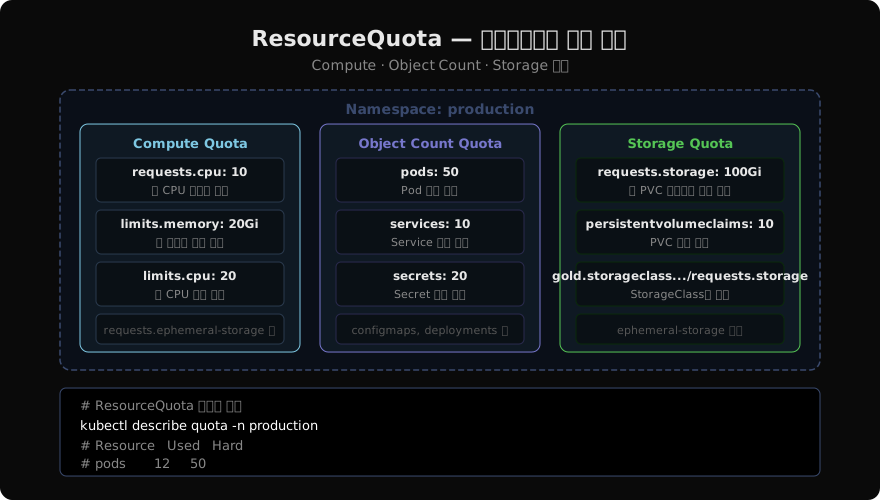
세 가지 쿼터 범주
Compute Resource Quota
CPU와 메모리의 요청량·한도량 합산을 제한합니다.
apiVersion: v1
kind: ResourceQuota
metadata:
  name: compute-quota
  namespace: production
spec:
  hard:
    requests.cpu: "10"
    requests.memory: "20Gi"
    limits.cpu: "20"
limits.memory: "40Gi"requests.cpu는 모든 Pod의 resources.requests.cpu 합산을 제한하고, limits.cpu는 resources.limits.cpu 합산을 제한합니다.
Object Count Quota
네임스페이스 내 Kubernetes 오브젝트 개수를 제한합니다.
spec:
  hard:
    pods: "50"
    services: "10"
    services.loadbalancers: "2"
    services.nodeports: "5"
    secrets: "20"
    configmaps: "20"
    persistentvolumeclaims: "10"
replicationcontrollers: "0" # 사용 금지services.loadbalancers나 services.nodeports로 비용이 많이 드는 서비스 타입을 제한하는 것이 실무에서 유용합니다.
Storage Resource Quota
PVC의 스토리지 총량과 개수를 제한합니다.
spec:
  hard:
    requests.storage: "100Gi"
    persistentvolumeclaims: "10"
    # StorageClass별 제한
    gold.storageclass.storage.k8s.io/requests.storage: "50Gi"
Scope와 ScopeSelector
쿼터를 특정 Pod에만 적용하고 싶을 때 scopes와 scopeSelector를 사용합니다.
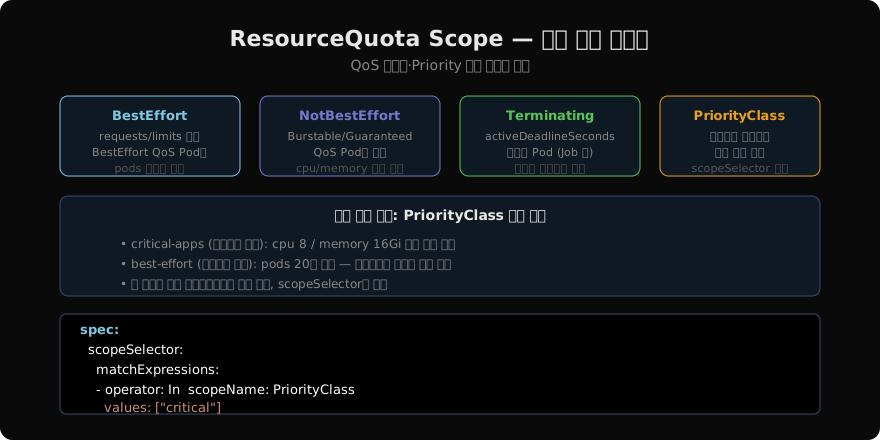
BestEffort 스코프는 requests/limits가 없는 Pod에만 적용되며 pods 쿼터만 설정할 수 있습니다. NotBestEffort는 Burstable/Guaranteed QoS Pod에 적용됩니다. PriorityClass 스코프는 특정 우선순위 클래스의 Pod에만 쿼터를 적용합니다.
# 고우선순위 Pod에만 적용되는 쿼터
apiVersion: v1
kind: ResourceQuota
metadata:
  name: critical-quota
spec:
  hard:
    pods: "10"
    requests.cpu: "8"
    requests.memory: "16Gi"
  scopeSelector:
    matchExpressions:
    - operator: In
      scopeName: PriorityClass
      values: ["system-critical", "high-priority"]
운영 권장 패턴
# 현재 쿼터 사용량 확인
kubectl describe quota -n production

# 출력 예시:
# Resource            Used    Hard
# --------            ----    ----
# limits.cpu          4       20
# limits.memory       8Gi     40Gi
# pods                12      50
# requests.cpu        2       10
# requests.memory     4Gi     20Gi

# 쿼터 초과로 Pod 생성이 거부될 때
kubectl get events -n production | grep FailedCreate
# "exceeded quota: pods, requested: pods=1, used: pods=50, limited: pods=50"
멀티테넌시 환경에서는 팀별 네임스페이스에 ResourceQuota + LimitRange를 표준 세트로 배포합니다. Helm 차트나 Kustomize 컴포넌트로 관리하면 일관성을 유지하기 좋습니다.
지난 글: 쿠버네티스 LimitRange — 네임스페이스 내 리소스 기본값과 제한
다음 글: 쿠버네티스 HPA — Pod 수평 자동 스케일링
읽어주셔서 감사합니다. 😊
PALDYN / ARTICLE AI
글의 개념, 수식, 코드에 대해 물어보세요.
질문과 관련된 문단을 골라 답변의 문맥으로 사용합니다.생각 중 · 0초