

Seccomp와 AppArmor — 커널 레벨 보안 프로파일
Seccomp로 syscall을 제한하고 AppArmor로 파일/네트워크 접근을 제어하는 방법, RuntimeDefault 프로파일, 커스텀 프로파일 개발, Pod 설정 방법을 설명합니다.
지난 글에서 Security Context로 파드 프로세스 권한을 설정하는 방법을 알아봤다. 이번에는 한 단계 더 깊이 들어가 커널 레벨 보안 메커니즘인 Seccomp와 AppArmor를 다룬다. Security Context의 capabilities가 “어떤 권한 그룹을 가질 수 있는가”를 제어한다면, Seccomp는 “어떤 시스템 콜을 호출할 수 있는가”를, AppArmor는 “어떤 파일과 네트워크에 접근할 수 있는가”를 제어한다. 이 둘은 심층 방어(Defense in Depth)를 완성하는 마지막 레이어다.
Seccomp 개요
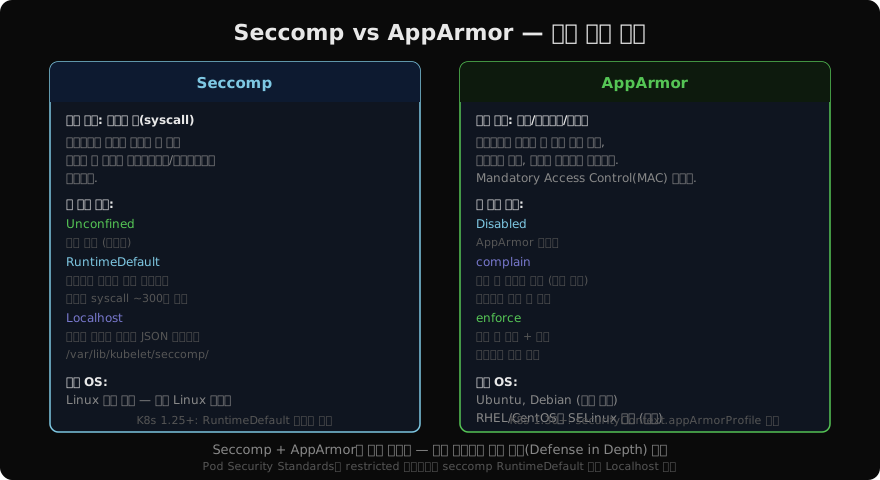
Seccomp(Secure Computing Mode)는 Linux 커널 기능으로, 프로세스가 호출할 수 있는 시스템 콜(syscall)을 필터링한다. 컨테이너화된 앱이 kexec_load(커널 교체), mount(파일시스템 마운트) 같은 위험한 syscall을 호출하는 것을 원천 차단한다.
RuntimeDefault 프로파일 적용
가장 쉽고 효과적인 첫 단계는 RuntimeDefault를 사용하는 것이다. containerd/Docker의 기본 seccomp 프로파일로, 약 300개의 위험 syscall을 차단하면서 대부분의 앱이 정상 동작한다.
apiVersion: v1
kind: Pod
metadata:
  name: secure-pod
spec:
  securityContext:
    seccompProfile:
      type: RuntimeDefault   # containerd/Docker 기본 프로파일
  containers:
    - name: app
      image: my-app:latest
# RuntimeDefault 적용 확인
kubectl get pod secure-pod -o jsonpath=\
'{.spec.securityContext.seccompProfile}'
# {"type":"RuntimeDefault"}
# 컨테이너 내에서 차단된 syscall 시도 (예: reboot)
kubectl exec secure-pod -- reboot
# Operation not permittedAudit 모드로 필요한 Syscall 파악
커스텀 프로파일을 개발할 때는 먼저 Audit 모드로 필요한 syscall을 파악한다.
{
  "defaultAction": "SCMP_ACT_LOG",
  "syscalls": []
}SCMP_ACT_LOG는 모든 syscall을 허용하되 커널 로그(dmesg)에 기록한다. 앱을 실제로 실행하면서 어떤 syscall이 호출되는지 확인할 수 있다.
# Audit 모드 실행 후 syscall 확인
dmesg | grep "type=SECCOMP" | awk '{print $NF}' | sort -u
# syscall=0  (read)
# syscall=1  (write)
# syscall=2  (open)
# ...

# syscall 번호를 이름으로 변환
ausyscall --dump | grep "^0\|^1\|^2"
Localhost 커스텀 프로파일
파악한 syscall로 화이트리스트 프로파일을 만들어 노드에 배포한다.
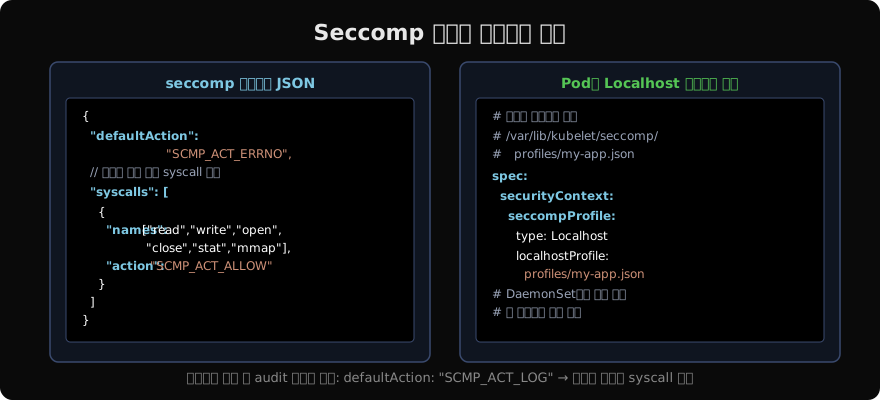
# 프로파일을 모든 노드의 /var/lib/kubelet/seccomp/profiles/에 배포
# DaemonSet으로 배포하는 것이 권장됨

# 단일 노드 테스트
sudo mkdir -p /var/lib/kubelet/seccomp/profiles
sudo cp my-app.json /var/lib/kubelet/seccomp/profiles/
# Localhost 프로파일 사용
spec:
securityContext:
seccompProfile:
type: Localhost
localhostProfile: profiles/my-app.jsonAppArmor 개요와 적용
AppArmor는 Ubuntu/Debian 배포판에 기본 탑재된 Mandatory Access Control 시스템이다. 파일 경로, 네트워크 소켓, 리소스 사용을 프로파일로 제한한다.
# 노드에서 AppArmor 지원 확인
cat /sys/module/apparmor/parameters/enabled
# Y

# 기본 Docker 프로파일 확인
sudo aa-status | grep docker
# docker-default (enforce)

# 커스텀 프로파일 생성 (기본 구조)
cat /etc/apparmor.d/k8s-my-app-profile
#include <tunables/global>
profile k8s-my-app flags=(attach_disconnected) {
#include <abstractions/base>
network inet tcp, # TCP 연결 허용
network inet udp,
/app/my-app mr, # 앱 바이너리 실행 허용 (r=read, m=memory map)
/tmp/** rw, # /tmp 읽기/쓰기
/var/log/** w, # 로그 디렉터리 쓰기
deny /etc/shadow r, # shadow 파일 읽기 금지
deny /proc/sys/kernel/core_pattern w, # core dump 경로 변경 금지
}# AppArmor 프로파일 로드
sudo apparmor_parser -r -W /etc/apparmor.d/k8s-my-app-profile
# 프로파일 상태 확인
sudo aa-status | grep k8s-my-app
# k8s-my-app-profile (enforce)# Pod에 AppArmor 프로파일 적용 (K8s 1.30+ securityContext 방식)
spec:
securityContext:
appArmorProfile:
type: Localhost
localhostProfile: k8s-my-app-profile# K8s 1.30 미만에서는 어노테이션 방식
metadata:
annotations:
container.apparmor.security.beta.kubernetes.io/app: localhost/k8s-my-app-profilecomplain 모드로 프로파일 개발
# complain 모드로 프로파일 로드 (차단 없이 로그만)
sudo aa-complain /etc/apparmor.d/k8s-my-app-profile

# 앱 실행 후 로그 확인
sudo journalctl -f | grep apparmor

# 로그 기반으로 프로파일 자동 업데이트
sudo aa-logprof
# 대화형으로 새로운 접근 패턴을 프로파일에 추가
Seccomp + AppArmor + Security Context 조합
가장 강력한 파드 하드닝은 세 가지를 함께 사용하는 것이다.
apiVersion: v1
kind: Pod
metadata:
  name: hardened-pod
spec:
  securityContext:
    runAsNonRoot: true
    runAsUser: 1000
    seccompProfile:
      type: RuntimeDefault        # Seccomp
    appArmorProfile:
      type: Localhost
      localhostProfile: k8s-my-app-profile  # AppArmor
  containers:
    - name: app
      image: my-app:latest
      securityContext:
        allowPrivilegeEscalation: false
        readOnlyRootFilesystem: true
        capabilities:
          drop: [ALL]             # Capabilities
Pod Security Standards와의 관계
| 프로파일 | Seccomp 요구사항 |
|---|---|
| Privileged | 제한 없음 |
| Baseline | Unconfined만 차단 |
| Restricted | RuntimeDefault 또는 Localhost 강제 |
Restricted 프로파일은 seccomp를 강제하므로, Restricted 정책을 사용하면 자동으로 최소한의 Seccomp 보호가 적용된다.
지난 글: 쿠버네티스 Security Context — 파드 보안 설정
읽어주셔서 감사합니다. 😊
PALDYN / ARTICLE AI
글의 개념, 수식, 코드에 대해 물어보세요.
질문과 관련된 문단을 골라 답변의 문맥으로 사용합니다.생각 중 · 0초