

ESLint 커스텀 규칙 — AST 기반 규칙 작성
ESLint 커스텀 규칙의 meta/create 구조, AST 노드 방문자 패턴, context.report와 fixer, RuleTester로 단위 테스트, 플러그인 패키지화까지 실전 예제로 정리합니다.
지난 글에서 Husky와 lint-staged로 커밋 훅을 구성했습니다. 이번에는 ESLint 커스텀 규칙 작성을 다룹니다. 기존 플러그인으로 해결되지 않는 팀 고유의 코딩 규칙이 있을 때, 또는 레거시 패턴 마이그레이션을 자동화하고 싶을 때 커스텀 규칙이 필요합니다. 커스텀 규칙은 ESLint가 제공하는 방문자(Visitor) 패턴으로 AST 노드를 순회하며 위반을 감지하고, 선택적으로 자동 수정(fixer)까지 제공합니다.
AST 방문자 패턴
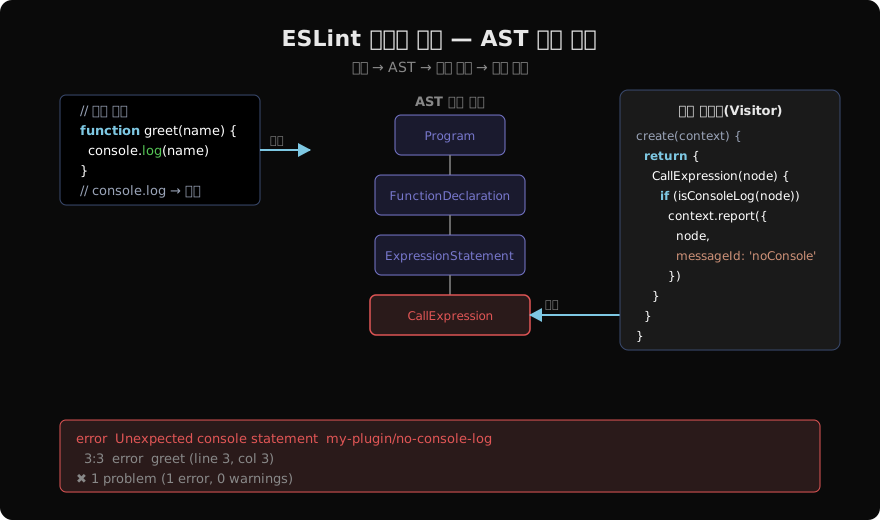
ESLint는 소스 코드를 파싱해 AST(Abstract Syntax Tree)를 만들고, 각 규칙에 정의된 방문자 객체에 노드 타입 이름으로 된 메서드를 호출합니다. CallExpression(node) 메서드를 정의하면 모든 함수 호출식(foo(), bar.baz() 등)을 방문할 때 그 메서드가 호출됩니다.
어떤 AST 노드 타입이 있는지 보려면 AST Explorer를 활용합니다. 코드를 붙여넣으면 실시간으로 AST 구조를 확인할 수 있습니다.
규칙 구조
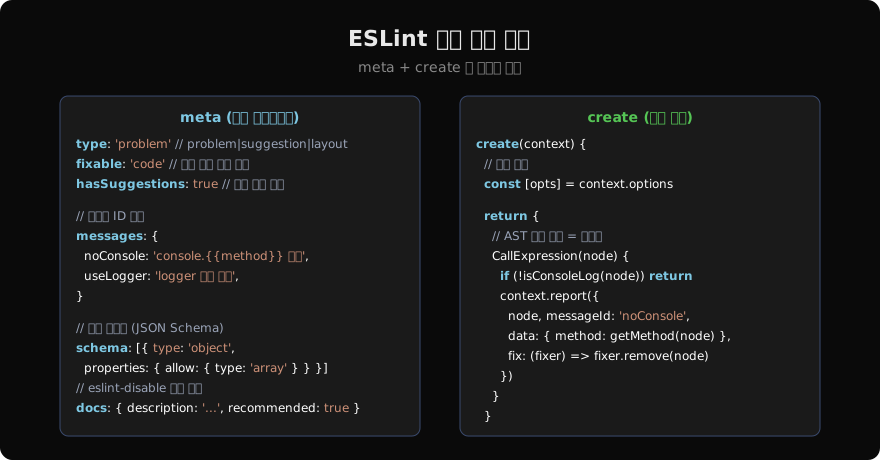
ESLint 규칙은 meta와 create 두 파트로 구성됩니다.
// rules/no-console-log.js
export default {
  meta: {
    type: 'problem',
    fixable: 'code',
    messages: {
      noConsole: 'console.{{method}}() 사용 금지. logger를 사용하세요.',
    },
    schema: [
      {
        type: 'object',
        properties: {
          allow: { type: 'array', items: { type: 'string' } },
        },
        additionalProperties: false,
      },
    ],
    docs: {
      description: 'console 메서드 사용을 금지합니다.',
      recommended: true,
    },
  },

  create(context) {
    const [options = {}] = context.options
    const allowList = options.allow ?? []

    return {
      CallExpression(node) {
        if (
          node.callee.type !== 'MemberExpression' ||
          node.callee.object.name !== 'console'
        ) return

        const method = node.callee.property.name
        if (allowList.includes(method)) return

        context.report({
          node,
          messageId: 'noConsole',
          data: { method },
          fix(fixer) {
            // 전체 구문(ExpressionStatement)을 제거
            const stmt = node.parent
            if (stmt.type === 'ExpressionStatement') {
              return fixer.remove(stmt)
            }
          },
        })
      },
    }
  },
}
context API 주요 메서드
| 메서드 | 설명 |
|---|---|
context.report({ node, messageId, data, fix }) | 위반 보고 + 선택적 자동 수정 |
context.options | 규칙에 전달된 옵션 배열 |
context.getFilename() | 현재 파일 경로 |
context.getSourceCode() | 소스 코드 객체 (토큰, 주석 접근) |
context.getScope() | 현재 스코프 정보 |
Fixer API
fix 콜백이 받는 fixer 객체는 소스 코드를 텍스트 단위로 수정합니다.
fix(fixer) {
  // 노드 제거
  fixer.remove(node)

  // 텍스트 삽입 (노드 앞/뒤)
  fixer.insertTextBefore(node, '/* deprecated */ ')
  fixer.insertTextAfter(node, ' /* end */')

  // 노드를 다른 텍스트로 교체
  fixer.replaceText(node, 'logger.info(...args)')

  // 범위 기반 교체
  fixer.replaceTextRange([start, end], newText)
}
여러 수정을 동시에 하려면 배열로 반환합니다.
fix(fixer) {
  return [
    fixer.remove(node.callee.object),         // 'console' 제거
    fixer.replaceText(node.callee.property, 'logger'), // 'log' → 'logger'
  ]
}
RuleTester — 단위 테스트
커스텀 규칙은 반드시 RuleTester로 테스트합니다.
// rules/no-console-log.test.js
import { RuleTester } from 'eslint'
import rule from './no-console-log.js'

const tester = new RuleTester({
  languageOptions: { ecmaVersion: 2022, sourceType: 'module' },
})

tester.run('no-console-log', rule, {
  valid: [
    'logger.info("hello")',
    { code: 'console.warn("warn")', options: [{ allow: ['warn'] }] },
  ],
  invalid: [
    {
      code: 'console.log("debug")',
      errors: [{ messageId: 'noConsole', data: { method: 'log' } }],
      output: '',    // fix 후 결과
    },
    {
      code: 'console.error("err")',
      errors: [{ messageId: 'noConsole', data: { method: 'error' } }],
    },
  ],
})
플러그인으로 패키지화
// eslint-plugin-my-rules/index.js
import noConsoleLog from './rules/no-console-log.js'
import noDirectImport from './rules/no-direct-import.js'

export default {
  meta: { name: 'my-rules', version: '1.0.0' },
  rules: {
    'no-console-log': noConsoleLog,
    'no-direct-import': noDirectImport,
  },
  configs: {
    recommended: {
      plugins: { 'my-rules': {} },
      rules: {
        'my-rules/no-console-log': 'error',
        'my-rules/no-direct-import': 'warn',
      },
    },
  },
}
// eslint.config.mjs
import myRules from 'eslint-plugin-my-rules'
export default [
myRules.configs.recommended,
{
rules: {
'my-rules/no-console-log': ['error', { allow: ['warn', 'error'] }],
},
},
]Selector 문법 — 고급 노드 선택
방문자 키로 단순 노드 타입 외에 CSS 셀렉터와 유사한 문법을 사용할 수 있습니다.
return {
  // async 함수 내의 await 없는 return
  'FunctionDeclaration[async=true] > BlockStatement > ReturnStatement': (node) => {
    // ...
  },

  // 특정 이름의 식별자
  'Identifier[name="TODO"]': (node) => {
    context.report({ node, message: 'TODO 주석을 이슈로 전환하세요.' })
  },

  // 방문 후 (자식 순회 완료 후)
  'FunctionDeclaration:exit': (node) => {
    // ...
  },
}
지난 글: Husky + lint-staged — 커밋 훅으로 품질 게이트 구축
다음 글: SPA vs MPA vs MFE — 프론트엔드 아키텍처 선택
읽어주셔서 감사합니다. 😊
PALDYN / ARTICLE AI
글의 개념, 수식, 코드에 대해 물어보세요.
질문과 관련된 문단을 골라 답변의 문맥으로 사용합니다.생각 중 · 0초