

MariaDB MaxScale — 지능형 데이터베이스 프록시 완전 가이드
MariaDB MaxScale의 아키텍처, ReadWriteSplit 라우터, ReadConnRoute, 쿼리 힌트 라우팅, 모니터링, maxctrl 운영 명령을 단계별로 설명합니다.
지난 글에서 Galera Cluster의 동기 복제 원리와 운영 패턴을 살펴봤다. 이번 글에서는 MariaDB 생태계의 지능형 데이터베이스 프록시인 MaxScale을 다룬다. MaxScale은 단순한 로드 밸런서가 아니라 SQL을 파싱해 쿼리 유형에 따라 적절한 서버로 라우팅하는 미들웨어다.
MaxScale이란
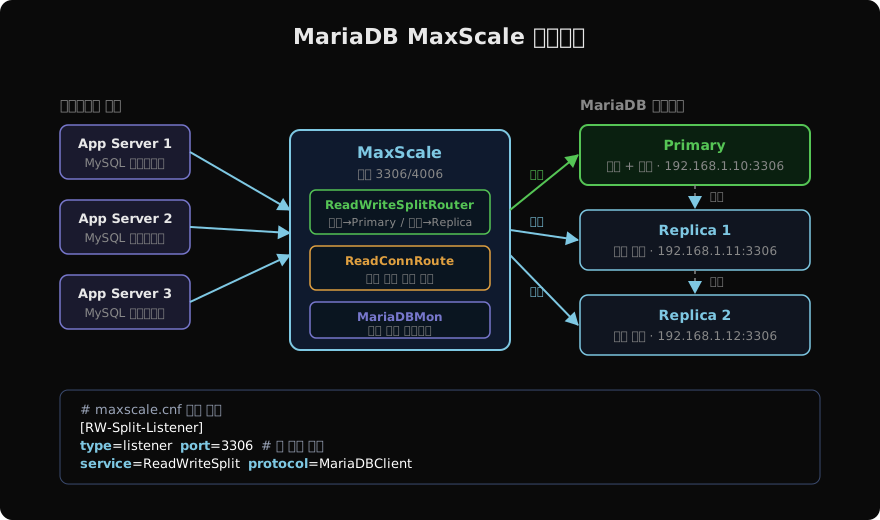
MaxScale은 MariaDB Corporation이 개발한 오픈소스 데이터베이스 프록시다. 애플리케이션은 MaxScale 하나에만 연결하면 되고, MaxScale이 내부적으로 Primary/Replica를 분리해 트래픽을 분산한다. 주요 기능은 다음과 같다.
- 쿼리 라우팅: SELECT는 Replica, 쓰기는 Primary로 자동 분리
- 커넥션 풀링: 백엔드 연결 수를 제한해 DB 부하 감소
- 자동 Failover: Primary 장애 시 Replica를 자동 승격
- 쿼리 필터링: 느린 쿼리 차단, 화이트리스트·블랙리스트 적용
핵심 구성 요소
MaxScale 설정 파일(/etc/maxscale.cnf)은 네 가지 객체로 구성된다.
| 객체 | 역할 |
|---|---|
| Server | 백엔드 MariaDB 서버 정의 |
| Monitor | 서버 상태 주기적 확인 (MariaDBMon) |
| Service | 라우터 + 서버 그룹 조합 |
| Listener | 클라이언트가 접속하는 포트 |
# /etc/maxscale.cnf 기본 구조

[maxscale]
threads = auto          # CPU 코어 수 자동 감지

# ── 백엔드 서버 ──────────────────────────────────────────
[Primary]
type     = server
address  = 192.168.1.10
port     = 3306
protocol = MariaDBBackend

[Replica1]
type    = server
address = 192.168.1.11
port    = 3306
protocol = MariaDBBackend

[Replica2]
type    = server
address = 192.168.1.12
port    = 3306
protocol = MariaDBBackend

# ── 모니터 ───────────────────────────────────────────────
[MariaDB-Monitor]
type        = monitor
module      = mariadbmon
servers     = Primary,Replica1,Replica2
user        = maxscale_mon
password    = mon_password
monitor_interval = 2000ms
auto_failover    = true
auto_rejoin      = true
ReadWriteSplitRouter 설정
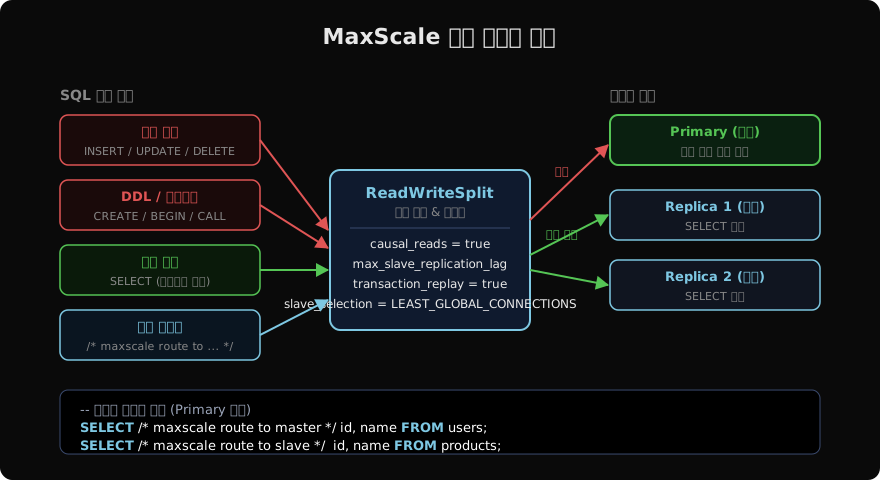
가장 많이 쓰이는 라우터다. SQL 구문을 분석해 쓰기는 Primary, 읽기는 Replica로 분산한다.
[RW-Split-Service]
type    = service
router  = readwritesplit
servers = Primary,Replica1,Replica2
user    = maxscale_user
password = rw_password

# 읽기 분산 전략
slave_selection_criteria       = LEAST_GLOBAL_CONNECTIONS
max_slave_replication_lag      = 5000ms   # 5초 이상 지연된 Replica 제외
causal_reads                   = true     # 직전 쓰기 반영 보장
transaction_replay             = true     # 실패한 트랜잭션 자동 재시도
master_failure_mode            = fail_on_write

[RW-Split-Listener]
type     = listener
service  = RW-Split-Service
port     = 3306
protocol = MariaDBClient
causal_reads = true로 설정하면 MaxScale이 GTID를 추적해 직전 쓰기가 반영된 Replica에만 읽기를 보내므로 Read-Your-Writes 일관성을 보장한다.
ReadConnRoute — 읽기 전용 로드 밸런서
분석 쿼리나 배치 작업처럼 반드시 Replica에만 보내야 하는 경우 ReadConnRoute를 별도 리스너로 구성한다.
[Read-Only-Service]
type    = service
router  = readconnroute
servers = Replica1,Replica2
user    = maxscale_user
password = rw_password
router_options = slave

[Read-Only-Listener]
type     = listener
service  = Read-Only-Service
port     = 3307          # 읽기 전용 포트 분리
protocol = MariaDBClient
애플리케이션에서 읽기 전용 연결은 포트 3307로, 쓰기 포함 연결은 포트 3306으로 분리해 접속하면 된다.
쿼리 힌트 라우팅
특정 SELECT를 무조건 Primary로 보내야 하는 경우(예: 방금 INSERT한 데이터 즉시 조회) SQL 힌트로 라우팅을 강제할 수 있다.
-- Primary(master)로 강제 라우팅
SELECT /* maxscale route to master */
    id, order_status
FROM orders
WHERE id = LAST_INSERT_ID();

-- Replica(slave)로 강제 라우팅
SELECT /* maxscale route to slave */
    COUNT(*) AS total
FROM products
WHERE category = 'electronics';
힌트는 SQL 주석 안에 maxscale route to master|slave 형식으로 넣는다.
Binlog Router — 중앙 복제 허브
MaxScale은 Binlog Router 기능도 제공한다. Primary의 바이너리 로그를 MaxScale이 먼저 받고, 여러 Replica가 MaxScale에서 복제 스트림을 가져간다. Primary 부하를 줄이고 복제 토폴로지 변경을 유연하게 관리할 수 있다.
[BinlogRouter]
type                = service
router              = binlogrouter
server_id           = 99
master_id           = 1
filestem            = binlog
router_options      = mariadb10-compatibility=1

[BinlogListener]
type     = listener
service  = BinlogRouter
port     = 3309
protocol = MariaDBClient
maxctrl — 운영 CLI
MaxScale 2.5+에서는 maxctrl로 런타임 중 서버 상태 조회와 설정 변경이 가능하다.
# 서버 상태 확인
maxctrl list servers

# 서비스 및 리스너 상태
maxctrl list services
maxctrl list listeners

# 서버를 maintenance 모드로 전환 (쿼리 드레인 후 연결 해제)
maxctrl set server Primary maintenance

# maintenance 해제
maxctrl clear server Primary maintenance

# 즉시 Failover 실행 (테스트용)
maxctrl call command mariadbmon switchover MariaDB-Monitor

# 런타임 파라미터 변경 (재시작 불필요)
maxctrl alter service RW-Split-Service max_slave_replication_lag 3000ms
모니터링 쿼리
-- MaxScale 내부 상태 조회 (MaxScale 전용 가상 DB)
SELECT * FROM maxscale.servers;

-- 세션 목록
SELECT * FROM maxscale.sessions LIMIT 20;

-- 라우팅 통계 (서비스별 쿼리 수)
SELECT * FROM maxscale.services;
MaxScale이 자체 제공하는 maxscale 스키마에 접속하면 서버·세션·서비스 상태를 SQL로 조회할 수 있다.
주요 운영 팁
MaxScale을 실제 운영에 적용할 때 자주 마주치는 이슈와 해결책이다.
causal_reads오버헤드: Gtid 추적으로 Replica에 추가 쿼리가 발생한다. 지연에 민감하면causal_reads = fast사용- 트랜잭션 내 SELECT:
BEGIN~COMMIT사이의 SELECT는 무조건 Primary로 라우팅된다. 읽기 전용 트랜잭션은START TRANSACTION READ ONLY로 열면 Replica 활용 가능 - Prepared Statement: Prepared Statement는 세션 수명 동안 같은 서버에 고정된다. 연결 풀과 함께 사용 시 주의 필요
- 커넥션 풀 크기:
max_connections(MaxScale → DB)와max_slave_connections파라미터로 Replica별 최대 연결 수를 제한한다
다음 글에서는 MariaDB 10.3+에서 도입된 System-Versioned Tables(시간 여행 쿼리)를 살펴본다.
지난 글: MariaDB Galera Cluster — 동기식 다중 Primary 클러스터 완전 가이드
다음 글: MariaDB System-Versioned Tables — 시간 여행 쿼리
읽어주셔서 감사합니다. 😊
PALDYN / ARTICLE AI
글의 개념, 수식, 코드에 대해 물어보세요.
질문과 관련된 문단을 골라 답변의 문맥으로 사용합니다.생각 중 · 0초