

Fetch API 완전 이해
fetch()의 Request·Response·Headers 인터페이스, HTTP 오류 처리 패턴, credentials·mode·cache 옵션, FormData·blob 전송, 재시도 패턴까지 정리합니다.
지난 글에서 requestAnimationFrame과 requestIdleCallback을 살펴봤습니다. 이번에는 브라우저 내장 HTTP 클라이언트인 Fetch API를 정리합니다. XMLHttpRequest를 대체하는 Promise 기반 API로, 서비스 워커·스트림과 긴밀하게 연동됩니다.
fetch 기본
const response = await fetch('https://api.example.com/users');
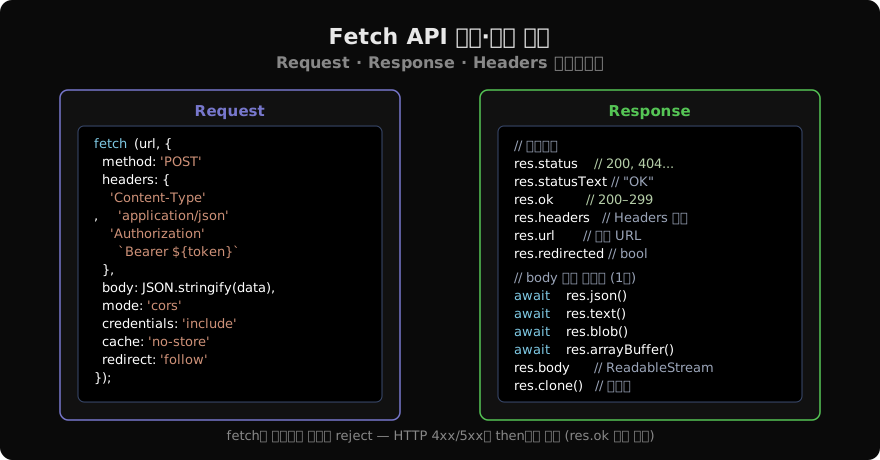
const users = await response.json();fetch()는 Response 객체로 resolve되는 Promise를 반환합니다. 네트워크 오류(DNS 실패, 연결 거부)만 reject됩니다. HTTP 4xx, 5xx는 resolve됩니다 — 이 점이 가장 흔한 실수입니다.
Request · Response 구조
HTTP 오류 처리
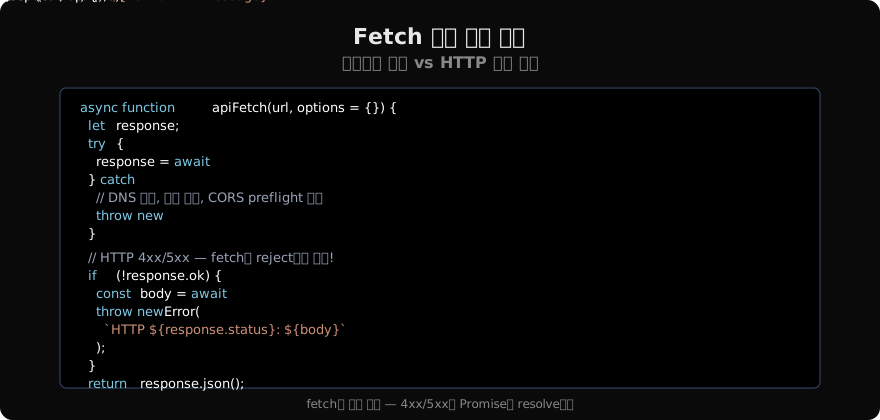
async function apiFetch(url, options = {}) {
  let response;
  try {
    response = await fetch(url, options);
  } catch (networkErr) {
    throw new Error(`네트워크 오류: ${networkErr.message}`);
  }

  if (!response.ok) {
    const body = await response.text().catch(() => '');
    throw Object.assign(new Error(`HTTP ${response.status}`), {
      status: response.status,
      body,
    });
  }

  const contentType = response.headers.get('content-type') ?? '';
  return contentType.includes('application/json') ? response.json() : response.text();
}
주요 RequestInit 옵션
const res = await fetch('/api/data', {
  method: 'POST',                    // GET(기본) | POST | PUT | PATCH | DELETE
  headers: {
    'Content-Type': 'application/json',
    Authorization: `Bearer ${token}`,
  },
  body: JSON.stringify({ name: 'Alice' }), // GET/HEAD는 body 불가
  mode: 'cors',           // 'cors' | 'no-cors' | 'same-origin'
  credentials: 'include', // 'omit'(기본) | 'same-origin' | 'include'
  cache: 'no-store',      // 'default' | 'no-store' | 'reload' | 'force-cache'
  redirect: 'follow',     // 'follow'(기본) | 'error' | 'manual'
  signal: controller.signal, // AbortController 연동
});
credentials 주의: 쿠키를 서버로 보내려면 'include', 서버는 Access-Control-Allow-Credentials: true를 반환하고 Access-Control-Allow-Origin에 와일드카드(*) 대신 정확한 origin을 지정해야 합니다.
FormData와 파일 업로드
const formData = new FormData();
formData.append('name', 'Alice');
formData.append('avatar', fileInput.files[0]); // File 객체

const res = await fetch('/api/profile', {
  method: 'POST',
  body: formData, // Content-Type은 자동으로 multipart/form-data 설정
  // headers에 Content-Type 직접 지정하면 boundary가 빠져 오류 발생!
});
응답 본문 소비
Response body는 스트림이므로 단 한 번만 소비할 수 있습니다.
const res = await fetch('/api/image');

// ✅ clone() 후 각각 소비
const resClone = res.clone();
const blob = await res.blob();          // 이미지로 사용
const arrayBuffer = await resClone.arrayBuffer(); // 원본 데이터도 필요 시

// ❌ 두 번 소비 — 두 번째는 빈 body
const text1 = await res.text();
const text2 = await res.text(); // TypeError: body already used
Headers 인터페이스
const headers = new Headers({
  'Content-Type': 'application/json',
  Authorization: 'Bearer token',
});

headers.append('X-Custom', 'value');
headers.set('Authorization', 'Bearer new-token'); // 덮어씀
headers.get('content-type'); // 대소문자 무관 "application/json"
headers.has('X-Custom');     // true
headers.delete('X-Custom');

// 순회
for (const [name, value] of headers) {
  console.log(`${name}: ${value}`);
}
재시도 패턴
async function fetchWithRetry(url, options = {}, retries = 3, delay = 1000) {
  for (let attempt = 0; attempt <= retries; attempt++) {
    try {
      const res = await fetch(url, options);
      if (res.ok) return res;
      if (res.status < 500) throw new Error(`HTTP ${res.status}`); // 4xx는 재시도 안 함
      if (attempt === retries) throw new Error(`HTTP ${res.status} after ${retries} retries`);
    } catch (err) {
      if (attempt === retries) throw err;
    }
    await new Promise((r) => setTimeout(r, delay * 2 ** attempt)); // 지수 백오프
  }
}
Timeout 구현
fetch에는 내장 타임아웃이 없습니다. AbortController와 setTimeout을 조합합니다.
async function fetchWithTimeout(url, options = {}, timeoutMs = 8000) {
  const controller = new AbortController();
  const timerId = setTimeout(() => controller.abort(), timeoutMs);
  try {
    const res = await fetch(url, { ...options, signal: controller.signal });
    return res;
  } finally {
    clearTimeout(timerId);
  }
}
JSON 편의 래퍼
실무에서 자주 사용하는 패턴입니다.
const api = {
  async get(url, headers = {}) {
    return apiFetch(url, { method: 'GET', headers });
  },
  async post(url, data, headers = {}) {
    return apiFetch(url, {
      method: 'POST',
      headers: { 'Content-Type': 'application/json', ...headers },
      body: JSON.stringify(data),
    });
  },
  async put(url, data, headers = {}) {
    return apiFetch(url, {
      method: 'PUT',
      headers: { 'Content-Type': 'application/json', ...headers },
      body: JSON.stringify(data),
    });
  },
  async delete(url, headers = {}) {
    return apiFetch(url, { method: 'DELETE', headers });
  },
};
지난 글: requestAnimationFrame · requestIdleCallback 완전 이해
다음 글: Fetch 취소 · AbortController 완전 이해
읽어주셔서 감사합니다. 😊
PALDYN / ARTICLE AI
글의 개념, 수식, 코드에 대해 물어보세요.
질문과 관련된 문단을 골라 답변의 문맥으로 사용합니다.생각 중 · 0초