

Push API · 브라우저 푸시 알림
Web Push API의 구독 흐름, VAPID 키 쌍, PushManager.subscribe(), Service Worker push 이벤트, showNotification() 옵션, notificationclick 처리, 서버 측 web-push 라이브러리 사용까지 정리합니다.
지난 글에서 Service Worker의 라이프사이클과 캐시 전략을 살펴봤습니다. 이번에는 Push API를 정리합니다. Web Push는 브라우저가 닫혀 있어도 서버에서 알림을 보낼 수 있는 표준 메커니즘으로, PWA에서 네이티브 앱 수준의 사용자 경험을 제공합니다.
Web Push 아키텍처
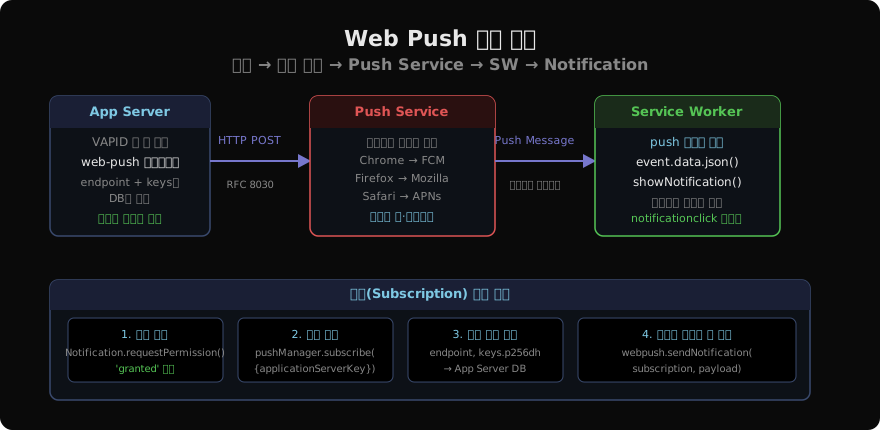
Web Push는 세 참여자로 이루어집니다.
App Server: 알림을 보내고 싶은 백엔드 서버. VAPID 키로 서명된 HTTP 요청을 Push Service에 보냅니다.
Push Service: 브라우저 제공자가 운영하는 중계 서버. Chrome은 FCM(Firebase Cloud Messaging), Firefox는 Mozilla의 서버, Safari는 Apple의 APNs를 사용합니다. App Server는 이 서비스의 endpoint URL로 메시지를 보냅니다.
Service Worker: 브라우저 안에서 push 이벤트를 수신하고 showNotification()을 호출합니다. 페이지가 닫혀 있어도 SW가 살아있으면 알림이 표시됩니다.
VAPID 키 생성
VAPID(Voluntary Application Server Identification)는 App Server가 Push Service에 자신을 증명하는 방식입니다.
# Node.js에서 web-push 패키지로 키 생성
npx web-push generate-vapid-keys
// 결과
{
publicKey: 'BNRGm…', // 클라이언트에게 공개
privateKey: 'abc…' // 서버 측 비밀 보관
}공개 키는 클라이언트의 subscribe() 호출에 사용되고, 개인 키는 서버에서 메시지를 서명할 때 사용됩니다.
클라이언트: 권한 요청과 구독
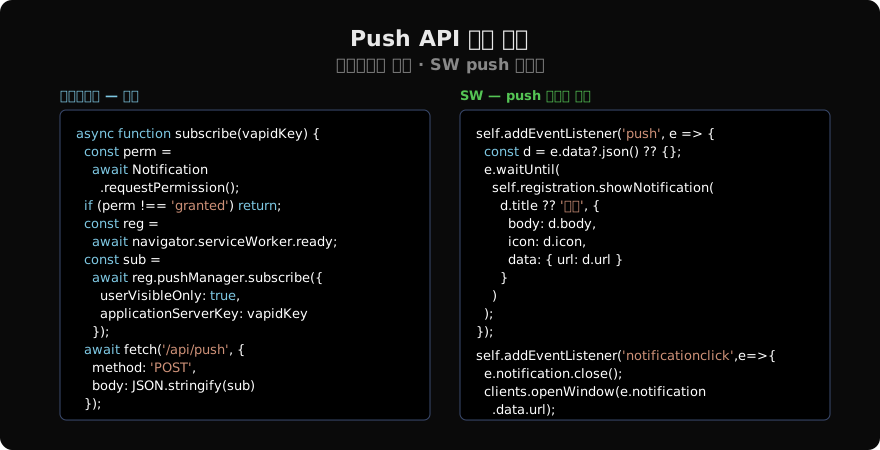
async function subscribeToPush() {
  // 1. 알림 권한 요청
  const permission = await Notification.requestPermission();
  if (permission !== 'granted') {
    console.log('알림 거부됨');
    return;
  }

  // 2. Service Worker가 준비될 때까지 대기
  const registration = await navigator.serviceWorker.ready;

  // 3. Push 구독 생성
  const subscription = await registration.pushManager.subscribe({
    userVisibleOnly: true, // Chrome 필수: 모든 push에 알림 표시
    applicationServerKey: urlBase64ToUint8Array(VAPID_PUBLIC_KEY)
  });

  // 4. 구독 정보를 App Server에 전송·저장
  await fetch('/api/push/subscribe', {
    method: 'POST',
    headers: { 'Content-Type': 'application/json' },
    body: JSON.stringify(subscription)
  });
}

// VAPID 공개 키를 Uint8Array로 변환하는 유틸리티
function urlBase64ToUint8Array(base64String) {
  const padding = '='.repeat((4 - base64String.length % 4) % 4);
  const base64 = (base64String + padding).replace(/-/g, '+').replace(/_/g, '/');
  return Uint8Array.from(atob(base64), c => c.charCodeAt(0));
}
subscription 객체에는 endpoint, keys.p256dh, keys.auth 필드가 포함됩니다. 이 값들을 DB에 저장해야 나중에 메시지를 보낼 수 있습니다.
Service Worker: push 이벤트 처리
// sw.js
self.addEventListener('push', (event) => {
  const data = event.data?.json() ?? {
    title: '새 알림',
    body: '내용 없음'
  };

  const options = {
    body: data.body,
    icon: '/icons/icon-192.png',
    badge: '/icons/badge-72.png',
    image: data.image,
    data: { url: data.url || '/' },
    actions: [
      { action: 'open', title: '열기' },
      { action: 'dismiss', title: '무시' }
    ],
    requireInteraction: false, // true면 사용자가 닫을 때까지 유지
    silent: false,
    tag: data.tag || 'default', // 같은 tag면 이전 알림을 교체
  };

  event.waitUntil(
    self.registration.showNotification(data.title, options)
  );
});

// 알림 클릭 처리
self.addEventListener('notificationclick', (event) => {
  const { action, notification } = event;
  notification.close();

  if (action === 'dismiss') return;

  event.waitUntil(
    clients.matchAll({ type: 'window' }).then(clientList => {
      const url = notification.data.url;
      // 이미 열린 탭이 있으면 포커스
      const existing = clientList.find(c => c.url === url);
      if (existing) return existing.focus();
      return clients.openWindow(url);
    })
  );
});event.waitUntil()에 Promise를 전달하지 않으면 브라우저가 SW를 너무 일찍 종료해 알림이 표시되지 않을 수 있습니다.
서버: 메시지 전송 (Node.js)
import webpush from 'web-push';

webpush.setVapidDetails(
  'mailto:admin@example.com',
  process.env.VAPID_PUBLIC_KEY,
  process.env.VAPID_PRIVATE_KEY
);

async function sendPushNotification(subscription, payload) {
  try {
    await webpush.sendNotification(
      subscription,
      JSON.stringify({
        title: '새 메시지',
        body: payload.message,
        url: `/messages/${payload.id}`,
        tag: `message-${payload.id}`
      })
    );
  } catch (err) {
    if (err.statusCode === 410) {
      // Gone: 구독이 만료됨 → DB에서 삭제
      await db.subscriptions.delete(subscription.endpoint);
    } else {
      console.error('Push 전송 실패:', err);
    }
  }
}
statusCode === 410은 사용자가 구독을 취소했거나 브라우저가 구독을 만료했음을 의미합니다. 이 경우 구독 정보를 삭제해야 합니다.
구독 관리
// 구독 상태 확인
const registration = await navigator.serviceWorker.ready;
const subscription = await registration.pushManager.getSubscription();
if (subscription) {
  console.log('이미 구독됨:', subscription.endpoint);
}

// 구독 취소
await subscription?.unsubscribe();
await fetch('/api/push/unsubscribe', {
  method: 'POST',
  body: JSON.stringify({ endpoint: subscription.endpoint })
});
주요 제약사항
userVisibleOnly: Chrome에서 true가 필수입니다. Push 메시지를 받을 때마다 반드시 알림을 표시해야 합니다. 알림 없이 백그라운드 데이터 동기화만 하려면 Background Sync API를 사용하세요.
HTTPS 필수: Push API는 Service Worker와 마찬가지로 HTTPS 환경에서만 동작합니다.
Safari: iOS 16.4+ / macOS Ventura+에서 Web Push를 지원합니다. iOS에서는 홈 화면에 추가된 PWA에서만 작동합니다.
지난 글: Service Worker 기초 · 오프라인 캐싱
다음 글: Background Sync API · 오프라인 요청 큐
읽어주셔서 감사합니다. 😊
PALDYN / ARTICLE AI
글의 개념, 수식, 코드에 대해 물어보세요.
질문과 관련된 문단을 골라 답변의 문맥으로 사용합니다.생각 중 · 0초