

WebRTC 개요 · P2P 실시간 통신
WebRTC의 시그널링 흐름(SDP Offer/Answer), ICE·STUN·TURN 서버 역할, RTCPeerConnection·RTCDataChannel·MediaStream API, NAT 통과 전략, 보안 모델까지 정리합니다.
지난 글에서 WebSocket으로 서버를 통한 양방향 통신을 살펴봤습니다. 이번에는 서버를 거치지 않고 브라우저 간 직접 통신하는 WebRTC를 정리합니다. 화상통화, 화면 공유, 파일 전송, 게임 P2P 등에 사용됩니다.
WebRTC 개요
WebRTC(Web Real-Time Communication)는 브라우저 간 P2P 저지연 통신을 가능하게 하는 표준입니다. 데이터는 중간 서버를 거치지 않고 직접 전송되어 지연이 낮고, 종단 간 암호화(DTLS-SRTP)가 강제됩니다.
WebRTC가 다루는 세 가지 영역:
- MediaStream API: 카메라/마이크 캡처
- RTCPeerConnection: P2P 연결 수립·미디어 전송
- RTCDataChannel: P2P 임의 데이터 전송
시그널링 흐름
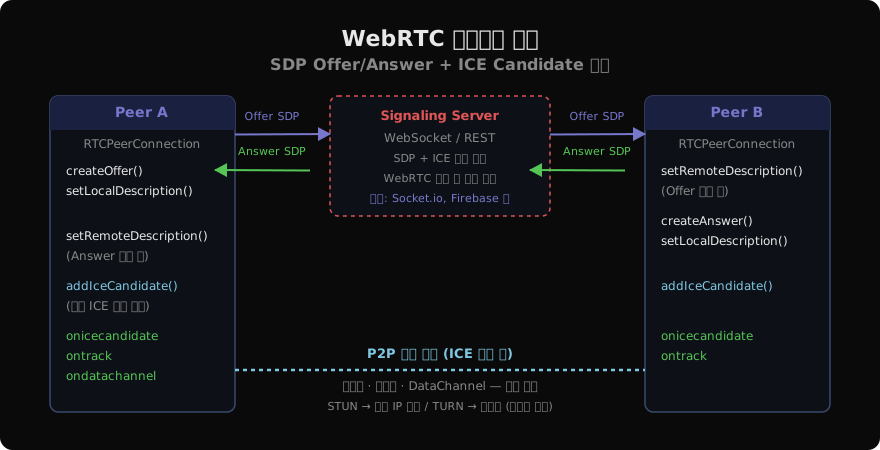
WebRTC 자체는 시그널링 채널을 정의하지 않습니다. 연결 수립에 필요한 SDP(Session Description Protocol)와 ICE 후보를 교환할 별도 채널(WebSocket, REST 등)을 직접 구현해야 합니다.
시그널링 단계:
- Offer: Peer A가
createOffer()→setLocalDescription()→ 시그널링 서버를 통해 Peer B에게 전달 - Answer: Peer B가
setRemoteDescription(offer)→createAnswer()→setLocalDescription(answer)→ 시그널링 서버를 통해 Peer A에게 전달 - ICE 후보 교환: 양 피어가
onicecandidate이벤트에서 얻은 후보를 상대방의addIceCandidate()로 추가 - 연결 완료: 최적 ICE 후보 쌍을 찾아 P2P 연결 수립
RTCPeerConnection 기본 구현
const config = {
  iceServers: [
    { urls: 'stun:stun.l.google.com:19302' },
    {
      urls: 'turn:turn.example.com:3478',
      username: 'user',
      credential: 'pass'
    }
  ]
};

const pc = new RTCPeerConnection(config);

// ICE 후보 수집 → 상대방에게 전달
pc.onicecandidate = ({ candidate }) => {
  if (candidate) {
    signalingChannel.send({ type: 'candidate', candidate });
  }
};

// 연결 상태 모니터링
pc.onconnectionstatechange = () => {
  console.log('연결 상태:', pc.connectionState);
  // 'new' | 'connecting' | 'connected' | 'disconnected' | 'failed'
};
Offer/Answer 교환 구현
// ─── Peer A (발신자) ───
async function call(signalingChannel) {
  // 미디어 스트림 추가
  const stream = await navigator.mediaDevices.getUserMedia(
    { video: true, audio: true }
  );
  stream.getTracks().forEach(t => pc.addTrack(t, stream));

  const offer = await pc.createOffer();
  await pc.setLocalDescription(offer);
  signalingChannel.send({ type: 'offer', sdp: offer });
}

// ─── Peer B (수신자) ───
async function onOffer(offer, signalingChannel) {
  await pc.setRemoteDescription(offer);
  const answer = await pc.createAnswer();
  await pc.setLocalDescription(answer);
  signalingChannel.send({ type: 'answer', sdp: answer });
}

// ─── 원격 미디어 수신 ───
pc.ontrack = ({ streams }) => {
  remoteVideo.srcObject = streams[0];
};
ICE · STUN · TURN
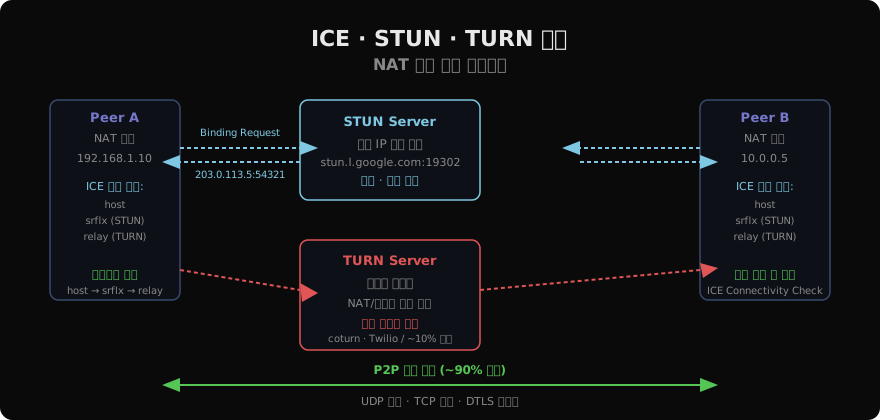
대부분의 기기는 NAT 뒤에 있어 공인 IP가 없습니다. ICE(Interactive Connectivity Establishment)가 다음 전략으로 NAT를 통과합니다.
STUN (Session Traversal Utilities for NAT): 피어가 외부에서 보이는 공인 IP:포트를 알려줍니다. stun.l.google.com:19302 같은 무료 서버를 사용할 수 있습니다.
TURN (Traversal Using Relays around NAT): P2P 직접 연결이 불가능한 경우 서버가 트래픽을 릴레이합니다. 대역폭 비용이 발생하며 약 10%의 연결에서만 필요합니다.
ICE 후보 유형:
host: 로컬 네트워크 주소 (최우선)srflx(server-reflexive): STUN으로 획득한 공인 주소relay: TURN 릴레이 주소 (최후 수단)
pc.onicecandidate = ({ candidate }) => {
  if (!candidate) {
    console.log('ICE 수집 완료');
    // pc.localDescription에 모든 후보 포함
    return;
  }
  console.log('후보 타입:', candidate.type); // 'host' | 'srflx' | 'relay'
  console.log('후보 주소:', candidate.address);
};
RTCDataChannel — 임의 데이터 P2P 전송
// Offer 피어에서 채널 생성
const dc = pc.createDataChannel('chat', {
  ordered: true,        // TCP-like 순서 보장
  maxRetransmits: null, // reliable (reliable + ordered = TCP-like)
  // maxRetransmits: 0  // unreliable (게임 상태에 적합)
});

dc.onopen = () => dc.send('안녕!');
dc.onmessage = ({ data }) => console.log(data);
dc.onclose = () => console.log('DataChannel 닫힘');

// Answer 피어에서 채널 수신
pc.ondatachannel = ({ channel }) => {
  channel.onmessage = ({ data }) => console.log('수신:', data);
};RTCDataChannel은 UDP 기반으로 HTTP 없이 파일·게임 상태·텍스트를 직접 전송합니다. ordered: false, maxRetransmits: 0으로 설정하면 UDP처럼 빠르지만 손실이 있는 전송이 됩니다.
화면 공유
const screenStream = await navigator.mediaDevices.getDisplayMedia({
  video: { cursor: 'always' },
  audio: true // 탭 오디오 (브라우저에 따라 다름)
});

// 기존 비디오 트랙을 화면 공유로 교체
const videoTrack = screenStream.getVideoTracks()[0];
const sender = pc.getSenders().find(s =>
  s.track?.kind === 'video'
);
await sender?.replaceTrack(videoTrack);

// 화면 공유 종료 감지
videoTrack.onended = () => {
  console.log('화면 공유 종료');
};
보안 모델
WebRTC는 보안이 필수입니다:
- 미디어 전송: SRTP (Secure Real-time Transport Protocol)
- 데이터 채널: DTLS (Datagram TLS)
- HTTPS 환경에서만
getUserMedia()가능 - ICE ufrag/password로 연결 인증
- TURN 서버 자격증명은 시간 제한 토큰(HMAC)으로 보호
// 연결 상태 종합 확인
pc.onconnectionstatechange = () => {
  if (pc.connectionState === 'failed') {
    // ICE 재시작
    pc.restartIce();
  }
};

pc.oniceconnectionstatechange = () => {
  console.log('ICE:', pc.iceConnectionState);
  // 'checking' | 'connected' | 'completed' | 'failed'
};
실전 팁
미디어 품질 제어: RTCRtpSender.setParameters()로 비트레이트·해상도를 동적으로 조절합니다.
연결 실패 복구: connectionState === 'failed'에서 pc.restartIce()를 호출하면 새 ICE 후보를 수집하며 재연결을 시도합니다.
라이브러리 활용: simple-peer, PeerJS, mediasoup, livekit 같은 라이브러리는 시그널링과 미디어 서버를 추상화해 SFU(Selective Forwarding Unit) 구조를 쉽게 구현합니다.
지난 글: WebSocket API 완전 이해
다음 글: Service Worker 기초 · 오프라인 캐싱
읽어주셔서 감사합니다. 😊
PALDYN / ARTICLE AI
글의 개념, 수식, 코드에 대해 물어보세요.
질문과 관련된 문단을 골라 답변의 문맥으로 사용합니다.생각 중 · 0초