

인증서와 PKI — X.509, CA 체인, 신뢰 구축
공개키 인프라(PKI)의 구조, X.509 인증서 필드 해부, Root CA/Intermediate CA/Leaf 인증서 신뢰 체인, CRL과 OCSP 폐기 메커니즘을 완전 정리합니다.
지난 글에서 mTLS와 상호 인증을 살펴봤습니다. TLS에서 서버(또는 클라이언트)의 신원을 증명하는 핵심은 X.509 인증서입니다. 인증서를 발급하고 관리하는 체계가 PKI(Public Key Infrastructure)입니다. 이번 글에서는 PKI의 신뢰 모델과 인증서 구조를 해부합니다.
PKI의 신뢰 문제
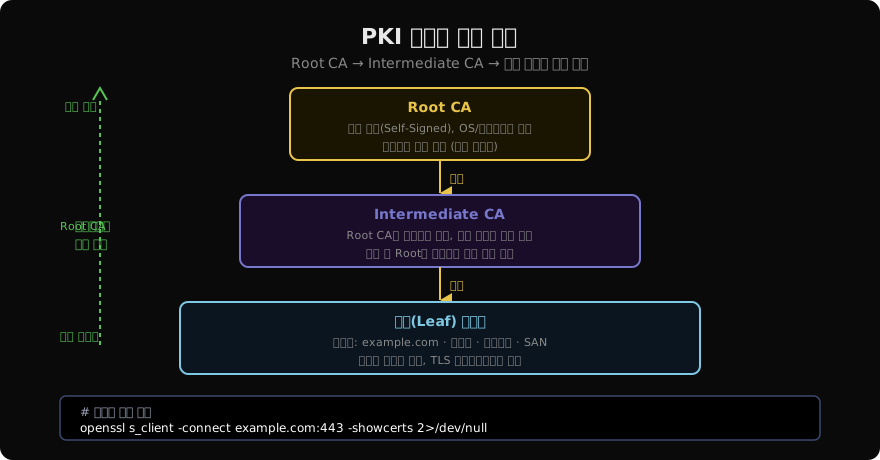
인터넷에서 처음 만나는 서버가 “나는 example.com입니다”라고 말하면 어떻게 믿을 수 있을까요? PKI는 신뢰할 수 있는 제3자(Certificate Authority)를 통해 이 문제를 해결합니다.
신뢰 체인의 원리:
  브라우저/OS: "나는 DigiCert의 Root CA를 신뢰한다" (미리 내장)
  DigiCert:    "나는 Intermediate CA를 신뢰한다" (Root CA 서명)
  Int. CA:     "나는 example.com 인증서를 신뢰한다" (Intermediate 서명)

  따라서: 브라우저 → example.com 신뢰 가능!
인증서 신뢰 체인
Root CA
최상위 신뢰 기관입니다.
특징:
  - 자체 서명(Self-Signed): 발급자 = 주체
  - OS/브라우저에 사전 설치
  - 오프라인 보관 (물리적 보안 최우선)
  - 유효기간: 20~40년

예) DigiCert Global Root CA, ISRG Root X1 (Let's Encrypt)
# 시스템 신뢰 Root CA 목록 확인
# Linux (Debian/Ubuntu)
ls /etc/ssl/certs/ | head -10
# macOS
security find-certificate -a -p /System/Library/Keychains/SystemRootCertificates.keychain | \
openssl x509 -noout -subject | head -10Intermediate CA
Root CA와 Leaf 인증서 사이에 위치합니다.
역할:
  - 실제 서버/클라이언트 인증서 발급
  - Root CA 대신 위험 노출
  - 침해 시 Root를 건드리지 않고 폐기 가능

개수: Root CA 하나에 여러 Intermediate CA 가능
     (예: DigiCert TLS RSA SHA256 2020 CA1)
Leaf (Server) Certificate
실제 도메인에 발급되는 인증서입니다.
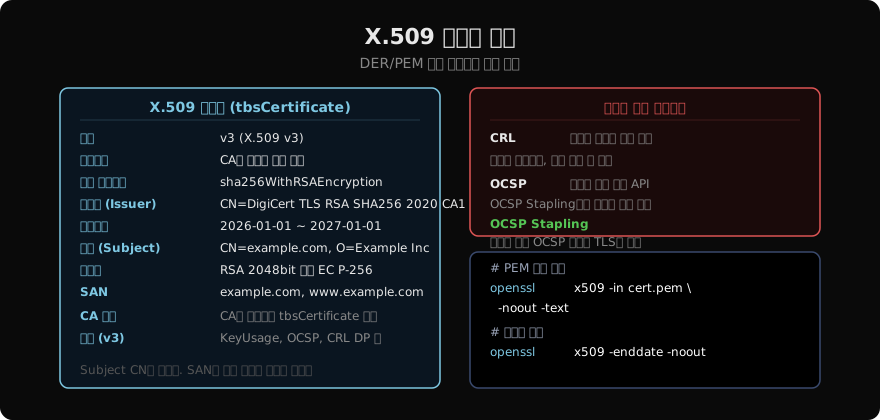
X.509 인증서 구조
# 인증서 전체 내용 출력
openssl x509 -in cert.pem -noout -text

# 주요 필드만 추출
openssl x509 -in cert.pem -noout \
  -subject -issuer -dates -fingerprint -serial

# 출력 예시:
# subject=CN=example.com, O=Example Inc.
# issuer=CN=DigiCert TLS RSA SHA256 2020 CA1
# notBefore=Jan  1 00:00:00 2026 GMT
# notAfter=Jan  1 00:00:00 2027 GMT
# SHA256 Fingerprint=AB:CD:EF:...
핵심 필드 설명
Subject Alternative Name (SAN)
현대 TLS에서 가장 중요한 필드입니다. CN(Common Name)은 레거시가 됐고, 실제 도메인 검증은 SAN으로 합니다.
# SAN 확인
openssl x509 -in cert.pem -noout \
  -ext subjectAltName

# 출력 예시:
# X509v3 Subject Alternative Name:
#     DNS:example.com, DNS:www.example.com, DNS:*.example.com
Key Usage와 Extended Key Usage
Key Usage: digitalSignature, keyEncipherment
           → 서명과 키 암호화에 사용 가능

Extended Key Usage:
  serverAuth  (1.3.6.1.5.5.7.3.1) → HTTPS 서버
  clientAuth  (1.3.6.1.5.5.7.3.2) → mTLS 클라이언트
  emailProtection                 → S/MIME
인증서 폐기 메커니즘
인증서가 만료 전에 무효화되어야 할 때(개인키 유출, 오발급 등)가 있습니다.
CRL (Certificate Revocation List)
# 인증서의 CRL 배포 URL 확인
openssl x509 -in cert.pem -noout \
  -ext cRLDistributionPoints

# CRL 다운로드 및 확인
curl -s http://crl.example.com/issuer.crl | \
  openssl crl -inform DER -text -noout | head -30
문제: CRL 파일이 커질 수 있고, 주기적 다운로드로 실시간성이 떨어집니다.
OCSP (Online Certificate Status Protocol)
# 인증서의 OCSP 서버 URL 확인
openssl x509 -in cert.pem -noout \
  -ext authorityInfoAccess

# OCSP 직접 조회
openssl ocsp \
  -issuer intermediate-ca.pem \
  -cert server-cert.pem \
  -url http://ocsp.example.com \
  -text
# 결과: good / revoked / unknown
OCSP Stapling
서버가 OCSP 응답을 미리 가져와 TLS 핸드셰이크에 포함합니다.
# Nginx OCSP Stapling 활성화
ssl_stapling on;
ssl_stapling_verify on;
ssl_trusted_certificate /etc/nginx/ca-chain.pem;
resolver 8.8.8.8 valid=300s;
resolver_timeout 5s;

# 확인
openssl s_client -connect example.com:443 -status 2>/dev/null | \
  grep -A 20 "OCSP response:"
인증서 발급 과정
# CSR (Certificate Signing Request) 생성
openssl req -new \
  -key server-key.pem \
  -out server.csr \
  -subj "/CN=example.com/O=Example Inc/C=KR"

# SAN 포함 CSR
cat > san.ext << EOF
[req_ext]
subjectAltName = @alt_names
[alt_names]
DNS.1 = example.com
DNS.2 = www.example.com
EOF

openssl req -new -key server-key.pem \
  -out server.csr \
  -config san.ext

# CA 서명 (자체 서명 CA 사용 시)
openssl x509 -req \
  -in server.csr \
  -CA ca-cert.pem -CAkey ca-key.pem \
  -CAcreateserial \
  -out server-cert.pem \
  -days 365 \
  -extfile san.ext \
  -extensions req_ext
Let’s Encrypt와 ACME 프로토콜
무료 인증서를 자동으로 발급·갱신하는 표준 프로토콜입니다.
# certbot으로 Let's Encrypt 인증서 발급
certbot certonly \
  --webroot -w /var/www/html \
  -d example.com -d www.example.com \
  --email admin@example.com

# 자동 갱신 (cron 또는 systemd timer)
certbot renew --quiet --deploy-hook "nginx -s reload"

# DNS 챌린지로 와일드카드 인증서
certbot certonly \
  --dns-cloudflare \
  --dns-cloudflare-credentials /etc/cloudflare.ini \
  -d "*.example.com"
인증서 모니터링
# 만료일 확인 스크립트
check_expiry() {
  local domain=$1
  local days_remaining
  days_remaining=$(openssl s_client -connect "${domain}:443" \
    -servername "${domain}" < /dev/null 2>/dev/null \
    | openssl x509 -noout -enddate \
    | cut -d= -f2 \
    | awk '{print (mktime(strftime("%Y %m %d %H %M %S", strptime($0, "%b %d %T %Y %Z"))) - systime()) / 86400}')
  echo "${domain}: ${days_remaining} days remaining"
}

check_expiry example.com
지난 글: mTLS — 상호 TLS 인증 완전 정리
다음 글: HTTPS 완전 정복 — HTTP에 TLS를 더하면
읽어주셔서 감사합니다. 😊
PALDYN / ARTICLE AI
글의 개념, 수식, 코드에 대해 물어보세요.
질문과 관련된 문단을 골라 답변의 문맥으로 사용합니다.생각 중 · 0초