

[Nexacro N] 공통 confirm·alert 팝업 설계
Nexacro N에서 브라우저 기본 confirm/alert 대신 커스텀 팝업 폼을 공통 라이브러리로 제공하는 방법—gfn_confirm 함수 구현, 팝업 폼 설계, 콜백 패턴을 설명합니다.
지난 글에서 공유 변수와 application 객체를 다루었다. 이번 글은 공통 라이브러리의 핵심 구성 요소 중 하나인 공통 confirm·alert 팝업 설계를 다룬다. 브라우저 내장 confirm() / alert() 는 스타일을 변경할 수 없고, 다국어 처리도 어렵다. 공통 팝업 폼을 만들면 이를 해결할 수 있다.
왜 브라우저 confirm을 쓰면 안 되는가
Nexacro N은 HTML5 기반으로 실행되지만, 브라우저 내장 confirm()을 사용하면 몇 가지 문제가 생긴다.
- 스타일 통일 불가: 운영체제·브라우저마다 UI가 다르다
- 다국어 버튼 처리 어려움: “확인”/“취소” 같은 버튼 레이블을 코드로 바꿀 수 없다
- 콜백 구조 불일치: 비동기 환경에서
confirm()의 동기 호출이 실행 흐름을 방해할 수 있다 - 접근성 미지원: 포커스·탭 순서 등을 제어할 수 없다
대신 Nexacro N의 팝업(openPopup)으로 전용 confirm 폼을 열고, 결과를 콜백으로 받는 패턴을 사용한다.
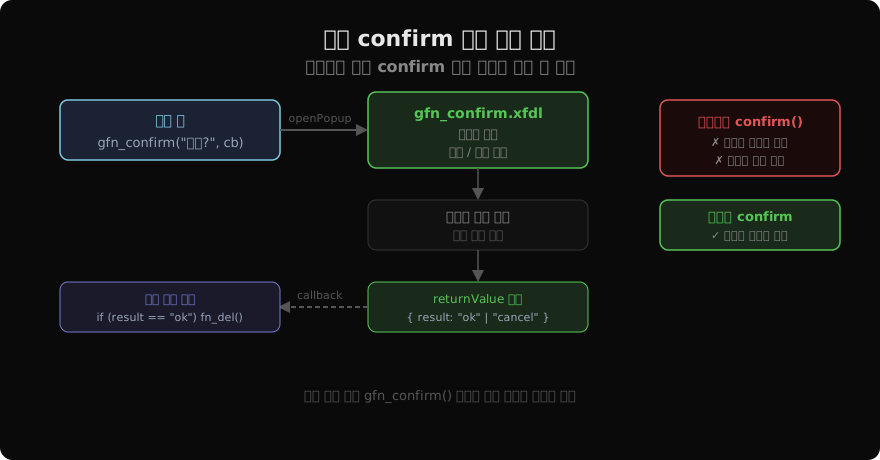
gfn_confirm 함수 구현
공통 라이브러리 함수로 gfn_confirm을 만들면 업무 폼에서는 한 줄로 confirm 팝업을 열 수 있다.
// gfn_common.xjs 또는 gfn_ui.xjs
function gfn_confirm(msg, callback, context) {
    var args = {
        message: msg,
        callback: callback,
        context: context
    };
    nexacro.openPopup(
        "gfn_confirm",
        "common/gfn_confirm.xfdl",
        args,
        300, 160  // 팝업 너비·높이
    );
}

function gfn_alert(msg) {
    var args = { message: msg };
    nexacro.openPopup(
        "gfn_alert",
        "common/gfn_alert.xfdl",
        args,
        280, 140
    );
}
gfn_confirm.xfdl 팝업 폼 스크립트
팝업 폼은 부모 폼에서 전달받은 메시지를 표시하고, 버튼 클릭 결과를 콜백으로 반환한다.
// gfn_confirm.xfdl 스크립트 섹션

// 폼 로드 시 인자 수신
function Form_onload(obj, e) {
    var args = this.opener.gfn_confirm.getArgs();
    this.sta_msg.set_text(args.message);
    this._callback = args.callback;
    this._context  = args.context;
}

// 확인 버튼
function btn_ok_onclick(obj, e) {
    if (typeof this._callback === "function") {
        this._callback.call(this._context, "ok");
    }
    this.close();
}

// 취소 버튼
function btn_cancel_onclick(obj, e) {
    if (typeof this._callback === "function") {
        this._callback.call(this._context, "cancel");
    }
    this.close();
}
업무 폼에서 사용하기
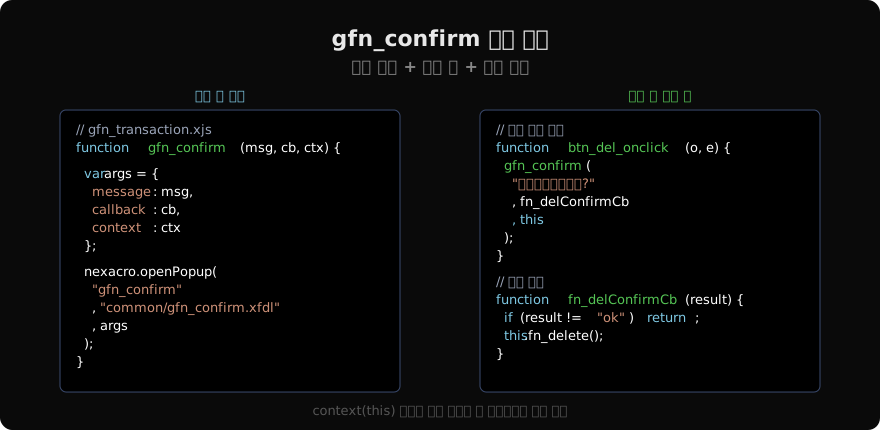
// 업무 폼 — 삭제 버튼 클릭
function btn_del_onclick(obj, e) {
    var rowIdx = this.grd_list.currentrow;
    if (rowIdx < 0) {
        gfn_alert("삭제할 항목을 선택하세요.");
        return;
    }
    gfn_confirm("선택한 항목을 삭제하시겠습니까?", fn_delCb, this);
}

function fn_delCb(result) {
    if (result !== "ok") return;
    this.transaction("delete", "/order/delete.do",
        "in:ds_key=ds_key",
        "out:ds_result=result",
        "fn_delTranCb",
        false
    );
}

function fn_delTranCb(sId, nEC, sEM) {
    if (nEC != 0) { gfn_alert(sEM); return; }
    gfn_alert("삭제가 완료되었습니다.");
    this.fn_search();
}
alert와 confirm 변형
프로젝트 규모가 커지면 타입별 팝업을 추가한다.
| 함수 | 설명 | 버튼 |
|---|---|---|
gfn_alert(msg) | 단순 정보 전달 | 확인 |
gfn_confirm(msg, cb, ctx) | 확인/취소 선택 | 확인·취소 |
gfn_confirmYesNo(msg, cb, ctx) | 예/아니오 선택 | 예·아니오 |
gfn_confirmDel(cb, ctx) | 삭제 전용 (메시지 고정) | 확인·취소 |
gfn_confirmDel처럼 자주 쓰는 패턴은 메시지까지 고정해 두면 업무 폼에서 호출이 더 간결해진다.
// gfn_ui.xjs
function gfn_confirmDel(callback, context) {
    gfn_confirm("선택한 항목을 삭제하시겠습니까?", callback, context);
}

// 업무 폼
function btn_del_onclick(obj, e) {
    gfn_confirmDel(fn_delCb, this);
}
구현 시 주의사항
this 컨텍스트 전달: 콜백 함수가 폼 컴포넌트에 접근하려면 context로 this를 전달해야 한다. gfn_confirm 안에서 callback.call(context, result) 로 호출해야 this가 올바른 폼 객체를 가리킨다.
팝업 중복 열기 방지: 버튼을 빠르게 여러 번 클릭하면 팝업이 중복 열릴 수 있다. 팝업이 이미 열려 있으면 무시하는 처리가 필요하다.
function gfn_confirm(msg, callback, context) {
    // 이미 열려 있으면 무시
    if (nexacro.getPopup("gfn_confirm")) return;

    var args = { message: msg, callback: callback, context: context };
    nexacro.openPopup("gfn_confirm", "common/gfn_confirm.xfdl", args, 300, 160);
}
지난 글: [Nexacro N] 공유 변수와 application 객체 활용
다음 글: [Nexacro N] BaseForm — 기본 폼 아키텍처
읽어주셔서 감사합니다. 😊
PALDYN / ARTICLE AI
글의 개념, 수식, 코드에 대해 물어보세요.
질문과 관련된 문단을 골라 답변의 문맥으로 사용합니다.생각 중 · 0초