

[Nexacro N] 동적 그리드 컬럼
Nexacro N Grid 컴포넌트의 컬럼을 런타임에 동적으로 추가·제거하는 방법—set_formats 초기화, addCol, getColByID를 이용한 가시성·너비 제어, 서버 메타데이터 기반 컬럼 구성 패턴을 설명합니다.
지난 글에서 addChild / removeChild로 일반 컴포넌트를 동적으로 관리하는 방법을 살펴보았다. 이번 글은 Grid 컴포넌트의 컬럼을 런타임에 동적으로 구성하는 방법을 다룬다. 서버에서 조회 컬럼 목록을 메타데이터로 받아오거나, 사용자 권한에 따라 보여줄 컬럼이 달라지는 화면에서 필수적인 기술이다.
컬럼 동적 구성 흐름
서버 메타데이터를 받아 Grid 컬럼을 재구성하는 흐름은 다음 순서로 진행된다.
- 서버에서 컬럼 정의 Dataset 수신 (colNm, colLabel, colWidth, …)
set_formats("")로 기존 컬럼 전체 제거- Dataset 순회하며
addCol로 컬럼 추가 set_binddataset으로 데이터 Dataset 연결
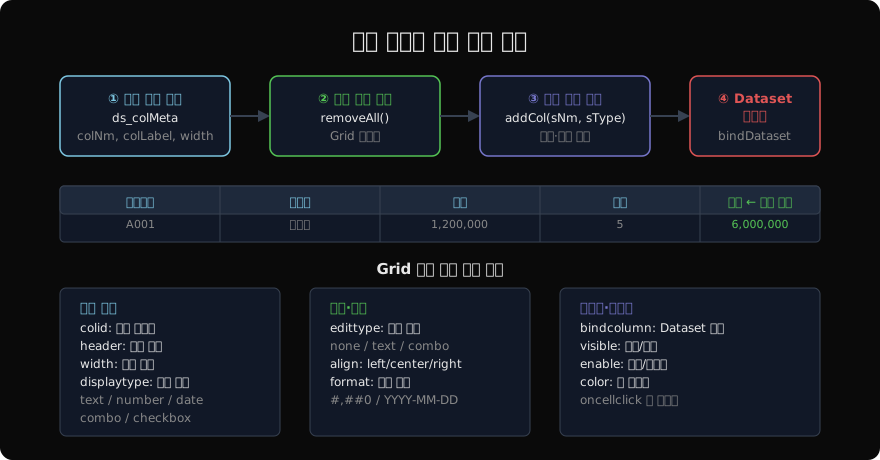
set_formats로 컬럼 초기화
this.grd_main.set_formats("");Grid의 set_formats에 빈 문자열을 전달하면 모든 컬럼 정의가 초기화된다. 재구성 전에 반드시 호출해 이전 컬럼이 남지 않도록 한다.
addCol로 컬럼 추가
oGrid.addCol(sColId, sHeader, nWidth, sDisplayType);| 인수 | 설명 |
|---|---|
sColId | 컬럼 식별자 (Dataset 컬럼명과 일치 권장) |
sHeader | 헤더 표시 텍스트 |
nWidth | 컬럼 너비(px) |
sDisplayType | "text" / "number" / "date" / "combo" 등 |
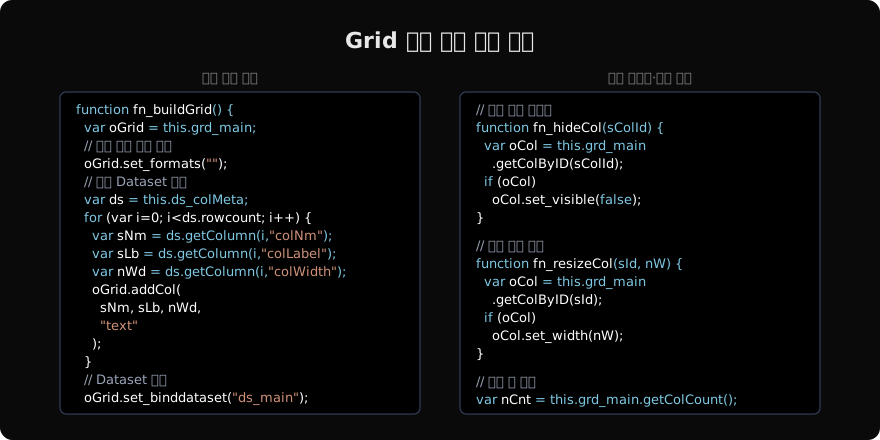
function fn_buildGrid() {
  var oGrid = this.grd_main;
  oGrid.set_formats("");

  var ds = this.ds_colMeta;
  for (var i = 0; i < ds.rowcount; i++) {
    oGrid.addCol(
      ds.getColumn(i, "colNm"),
      ds.getColumn(i, "colLabel"),
      ds.getColumn(i, "colWidth"),
      "text"
    );
  }
  oGrid.set_binddataset("ds_main");
}
컬럼 가시성·너비 동적 제어
이미 구성된 Grid에서 특정 컬럼만 숨기거나 너비를 바꿀 때는 getColByID로 컬럼 객체를 가져온 뒤 속성을 설정한다.
function fn_toggleCol(sColId, bVisible) {
  var oCol = this.grd_main.getColByID(sColId);
  if (oCol) oCol.set_visible(bVisible);
}

function fn_resizeCol(sColId, nWidth) {
  var oCol = this.grd_main.getColByID(sColId);
  if (oCol) oCol.set_width(nWidth);
}
권한에 따라 특정 컬럼을 숨길 때는 set_visible(false) 대신 set_width(0)을 쓰는 프로젝트도 있다. 그러나 set_visible(false)가 더 명확하고 이후 복원이 쉽다.
Format XML로 한 번에 구성
컬럼 수가 고정적이지만 편집 가능 여부·포맷 등만 동적으로 바꾸는 경우에는 Format XML 문자열을 직접 작성해 set_formats에 전달하는 방식이 더 빠르다.
function fn_applyFormat(bEditable) {
  var sEdit = bEditable ? "text" : "none";
  var sFmt = "<Formats>"
    + "<Format id='default'>"
    + "  <Columns>"
    + "    <Column size='80'/>"
    + "    <Column size='160'/>"
    + "    <Column size='100'/>"
    + "  </Columns>"
    + "  <Rows>"
    + "    <Row size='24' band='head'/>"
    + "    <Row size='24'/>"
    + "  </Rows>"
    + "  <Band id='head'>"
    + "    <Cell text='코드'/>"
    + "    <Cell text='품목명'/>"
    + "    <Cell text='단가'/>"
    + "  </Band>"
    + "  <Band id='body'>"
    + "    <Cell displaytype='text' edittype='" + sEdit + "' bindcolumn='itemCd'/>"
    + "    <Cell displaytype='text' edittype='" + sEdit + "' bindcolumn='itemNm'/>"
    + "    <Cell displaytype='number' edittype='" + sEdit + "' bindcolumn='price'/>"
    + "  </Band>"
    + "</Format>"
    + "</Formats>";
  this.grd_main.set_formats(sFmt);
  this.grd_main.set_binddataset("ds_item");
}
주의 사항
addCol은set_formats를 먼저 호출해 초기화한 뒤에만 정상 동작한다. 기존 Format이 있는 상태에서addCol만 호출하면 컬럼이 중복될 수 있다.- Format XML 방식은 문자열 조합 오류가 나기 쉬우므로 디버깅 시
trace(sFmt)로 생성된 XML을 확인한다. - 컬럼 수가 많을수록 Grid 초기화 비용이 크다. 자주 재구성되는 화면이라면 컬럼 수를 최소화하거나, 가시성 토글(
set_visible)만으로 처리할 수 있는지 검토한다.
지난 글: [Nexacro N] addChild / removeChild
다음 글: [Nexacro N] 런타임 폼 로드
읽어주셔서 감사합니다. 😊
PALDYN / ARTICLE AI
글의 개념, 수식, 코드에 대해 물어보세요.
질문과 관련된 문단을 골라 답변의 문맥으로 사용합니다.생각 중 · 0초