

[Nexacro N] 엑셀 템플릿 출력
Nexacro N에서 서버에 저장된 엑셀 템플릿에 데이터를 주입해 완성된 보고서 파일을 다운로드하는 패턴, Apache POI 마커 치환, 행 반복 삽입 방법을 설명합니다.
지난 글에서 Grid 데이터를 엑셀로 내보내는 기본 패턴을 살펴보았다. exportObject()는 단순한 데이터 표 형태로는 충분하지만, 기업 보고서처럼 고정된 레이아웃(로고, 회사명, 특정 셀 위치에 데이터)이 필요한 경우에는 서버 측 엑셀 템플릿 출력이 필요하다.
템플릿 방식의 개념
서버에 미리 준비된 .xlsx 파일(템플릿)을 열고, 특정 마커 문자열([COMPANY_NM], [BASE_DT] 등)을 실제 데이터로 교체한 뒤 스트리밍으로 클라이언트에 전달하는 방식이다. 기존 서식(병합 셀, 테두리, 폰트, 색상)이 그대로 유지된다.
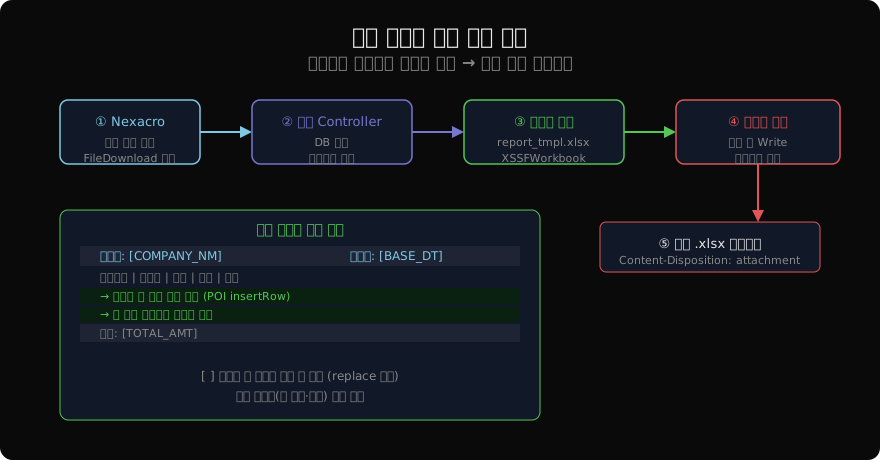
Nexacro 클라이언트 측 호출
조회 조건을 Query String으로 전달하고 nexacro.FileDownload()로 서버 URL을 호출한다.
function btn_report_onclick(obj, e) {
    var sDate = this.edtDate.value;
    var sDept = this.comboDept.value;
    if (!sDate) {
        this.gfn_alert("기준일을 선택해 주세요.");
        return;
    }
    var sUrl = "/excel/report?date=" + sDate + "&dept=" + sDept;
    nexacro.FileDownload(sUrl, "fn_downloadCallback");
}

function fn_downloadCallback(errcode, errmsg) {
    if (errcode != 0) {
        this.gfn_alert("보고서 생성 실패: " + errmsg);
    }
}
서버에서 파일을 생성해 스트리밍하면 브라우저 다운로드 다이얼로그가 열린다.
서버 템플릿 처리 (Spring Boot + POI)
@GetMapping("/excel/report")
public void generateReport(
        @RequestParam String date,
        @RequestParam String dept,
        HttpServletResponse response) throws Exception {

    // 1. 템플릿 로드
    InputStream tmpl = getClass().getResourceAsStream(
        "/templates/sales_report.xlsx");
    Workbook wb    = new XSSFWorkbook(tmpl);
    Sheet    sheet = wb.getSheetAt(0);

    // 2. 단순 마커 치환
    replaceMarker(sheet, "[BASE_DT]",  date);
    replaceMarker(sheet, "[DEPT_NM]",  dept);

    // 3. 데이터 행 반복 삽입
    List<SalesRow> rows = salesService.find(date, dept);
    int startRow = 5;  // 템플릿에서 데이터 시작 행 번호
    for (int i = 0; i < rows.size(); i++) {
        Row row = sheet.createRow(startRow + i);
        row.createCell(0).setCellValue(rows.get(i).getItemCd());
        row.createCell(1).setCellValue(rows.get(i).getItemNm());
        row.createCell(2).setCellValue(rows.get(i).getQty());
        row.createCell(3).setCellValue(rows.get(i).getAmt());
    }

    // 4. 합계 마커 치환
    long total = rows.stream().mapToLong(SalesRow::getAmt).sum();
    replaceMarker(sheet, "[TOTAL_AMT]", String.valueOf(total));

    // 5. 스트리밍 출력
    String fileName = URLEncoder.encode("매출보고서_" + date + ".xlsx",
        StandardCharsets.UTF_8).replace("+", "%20");
    response.setContentType(
        "application/vnd.openxmlformats-officedocument.spreadsheetml.sheet");
    response.setHeader("Content-Disposition",
        "attachment; filename*=UTF-8''" + fileName);
    wb.write(response.getOutputStream());
    wb.close();
}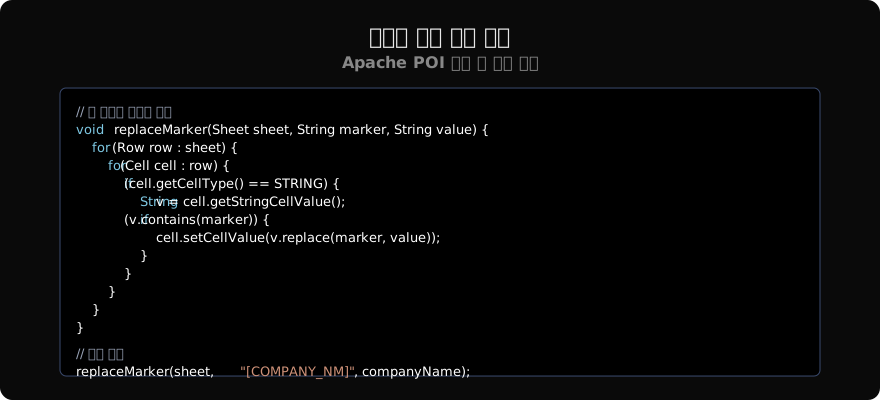
마커 치환 유틸리티
void replaceMarker(Sheet sheet, String marker, String value) {
    for (Row row : sheet) {
        for (Cell cell : row) {
            if (cell.getCellType() == CellType.STRING) {
                String v = cell.getStringCellValue();
                if (v.contains(marker)) {
                    cell.setCellValue(v.replace(marker, value));
                }
            }
        }
    }
}
마커를 [, ]로 감싸는 약속된 형식을 사용하면 일반 텍스트와 쉽게 구분할 수 있다. 여러 마커가 한 셀에 있어도 replace() 체인으로 처리된다.
스타일 유지 행 복사
데이터 행 삽입 시 기존 템플릿 행의 스타일을 복사하면 일관된 서식을 유지할 수 있다.
Row templateRow = sheet.getRow(startRow);
for (int i = 0; i < rows.size(); i++) {
    Row newRow = sheet.createRow(startRow + i);
    // 템플릿 행 스타일 복사
    for (int c = 0; c < templateRow.getLastCellNum(); c++) {
        Cell tCell = templateRow.getCell(c);
        Cell nCell = newRow.createCell(c);
        if (tCell != null) {
            nCell.setCellStyle(tCell.getCellStyle());
        }
    }
    // 데이터 채우기
    newRow.getCell(0).setCellValue(rows.get(i).getItemCd());
    newRow.getCell(1).setCellValue(rows.get(i).getItemNm());
}
템플릿 파일 관리
- 템플릿 파일은
src/main/resources/templates/경로에 보관한다. - 운영 중 템플릿을 교체해야 할 경우를 대비해 DB에 파일 경로를 저장하고 동적으로 로드하는 방식도 있다.
- 테스트 환경에서 템플릿 변경이 잦다면 별도 파일 서버나 S3 버킷에 관리하는 것이 편리하다.
성능 고려사항
대용량 데이터(수만 행)를 엑셀로 생성할 때는 XSSFWorkbook 대신 메모리 효율적인 SXSSFWorkbook을 사용한다.
// 메모리에 100행만 유지하고 나머지는 디스크로 flush
SXSSFWorkbook wb = new SXSSFWorkbook(100);
wb.setCompressTempFiles(true);SXSSFWorkbook은 한번 쓴 행이 메모리에서 해제되므로 OOM(Out of Memory) 없이 수십만 행도 처리할 수 있다.
정리
엑셀 템플릿 출력은 템플릿 파일 준비 → 마커 치환 → 데이터 행 삽입 → 스트리밍의 4단계 흐름이다. 기존 서식이 유지되어 기업 보고서 양식에 적합하고, 디자인 변경 시 코드 없이 템플릿 파일만 교체하면 된다는 장점이 있다.
지난 글: 엑셀 내보내기·가져오기
다음 글: 엑셀 병합·서식
읽어주셔서 감사합니다. 😊
PALDYN / ARTICLE AI
글의 개념, 수식, 코드에 대해 물어보세요.
질문과 관련된 문단을 골라 답변의 문맥으로 사용합니다.생각 중 · 0초