

[Nexacro N] fn_search() 표준 조회 함수 구현
Nexacro N CRUD 패턴의 조회 함수 fn_search()를 구현하는 방법—조건 Dataset 수집, transaction() 호출, 콜백 처리, 다중 조건 처리, 페이징 연동—을 설명합니다.
지난 글에서 CRUD 패턴 전체 구조를 살펴봤다. 이번에는 그 첫 단계인 fn_search() 조회 함수를 상세히 구현한다. 조건 Dataset 수집부터 서버 트랜잭션, 결과 바인딩, 에러 처리까지 실무에서 쓰는 완성된 패턴을 정리한다.
fn_search() 기본 흐름
조회는 네 단계로 이루어진다.
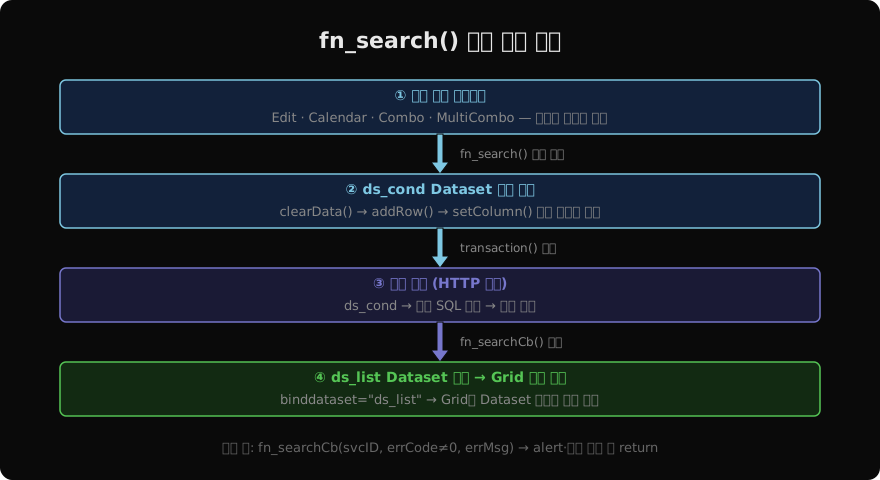
- 사용자가 조건 컴포넌트에 값을 입력하고 조회 버튼을 클릭한다.
fn_search()안에서ds_condDataset에 조건을 담는다.transaction()으로 서버에 요청한다.- 콜백에서
ds_list가 갱신되고 Grid가 자동으로 반영된다.
기본 구현
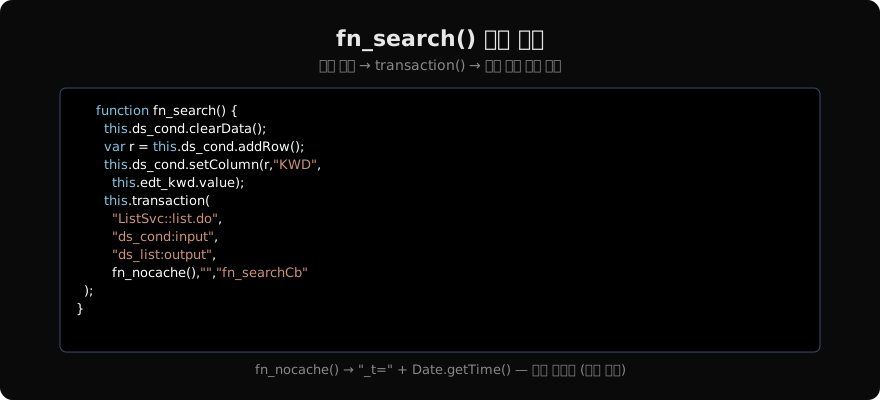
function fn_search() {
  // ① 조건 초기화
  this.ds_cond.clearData();
  var row = this.ds_cond.addRow();

  // ② 각 조건 컴포넌트에서 값 수집
  this.ds_cond.setColumn(row, "KEYWORD",
    this.edt_keyword.value);
  this.ds_cond.setColumn(row, "START_DT",
    this.cal_startDt.value);
  this.ds_cond.setColumn(row, "END_DT",
    this.cal_endDt.value);
  this.ds_cond.setColumn(row, "STATUS",
    this.cmb_status.value);

  // ③ 서버 트랜잭션 호출
  this.transaction(
    "OrderSvc::getList.do",
    "ds_cond:input",
    "ds_list:output",
    fn_nocache(),
    "",
    "fn_searchCb"
  );
}ds_cond를 매번 clearData() 후 새로 채우는 이유는, 이전 조회 조건이 남아 있으면 서버로 잘못된 파라미터가 전달될 수 있기 때문이다.
콜백 처리
function fn_searchCb(svcID, errCode, errMsg) {
  if (errCode != 0) {
    alert("조회 실패: " + errMsg);
    return;
  }
  // 조회 결과 없을 때 별도 처리
  if (this.ds_list.rowcount === 0) {
    alert("조회 결과가 없습니다.");
  }
}
에러 코드가 0이 아니면 즉시 return해 이후 코드가 실행되지 않도록 해야 한다. ds_list는 트랜잭션이 완료되면 자동으로 갱신되므로 콜백에서 별도 바인딩을 할 필요가 없다.
조건 필수 입력 검증
function fn_search() {
  // 필수 조건 체크
  if (this.edt_keyword.value.trim() === "") {
    alert("검색어를 입력하세요.");
    this.edt_keyword.setFocus();
    return;
  }
  if (this.cal_startDt.value > this.cal_endDt.value) {
    alert("시작일이 종료일보다 클 수 없습니다.");
    return;
  }

  this.ds_cond.clearData();
  // ... 이하 동일
}
트랜잭션을 보내기 전에 UI에서 기본 유효성 검사를 마치면 불필요한 서버 요청을 줄일 수 있다.
Enter 키로 조회 트리거
// Edit 컴포넌트에 onkeyup 이벤트 등록
function edt_keyword_onkeyup(obj, e) {
  if (e.keycode === 13) {  // Enter
    this.fn_search();
  }
}
조건 입력 컴포넌트 전체에 동일한 이벤트를 공유하려면 이벤트 핸들러를 공통 함수로 추출하고 각 컴포넌트의 onkeyup에 등록한다.
다중 서비스 동시 조회
한 화면에서 여러 서비스를 동시에 조회할 때는 멀티 트랜잭션 또는 동시 호출을 사용한다.
function fn_searchAll() {
  // 공통 조건 공유
  this.ds_cond.clearData();
  var row = this.ds_cond.addRow();
  this.ds_cond.setColumn(row, "DEPT_CD",
    this.cmb_dept.value);

  // 두 서비스 동시 호출
  this.transaction(
    "EmpSvc::getEmpList.do",
    "ds_cond:input", "ds_empList:output",
    fn_nocache(), "", "fn_empCb"
  );
  this.transaction(
    "EmpSvc::getDeptInfo.do",
    "ds_cond:input", "ds_deptInfo:output",
    fn_nocache(), "", "fn_deptCb"
  );
}transaction()은 비동기이므로 두 번 연속 호출하면 동시에 서버에 요청이 나간다.
조회 중 로딩 표시
function fn_search() {
  this.ProgressBar00.visible = true;  // 로딩 표시
  // ... ds_cond 수집 ...
  this.transaction(/* ... */, "fn_searchCb");
}

function fn_searchCb(svcID, errCode, errMsg) {
  this.ProgressBar00.visible = false;  // 로딩 숨김
  if (errCode != 0) { alert(errMsg); return; }
}
버튼 비활성화(.enable = false)를 함께 적용하면 중복 요청을 방지할 수 있다.
지난 글: CRUD 패턴 설계와 표준 구조
다음 글: fn_new() 신규 행 추가 패턴
읽어주셔서 감사합니다. 😊
PALDYN / ARTICLE AI
글의 개념, 수식, 코드에 대해 물어보세요.
질문과 관련된 문단을 골라 답변의 문맥으로 사용합니다.생각 중 · 0초